
Our Short List of 3
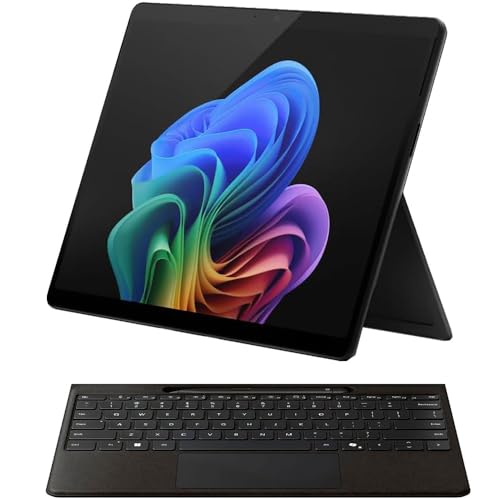
- Best for: Anyone who needs full Windows desktop software in a tablet body.
- Snapdragon X Elite processor, 12 cores
- 13-inch OLED PixelSense touchscreen display
- 16GB memory
- 1TB SSD

- Best for: Android users who want a big screen, a pen, and a desktop-like mode.
- 12.4-inch AMOLED 2X display
- 256GB storage
- MediaTek Dimensity 9300+ processor
- S Pen included

- Best for: Buyers who want a tablet, pen, and keyboard in one box.
- 12.7-inch 3K display, 2944 x 1840
- MediaTek Dimensity 7050 processor
- 8GB memory
- 128GB storage
All 3 Picks at a Glance
| Product | Specs | Action |
|---|---|---|
| Microsoft Surface Pro 11 |
| Check price on Amazon |
| Samsung Galaxy Tab S10+ |
| Check price on Amazon |
| Lenovo Tab P12 |
| Check price on Amazon |
Key takeaways
- The 5 best tablets that work like laptops, with keyboards, desktop-class apps, and laptop-sized screens for real work on the go.
What's inside
As an Amazon Associate I earn from qualifying purchases. This post may contain affiliate links at no extra cost to you.
A tablet that works like a laptop sounds simple until you try to finish real work on one. The screen is fine for watching videos, but the moment you need to write a long document, answer email with attachments, or join a video call while taking notes, the missing keyboard, the cramped split-screen view, and the mobile version of your apps start to slow you down. The right tablet closes that gap instead of asking you to work around it.
This guide is for students, commuters, and anyone who wants one light device instead of a tablet plus a laptop. Every pick below was chosen from its name and specifications on its Amazon listing, with a keyboard option, a screen large enough for side-by-side apps, and enough storage for documents and media.
Quick Picks
As an Amazon Associate we earn from qualifying purchases
| Product | Best for | Key spec from title |
|---|---|---|
| Apple iPad Pro 11-inch (M4) | Pro work in the lightest frame | M4 chip, 11-inch Ultra Retina XDR display |
| Microsoft Surface Pro 11 | A full Windows laptop in tablet form | Snapdragon X Elite, 13-inch OLED touchscreen |
| Samsung Galaxy Tab S10+ | Android work with a pen included | 12.4-inch AMOLED 2X display, S Pen included |
| Apple iPad Air 11-inch (M3) | Everyday laptop replacement on a budget | M3 chip, 11-inch Liquid Retina display |
| Lenovo Tab P12 | A keyboard bundle ready out of the box | 12.7-inch 3K display, pen and keyboard included |
How to Choose
Start With the Keyboard, Not the Tablet
A tablet only works like a laptop when typing feels natural, so check the keyboard before anything else. Look for a keyboard cover or folio with real key travel and a trackpad, and confirm it connects through the tablet’s smart connector or pogo pins rather than Bluetooth alone, since a pogo-pin keyboard never needs charging or pairing. The Surface Pro bundle in this guide includes its keyboard, and the Lenovo bundle includes one too, while the iPads and the Galaxy Tab need a keyboard bought separately. If you type for hours every day, a cramped keyboard will undo every other advantage the tablet has.
Match the Screen to Split-Screen Work
Laptop work means two windows side by side, so a screen under 11 inches makes that layout feel squeezed. The tablets here range from 11 to 12.7 inches, and the larger ones give each app more room when you run a browser next to a document. Resolution matters too: the iPad Pro and the Surface Pro use high-resolution OLED or XDR panels that keep small text sharp, while the Tab P12 uses a 3K LCD that is still clear for reading and writing. Check the brightness as well if you plan to work near windows or outdoors.
Pick the Operating System You Already Live In
The biggest practical difference between these tablets is not hardware but software. iPadOS runs the Apple apps and the desktop-class versions of many office tools, Windows 11 on the Surface Pro runs the same full desktop programs as a laptop, and Android on the Galaxy Tab and Lenovo Tab runs mobile apps with Samsung DeX or a desktop mode for a laptop-like layout. If your work depends on one specific desktop program, the Surface Pro is the safe choice, since it runs Windows software directly rather than a mobile version of it.
Check Storage, Ports, and Pen Support
A laptop replacement needs room for files, so treat 128GB as the floor and prefer 256GB if you store large documents, photos, or offline video. Ports matter as well: the Surface Pro and the iPads use USB-C, and the Surface Pro adds a Surface Connect port, while the Android tablets rely on USB-C alone, so a small hub may be needed for a monitor or a wired drive. A pen is worth having for notes and markup, and the Galaxy Tab S10+ and the Lenovo Tab P12 include one in the box, while the iPad Pro and iPad Air work with Apple Pencil models sold separately.
The 5 Best Options
Apple iPad Pro 11-inch (M4)
The iPad Pro 11-inch with the M4 chip is the closest an iPad has come to replacing a laptop, thanks to a fast chip and a display that stays sharp when you split the screen between a document and a browser. Its 11-inch Ultra Retina XDR display handles small text well, and the tablet pairs with the Magic Keyboard and Apple Pencil Pro for typing and handwriting. It runs iPadOS, so check that the apps you rely on have the desktop-class features you need before committing.
Specs
- Apple M4 chip
- 11-inch Ultra Retina XDR display
- 256GB storage
- Wi-Fi 6E
- Face ID
- 12MP front and back cameras
- LiDAR Scanner
- Item model number MVV83LL/A
Best for: Pro-level work in the lightest tablet frame.
Watch out for: The keyboard and Apple Pencil are sold separately, and iPadOS still runs mobile versions of some apps.
ASIN: B0D3J9XDMQ
Microsoft Surface Pro 11
- Best for: Anyone who needs full Windows desktop software in a tablet body.
- Snapdragon X Elite processor, 12 cores
- 13-inch OLED PixelSense touchscreen display
- 16GB memory
- 1TB SSD
Anyone who needs full Windows desktop software in a tablet body.
The Snapdragon chip runs on Arm, so confirm any niche Windows program you depend on has an Arm version before buying.
The Surface Pro 11 is the only pick here that runs full Windows 11, so it behaves like a laptop the moment you attach its keyboard and open the same desktop programs you use on a PC. The Snapdragon X Elite chip, 13-inch OLED touchscreen, 16GB of memory, and 1TB SSD give it room for real multitasking, and the bundle in this listing includes the Surface Pro Keyboard. Its kickstand and detachable keyboard make it easy to switch between laptop mode and tablet mode during the day.
Samsung Galaxy Tab S10+
- Best for: Android users who want a big screen, a pen, and a desktop-like mode.
- 12.4-inch AMOLED 2X display
- 256GB storage
- MediaTek Dimensity 9300+ processor
- S Pen included
Android users who want a big screen, a pen, and a desktop-like mode.
The keyboard cover is sold separately, and some professional apps still have fewer features on Android than on Windows.
The Galaxy Tab S10+ is the strongest Android option for laptop-style work, with a large 12.4-inch AMOLED 2X display, an S Pen in the box, and Galaxy AI tools that help with note-taking and searching. Its Dimensity 9300+ chip keeps split-screen apps moving, and Samsung DeX gives the home screen a desktop-like layout with a taskbar and windowed apps. A keyboard cover turns it into a workable typing machine, though it is sold separately.
Apple iPad Air 11-inch (M3)
The iPad Air 11-inch with the M3 chip covers the same laptop-replacement job as the iPad Pro at a lower tier, with a bright 11-inch Liquid Retina display, 128GB of storage, and Touch ID built into the top button. It works with the Magic Keyboard and Apple Pencil, so it types and writes like the Pro for everyday documents, email, and classes. The main trade-off is the standard display and the smaller storage, which fills up faster if you keep large files offline.
Specs
- Apple M3 chip
- 11-inch Liquid Retina display
- 128GB storage
- Wi-Fi 6E
- Touch ID
- 12MP front and back cameras
- Item model number MC9X4LL/A
- Color Blue
Best for: Students and everyday users who want an iPad that types like a laptop.
Watch out for: 128GB of storage fills up quickly with photos and large documents, and the keyboard and pencil are sold separately.
ASIN: B0DZ74YQ1V
Lenovo Tab P12
- Best for: Buyers who want a tablet, pen, and keyboard in one box.
- 12.7-inch 3K display, 2944 x 1840
- MediaTek Dimensity 7050 processor
- 8GB memory
- 128GB storage
Buyers who want a tablet, pen, and keyboard in one box.
Android tablet apps vary in quality, and the 128GB of storage is the smallest in this guide relative to the screen size.
The Lenovo Tab P12 is the most complete bundle in this guide, because the 2023 listing includes both the Tab Pen Plus and a keyboard, so it works like a laptop straight out of the box. Its 12.7-inch 3K display is the largest here, its quad JBL speakers with Dolby Atmos suit video calls and media, and its 10200 mAh battery lasts through a long workday. Android 13 runs the tablet, and the pogo-pin keyboard connection means the keyboard never needs its own charge.
Which One Fits Your Situation
You Live in Apple Apps and Want the Fastest Tablet
Pick the iPad Pro 11-inch (M4) if your documents, notes, and creative work already live in Apple’s apps and you want the fastest chip and the sharpest display here. Add the Magic Keyboard and an Apple Pencil, and it covers writing, email, and light design work. If your budget is tighter, the iPad Air (M3) does the same daily work with a standard display and less storage.
You Need Real Windows Programs
Pick the Surface Pro 11 if your work depends on full desktop software, since it is the only tablet here that runs Windows 11 and its desktop programs directly. The included keyboard and the 1TB SSD mean you can open the same files and programs you use on a PC without hunting for mobile versions or workarounds.
You Want Android With a Pen in the Box
Pick the Galaxy Tab S10+ if you prefer Android and want a pen included for notes and markup, with DeX for a desktop-like layout. Pick the Lenovo Tab P12 instead if you also want the keyboard included, since its bundle covers pen and keyboard together and its larger 3K screen gives split-screen apps more room.
You Want the Lowest Total Cost
Pick the Lenovo Tab P12 if you want to spend once and be done, because the pen and keyboard are already in the box. The iPad Air (M3) is the cheaper Apple route, but remember to count the keyboard and pencil you will buy separately when you compare the real total.
Common Mistakes
- Buying a tablet for laptop work and skipping the keyboard, then discovering that typing on glass is too slow for long documents.
- Choosing the smallest storage option and running out of room for offline files, photos, and large apps.
- Assuming every app on a tablet has the same features as its desktop version, especially for spreadsheets, design tools, and video editing.
- Picking a tablet for one specific program without checking that the program exists on that operating system.
- Forgetting that a tablet usually has one USB-C port, so a hub is needed for a monitor, a wired drive, and charging at the same time.
Frequently Asked Questions
Can a tablet really replace a laptop?
Yes, for writing, email, browsing, classes, and light creative work, a tablet with a keyboard and a large screen covers the job well. It falls short when your work needs full desktop software, heavy multitasking with many windows, or ports that a tablet does not have, so check your must-have programs first.
Do I need to buy the keyboard separately?
It depends on the tablet. The Surface Pro bundle and the Lenovo Tab P12 bundle in this guide include a keyboard, while the iPad Pro, iPad Air, and Galaxy Tab S10+ need a keyboard bought separately. Add that cost to the tablet before you compare options.
Which tablet has the best screen for split-screen work?
The Lenovo Tab P12 has the largest screen at 12.7 inches, and the Galaxy Tab S10+ follows at 12.4 inches, so both give side-by-side apps more room. The iPad Pro and Surface Pro have sharper OLED and XDR panels, which help when you read small text for hours.
Is the Surface Pro 11 a tablet or a laptop?
It is both: a tablet with a detachable keyboard and a kickstand that runs full Windows 11. With the keyboard attached it works like a laptop, and with the keyboard removed it works like a tablet, which is why it suits people who want one device for both jobs.
What should I check before buying a tablet as a laptop replacement?
Check that your essential apps exist on the tablet’s operating system, that the keyboard has a trackpad and real key travel, and that the storage is at least 128GB, ideally 256GB. Also confirm the pen situation, since the Galaxy Tab and Lenovo Tab include one while the iPads need one bought separately.
Related guides
More from Amazon
Programs that pair well with the guide above. Offers and eligibility are set by Amazon and may change.
Free shipping on eligible items, Prime Video and more. Eligible new members can start with a free trial.
Start a Prime free trialAd-free music streaming. Eligible new subscribers can start with a free trial.
Try Music Unlimited freeA Prime membership for ages 18-24 with a trial period. Eligibility is set by Amazon.
See Prime for Young AdultsAudiobooks and podcasts to listen to on the go. Eligible new members can start with a free trial.
Try Audible freeAs an Amazon Associate we earn from qualifying purchases.









Write Your Review
No reviews yet. Be the first to share your experience!