
Our Short List of 3

- Best for: Sim racers and high-resolution headset owners who want GPU headroom.
- Processor: Intel Core Ultra 9 275HX (24-core)
- Graphics: NVIDIA GeForce RTX 5080 16GB
- Memory: 32GB RAM
- Storage: 1TB Gen 5 NVMe SSD

- Best for: Players who want OLED contrast and a 12GB GPU buffer in one machine.
- Processor: Intel Core Ultra 9 275HX
- Graphics: NVIDIA GeForce RTX 5070 Ti, 12GB GDDR7
- Memory: 32GB DDR5 RAM
- Storage: 1TB SSD
- Best for: Buyers who want the strongest laptop GPU available for demanding headsets.
- Processor: Intel Core Ultra 9 285HX
- Graphics: NVIDIA GeForce RTX 5090, 24GB GDDR7
- Memory: 64GB DDR5-6400 RAM
- Storage: 2TB NVMe M.2 SSD
All 4 Picks at a Glance
| Product | Specs | Action |
|---|---|---|
| Lenovo Legion Pro 7i Gen 10 83F50053US |
| Check price on Amazon |
| Acer Predator Helios Neo 16S PHN16S-71-98RF |
| Check price on Amazon |
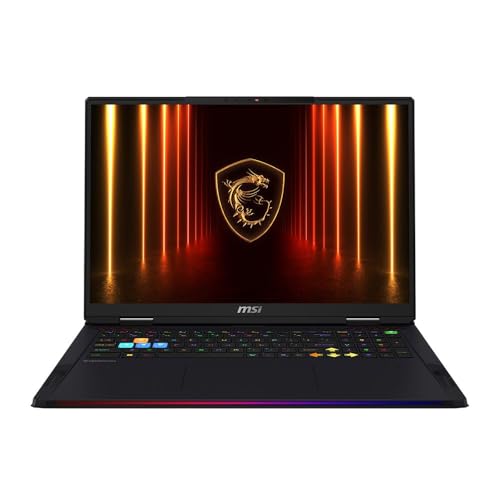
| MSI Raider 18 HX AI |
| Check price on Amazon |
 Razer Blade 16 (2025) |
| Check price on Amazon |
Key takeaways
- Compare five laptops for VR with RTX graphics, fast 240Hz displays and the ports tethered PC headsets need, plus the key checks to run before you buy.
What's inside
As an Amazon Associate I earn from qualifying purchases. This post may contain affiliate links at no extra cost to you.
Buying a laptop for PC VR is really a decision about the graphics card and the ports, in that order. A headset renders two high-resolution views at once and expects them at a strict frame pace, so the discrete GPU model and its video memory decide which headsets and detail settings are realistic. The ports decide whether the headset can even connect the way its maker intends, because some headsets want a DisplayPort-class video signal while others run over USB, and a laptop offering only the wrong output turns the purchase into an adapter hunt.
This roundup is for tethered PC VR players, sim racers and flight sim fans, VR developers, and anyone replacing a desktop with one machine that also travels. Every pick below is a laptop with an NVIDIA GeForce RTX discrete GPU, chosen from its Amazon product page name and stated specs: GPU model and memory where the listing gives them, processor, RAM, storage, display, and the model number that pins down the exact configuration.
Quick Picks
As an Amazon Associate we earn from qualifying purchases
| Product | Best for | Key spec from title |
|---|---|---|
| ASUS ROG Strix G16 (2025) G615LR-AS96 | Mainstream tethered VR at high settings | GeForce RTX 5070 Ti GPU |
| Lenovo Legion Pro 7i Gen 10 83F50053US | Demanding headsets and long sessions | GeForce RTX 5080 16GB |
| Acer Predator Helios Neo 16S PHN16S-71-98RF | OLED clarity with a strong GPU | RTX 5070 Ti 12GB GDDR7 |
| MSI Raider 18 HX AI | Maximum GPU power on a big screen | GeForce RTX 5090 24GB GDDR7 |
| Razer Blade 16 (2025) | VR that has to travel | GeForce RTX 5090, 32GB RAM |
How to Choose
Start with the GPU tier and its video memory
The GPU does nearly all of the rendering work in PC VR, and the headset has to receive two frames, one per eye, at its native refresh pace. As a working rule, an RTX 5070-class card is the sensible floor for current tethered headsets, an RTX 5070 Ti or RTX 5080 adds headroom for higher-resolution headsets and supersampling, and an RTX 5090 is for buyers who refuse to lower settings. Video memory matters alongside the tier: listings here state 12GB on the RTX 5070 Ti Acer, 16GB on the RTX 5080 Lenovo, and 24GB on the RTX 5090 MSI, and larger buffers cope better with high-resolution textures and big sim worlds.
Check the ports against your headset’s connection
Headsets connect in different ways. Some use a DisplayPort or USB-C DisplayPort alt mode cable for the video signal, others run video over a USB data link, and the laptop needs the matching output. Before buying, open your headset maker’s support page, note exactly which connection it specifies, then match it against the port list in the laptop’s Amazon listing. Also confirm whether the listing states HDMI and which USB-C ports carry a display signal, because on many gaming laptops only certain ports are wired for video output, and a dock or hub in between can break a direct headset connection.
Give the CPU and RAM enough headroom
VR runtimes, tracking software, voice chat, and recording tools all compete with the game for processor time, so a current high-end mobile CPU is more than a luxury here. Every laptop in this roundup pairs its RTX GPU with a flagship-class processor: Intel Core Ultra 9 HX chips in the ASUS, Lenovo, Acer, and MSI, and an AMD Ryzen AI 9 HX 370 in the Razer. Memory follows the same logic. Sixteen gigabytes is workable, but each of these listings states 32GB or more, which keeps large sim titles, browser guides, and streaming software open alongside the headset runtime without swapping to disk.
Look at cooling and sustained power, not just peak specs
A GPU that boosts briefly and then throttles will drop frames mid-session, and dropped frames in VR feel far worse than a lower average frame rate on a monitor. Listings sometimes state the GPU power range or the cooling design; where they do, treat a higher stated wattage as a sign the chassis can sustain performance. Chassis size is the rough proxy when wattage is not stated: the 18-inch MSI Raider has far more cooling volume than the slim Razer Blade 16, which trades some sustained headroom for portability. Plan to play plugged into the supplied adapter, since battery power limits GPU output.
The 5 Best Options
ASUS ROG Strix G16 (2025) G615LR-AS96
The Strix G16 is the balanced entry point into this group: an RTX 5070 Ti for the headset and a 16-inch 2.5K 240Hz panel for everything you do outside it. It suits players moving from a desktop who want one machine for tethered VR and flat-screen gaming without jumping to the largest, heaviest chassis here. The Core Ultra 9 275HX and 32GB of DDR5 memory leave room for streaming and recording alongside the VR runtime, and the stated Wi-Fi 7 covers wireless PC VR streaming to standalone headsets that support it, subject to your router and the headset maker’s app requirements.
Specs
- Processor: Intel Core Ultra 9 275HX
- Graphics: NVIDIA GeForce RTX 5070 Ti GPU
- Memory: 32GB DDR5
- Storage: 1TB SSD
- Display: 16-inch ROG Nebula, 2.5K, 240Hz/3ms
- Wireless: Wi-Fi 7
- Operating system: Windows 11 Home
- Model number: G615LR-AS96
Best for: Tethered VR players who also game heavily on the built-in screen.
Watch out for: Confirm on the listing which ports carry the display signal for your headset’s cable type, and check your headset maker’s published GPU list for the RTX 5070 Ti before ordering.
ASIN: B0DW1X5YCQ
Lenovo Legion Pro 7i Gen 10 83F50053US
- Best for: Sim racers and high-resolution headset owners who want GPU headroom.
- Processor: Intel Core Ultra 9 275HX (24-core)
- Graphics: NVIDIA GeForce RTX 5080 16GB
- Memory: 32GB RAM
- Storage: 1TB Gen 5 NVMe SSD
Sim racers and high-resolution headset owners who want GPU headroom.
Match the full model number 83F50053US at checkout, because Legion Pro 7i listings on Amazon include seller-modified configurations with different memory and storage.
Lenovo’s factory configuration pairs an RTX 5080 with a stated 16GB of graphics memory, which is the combination to pick if your headset has a high native resolution or you run racing and flight simulators with dense scenery. The 16-inch WQXGA OLED screen runs at 240Hz with a stated 500 nits, so the machine stays enjoyable for ordinary gaming and work between VR sessions. A 1TB Gen 5 NVMe SSD gives fast-loading storage for a growing VR library, and the 32GB of system memory keeps overlays, telemetry apps, and voice tools running next to the game without crowding it.
Acer Predator Helios Neo 16S PHN16S-71-98RF
- Best for: Players who want OLED contrast and a 12GB GPU buffer in one machine.
- Processor: Intel Core Ultra 9 275HX
- Graphics: NVIDIA GeForce RTX 5070 Ti, 12GB GDDR7
- Memory: 32GB DDR5 RAM
- Storage: 1TB SSD
Players who want OLED contrast and a 12GB GPU buffer in one machine.
This model appears on Amazon in many seller-configured variants with bundled accessories, so verify that the listing you buy states the same 32GB and 1TB configuration under model PHN16S-71-98RF.
Acer’s Neo 16S is the pick for buyers who want the RTX 5070 Ti’s stated 12GB of GDDR7 memory alongside an OLED panel. The listing states a 16-inch 2.5K WQXGA OLED display at 240Hz and 500 nits, which makes it a strong flat-screen gaming machine as well as a VR host. Underneath sit the same Core Ultra 9 275HX processor as the ASUS and Lenovo, 32GB of DDR5 memory, and a 1TB SSD. Windows 11 Pro is a small bonus for anyone who also uses the laptop for work. It fits players who value display quality and a mid-tier GPU over maximum size.
MSI Raider 18 HX AI
- Best for: Buyers who want the strongest laptop GPU available for demanding headsets.
- Processor: Intel Core Ultra 9 285HX
- Graphics: NVIDIA GeForce RTX 5090, 24GB GDDR7
- Memory: 64GB DDR5-6400 RAM
- Storage: 2TB NVMe M.2 SSD
Buyers who want the strongest laptop GPU available for demanding headsets.
Check the headset maker’s minimum GPU list even at this level, and confirm the display output your headset needs is present on this exact configuration, since Raider listings vary by seller.
The Raider 18 HX AI is the no-compromise option: an RTX 5090 with a stated 24GB of GDDR7 memory, the largest graphics buffer in this roundup, driven by a Core Ultra 9 285HX. That headroom is what high-resolution headsets, heavy supersampling, and modded simulators ask for. The 18-inch QHD+ 240Hz display and 64GB of DDR5-6400 memory make it a genuine desktop replacement that also edits video and compiles code quickly. At this size it lives on a desk rather than in a backpack, so treat it as a movable workstation that runs VR at home base rather than a travel machine.
Razer Blade 16 (2025)
- Best for: VR players who need flagship graphics in a portable chassis.
- Processor: AMD Ryzen AI 9 HX 370
- Graphics: NVIDIA GeForce RTX 5090
- Memory: 32GB RAM
- Storage: 2TB SSD
VR players who need flagship graphics in a portable chassis.
On slim laptops, verify in the listing details whether the USB-C ports support DisplayPort alt mode for a tethered headset, and plan on the wall adapter for full GPU power during sessions.
The Blade 16 is the VR laptop for people who move around: it puts an RTX 5090 into a slim 16-inch chassis that fits in a normal laptop bag, which none of the other RTX 5090 machines here attempt. The Ryzen AI 9 HX 370 and 32GB of memory handle the runtime and background tools, while the QHD+ 240Hz OLED panel keeps flat-screen play sharp when the headset is packed away. Choose it for demos at friends’ houses, LAN events, and small rooms where a desktop tower does not fit, accepting that a thin chassis has less cooling volume than the 18-inch MSI.
Which One Fits Your Situation
You run a high-resolution tethered headset
Start with the Lenovo Legion Pro 7i, whose RTX 5080 carries a stated 16GB of graphics memory, or step up to the MSI Raider 18 HX AI if your headset pushes resolution and refresh rate to the top of the range. Both pair the GPU with an HX processor and at least 32GB of system memory, so the runtime is not starved while the game renders. Cross-check the GPU model against the headset maker’s published minimum list before paying.
You play VR at home but travel with the laptop
The Razer Blade 16 is built for this split life: RTX 5090 graphics in a slim 16-inch body that fits a standard bag, with a QHD+ OLED screen for the train or hotel desk. The ASUS ROG Strix G16 is the alternative if you want a larger cooling system and can accept a thicker machine. Either way, pack the supplied power adapter, because these GPUs only reach their rated performance when plugged in, not on battery.
You race or fly in VR simulators
Sim titles reward graphics memory and sustained power, because dense scenery streams constantly. The MSI Raider 18 HX AI, with its stated 24GB of GDDR7 and big cooling volume, is the safest pick for long stints, and its 64GB of system memory suits heavily modded setups. The Lenovo Legion Pro 7i is the slightly smaller option built the same way. Keep the headset itself on a direct port rather than through a hub.
You are buying your first PC VR laptop
The ASUS ROG Strix G16 and Acer Predator Helios Neo 16S are the sensible first machines: current RTX 5070 Ti graphics, 32GB of memory, and fast 240Hz displays that stay useful for years of flat-screen gaming. Pick between them on the screen, since the Acer’s OLED panel is its headline feature. Before ordering either, read your headset’s connection requirements and confirm the listing offers that output, because that single check prevents the most common first-buyer mistake.
Common Mistakes
- Buying on the GPU name alone without checking its stated video memory, when high-resolution headsets lean heavily on the memory buffer.
- Assuming every USB-C port outputs video, when only some ports on a given laptop carry a DisplayPort signal for a tethered headset.
- Skipping the headset maker’s published minimum GPU list, which is the only authoritative compatibility check for a specific headset.
- Ordering a seller-modified configuration by mistake, because gaming laptops on Amazon appear in many variants under similar titles with different memory and storage.
- Expecting full VR performance on battery power, when these RTX GPUs need the wall adapter to run at their rated output.
Frequently Asked Questions
How do I know if one of these laptops works with my headset?
Check the headset maker’s own support pages, because each publishes a list of minimum and recommended graphics cards for its PC connection mode. Find the exact GPU model named in the laptop’s listing, such as RTX 5070 Ti or RTX 5080, on that list. Also confirm the connection type the headset uses, since a listed GPU still cannot help if the laptop lacks the required display output.
Does the laptop’s own screen refresh rate matter for VR?
No. The headset has its own displays and refresh pace, and the laptop panel is not part of the VR image path. The 240Hz screens on these machines matter for flat-screen gaming and general smoothness, not for what you see inside the headset. Buy the panel for your desk use, and judge VR suitability by the GPU, its memory, and the ports instead.
Can these laptops run a standalone headset over a USB link or Wi-Fi?
Standalone headsets that support PC VR connect through a USB data link or the maker’s wireless streaming app, and both routes still render on the laptop’s GPU, so the same GPU checks apply. For wireless play, the headset maker specifies router requirements, so confirm your network gear matches before blaming the laptop for stutter. Wired link modes need a suitable USB port and cable, which the headset maker also specifies.
Why do listings for the same laptop model show different specs?
Manufacturers sell several factory configurations of one model, and marketplace sellers add their own modified versions with upgraded memory or storage. That is why this article names a model number for every pick. Compare that number, plus the stated RAM, storage, and GPU memory, against the listing at checkout. If any of those fields differ, you are looking at a different configuration than the one described here.
Related guides
More from Amazon
Programs that pair well with the guide above. Offers and eligibility are set by Amazon and may change.
Free shipping on eligible items, Prime Video and more. Eligible new members can start with a free trial.
Start a Prime free trialAd-free music streaming. Eligible new subscribers can start with a free trial.
Try Music Unlimited freeA Prime membership for ages 18-24 with a trial period. Eligibility is set by Amazon.
See Prime for Young AdultsAudiobooks and podcasts to listen to on the go. Eligible new members can start with a free trial.
Try Audible freeAs an Amazon Associate we earn from qualifying purchases.









Write Your Review
No reviews yet. Be the first to share your experience!