
Our Short List of 3

- Best for: Browser-only users who value simplicity and quick starts.
- 14-inch touchscreen display, 1920 x 1200 resolution
- Intel Core 3 processor N355
- 8GB memory
- 512GB SSD storage
- Best for: Heavy tab users and households whose main computer lives in the browser.
- 15.6-inch Full HD IPS display
- AMD Ryzen 5 5500U hexa-core mobile processor
- AMD Radeon graphics
- 8GB DDR4 memory
- Best for: Very light, predictable browsing routines and second-machine duty.
- 15.6-inch Full HD display
- Intel Celeron N4020 processor
- 4GB memory
- 64GB storage
All 3 Picks at a Glance
| Product | Specs | Action |
|---|---|---|
| Acer Chromebook Plus 514 |
| Check price on Amazon |
| Acer Aspire 5 A515-45-R74Z |
| Check price on Amazon |
| ASUS Vivobook Go 15 L510 |
| Check price on Amazon |
Key takeaways
- Laptops for browsing, email and streaming: a Chromebook Plus and three Windows options judged on screens, Wi-Fi, memory for tabs and simple everyday upkeep.
What's inside
As an Amazon Associate I earn from qualifying purchases. This post may contain affiliate links at no extra cost to you.
A browsing laptop sounds simple until it is wrong. The wrong one boots slowly, stutters with a dozen tabs open, shows washed-out video and makes every update feel like an interruption. The real decision is not processing power in the abstract; it is whether the screen is pleasant, the memory can hold your tab habit, and the machine will still feel quick in three years of ordinary use.
This guide is for people whose computing lives in the browser: email, news, shopping, banking, social feeds, documents and streaming. It includes one Chromebook, which many browsing-only users find simplest, and three Windows laptops at different levels of headroom. Every specification quoted comes from the Amazon listing of the named configuration, so you can check the exact variant before ordering. None of these machines is exotic, and that restraint is deliberate: browsing rewards balance far more than brilliance in any single specification.
Quick Picks
As an Amazon Associate we earn from qualifying purchases
| Product | Best for | Key spec from title |
|---|---|---|
| Acer Chromebook Plus 514 | The simplest browsing-only machine | Core 3 N355, 8GB RAM, 512GB SSD, Chrome OS |
| Lenovo IdeaPad Slim 3 (Ryzen 3) | A full Windows laptop for everyday browsing | Ryzen 3 7320U, 8GB RAM, 256GB storage |
| Acer Aspire 5 A515-45-R74Z | More cores for heavy tab users | Ryzen 5 5500U, 8GB RAM, 256GB SSD |
| ASUS Vivobook Go 15 L510 | The lightest-duty option for a single simple routine | Celeron N4020, 4GB RAM, 64GB storage |
How to Choose
Memory is the tab-habit specification
Browsers reward memory more than almost any other part. Eight gigabytes, as in three of these picks, keeps a healthy set of tabs, email and a video stream comfortable. Four gigabytes, in the Vivobook Go, is a genuine limit: it suits a handful of tabs and one task at a time. If you are the person with forty tabs and no intention of changing, be honest and choose the 8GB machines, or you will blame the laptop for a mismatch you chose.
Screens decide daily pleasure
Browsing is reading and watching, so the display is the experience. All four picks use Full HD or better panels, with the Chromebook Plus listing a sharper 1920 x 1200 touchscreen. A 15.6-inch screen suits a desk or lap at home; the 14-inch Chromebook travels better. If the laptop will sit in a bright conservatory or kitchen, check the listing details for panel type and consider where you sit relative to windows, because gloss and glare are daily irritations.
Chrome OS or Windows is the real fork
If everything you do lives in a browser and Google services, Chrome OS starts fast, updates quietly and resists much of the maintenance Windows asks for; the Chromebook Plus here is built exactly for that life. Choose Windows if you need specific desktop programs, offline Office habits or peripherals with Windows-only software. The three Windows picks span light to comfortable performance, so the fork is about ecosystem first and speed second.
Storage and updates over the years
Browsing machines accumulate downloads, photos and cached everything. The Chromebook’s 512GB SSD as listed is unusually generous and keeps local files painless, while the Vivobook Go’s 64GB leans on the cloud by design. Windows machines also slow down when drives are nearly full, so leave headroom. Finally, check the operating system mode on the listing: Windows in S Mode, noted on the Vivobook Go, restricts apps to the Microsoft Store until switched out.
The 4 Best Options
Acer Chromebook Plus 514
- Best for: Browser-only users who value simplicity and quick starts.
- 14-inch touchscreen display, 1920 x 1200 resolution
- Intel Core 3 processor N355
- 8GB memory
- 512GB SSD storage
Browser-only users who value simplicity and quick starts.
Chrome OS cannot run Windows desktop programs; if one essential app is Windows-only, choose a Windows pick instead.
The Chromebook Plus 514 is the purist’s browsing machine. Its listing specifies an Intel Core 3 N355 processor, 8GB of memory, a 512GB SSD and a 14-inch 1920 x 1200 touchscreen running Chrome OS. It starts quickly, updates in the background and asks almost nothing of its owner, which is precisely what browsing-only users want. The touchscreen suits sofa scrolling and video calls feel natural at a desk. If your digital life is already in the browser, this is the least complicated laptop in the guide.
Watch out for: Chrome OS cannot run Windows desktop programs; if one essential app is Windows-only, choose a Windows pick instead.
Lenovo IdeaPad Slim 3 (Ryzen 3)
This IdeaPad Slim 3 is the straightforward Windows answer. A Ryzen 3 7320U, 8GB of memory and 256GB of storage cover browsing, email, documents and streaming without drama, and the 15.6-inch Full HD screen gives web pages room to breathe. It suits the home user who wants a proper laptop that also handles the occasional Word document, photo folder or video call. Nothing here is exotic, and that is the point: it is the familiar, full-size, do-the-basics-well option.
Specs
- 15.6-inch Full HD display
- AMD Ryzen 3 7320U processor
- 8GB memory
- 256GB storage
- Model 82XQ001GUS in Arctic Grey
- Windows 11
Best for: Home users who want full Windows for browsing and everyday tasks.
Watch out for: The Ryzen 3 is an entry processor; it is comfortable for browsing but not the choice for heavy multitasking or creative software.
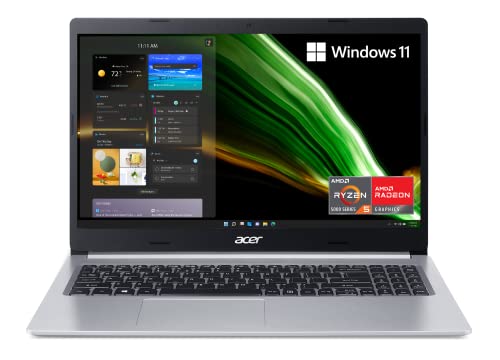
Acer Aspire 5 A515-45-R74Z
- Best for: Heavy tab users and households whose main computer lives in the browser.
- 15.6-inch Full HD IPS display
- AMD Ryzen 5 5500U hexa-core mobile processor
- AMD Radeon graphics
- 8GB DDR4 memory
Heavy tab users and households whose main computer lives in the browser.
It is still an 8GB machine; if you also plan to run demanding desktop software later, look at 16GB options outside this browsing brief.
The Aspire 5 is for the browser user whose sessions are not light. Its six-core Ryzen 5, 8GB of memory and NVMe SSD keep large tab collections, web apps and streaming responsive, and the Full HD IPS panel is easy on the eyes during long reading sessions. Wi-Fi 6 and a backlit keyboard round out a machine that feels a step above the minimum. Choose it if the laptop is also the household’s main computer for admin, homework help and everything the web carries.
Watch out for: It is still an 8GB machine; if you also plan to run demanding desktop software later, look at 16GB options outside this browsing brief.
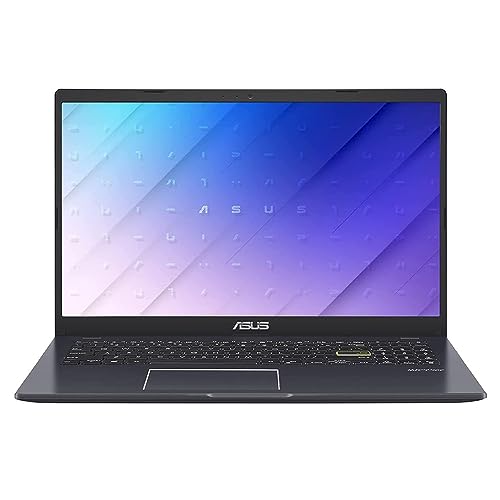
ASUS Vivobook Go 15 L510
- Best for: Very light, predictable browsing routines and second-machine duty.
- 15.6-inch Full HD display
- Intel Celeron N4020 processor
- 4GB memory
- 64GB storage
Very light, predictable browsing routines and second-machine duty.
Windows runs in S Mode as listed and storage is small, so confirm you are comfortable with Store apps and cloud-based files before ordering.
The Vivobook Go 15 is the narrow brief done cheaply in spirit: a Celeron N4020, 4GB of memory and 64GB of storage for a routine of email, a few tabs and streaming. The listing includes a year of Microsoft 365, which suits light document work. It makes sense as a second machine, a travel spare or a laptop for a relative whose use is genuinely small and predictable. Buy it with clear eyes: it is the minimum viable browsing laptop, not a bargain powerhouse.
Watch out for: Windows runs in S Mode as listed and storage is small, so confirm you are comfortable with Store apps and cloud-based files before ordering.
Which One Fits Your Situation
Everything you do is in the browser
Take the Chromebook Plus. It starts fast, maintains itself and has the storage and screen to make browsing feel effortless. For a Google-centred life of mail, documents, photos and streaming, it removes more friction than any specification upgrade on a Windows machine would.
You want Windows, but only for everyday things
The IdeaPad Slim 3 with the Ryzen 3 is your fit: a full-size screen, enough memory for normal tab habits and proper Windows for the odd desktop task. It is the uncomplicated family browsing laptop.
Your tabs number in the dozens
Choose the Aspire 5. The six-core processor keeps big browsing sessions and web apps smooth, and the IPS screen stays comfortable through long evenings of reading and streaming. It is the headroom option for people who never close anything.
The laptop is a spare or for one simple routine
The Vivobook Go covers email, news and streaming for one undemanding user. Keep expectations aligned with its 4GB of memory and small storage, and it will do its narrow job without complaint.
Common Mistakes
- Buying 4GB of memory for a heavy tab habit, then blaming the laptop for constant reloading.
- Choosing Chrome OS while depending on a Windows-only program, or Windows while wanting zero maintenance.
- Ignoring the S Mode note on a listing and being surprised that non-Store apps will not install.
- Letting a small drive fill completely, which slows any operating system down over time.
- Paying for gaming hardware when the workload is browsing, instead of spending on screen and memory.
Frequently Asked Questions
Is a Chromebook good enough for browsing?
For browsing, email, documents in the cloud and streaming, yes; the Chromebook Plus here is designed for exactly that and adds a sharp touchscreen and generous storage. The limits appear with Windows-only desktop software or heavy offline workflows. If your life is browser-based, it is often the simplest choice.
How much memory do I need for web browsing?
Eight gigabytes is the comfortable level for typical tab habits, streaming and a few web apps at once, and three picks here meet it. Four gigabytes works for a few tabs and one task at a time. If you keep dozens of tabs open, prioritise memory over processor badges.
What does Windows S Mode mean for browsing?
S Mode restricts installations to Microsoft Store apps, which still covers major browsers’ alternatives, streaming apps and light tools, but not every program. The Vivobook Go listing specifies S Mode. Switching out of S Mode is possible on Windows, but check the listing and Microsoft’s current guidance before relying on it.
How long will a browsing laptop stay fast?
Machines with 8GB of memory and SSD storage, like most picks here, typically stay pleasant for years of browsing because the workload grows slowly. Keeping the drive from filling up and letting updates complete are the two habits that preserve that feeling longest.
Related guides
More from Amazon
Programs that pair well with the guide above. Offers and eligibility are set by Amazon and may change.
Free shipping on eligible items, Prime Video and more. Eligible new members can start with a free trial.
Start a Prime free trialAd-free music streaming. Eligible new subscribers can start with a free trial.
Try Music Unlimited freeA Prime membership for ages 18-24 with a trial period. Eligibility is set by Amazon.
See Prime for Young AdultsAudiobooks and podcasts to listen to on the go. Eligible new members can start with a free trial.
Try Audible freeAs an Amazon Associate we earn from qualifying purchases.










Write Your Review
No reviews yet. Be the first to share your experience!