
Our Short List of 3

- Display: 15.6-inch Full HD
- Processor: Intel dual-core, as listed
- Memory: 8GB
- Storage: 128GB SSD plus 128GB eMMC, as listed
- Display: 15.6-inch Full HD
- Processor: Intel Celeron N4020
- Memory: 4GB
- Storage: 64GB

- Display: 15.6-inch Full HD class
- Processor: AMD Ryzen 5 7520U, four cores
- Graphics: Integrated AMD Radeon 610M
- Memory: 8GB LPDDR5, soldered as listed
All 3 Picks at a Glance
| Product | Specs | Action |
|---|---|---|
| 1. Lenovo IdeaPad 1 Student Laptop (B0CQB84CTP) |
| Check price on Amazon |
| 2. ASUS Vivobook Go 15 L510MA-AS02 |
| Check price on Amazon |
| 4. Lenovo IdeaPad 1 15AMN7 (B0D8Y9J2J3) |
| Check price on Amazon |
Key takeaways
- Windows laptops positioned in the entry budget segment, comparing Lenovo and ASUS models on processor, memory, storage, display and Windows 11 edition for study and everyday work.
As an Amazon Associate I earn from qualifying purchases. This post may contain affiliate links at no extra cost to you.
As an Amazon Associate we earn from qualifying purchases.
Disclosure: This article contains affiliate links. If you buy through a link on this page, we may earn a commission at no extra cost to you.
Introduction
Searches in this part of the market usually start with a simple budget idea and then run into a complicated reality. Listings change, configurations multiply, and two laptops with almost identical names can have different processors, memory, storage and even different editions of Windows. This guide therefore does something deliberate: it does not promise that any model sits at a particular figure at the moment you read it. Instead, it shortlists real Windows laptops that manufacturers and sellers position in the entry budget segment, and it judges them on the specifications that decide whether a budget machine stays pleasant to use.
That distinction matters for honesty and for usefulness. A laptop that was in a budget segment last season can move, a configuration can be replaced, and a seller listing can change its bundle. What does not change as quickly is whether the hardware itself makes sense: a modern processor, enough memory, sensible storage, a screen you can read for hours, and genuine Windows rather than a different operating system that cannot run the programs you need.
Every model below is a Windows laptop according to its listing. There are no ChromeOS machines and no Apple machines in this shortlist, because neither answers a search from a buyer who needs standard Windows programs for school, work or home administration. Within that Windows-only frame, the four picks split into two pairs: two very simple machines for light duties, and two stronger Ryzen configurations for buyers whose budget segment stretches to better multitasking hardware.
Quick Picks
- Best simple Lenovo for light study duties: Lenovo IdeaPad 1 B0CQB84CTP — a 15.6-inch Full HD screen with modest memory and combined storage types to understand before buying.
- Best compact budget ASUS formula: ASUS Vivobook Go 15 L510MA-AS02 — a light 15.6-inch design for basic tasks, with small storage that suits cloud-based work.
- Best step-up performance in this shortlist: Acer Aspire 3 A315-24PT-R0UX — a Ryzen 5 processor, more memory and a larger drive, plus a touch display in its listing.
- Best Lenovo step-up option: Lenovo IdeaPad 1 15AMN7 B0D8Y9J2J3 — a Ryzen 5 processor and a large solid state drive in a 15.6-inch Full HD design.
The Products
1. Lenovo IdeaPad 1 Student Laptop (B0CQB84CTP)
- Display: 15.6-inch Full HD
- Processor: Intel dual-core, as listed
- Memory: 8GB
- Storage: 128GB SSD plus 128GB eMMC, as listed
This Lenovo IdeaPad 1 listing describes a 15.6-inch Full HD display, an Intel dual-core processor, 8GB of memory, 128GB of solid state storage plus 128GB of eMMC storage, Wi-Fi 6, a webcam, Bluetooth, a year of Office 365 mentioned in the listing title, and Windows 11 Home, in grey, with the series identified as IdeaPad 1 15IJL7. It is a machine for defined, light duties: writing assignments, browsing, email, streaming and video calls.
The storage description deserves careful reading, because it combines two different storage types rather than offering one single large drive. Programs and Windows live within the limits of that arrangement, so this laptop suits a student or home user whose documents live mainly in cloud storage and whose program list is short. The dual-core processor sets the same expectation. It covers everyday basics, and it will feel limited sooner than the Ryzen machines below if you multitask heavily.
The Full HD screen is the pleasant surprise in the specification, since sharper text helps during long reading and writing sessions. Confirm the software bundle and every specification on the current listing, because IdeaPad 1 configurations are numerous.
Specifications
Pros
Cons
Check the Lenovo IdeaPad 1 on Amazon
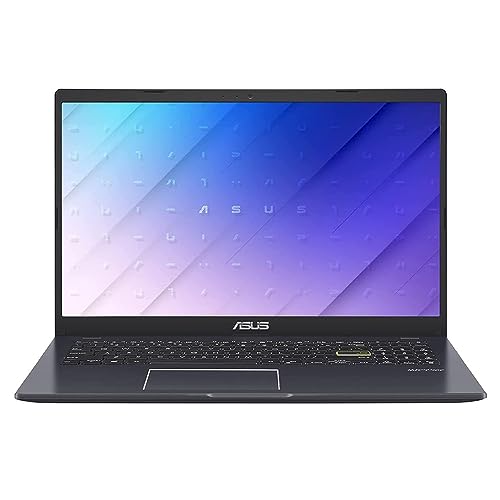
2. ASUS Vivobook Go 15 L510MA-AS02
- Display: 15.6-inch Full HD
- Processor: Intel Celeron N4020
- Memory: 4GB
- Storage: 64GB
The ASUS Vivobook Go 15 L510MA-AS02 listing describes a thin and light 15.6-inch Full HD laptop with an Intel Celeron N4020 processor, 4GB of memory, 64GB of storage, Windows 11 Home in S Mode and a year of Microsoft 365 mentioned in the listing, in Star Black. This is the simplest formula in the shortlist, and it should be chosen only for simple work: web-based school platforms, documents, email, streaming and calls.
With 4GB of memory and 64GB of storage, this machine depends on the cloud and on restraint. Keep few programs installed, store files online, and expect S mode to shape what you can install until you read the listing guidance about switching out of it. In return, the design goal is portability and simplicity, and the Full HD screen keeps everyday reading comfortable.
There are many newer Vivobook Go configurations with stronger hardware, including a Ryzen model in the companion guide on this site for inexpensive Windows laptops in general. This older L510 configuration is included here because it represents the bottom of the Windows budget segment honestly, with its limits stated plainly rather than hidden.
Specifications
Pros
Cons
Check the ASUS Vivobook Go 15 L510 on Amazon
3. Acer Aspire 3 A315-24PT-R0UX
The Acer Aspire 3 A315-24PT-R0UX is the step-up pick in this shortlist. Its listing describes a 15.6-inch Full HD IPS touch display, an AMD Ryzen 5 7520U quad-core processor, AMD Radeon graphics, 16GB of LPDDR5 memory, a 512GB NVMe solid state drive, Wi-Fi 6 and Windows 11 Home. On paper, that specification answers the three most common budget laptop complaints at once: it has a stronger processor for multitasking, double the memory of the basic picks, and a drive large enough for a real local library of documents, photos and programs.
The touch display adds flexibility for scrolling, presenting and working in tighter spaces, although it does not turn the machine into a tablet and the design remains a conventional laptop. Integrated Radeon graphics still define the boundary of the machine. Everyday creative work and light tasks are in scope, while demanding games and heavy video production are not.
For a buyer whose budget segment can stretch to the stronger end of the entry tier, this is the configuration in the shortlist that will stay comfortable the longest, because memory and storage headroom age more gracefully than a headline feature does.
Specifications
- Display: 15.6-inch Full HD IPS touch
- Processor: AMD Ryzen 5 7520U quad-core
- Graphics: AMD Radeon graphics
- Memory: 16GB LPDDR5
- Storage: 512GB NVMe SSD
- Wireless: Wi-Fi 6
- Operating system: Windows 11 Home
Pros
- Ryzen 5 processor with generous memory for multitasking
- Large NVMe drive for local files and programs
- Touch enabled Full HD IPS panel
Cons
- Integrated graphics only, despite the stronger processor
- Touch features may go unused by desk-based buyers
- Check the exact model code, as Aspire 3 configurations vary widely
Check the Acer Aspire 3 Touch on Amazon
4. Lenovo IdeaPad 1 15AMN7 (B0D8Y9J2J3)
- Display: 15.6-inch Full HD class
- Processor: AMD Ryzen 5 7520U, four cores
- Graphics: Integrated AMD Radeon 610M
- Memory: 8GB LPDDR5, soldered as listed
This Lenovo IdeaPad 1 configuration, series 15AMN7, is listed with an AMD Ryzen 5 7520U processor, 8GB of soldered LPDDR5 memory, a 512GB M.2 PCIe NVMe solid state drive, integrated AMD Radeon 610M graphics, a 15.6-inch Full HD class display, an HD camera with a privacy shutter, a card reader, HDMI, USB-C among its ports, and Windows 11. It sits a clear step above the dual-core IdeaPad 1 at the top of this guide while keeping the same straightforward, portable idea.
The large drive is the headline practical benefit, removing the storage juggling that defines the cheapest configurations. The Ryzen 5 processor handles documents, browsing, calls and several open programs with far more ease than an entry dual-core chip. The soldered memory is the planning point: because it is soldered in this listing description, you should treat the installed amount as fixed and choose the configuration accordingly rather than assuming a later upgrade.
Port variety, including a card reader and HDMI alongside USB-C, makes this a sensible family or student laptop that connects to cameras, monitors and accessories without a collection of adapters for common tasks.
Specifications
Pros
Cons
Check this Lenovo IdeaPad 1 on Amazon
How to Choose in This Budget Segment
Begin by deciding which pair in this shortlist matches your workload. If your days are web platforms, documents and calls, the simple Lenovo and ASUS machines cover the basics with clear limits. If you keep many programs open, store files locally or want a laptop to stay comfortable for longer, the Ryzen configurations are the safer segment to shop in, even though listings and positioning change over time.
Then verify four things on the exact listing you will order from. First, Windows: confirm it says Windows 11 and note S mode where present. Second, storage: read both the size and the type, and be wary of combined storage descriptions that split capacity across different technologies. Third, memory: check the amount and whether it is soldered. Fourth, identity: match the model code, series and ASIN, because budget laptop families reuse names across very different hardware.
Finally, ignore any assumption carried over from the search term you typed. Segment labels describe where a model is positioned, not a guaranteed figure on the day you buy, so judge the listing in front of you on its specifications, its seller and what is included.
FAQs
Does this guide guarantee that these laptops sit at one exact figure today?
No. This guide shortlists Windows models positioned in the entry budget segment and compares their specifications. Listings and configurations change, so check the current listing for the model and ASIN you choose and judge it on the hardware described there.
Why are there no Chromebooks in this shortlist?
Because this search is for Windows laptops. ChromeOS machines cannot run standard Windows desktop programs in the same way, so including them would mislead buyers who need Windows software for school or work.
Which pick suits a student best?
For light, cloud-based coursework, either simple pick can work. For a student who keeps files locally, installs larger programs or multitasks heavily, one of the Ryzen configurations with a larger drive is the more comfortable choice.
Is a touch screen worth choosing in this segment?
Only if you will actually use it for scrolling, presenting or working in small spaces. Memory, processor and storage usually matter more to daily comfort than touch does, which is why the step-up picks in this guide lead with those specifications.
What should I check first when the laptop arrives?
Confirm the model code, processor, memory, storage and Windows edition against the listing you ordered from, then run Windows updates and check the webcam, ports and keyboard before you settle into transferring files.
Conclusion
In the entry budget segment, the smartest purchase is rarely the machine with the boldest search term behind it. It is the machine whose processor, memory and storage match your real workload, running genuine Windows, identified by an exact model code and ASIN. Choose the simple Lenovo or ASUS for light cloud-based duties, or step up to the Ryzen Acer or Lenovo for headroom that lasts. Either way, verify the current listing carefully, and let specifications rather than segment labels make the final decision.
Related guides
More from Amazon
Programs that pair well with the guide above. Offers and eligibility are set by Amazon and may change.
Free shipping on eligible items, Prime Video and more. Eligible new members can start with a free trial.
Start a Prime free trialAd-free music streaming. Eligible new subscribers can start with a free trial.
Try Music Unlimited freeA Prime membership for ages 18-24 with a trial period. Eligibility is set by Amazon.
See Prime for Young AdultsAudiobooks and podcasts to listen to on the go. Eligible new members can start with a free trial.
Try Audible freeAs an Amazon Associate we earn from qualifying purchases.










Write Your Review
No reviews yet. Be the first to share your experience!