
Our Short List of 3

- Best for: Everyday work and media on a large Windows 10 touch display.
- 15.6-inch Full HD IPS touchscreen display
- Intel Core i7-1065G7 processor
- 12GB RAM
- 1TB hard drive

- Best for: Heavy multitasking and large files on Windows 10 with touch.
- 15.6-inch Full HD IPS touchscreen display
- AMD Ryzen 7 5700U processor
- 16GB RAM
- 512GB SSD
- Best for: Reliable daily use on a proven Windows 10 touch laptop.
- 15.6-inch Full HD touchscreen display
- Intel Core i7-8550U processor
- 12GB RAM
- 1TB hard drive
All 5 Picks at a Glance
| Product | Specs | Action |
|---|---|---|
| HP Pavilion 15, Intel Core i7-1065G7 |
| Check price on Amazon |
| HP Pavilion 15, AMD Ryzen 7 5700U |
| Check price on Amazon |
| HP Pavilion 15t, 15-CC665CL |
| Check price on Amazon |
 Lenovo Flex 5 14 |
| Check price on Amazon |
 HP Pavilion 15, Intel Core i5-1035G1 |
| Check price on Amazon |
Key takeaways
- Still on Windows 10? These five touchscreen laptops run Windows 10 with tap, swipe, and pen-friendly displays for work, study, and everyday use.
What's inside
As an Amazon Associate I earn from qualifying purchases. This post may contain affiliate links at no extra cost to you.
Windows 10 remains the operating system many people know best, and some software, work tools, and older peripherals still run most comfortably on it. Add a touchscreen and the familiar system gains a second way to work: tap a button instead of hunting for it, scroll with a finger, and sign a document on the screen. The real decision is which combination of screen, processor, and memory fits the work you actually do, because Windows 10 touch laptops span from slim convertibles to large desktop replacements.
This guide is for people who want to stay on Windows 10, whether for a work application, a favourite program, or simple familiarity. Every pick below is a touchscreen laptop that ships with Windows 10, identified by its name and specifications on its Amazon product page.
Quick Picks
As an Amazon Associate we earn from qualifying purchases
| Product | Best for | Key spec from title |
|---|---|---|
| HP Pavilion 15, i7-1065G7 | Everyday work with a large touch display | 15.6-inch Full HD IPS touch, Windows 10 Home |
| HP Pavilion 15, Ryzen 7 5700U | Heavy multitasking with touch | 15.6-inch Full HD IPS touch, 16GB RAM, Windows 10 Home |
| HP Pavilion 15t, 15-CC665CL | A proven touch laptop for daily use | 15.6-inch Full HD touch, Windows 10 |
| Lenovo Flex 5 14 | A light 2-in-1 for work on the move | 14-inch touch display, Windows 10 Home |
| HP Pavilion 15, i5-1035G1 | A balanced touch laptop for home | 15.6-inch Full HD IPS touch, Windows 10 Home |
How to Choose
Match the Processor to Your Workload
Windows 10 runs well on a wide range of processors, but the chip still decides how the laptop feels. An eighth-generation Intel Core i5 or a Ryzen 5 handles documents, browsing, and video calls with ease. Step up to a Core i7 or Ryzen 7 if you edit photos, run large spreadsheets, or keep many applications open at once. A weaker chip will cope with one task at a time, yet it will stutter when the workload grows, and a touch screen only makes the lag more obvious.
Treat Memory as the Touch Experience
Touch feels slow when the system is short on memory, because every tap waits on a busy machine. Aim for 12GB or 16GB of RAM if you run several programs together, and treat 8GB as the floor for light use only. Memory matters more than storage for how responsive the touchscreen feels, since a machine that swaps to disk between taps turns a quick gesture into a wait. If the laptop feels sluggish when you tap, memory is the first specification to check.
Check the Screen Type, Not Just the Size
A Full HD IPS touchscreen looks sharper and keeps its colours when you tilt the screen, which matters when you tap and swipe from an angle. Lower-resolution panels look soft up close and wash out at the edges. Check the specification for Full HD and IPS together, and remember that a 14-inch screen suits travel while a 15.6-inch screen suits a desk. The panel type affects every hour you spend looking at the machine, so it deserves as much attention as the processor.
Confirm Windows 10 Is the Installed System
Some listings for these models also appear in Windows 11 versions, and the two can share a model name. Read the operating system field on the product page and match the exact configuration, because a machine that ships with Windows 11 is a different purchase from one that ships with Windows 10. The model number and the operating system line together confirm what you are buying, so check both before you place the order and keep the listing open while you compare.
The 5 Best Options
HP Pavilion 15, Intel Core i7-1065G7
- Best for: Everyday work and media on a large Windows 10 touch display.
- 15.6-inch Full HD IPS touchscreen display
- Intel Core i7-1065G7 processor
- 12GB RAM
- 1TB hard drive
Everyday work and media on a large Windows 10 touch display.
The 1TB hard drive is a spinning disk, so the machine starts up more slowly than a laptop with solid-state storage.
This Pavilion 15 is a strong all-rounder for Windows 10 touch use. Its 15.6-inch Full HD IPS touchscreen responds well to taps and swipes, and the Intel Core i7-1065G7 processor with 12GB of memory keeps documents, browsers, and media running together without fuss. The 1TB hard drive holds a large library of files, photos, and programs, which suits a home laptop that doubles as the family file store. It is a big machine, so it fits a desk better than a small bag.
Watch out for: The 1TB hard drive is a spinning disk, so the machine starts up more slowly than a laptop with solid-state storage.
HP Pavilion 15, AMD Ryzen 7 5700U
- Best for: Heavy multitasking and large files on Windows 10 with touch.
- 15.6-inch Full HD IPS touchscreen display
- AMD Ryzen 7 5700U processor
- 16GB RAM
- 512GB SSD
Heavy multitasking and large files on Windows 10 with touch.
It is a full-size 15.6-inch laptop, so it is heavier than the 14-inch convertible in this guide and less suited to carrying all day.
This Pavilion 15 is the most capable pick in the group, because its AMD Ryzen 7 5700U processor and 16GB of memory handle heavy multitasking with room to spare. The 512GB solid-state drive makes startup and file opening noticeably quicker than the hard-drive models here, and the 15.6-inch Full HD IPS touchscreen keeps the interface bright and responsive. If you run many applications at once or work with large files, this is the configuration that will keep up.
Watch out for: It is a full-size 15.6-inch laptop, so it is heavier than the 14-inch convertible in this guide and less suited to carrying all day.
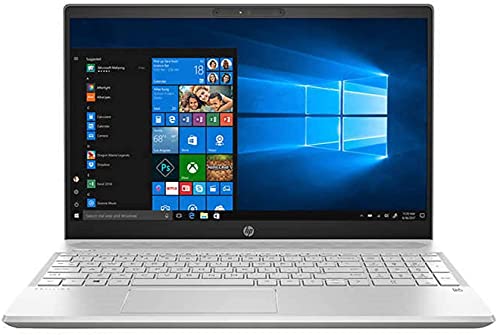
HP Pavilion 15t, 15-CC665CL
- Best for: Reliable daily use on a proven Windows 10 touch laptop.
- 15.6-inch Full HD touchscreen display
- Intel Core i7-8550U processor
- 12GB RAM
- 1TB hard drive
Reliable daily use on a proven Windows 10 touch laptop.
The eighth-generation processor and spinning hard drive are older technology, so demanding modern applications will feel slow.
The Pavilion 15t is a proven workhorse that has been around long enough for its strengths and limits to be well known. Its 15.6-inch Full HD touchscreen and Intel Core i7-8550U processor cover office work, browsing, and media, while 12GB of memory and a 1TB hard drive give it room for a big personal library. It suits anyone who wants a dependable Windows 10 touch laptop without paying for the newest hardware, and its familiar design is easy to live with day to day.
Watch out for: The eighth-generation processor and spinning hard drive are older technology, so demanding modern applications will feel slow.
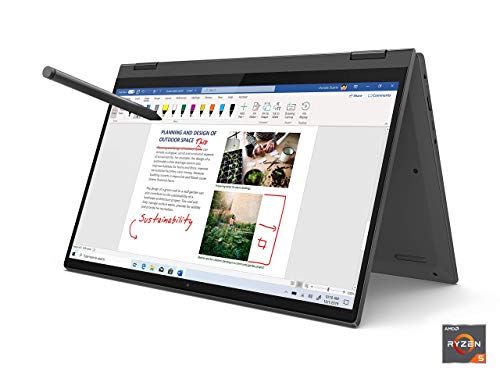
Lenovo Flex 5 14
- Best for: Work on the move with a light Windows 10 convertible.
- 14-inch Full HD touchscreen display
- AMD Ryzen 5 5500U processor
- 16GB RAM
- 256GB SSD
Work on the move with a light Windows 10 convertible.
The 256GB of storage fills up quickly with large files, so plan on an external drive or cloud storage for a big media library.
The Lenovo Flex 5 14 is the portable pick here. Its 14-inch touchscreen folds back into tablet mode, so you can type at a desk, then flip the screen around to read or present. The AMD Ryzen 5 5500U processor with 16GB of memory handles office work and browsing comfortably, and the 256GB solid-state drive keeps the machine quick to start. At 3.63 pounds with a 52.5Wh battery, it is the easiest of the five to carry between rooms or to a meeting.
Watch out for: The 256GB of storage fills up quickly with large files, so plan on an external drive or cloud storage for a big media library.
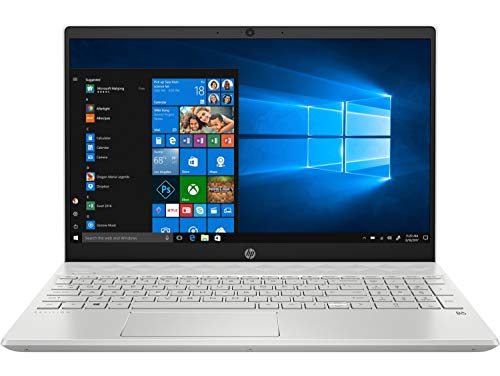
HP Pavilion 15, Intel Core i5-1035G1
- Best for: General home use with a balanced Windows 10 touch laptop.
- 15.6-inch Full HD IPS touchscreen display
- Intel Core i5-1035G1 processor
- 12GB RAM
- 512GB SSD
General home use with a balanced Windows 10 touch laptop.
The tenth-generation processor is a step behind the Ryzen 7 model here, so very heavy workloads will run better on that machine.
This Pavilion 15 is the balanced home pick. Its 15.6-inch Full HD IPS touchscreen and Intel Core i5-1035G1 processor cover browsing, streaming, documents, and video calls, while 12GB of memory keeps several applications open at once. The 512GB solid-state drive gives it quick startup and room for a solid library of files. It does not lead the group on any single specification, yet it is the most even combination of screen, speed, and storage for general home use.
Watch out for: The tenth-generation processor is a step behind the Ryzen 7 model here, so very heavy workloads will run better on that machine.
Which One Fits Your Situation
You Work From a Desk Most of the Day
Pick the HP Pavilion 15 with the Ryzen 7 5700U. Its 16GB of memory and 512GB solid-state drive keep a full working day smooth, and the large Full HD IPS touchscreen gives you room to tap, scroll, and multitask. The fast storage also means the machine wakes quickly between tasks, so a working day spent moving between documents and calls feels fluid rather than interrupted.
You Carry the Laptop Between Rooms and Meetings
Pick the Lenovo Flex 5 14. It is the lightest machine here, its screen folds into tablet mode for presentations, and the solid-state drive means it wakes up fast when you open the lid. The 14-inch size also fits on smaller tables and in smaller bags, which makes it the easiest of the five to carry through a full day of meetings.
You Need Room for a Big File Library
Pick the HP Pavilion 15 with the Core i7-1065G7 or the Pavilion 15t. Both have 1TB hard drives, which hold far more files than the 256GB and 512GB solid-state drives in this guide, even though they are slower to access. If your library is mostly documents and photos rather than video, the slower access barely matters, and the extra room is worth more than the speed.
You Want the Best Balance of Speed and Storage
Pick the HP Pavilion 15 with the Core i5-1035G1. Its solid-state drive and 12GB of memory give it quick responses for everyday tasks, and the Full HD IPS touchscreen covers the touch experience without a premium configuration. It is the most even combination here for a household that wants one laptop to do a bit of everything well.
Common Mistakes
- Buying a Windows 11 version of a model that also ships with Windows 10.
- Choosing 8GB of memory and then wondering why the touchscreen feels sluggish under load.
- Picking a lower-resolution screen and finding text blurry during long reading sessions.
- Ignoring storage type, so a big hard drive masks slow startup times.
- Assuming every Pavilion 15 is a touchscreen, when non-touch versions share the name.
Frequently Asked Questions
Can I upgrade a Windows 10 touchscreen laptop to Windows 11 later?
Most of these machines meet the basic requirements, but the upgrade depends on the processor generation and the security chip in the specific configuration. Check the compatibility of the exact model before assuming an upgrade is possible, and keep in mind that staying on Windows 10 is a valid choice while it still receives support.
Does a touchscreen drain the battery faster?
A touchscreen uses a small amount of extra power, but the difference is modest next to the screen brightness and the processor load. Brightness settings and background applications affect battery life far more than the touch layer itself, so lower the brightness when you work away from a charger.
Do I need a stylus with a touchscreen laptop?
Not necessarily. A finger covers tapping, scrolling, and swiping for most tasks. A stylus helps with handwriting, sketching, and precise selection, so it is worth adding if you take handwritten notes or draw. Check that the laptop supports an active stylus before buying one.
Is Windows 10 still safe to use?
Windows 10 still receives security updates for supported editions, and it runs current browsers and office software. Keep the system updated, use a current browser, and avoid installing software from unknown sources. Plan your move to a newer system before support ends for your edition.
Related guides
More from Amazon
Programs that pair well with the guide above. Offers and eligibility are set by Amazon and may change.
Free shipping on eligible items, Prime Video and more. Eligible new members can start with a free trial.
Start a Prime free trialAd-free music streaming. Eligible new subscribers can start with a free trial.
Try Music Unlimited freeA Prime membership for ages 18-24 with a trial period. Eligibility is set by Amazon.
See Prime for Young AdultsAudiobooks and podcasts to listen to on the go. Eligible new members can start with a free trial.
Try Audible freeAs an Amazon Associate we earn from qualifying purchases.










Write Your Review
No reviews yet. Be the first to share your experience!