
Our Short List of 3

- Best for: A first serious gaming laptop with strong cooling and room to add a second drive later.
- Intel Core i7-13650HX processor
- NVIDIA GeForce RTX 4060 Laptop GPU, up to 140W maximum graphics power
- 16-inch WUXGA 1920 x 1200 IPS display, 165Hz, 3ms response time, NVIDIA G-SYNC and Advanced Optimus
- 16GB DDR5 dual-channel memory, up to 4800 MT/s, maximum 32GB
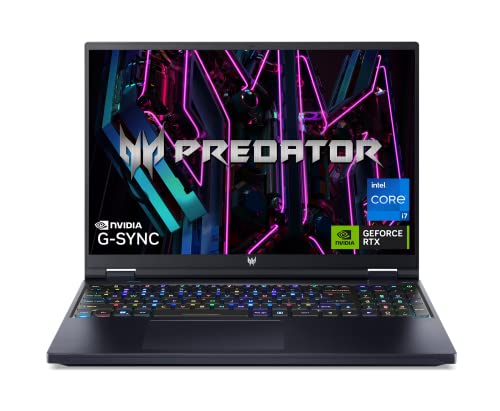
- Best for: A permanent desk setup where the sharper 2560 x 1600 panel and 1TB of storage matter most.
- Intel Core i7-13700HX processor
- NVIDIA GeForce RTX 4060 Laptop GPU
- 16-inch 2560 x 1600 display, 165Hz, NVIDIA G-SYNC
- 16GB DDR5 memory, up to 4800 MT/s, 2 DDR5 slots, maximum 32GB

- Best for: Daily carrying and gaming away from home in a smaller, lighter Predator.
- Intel Core Ultra 7 155H processor with dedicated AI engine
- NVIDIA GeForce RTX 4060 Laptop GPU
- 14.5-inch WQXGA 2560 x 1600 IPS display, 120Hz, NVIDIA G-SYNC and Advanced Optimus
- 16GB LPDDR5X memory
All 3 Picks at a Glance
| Product | Specs | Action |
|---|---|---|
| Acer Predator Helios Neo 16 (PHN16-71-76H5) |
| Check price on Amazon |
| Acer Predator Helios 16 (PH16-71-74UU) |
| Check price on Amazon |
| Acer Predator Helios Neo 14 (PHN14-51-797W) |
| Check price on Amazon |
Key takeaways
- Compare the 3 best Acer Predator gaming laptops for November 2026: Helios Neo 16, Helios 16 and Helios Neo 14, all with RTX 4060 graphics on Amazon.
What's inside
As an Amazon Associate I earn from qualifying purchases. This post may contain affiliate links at no extra cost to you.
Choosing a Predator laptop is a decision about which screen, size and storage combination fits the way you actually play, not about chasing the biggest model name. Every Predator Helios carries the same aggressive styling and the same PredatorSense software, so the real differences sit in the panel resolution, the refresh rate, the amount of storage and whether the machine is built to stay on a desk or travel in a bag. Get those four things right and the laptop disappears into the game; get them wrong and you end up with a fast machine that still feels like a compromise.
This guide is for three kinds of buyers: players setting up a permanent desk station, players buying their first serious gaming laptop, and players who carry their machine between home, school and a friend’s place. Every laptop below is an Acer Predator model with its specifications taken from its Amazon listing, including the exact configuration code, so you can match the listing to the machine before you buy.
Quick Picks
As an Amazon Associate we earn from qualifying purchases
| Product | Best for | Key spec from title |
|---|---|---|
| Acer Predator Helios Neo 16 (PHN16-71-76H5) | A first serious gaming laptop with strong cooling | Intel Core i7-13650HX, RTX 4060, 16″ 165Hz, 16GB DDR5, 512GB SSD |
| Acer Predator Helios 16 (PH16-71-74UU) | A desk setup with a sharper, faster panel | Intel Core i7-13700HX, RTX 4060, 16″ 2560 x 1600 165Hz, 16GB DDR5, 1TB SSD |
| Acer Predator Helios Neo 14 (PHN14-51-797W) | Gaming away from home in a smaller bag | Intel Core Ultra 7 155H, RTX 4060, 14.5″ 120Hz, 16GB LPDDR5X, 1TB SSD |
How to Choose
Start With the Screen, Not the GPU
All three laptops in this guide use the same RTX 4060 graphics, so the panel is where the gaming experience actually changes. The Helios 16 pairs its GPU with a 2560 x 1600 display at 165Hz, which shows more detail in open-world games and keeps fast motion smooth in shooters. The Helios Neo 16 uses a 1920 x 1200 panel at the same 165Hz, so motion feels just as fluid but fine detail is softer. The Helios Neo 14 drops to 120Hz at 2560 x 1600, still smooth for most games but less responsive in competitive play. Pick the resolution and refresh rate for the games you play most, because the screen is the part you look at every session.
Accept That the GPU Is the Same and Judge the Rest
When every shortlisted laptop carries an RTX 4060, the useful comparison moves to the processor, the memory and the cooling around that graphics chip. The Helios 16 runs a 13th Gen Intel Core i7-13700HX, the Helios Neo 16 a Core i7-13650HX, and the Helios Neo 14 a newer Intel Core Ultra 7 155H with a dedicated AI engine. In practice the two i7 chips are close for gaming, while the Ultra 7 trades a little raw speed for better efficiency on battery. Cooling matters more than the chip name: the Helios Neo 16 listing names 5th Gen AeroBlade fans and liquid metal thermal grease on the CPU, which keeps a laptop quieter under load.
RAM and Storage Decide How Long the Laptop Lasts
Sixteen gigabytes of memory is the starting point on all three machines, but what you can change later is not the same. The Helios Neo 16 and the Helios 16 both list two DDR5 memory slots with room to expand to 32GB, and both list two M.2 slots for storage, so a second drive or a memory upgrade is straightforward. The Helios Neo 14 lists 16GB of LPDDR5X memory, which is soldered in most thin designs, so treat its memory as fixed and buy it only if 16GB covers your games and background apps. Storage splits the group too: the Helios Neo 16 ships with a 512GB SSD, while the other two ship with 1TB.
Size, Weight and Ports Decide Where You Play
A 16-inch Predator is a desk machine that can travel, while the 14.5-inch Neo 14 is a travel machine that can sit on a desk. The Helios Neo 16 measures 14.18 inches wide and weighs 5.73 pounds according to its Amazon listing, so it fits a backpack but you will feel it on a long walk. The Neo 14 is the obvious pick for daily carrying, with a smaller footprint and a lighter chassis. Ports matter once the laptop is docked: the Helios Neo 16 lists two Thunderbolt 4 ports, HDMI 2.1, Ethernet and several USB ports, which covers an external monitor, a headset and a mouse without a hub.
The 3 Best Options
Acer Predator Helios Neo 16 (PHN16-71-76H5)
- Best for: A first serious gaming laptop with strong cooling and room to add a second drive later.
- Intel Core i7-13650HX processor
- NVIDIA GeForce RTX 4060 Laptop GPU, up to 140W maximum graphics power
- 16-inch WUXGA 1920 x 1200 IPS display, 165Hz, 3ms response time, NVIDIA G-SYNC and Advanced Optimus
- 16GB DDR5 dual-channel memory, up to 4800 MT/s, maximum 32GB
A first serious gaming laptop with strong cooling and room to add a second drive later.
The 512GB SSD fills fast with large games, so plan on using the spare M.2 slot or an external drive.
The Helios Neo 16 is the most balanced entry point in the Predator line, pairing a 13th Gen Intel Core i7 with RTX 4060 graphics and a 165Hz display in a chassis that takes cooling seriously. Its Amazon listing names 5th Gen AeroBlade fans and liquid metal thermal grease on the CPU, plus PredatorSense software with Quiet, Balanced, Performance and Turbo modes, so you can trade fan noise for speed depending on the moment. The 1920 x 1200 panel keeps frame rates high at its native resolution, and the two Thunderbolt 4 ports make it easy to add a monitor later.
Watch out for: The 512GB SSD fills fast with large games, so plan on using the spare M.2 slot or an external drive.
Acer Predator Helios 16 (PH16-71-74UU)
- Best for: A permanent desk setup where the sharper 2560 x 1600 panel and 1TB of storage matter most.
- Intel Core i7-13700HX processor
- NVIDIA GeForce RTX 4060 Laptop GPU
- 16-inch 2560 x 1600 display, 165Hz, NVIDIA G-SYNC
- 16GB DDR5 memory, up to 4800 MT/s, 2 DDR5 slots, maximum 32GB
A permanent desk setup where the sharper 2560 x 1600 panel and 1TB of storage matter most.
Predator sells many configurations under the Helios 16 name, so confirm the listing shows model PH16-71-74UU before buying.
The Helios 16 is the step up for players who want the same RTX 4060 graphics behind a sharper screen. Its 2560 x 1600 panel at 165Hz with G-SYNC shows more detail in sprawling games and keeps competitive shooters smooth, and the 1TB SSD removes the storage squeeze that the Neo 16 buyer has to manage. The listing names a 13th Gen Intel Core i7-13700HX, 16GB of DDR5 memory with room to expand to 32GB, and a second M.2 slot, so the machine has a longer useful life than its out-of-the-box specifications suggest. Killer Wi-Fi 6E keeps online play stable when the router is shared.
Watch out for: Predator sells many configurations under the Helios 16 name, so confirm the listing shows model PH16-71-74UU before buying.
Acer Predator Helios Neo 14 (PHN14-51-797W)
- Best for: Daily carrying and gaming away from home in a smaller, lighter Predator.
- Intel Core Ultra 7 155H processor with dedicated AI engine
- NVIDIA GeForce RTX 4060 Laptop GPU
- 14.5-inch WQXGA 2560 x 1600 IPS display, 120Hz, NVIDIA G-SYNC and Advanced Optimus
- 16GB LPDDR5X memory
Daily carrying and gaming away from home in a smaller, lighter Predator.
The 120Hz panel is slower than the 165Hz panels in this guide, and the LPDDR5X memory should be treated as fixed.
The Helios Neo 14 is the Predator for players who actually carry their laptop every day. Its 14.5-inch WQXGA display keeps the same 2560 x 1600 resolution as the Helios 16 in a much smaller body, and the Intel Core Ultra 7 155H brings a dedicated AI engine along with better efficiency away from a power outlet. The listing names a Thunderbolt 4 port, a second USB-C port with DisplayPort and Power Delivery, two USB 3.2 Gen 2 ports, HDMI 2.1 and a microSD reader, which is a generous set of connections for a machine this size. The 120Hz refresh rate is the trade-off against its larger siblings.
Watch out for: The 120Hz panel is slower than the 165Hz panels in this guide, and the LPDDR5X memory should be treated as fixed.
Which One Fits Your Situation
A Desk Setup That Stays in One Place
Pick the Helios 16 (PH16-71-74UU). The 2560 x 1600 panel at 165Hz is the best screen in this guide, the 1TB SSD holds a real game library, and the 16GB of DDR5 memory can grow to 32GB later. Since the laptop rarely moves, its size and weight stop mattering and the sharper display pays off every session.
A First Serious Gaming Laptop
Pick the Helios Neo 16 (PHN16-71-76H5). It has the same RTX 4060 graphics and the same 165Hz refresh rate as the Helios 16, with serious cooling hardware and PredatorSense fan modes to keep noise under control. The 512GB SSD is the compromise, but the spare M.2 slot gives you a clear upgrade path when the library grows.
Gaming Away From Home Most Days
Pick the Helios Neo 14 (PHN14-51-797W). The 14.5-inch body is the easiest of the three to carry, the 1TB SSD holds plenty of games, and the Thunderbolt 4 and HDMI 2.1 ports still let it drive an external monitor at a desk. Accept the 120Hz panel as the price of portability and you get a genuine gaming laptop that fits a normal bag.
Competitive Shooters and Story Games on One Machine
Pick the Helios 16 (PH16-71-74UU) for its 165Hz panel with G-SYNC, which keeps fast motion smooth and prevents tearing when frame rates shift. The 2560 x 1600 resolution also suits story-driven games where scenery matters, and the 1TB SSD means you do not have to uninstall one game to install another. If the budget is tighter, the Helios Neo 16 is the fallback with the same refresh rate at a lower resolution.
Common Mistakes
- Buying by the model name alone: many different configurations share the Helios 16 and Helios Neo 16 names, so always match the configuration code on the listing.
- Ignoring the 512GB SSD on the Helios Neo 16 until the first big game update has nowhere to install.
- Assuming every RTX 4060 laptop performs the same: the Neo 16 listing names up to 140W of graphics power, and cooling hardware varies between models.
- Treating the Neo 14’s 16GB of LPDDR5X memory as upgradeable when it should be treated as fixed.
- Choosing the 120Hz Neo 14 for competitive shooters and then wishing for the 165Hz panel on the larger models.
Frequently Asked Questions
Are all Predator Helios laptops the same?
No. Helios and Helios Neo are separate lines, and each line has many configurations that share a name but differ in processor, panel and storage. The Helios 16 in this guide has a 2560 x 1600 panel and 1TB SSD, while the Helios Neo 16 has a 1920 x 1200 panel and 512GB SSD. Always check the configuration code, such as PH16-71-74UU, on the Amazon listing before buying.
Is the RTX 4060 enough for modern games?
Yes for most players. The RTX 4060 in these laptops handles modern games at the native resolution of their panels, with support for DLSS and ray tracing where games offer them. The 165Hz models suit competitive play, while the 120Hz Neo 14 is better for story games and everyday use. If you play at an external 4K monitor, a stronger GPU would be a better fit.
Can you upgrade the RAM and storage later?
It depends on the model. The Helios Neo 16 and Helios 16 both list two DDR5 memory slots with room to expand to 32GB and two M.2 slots for storage, so both upgrades are straightforward. The Helios Neo 14 lists 16GB of LPDDR5X memory, which should be treated as fixed, though its 1TB SSD still leaves room for a large library.
What is the difference between Helios and Helios Neo?
Helios is the higher line and Neo is the more affordable sibling, and the gap shows in panel and storage rather than graphics. In this guide both lines use the RTX 4060, but the Helios 16 gets the 2560 x 1600 display and 1TB SSD while the Neo 16 gets a 1920 x 1200 display and 512GB SSD. The Neo 14 trades screen speed for a smaller, lighter body.
Related guides
More from Amazon
Programs that pair well with the guide above. Offers and eligibility are set by Amazon and may change.
Free shipping on eligible items, Prime Video and more. Eligible new members can start with a free trial.
Start a Prime free trialAd-free music streaming. Eligible new subscribers can start with a free trial.
Try Music Unlimited freeA Prime membership for ages 18-24 with a trial period. Eligibility is set by Amazon.
See Prime for Young AdultsAudiobooks and podcasts to listen to on the go. Eligible new members can start with a free trial.
Try Audible freeAs an Amazon Associate we earn from qualifying purchases.










Write Your Review
No reviews yet. Be the first to share your experience!