
Key takeaways
- Find the best Minecraft laptops under 200 that can run the game on modest settings. Budget Windows and Chromebook picks, plus honest setup guidance for play.
What's inside
As an Amazon Associate I earn from qualifying purchases. This post may contain affiliate links at no extra cost to you.
Finding the best Minecraft laptops under 200 means accepting a clear trade from the start. At this level, you are not buying a gaming laptop. You are buying a light, everyday laptop with modest integrated graphics and just enough processor and memory to run Minecraft in its simpler forms, provided you choose the right edition and keep the settings sensible. That is still a useful machine for a younger player, a second household laptop, or a first computer for someone who mainly wants to build, explore, and play with friends in a familiar block world.

The quick answer is to pick a Windows laptop with an Intel Celeron processor, 4GB of memory, and solid-state storage for the widest choice of Minecraft editions, and to keep expectations grounded. Bedrock Edition, known on Windows as Minecraft for Windows, is the easier target on this hardware. Java Edition can run on the same class of machine, but it asks more of the processor and memory, so it needs lower settings, a short render distance, and a light touch with extra content. Chromebooks can also work, but only through the Chromebook version of Bedrock, so they suit a narrower kind of player.
This guide stays strictly on laptops that fit the under-200 brief and can run Minecraft in some form. Every pick below is a full laptop, with a built-in keyboard, screen, and battery. There are no desktops, tablets, or accessories in the roundup.
Quick Picks
Our Short List of 3
All 3 Picks at a Glance
| Product | Specs | Action |
|---|---|---|
| 2. ASUS Vivobook Go 15 L510, L510MA-AS02 (B09SVR5VD4) | Check price on Amazon | |
| 3. Lenovo IdeaPad 1 14 (B08YKHYCPW) | Check price on Amazon | |
 4. HP Chromebook 14, 2023 (B0C7MR5RDH) | Check price on Amazon |
How to Choose
Start With the Edition: Bedrock or Java
The single most important choice happens before you compare laptops. Minecraft exists in two main editions, and they do not ask the same thing of budget hardware. Bedrock Edition is the version sold for Windows, consoles, and mobile devices, and it is generally lighter on modest machines. Java Edition is the original PC version, and it supports the widest range of community mods and servers, but it also leans harder on the processor and on memory.
On a laptop in this bracket, Bedrock is the safer starting point. It loads faster on low-end hardware, holds a steadier frame rate at modest settings, and works well for single-player worlds and play with friends on shared Bedrock worlds. Java can still work for a simple vanilla world, but you should plan on short render distances, fast graphics settings, and no heavy modpacks. If the player already owns Java Edition, choose a Windows laptop from this guide and keep the world light.
Treat 4GB of Memory as the Floor, Not a Comfort Zone
Every laptop in this roundup has 4GB of memory, and that is typical for this bracket. It is enough to run Minecraft with a browser closed and little else running, but it leaves almost no headroom. A laptop with 4GB of memory will feel fine while you are inside a world, then slow down sharply if you open a video call, a browser with many tabs, and a music app at the same time.
Pick a Celeron That Can Hold a Steady Pace
Most laptops in this bracket use an Intel Celeron processor, and the differences between them are modest but real. A dual-core Celeron N4020 is the common baseline, and it can run Bedrock at low to medium settings when the world is not too demanding. A quad-core Celeron N4120, found in the Chromebook pick here, has more cores to share the work, which helps when the system is also handling background tasks or a browser window. Neither chip is a gaming processor, so keep the laptop on a hard, flat surface so its vents stay clear.
Expect Integrated Graphics and Plan the Settings Around Them
No laptop in this bracket has a separate graphics card. All of them rely on integrated Intel UHD Graphics, which shares memory with the rest of the system. Integrated graphics can draw the blocky world of Minecraft well at modest settings, but they cannot also handle long view distances, fancy lighting, and heavy texture packs at the same time.
A sensible starting point is a render distance of six to eight chunks, graphics set to fast, smooth lighting turned down or switched off, clouds switched off, and particles kept low. From there, raise one setting at a time. If movement starts to hitch, step the render distance back down before changing anything else.
Storage Size Shapes What You Can Keep Installed
Storage is tight on these laptops. The Windows picks here have 64GB of storage, and the Chromebook has 64GB of eMMC storage. After the operating system, updates, and a few school or work programs, the space left for games and worlds is limited. Minecraft itself does not need a huge amount of space for a single world, but worlds grow as you explore.
Before buying, think about what else the laptop must hold. If it is mainly a Minecraft and homework machine, 64GB can work with regular tidying. If it also needs to hold a large photo library, many large programs, or several big games, it will feel cramped very soon. A microSD card slot or a USB drive can help with files and backups, but Minecraft itself runs best from the internal drive.
Screen Size and Keyboard Comfort Matter More Than They Sound
Minecraft is a game of long sessions, building, and looking around a world, so the screen and keyboard deserve real attention. A 14-inch display is easier to carry and fits well on a small desk or a lap, while a 15.6-inch display gives more room for the inventory, the hotbar, and the world itself. A Full HD display, at 1920 by 1080, shows a sharper image than a basic HD display at 1366 by 768.
Be Honest About Mods, Shaders, and Servers
Mods and shaders are where many budget Minecraft plans come unstuck. Light quality-of-life additions can work on a careful setup, but large modpacks, heavy shader packs, and high-resolution texture packs are beyond this bracket. Shaders in particular ask the graphics hardware to do far more work per frame, and integrated graphics on a Celeron laptop will not keep up.
Servers deserve the same honest framing. A quiet Bedrock world with friends, or a small private server with a few players, can work well. A large public server with many players, complex builds, and heavy activity will push a budget laptop hard. If the player dreams of big modded servers and cinematic shaders, the right move is to save for a stronger machine.
The Best Minecraft Laptops Under 200 Reviewed
1. HP 14 Laptop, 14-dq0040nr (B0947BJ67M)
The HP 14 Laptop in the 14-dq0040nr configuration is the most balanced Windows pick in this roundup for Bedrock play. It pairs an Intel Celeron N4020 processor with 4GB of RAM and 64GB of storage, behind a 14-inch micro-edge HD display in a thin, portable body that weighs a little over three pounds. Windows 11 gives the widest choice of Minecraft editions here.
In play, this is a laptop for modest, steady sessions. Bedrock Edition at low to medium settings, with a render distance of six to eight chunks, is the natural fit. A simple survival world, a creative build, or a shared world with friends should run in a playable way once the settings are dialled in and other programs are closed. Java Edition is possible for a light vanilla world, but it needs the same discipline: short render distance, fast graphics, and no heavy extras.
Who it suits: a first-time Minecraft player who wants a portable Windows laptop for Bedrock, homework, browsing, and video, and who is happy to play at modest settings. Who should skip it: a player who wants large modpacks, shader packs, or long render distances, or who needs to keep many large programs installed at once. That player needs a stronger machine with more memory and storage.
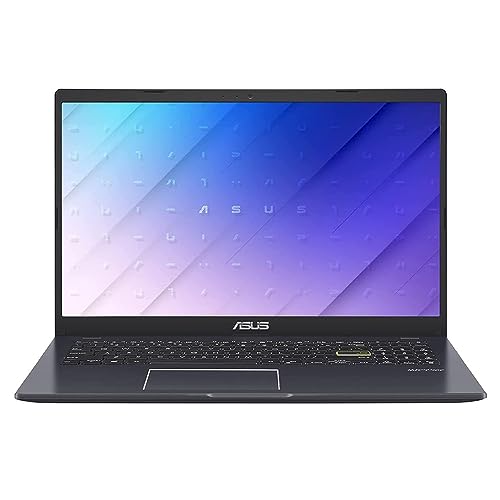
2. ASUS Vivobook Go 15 L510, L510MA-AS02 (B09SVR5VD4)
The ASUS Vivobook Go 15 L510 is the pick for players who want a bigger picture. Its 15.6-inch Full HD display, at 1920 by 1080, is the sharpest screen in this roundup, and that extra clarity helps when scanning a landscape, reading small menu text, or building detailed structures. Under the screen, the hardware follows the same budget pattern: an Intel Celeron N4020 processor, 4GB of RAM, 64GB of storage, and Intel UHD Graphics 600, running Windows 11 Home in S mode.
The larger, sharper display is the main reason to choose this laptop, but it does not change what the processor and graphics can do. Bedrock Edition remains the best match, at low to medium settings and a short render distance. Windows 11 in S mode adds one practical step: it limits installed programs to those from the Microsoft Store until S mode is switched off, so the owner should understand that step before installing the version of Minecraft they want.
Who it suits: a player who values a larger, sharper screen for building and exploring, and who mainly plays at a desk or table. Who should skip it: a player who wants maximum portability in a small bag, or who expects the bigger screen to mean stronger gaming performance. The screen is better; the gaming hardware is not stronger than the other Windows picks here.
3. Lenovo IdeaPad 1 14 (B08YKHYCPW)
The Lenovo IdeaPad 1 14 is the compact Windows alternative in this roundup, and it suits players who want a light machine that is easy to carry and quick to open. It uses the same core recipe as the HP 14: an Intel Celeron N4020 processor, 4GB of RAM, 64GB of storage, and Intel UHD Graphics 600, behind a 14-inch HD display.
For Minecraft, the guidance is the same as for the other Windows picks: the player gets a familiar Windows setup, Bedrock as the smoothest route, and Java as a lighter option for a simple vanilla world. The 14-inch HD display is less sharp than the Full HD panel on the ASUS, but it also asks less of the integrated graphics, which can help keep movement smooth at modest settings.
Who it suits: a player who wants a portable, easy-to-carry Windows laptop for Bedrock play and schoolwork, and who prefers a smaller screen and lighter body to a larger display. Who should skip it: a player who wants the sharpest screen in this bracket, or who needs more storage and memory for many programs alongside Minecraft. The 64GB of storage and 4GB of memory set a firm limit on how much else the machine can hold and run at once.
4. HP Chromebook 14, 2023 (B0C7MR5RDH)
The HP Chromebook 14 from 2023 is the Chromebook route in this roundup, and it needs a clear flag before anything else: it runs Chrome OS, not Windows, so it cannot run Java Edition in the normal way. What it can run is the Chromebook version of Minecraft Bedrock, which is the right fit for a player who is happy inside the Bedrock world and the Google ecosystem.
The hardware itself is a step up in one useful respect. The Intel Celeron N4120 is a quad-core processor, where the Windows picks use a dual-core N4020, and that extra core count helps when Chrome OS is handling background updates and browser tabs alongside the game. It has 4GB of RAM, 64GB of eMMC storage, Intel UHD Graphics 600, and a 14-inch display in a thin body.
Who it suits: a player who already lives in Chrome OS for school and browsing, who wants Bedrock play on a light, quick-starting laptop, and who does not need Java Edition, mods, or Windows programs. Who should skip it: any player who owns Java Edition, wants Java mods and servers, or needs Windows programs for school or work. For those players, one of the Windows laptops above is the correct choice, even if the Chromebook hardware looks tempting on its own.
What to Check Before You Buy
Before ordering, confirm the exact configuration on the listing you are about to buy. Budget laptops are often sold in several near-identical versions, and a single letter in a model number can mean a different processor, a different amount of memory, or a different storage size. Match the model number, processor, memory, storage, display size, and operating system against the pick in this guide, and do not assume that a similar-looking laptop from the same brand has the same hardware inside.
Next, confirm which edition of Minecraft the player owns or plans to buy, and whether that edition works on the operating system you have chosen. A Windows laptop covers both Bedrock and Java, while a Chromebook covers the Chromebook version of Bedrock. Buying the wrong edition for the machine is the most common and most avoidable mistake in this bracket, and it is far easier to sort out before the laptop arrives than after.
Also check the return and warranty terms, the condition of the laptop, and whether the listing is for a new machine or a renewed one. A renewed laptop can be a sensible way to fit a budget, but its battery, keyboard, and screen may show more wear than a new machine, and its warranty may be shorter. Read the listing carefully, keep the packaging until the laptop has been used for a few days, and run Minecraft on it early so any problem shows up while a return is still simple.
FAQ
Can a laptop in this bracket really run Minecraft?
Yes, with limits. Bedrock Edition at low to medium settings, with a short render distance and other programs closed, is the realistic target. Java Edition can run a light vanilla world on the Windows picks, but it needs lower settings and no heavy modpacks. Shaders, large modpacks, and long render distances are beyond this hardware.
Is Bedrock or Java better on a budget laptop?
Bedrock is the easier choice on this hardware. It is generally lighter on modest processors and memory, and it works on both the Windows laptops and the Chromebook in this guide. Java is the better choice only if the player already owns Java Edition and accepts lower settings on a Windows laptop.
How much memory does Minecraft need at this level?
The laptops here have 4GB of memory, which is the floor for playable Minecraft at modest settings. It works when Minecraft is the main program running. It struggles when a browser with many tabs, a video call, and a music app are all running at the same time, so close other programs before playing.
Can I use mods and shaders on these laptops?
Light additions may work on a careful Windows setup, but large modpacks and shader packs should be avoided. Shaders ask the integrated graphics to do far more work per frame, and a Celeron laptop with integrated graphics will not keep up. If shaders and heavy mods are the goal, a stronger laptop with more memory and better graphics is needed.
Is a Chromebook a good choice for Minecraft?
A Chromebook can be a good choice for one kind of player: someone who wants Bedrock play, schoolwork in Google apps, and a light, quick machine, and who does not need Java Edition or Windows programs. For a player who wants Java, mods, or Windows software, a Windows laptop from this guide is the better fit.
Bottom Line
The best Minecraft laptops under 200 are not gaming laptops, and the honest way to shop for them is to match the machine to the edition and the settings it can actually handle. For most players in this bracket, a Windows laptop with a Celeron processor and 4GB of memory, playing Bedrock at modest settings, is the right starting point. The HP 14 is the most balanced choice, the ASUS Vivobook Go 15 adds the sharpest and largest screen, and the Lenovo IdeaPad 1 14 is the most portable Windows pick. The HP Chromebook 14 is a useful Bedrock-only alternative for a player who already lives in Chrome OS.
Disclosure: As an Amazon Associate, we may earn from qualifying purchases.
Related guides
More from Amazon
Programs that pair well with the guide above. Offers and eligibility are set by Amazon and may change.
Free shipping on eligible items, Prime Video and more. Eligible new members can start with a free trial.
Start a Prime free trialAd-free music streaming. Eligible new subscribers can start with a free trial.
Try Music Unlimited freeA Prime membership for ages 18-24 with a trial period. Eligibility is set by Amazon.
See Prime for Young AdultsAudiobooks and podcasts to listen to on the go. Eligible new members can start with a free trial.
Try Audible freeAs an Amazon Associate we earn from qualifying purchases.









Write Your Review
No reviews yet. Be the first to share your experience!