
Key takeaways
- Find the best laptops for ux design with color-accurate displays, smooth Figma performance, and portable designs for UX designers on Mac and Windows in 2026.
What's inside
- Quick Picks
- 1. Apple MacBook Pro 14 (M4) — Best Overall
- 2. Apple MacBook Air 13 (M4) — Best Portable Option
- 3. Dell XPS 14 (DA14250) — Best Windows OLED Option
- 4. Microsoft Surface Laptop 7 (13.8-inch) — Best Windows Touchscreen Option
- 5. Lenovo ThinkPad X1 Carbon Gen 12 — Best Lightweight Business Option
- Buying Guide: How to Choose a Laptop for UX Design
- FAQ
- Conclusion
As an Amazon Associate I earn from qualifying purchases. This post may contain affiliate links at no extra cost to you.
A UX designer spends most of the working day inside Figma, Adobe XD, Sketch, or a browser full of prototypes, design systems, and user research. That work places very specific demands on a laptop. The screen has to show color accurately, because a button or illustration that looks right on a washed-out panel can look wrong on a phone or a client monitor. The machine has to stay responsive with dozens of artboards, large component libraries, and several browser tabs open at once, and it has to be light enough to carry to a workshop or a client meeting.


The best laptops for ux design therefore share clear priorities: a bright, wide-gamut display first, followed by at least 16GB of memory, fast SSD storage, and a processor that can handle design tools, video calls, and research apps at the same time. Battery life matters too, because design work often happens away from a desk. This guide compares five laptops that meet those needs, with specifications taken from their Amazon listings.
As an Amazon Associate, we earn from qualifying purchases.
Quick Picks
Our Short List of 3
All 3 Picks at a Glance
| Product | Specs | Action |
|---|---|---|
| 1. Apple MacBook Pro 14 (M4) — Best Overall | Check price on Amazon | |
| 2. Apple MacBook Air 13 (M4) — Best Portable Option | Check price on Amazon | |
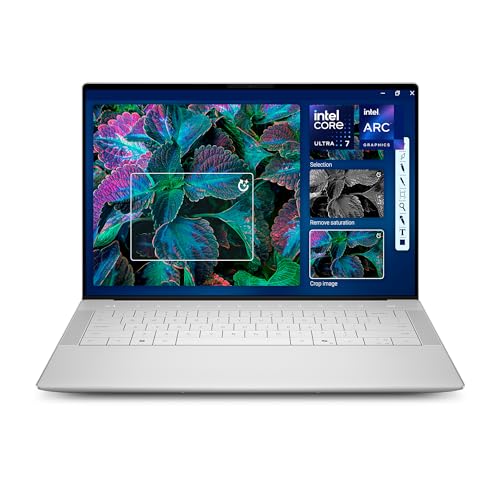 3. Dell XPS 14 (DA14250) — Best Windows OLED Option | Check price on Amazon |
1. Apple MacBook Pro 14 (M4) — Best Overall
According to the Amazon listing, the Apple 2024 MacBook Pro in this configuration uses the M4 chip with a 10-core CPU and a 10-core GPU, 16GB of unified memory, and 512GB of SSD storage. It has a 14.2-inch Liquid Retina XDR display, and the listed color is Silver. The display resolution is 3024 x 1964, with ProMotion up to 120Hz and peak brightness up to 1,600 nits for HDR content.
For UX design, the display is the strongest reason to choose this laptop. The Liquid Retina XDR panel covers the wide P3 color gamut, which helps when judging interface colors, illustrations, and photographs that will later be seen on modern phones and monitors. High sustained brightness also helps in a bright studio, where a dimmer screen can make light gray text and subtle borders hard to see. The 120Hz ProMotion refresh rate makes scrolling through long Figma files feel smoother.
Performance is well matched to design tools. The M4 chip handles Figma, Adobe XD, Sketch, and browser-based prototyping tools without the lag that can appear when a file contains many artboards, images, and nested components. Sixteen gigabytes of unified memory is enough for a typical UX workflow: a design tool, a browser with research tabs, Slack or Teams, and a video call running at the same time.
Battery life is another practical advantage: Apple lists up to 24 hours of video playback for this model family. Port selection is practical too, with Thunderbolt ports, an HDMI port, and a full-size SDXC card slot.
Who it suits: UX designers who want one laptop for Figma, prototyping, user research, and client presentations, on macOS, with a bright and color-accurate display.
Considerations: The 512GB SSD can fill quickly if large asset libraries are kept locally. Check the exact configuration before ordering, because MacBook Pro models are sold in several M4, M4 Pro, and M4 Max variants.
2. Apple MacBook Air 13 (M4) — Best Portable Option
According to the Amazon listing, the Apple 2025 MacBook Air 13 in this configuration uses the M4 chip, 16GB of unified memory, and 256GB of SSD storage. It has a 13.6-inch Liquid Retina display that supports one billion colors, a 12MP Center Stage camera, and Touch ID. The listed color is Starlight, and the model number shown on the listing is MW0Y3LL/A.
The MacBook Air is the lightest and most portable laptop in this guide. It weighs about 2.7 pounds and has no fan, so it stays silent during a quiet workshop, a user interview, or a client meeting. The M4 chip is fast enough for Figma and Adobe XD work with typical files, including multi-screen flows, component libraries, and interactive prototypes.
The display supports one billion colors and the P3 wide color gamut, according to the listing, which makes it capable for interface design and color decisions. It does not reach the peak brightness or contrast of the MacBook Pro XDR display, so designers who judge critical color should still check final designs on a calibrated external display. For app and web design, wireframing, and prototyping, it is more than capable.
Battery life is a strong point, with Apple listing up to 18 hours of video playback for the MacBook Air M4 family. The main limitation is storage: 256GB is tight for a designer who keeps many local files, fonts, and assets, so choosing the 512GB version, if the budget allows, is a sensible upgrade. There is also no built-in SD card slot, so a USB-C card reader is needed.
Who it suits: UX designers, students, and freelancers who travel often and need a light, silent laptop for Figma, wireframing, and presenting prototypes.
Considerations: Choose 512GB of storage rather than 256GB if the budget allows. Plan for a USB-C hub or card reader, and allow extra time for very large exports or video work.
3. Dell XPS 14 (DA14250) — Best Windows OLED Option
According to the Amazon listing information for this configuration, the Dell XPS 14 DA14250 is a 14.5-inch premium laptop with a Touch 3.2K OLED display running at 48-120Hz, an Intel Core Ultra 7 255H processor, Intel Arc Graphics, 32GB of memory, and 1TB of SSD storage. It includes a backlit English keyboard with a fingerprint reader.
The OLED display is the headline feature for UX design. OLED panels offer deep blacks, high contrast, and vivid color, which can make interfaces, illustrations, and photographs look striking during design reviews and client presentations. A 3.2K panel also shows fine detail clearly when checking small text, icons, and spacing at 100 percent zoom. Designers should still calibrate the display and disable automatic color or brightness changes when making final color decisions, because OLED color can vary with display mode and settings.
The 32GB of memory and 1TB of SSD storage are generous and well suited to a heavy UX workflow. Thirty-two gigabytes gives Figma, Adobe Creative Cloud apps, a browser with many tabs, and research tools room to stay open at the same time without slowing down. The Intel Core Ultra 7 255H processor is designed for productivity and AI-assisted tasks, and Intel Arc Graphics provides hardware acceleration for many design and export tasks.
The XPS 14 is a natural choice for UX designers who already use Windows. It is slim and well built, and the touchscreen can be useful for sketching, zooming, and navigating large canvases.
Who it suits: Windows UX designers who want an OLED display, 32GB of memory, and 1TB of storage in a portable 14-inch laptop.
Considerations: Verify the exact panel, processor, and memory configuration before ordering, because XPS 14 models are sold in several display and memory variants. Battery life on a bright OLED panel can be shorter than on a standard IPS display.
4. Microsoft Surface Laptop 7 (13.8-inch) — Best Windows Touchscreen Option
According to the Amazon listing information for this configuration, the Microsoft Surface Laptop in its 7th Edition has a 13.8-inch PixelSense touchscreen display at 2304 x 1536 resolution with a 120Hz refresh rate and 600 nits of brightness, a Snapdragon X Plus processor, 16GB of RAM, and a 512GB removable SSD. Battery life is listed at up to 18 hours.
For UX design, the 3:2 aspect ratio is a practical advantage. A taller screen shows more of a vertical Figma canvas, a long web page, or a research document without scrolling, which suits wireframes, user flows, and journey maps. The touchscreen adds another way to interact with a design: tapping, pinching to zoom, and scrolling through prototypes can feel more direct than a trackpad alone, especially when presenting work to a client or testing a touch interface.
The 120Hz refresh rate makes scrolling and panning through large design files feel smoother, and 600 nits of brightness helps the screen stay readable in a bright office. The Snapdragon X Plus processor is designed for everyday productivity and AI-assisted tasks in Windows, and 16GB of RAM is enough for Figma, a browser, and communication apps running together. The 512GB SSD is a practical size for a working set of design files, with older projects moved to external or cloud storage.
Who it suits: Windows UX designers who want a sharp 3:2 touchscreen, long battery life, and a light laptop for Figma, research, and presenting prototypes.
Considerations: Some specialized design plugins and older Windows apps may not yet run natively on Snapdragon ARM processors, so check that every tool in the current workflow is supported before ordering. Verify the exact processor, memory, and storage configuration, because Surface Laptop 7 models are sold in several variants.
5. Lenovo ThinkPad X1 Carbon Gen 12 — Best Lightweight Business Option
According to the Amazon listing information for this configuration, the Lenovo ThinkPad X1 Carbon Gen 12 has a 14-inch display, with a 2.8K 120Hz OLED option, 32GB of LPDDR5X memory, and a 1TB PCIe 4.0 SSD. It weighs only about 2.42 pounds, which makes it one of the lightest laptops in this guide.
Weight matters for UX designers who travel between offices, workshops, and client sites. At about 2.42 pounds, the X1 Carbon Gen 12 is easy to carry all day. The ThinkPad keyboard is also a long-standing strength: it is comfortable for long writing sessions, which matters for UX work that involves research notes, usability test scripts, and documentation as well as visual design.
The 2.8K OLED display option, where included in the chosen configuration, offers wide color coverage and high contrast for judging interfaces and illustrations. The 32GB of LPDDR5X memory gives Figma, Adobe apps, and a browser plenty of room to stay open together, and the 1TB PCIe 4.0 SSD helps large files open and save quickly. The 14-inch 16:10 display gives more vertical space than a traditional 16:9 screen, which helps when working on long pages and flows.
Who it suits: UX designers who travel often, write a lot of research documentation, and want a very light Windows laptop with 32GB of memory and 1TB of storage.
Considerations: Display options vary by configuration, so check whether the chosen listing has the 2.8K OLED panel or the standard IPS panel before ordering. Verify the exact processor, memory, and storage as well, because X1 Carbon Gen 12 models are sold in several configurations.
Buying Guide: How to Choose a Laptop for UX Design
Display first
For UX design, the display matters more than the processor. Look for a wide color gamut, ideally 100% DCI-P3 or close to it, and a bright panel of at least 500 nits. A high-resolution panel helps with checking small text, icons, and spacing. A 3:2 or 16:10 aspect ratio shows more vertical content than a 16:9 screen, which suits long pages and flows. Even the best laptop display should be calibrated for critical color work, and automatic brightness and night-shift modes should be turned off when judging color.
Memory and storage
Sixteen gigabytes of memory is the minimum for UX design in 2026, and 24GB or 32GB is better for large Figma files, component libraries, and several apps open at once. For storage, 512GB is the minimum practical size, and 1TB is better for a working set of design files, fonts, and assets. Plan for cloud storage or an external SSD for archives and backups.
Processor and graphics
A modern multi-core processor is important for smooth design work, especially with large files, interactive prototypes, and video calls running at the same time. A discrete GPU is not essential for most UX work, because Figma and Adobe XD are not as GPU-heavy as video editing or 3D rendering. Designers who also edit video, work in 3D, or use motion design tools regularly will benefit more from a stronger GPU and more memory.
Touchscreen and pen support
A touchscreen is not required for UX design, but it can be useful for testing touch interfaces, presenting prototypes, and navigating large canvases. A laptop with pen support can also be useful for sketching wireframes, although it is not a replacement for a dedicated drawing tablet for detailed illustration work.
Ports, keyboard, and trackpad
A good keyboard and trackpad matter when design work involves hours of precise cursor movement and typing. Look for a comfortable keyboard, a large and accurate trackpad, and a fingerprint reader or face recognition for quick sign-in. Thunderbolt or USB-C ports are useful for fast external SSDs and displays, and an HDMI port is useful for client presentations.
Battery life and weight
UX designers often work away from a desk, so battery life and weight deserve real attention. A laptop that lasts a full working day without a charger is more useful than a slightly faster machine that needs to stay plugged in. A laptop under 3 pounds is noticeably easier to carry to workshops and meetings than a 4-pound machine.
Operating system and software
Choose the operating system that runs the software already in use. Figma runs in the browser and on both macOS and Windows, so it works well on either system. Sketch runs only on macOS, while some enterprise design tools are Windows-only. MacBooks offer strong color management and long battery life, while Windows laptops offer more choice in OLED displays, touchscreens, and ports.
FAQ
What is the best laptop for UX design overall?
The Apple MacBook Pro 14 with the M4 chip is a strong overall choice, according to its Amazon listing, because it combines a bright 14.2-inch Liquid Retina XDR display with P3 color, 16GB of unified memory, and 512GB of SSD storage. Designers who want a lighter machine should consider the MacBook Air 13, while Windows designers should consider the Dell XPS 14 OLED or the Microsoft Surface Laptop 7.
How much RAM do UX designers need in a laptop?
At least 16GB is recommended, and 24GB or 32GB is better for large Figma files, component libraries, and several apps open at once. More memory helps Figma, Adobe apps, and a browser stay responsive, and it helps with research tools and video calls running in the background.
Is an OLED display good for UX design?
Yes, OLED can be excellent for UX design because it offers deep blacks, high contrast, and a wide color gamut, often 100% DCI-P3. Designers should still calibrate an OLED display and turn off automatic color and brightness changes for critical work.
Do UX designers need a discrete GPU?
Not usually. For Figma, Adobe XD, wireframing, and prototyping, a modern processor and enough memory matter more than a discrete GPU. A discrete GPU helps with video editing, 3D work, and motion design.
Should UX designers choose a MacBook or a Windows laptop?
Both can work well. MacBooks are known for bright, color-accurate displays, long battery life, and strong color management, and Sketch runs only on macOS. Windows laptops offer more choice, including OLED displays and touchscreens, and may be better for designers who use Windows-only enterprise tools.
Conclusion
The best laptops for ux design are the ones that make color decisions easier and design work smoother, not the ones with the highest benchmark scores. A bright, wide-gamut display, at least 16GB of memory, fast SSD storage, and a practical set of ports matter more than any single specification. The MacBook Pro 14 (M4) is the most balanced choice here, the MacBook Air 13 is the easiest to carry, and the Dell XPS 14, Microsoft Surface Laptop 7, and Lenovo ThinkPad X1 Carbon Gen 12 give Windows designers strong OLED, touchscreen, and lightweight options.
Before ordering, check the exact configuration on Amazon, including processor, memory, storage, and display type, because each model is sold in several variants. Calibrate the display, keep a backup of every design file, and choose the laptop that fits the way UX work is actually done.
Related guides
More from Amazon
Programs that pair well with the guide above. Offers and eligibility are set by Amazon and may change.
Free shipping on eligible items, Prime Video and more. Eligible new members can start with a free trial.
Start a Prime free trialAd-free music streaming. Eligible new subscribers can start with a free trial.
Try Music Unlimited freeA Prime membership for ages 18-24 with a trial period. Eligibility is set by Amazon.
See Prime for Young AdultsAudiobooks and podcasts to listen to on the go. Eligible new members can start with a free trial.
Try Audible freeAs an Amazon Associate we earn from qualifying purchases.









Write Your Review
No reviews yet. Be the first to share your experience!