
Our Short List of 3

- CPU: Intel Core i7-13650HX, 14 cores
- GPU: NVIDIA GeForce RTX 4060 Laptop GPU, 8GB GDDR6, 140W, NVENC encoder
- RAM: 16GB DDR5
- Storage: 1TB PCIe Gen4 SSD
- CPU: Intel Core i7-13620H, 10 cores
- GPU: NVIDIA GeForce RTX 4070 Laptop GPU, 8GB GDDR6, NVENC encoder
- RAM: 16GB DDR5, upgradeable
- Storage: 1TB NVMe SSD

- CPU: Intel Core i7-13620H, 10 cores
- GPU: NVIDIA GeForce RTX 4050 Laptop GPU, 6GB GDDR6, NVENC encoder
- RAM: 16GB DDR5
- Storage: 512GB PCIe Gen4 SSD
All 3 Picks at a Glance
| Product | Specs | Action |
|---|---|---|
| ASUS ROG Strix G16 (G614JV-AS74) |
| Check price on Amazon |
| MSI Katana 15 (B13VGK-484US) |
| Check price on Amazon |
| Acer Nitro V 15 (ANV15-51-73B9) |
| Check price on Amazon |
Key takeaways
- Compare the best laptops for live broadcasting, with NVENC and QuickSync encoders, strong CPUs, ample RAM, Ethernet and ports for cameras and audio gear.
What's inside
As an Amazon Associate I earn from qualifying purchases. This post may contain affiliate links at no extra cost to you.
Live broadcasting asks a laptop to do several jobs at the same time, for hours at a stretch. Broadcasting software such as OBS Studio or Streamlabs has to capture your camera and microphone, composite scenes and overlays, encode the picture into a stream, and send it to Twitch or YouTube Live without dropping frames. If you also play a game on the same machine, or run a production with multiple cameras and guests, the workload climbs again. Ordinary thin laptops built for documents and browsing are not designed for that kind of sustained load.
The machines in this guide are performance laptops chosen for the parts of the job that matter most on air. Each one carries a dedicated graphics chip with a hardware video encoder, NVIDIA NVENC or Intel QuickSync, so the stream is encoded on fixed-function silicon instead of stealing cycles from the processor. Each one pairs that encoder with a fast multi-core CPU, at least 16GB of memory, solid-state storage, and cooling built to hold performance through a long session. Port selection matters too, because a broadcast desk fills up quickly with cameras, capture devices, and audio interfaces.
This guide is about the laptop as the center of a live streaming and production setup, not a gaming laptop chosen purely for frame rates or an ultraportable chosen for travel weight. The focus stays on sustained encoding performance, connectivity for broadcast gear, and the thermal headroom to stay live for an entire show.
As an Amazon Associate, we earn from qualifying purchases.
What Live Broadcasting Actually Demands From a Laptop
The single most important component for a streaming laptop is the encoder. Software encoding with x264 looks good, but it competes with your game, your browser sources, and your audio processing for CPU time. A hardware encoder changes the equation. NVIDIA’s NVENC block, built into every GeForce RTX laptop GPU, encodes H.264 and HEVC video on dedicated hardware, and RTX 40-series chips add AV1 encoding, which YouTube Live accepts and which delivers cleaner picture quality at the same bitrate. Intel QuickSync, built into the integrated graphics of modern Core processors, works the same way and can run a second encode, such as a local recording, while NVENC handles the outgoing stream.
Beyond the encoder, look at four things. First, CPU cores: scene compositing, browser overlays, and audio filters all live on the processor, so a healthy core count keeps the show responsive. Second, memory: broadcasting software, a game, a browser full of dashboard tabs, and a chat client add up quickly, so 16GB is the practical floor and 32GB gives real breathing room. Third, cooling: a laptop that throttles after forty minutes will drop frames in hour two, so dual-fan designs with large exhausts are worth prioritizing. Fourth, ports and networking: a wired Ethernet jack removes Wi-Fi variability from your upload, and enough USB ports means your camera, interface, and control deck connect directly instead of fighting over a hub.
Lenovo Legion Pro 5i Gen 9
Tier: premium
The Legion Pro 5i Gen 9 is the strongest all-round broadcast machine in this guide, built around the pairing streamers benefit from most: a 24-core Intel Core i9-14900HX processor and a full-power NVIDIA GeForce RTX 4070 laptop GPU. That combination gives you two hardware encoders in one chassis. NVENC on the RTX 4070 can carry the outgoing stream, including AV1 encoding, while Intel QuickSync on the integrated graphics handles a high-quality local recording or a second destination at the same time. For broadcasters who stream and record every show for later editing, that dual-encoder arrangement is a genuine workflow advantage.
Memory and storage match the brief. The 32GB of DDR5 memory leaves room for broadcasting software, a demanding game, a browser loaded with dashboard tabs, and a chat client all at once, and both slots are accessible for later upgrades. Storage starts at 1TB on a fast NVMe drive, with a second M.2 slot free for a dedicated recordings drive. The 16-inch display runs at 2560 by 1600 resolution with a 240Hz refresh rate, so previewing your program feed and playing on the same panel both feel sharp and fluid.
Connectivity is where the Legion pulls further ahead for production work. A Thunderbolt 4 port handles high-bandwidth docks and capture hardware, HDMI 2.1 feeds an external monitor, and the RJ45 Ethernet jack gives your upload a stable wired path. Three USB-A ports cover an audio interface, a camera, and a control surface without a hub. The Legion Coldfront cooling system uses large fans and wide rear exhausts to move heat out during long sessions, and the built-in 1080p webcam can serve as a backup camera angle. At roughly five and a half pounds it is a desk machine first, but it moves between a home studio and an event venue without complaint.
Specs
- CPU: Intel Core i9-14900HX, 24 cores
- GPU: NVIDIA GeForce RTX 4070 Laptop GPU, 8GB GDDR6, NVENC encoder, plus Intel QuickSync
- RAM: 32GB DDR5, two slots, upgradeable
- Storage: 1TB PCIe NVMe SSD, second M.2 slot available
- Display: 16-inch 2560 x 1600 IPS, 240Hz, G-Sync
- Ports: Thunderbolt 4 USB-C, USB-C, 3x USB-A, HDMI 2.1, RJ45 Ethernet, audio combo jack
- Webcam: 1080p
- Weight: about 5.5 lb
ASUS ROG Strix G16 (G614JV-AS74)
- CPU: Intel Core i7-13650HX, 14 cores
- GPU: NVIDIA GeForce RTX 4060 Laptop GPU, 8GB GDDR6, 140W, NVENC encoder
- RAM: 16GB DDR5
- Storage: 1TB PCIe Gen4 SSD
Tier: mid-range
The ROG Strix G16 earns its place here on sustained performance. Its Intel Core i7-13650HX processor brings 14 cores to the multitasking side of broadcasting, and the GeForce RTX 4060 laptop GPU runs at a full 140W power level, which matters because lower-power versions of the same chip cannot hold the same clocks under a combined gaming and encoding load. NVENC handles the stream encode on dedicated hardware, including AV1, while the CPU stays free for scene switching, audio processing, and the game itself. For a streamer who plays and broadcasts from one machine, this configuration forces no compromises on either side of the workload.
Cooling is the Strix line’s calling card, and it suits long broadcasts. ASUS applies liquid metal thermal compound to the CPU and fits a three-fan arrangement with full-width rear exhausts, intended to keep temperatures and fan noise under control during extended sessions. Lower fan noise is not a luxury in a broadcast room, because your microphone sits in the same space as the laptop, and a quieter machine means less work for your audio filters.
The rest of the package fits a production desk well. The 16-inch screen runs at 1920 by 1200 with a 165Hz refresh rate, giving you a taller canvas for stacking a preview window, a scene list, and chat. Memory is 16GB of DDR5, and the 1TB PCIe Gen4 SSD stores game installs and recordings without juggling space. Thunderbolt 4, a second USB-C port, two USB-A ports, HDMI 2.1, and an RJ45 Ethernet jack cover cameras, interfaces, and wired networking. The built-in webcam is a basic 720p unit, so plan on an external camera as your main face camera.
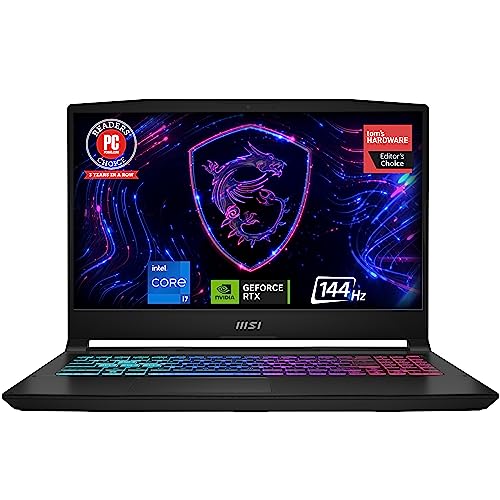
MSI Katana 15 (B13VGK-484US)
- CPU: Intel Core i7-13620H, 10 cores
- GPU: NVIDIA GeForce RTX 4070 Laptop GPU, 8GB GDDR6, NVENC encoder
- RAM: 16GB DDR5, upgradeable
- Storage: 1TB NVMe SSD
Tier: mid-range
The Katana 15 is the value play among the RTX 4070 machines in this guide. It pairs an Intel Core i7-13620H processor with a GeForce RTX 4070 laptop GPU, so you get the same NVENC encoder family and AV1 support as the premium picks, along with graphics power that drives modern games at the panel’s native resolution while the stream runs. The 10-core processor handles broadcasting software, overlays, and chat tools without strain, and because the encoder sits on the GPU, gameplay frame rates stay consistent while you are live.
MSI’s Cooler Boost 5 system, with dual fans and shared heat pipes across the CPU and GPU, is designed for exactly the sustained loads a broadcast creates. A three-hour stream is a thermal marathon, and this cooling arrangement keeps clocks stable from the first scene to the last. The 15.6-inch Full HD display refreshes at 144Hz, which suits fast-paced streamed games, and the four-zone RGB keyboard is easy to read in a dim studio.
Practical details round it out. The 16GB of DDR5 memory sits in upgradeable slots, so moving to 32GB later is simple when your production grows. The 1TB NVMe SSD holds a game library and an archive of recent broadcasts. Connections include a USB-C port with display output, three USB-A ports, HDMI 2.1, and an RJ45 Ethernet jack for a wired upload path, the single easiest reliability upgrade any streamer can make. At just under five pounds, the Katana 15 is also easy to carry to a local event.
HP OMEN 16 (Core i7-14700HX Configuration)
Tier: premium
This OMEN 16 configuration targets broadcasters who keep many production tools open at once. The Intel Core i7-14700HX brings 20 cores, serious multitasking muscle for a laptop running broadcasting software, a game, voice chat, a browser, and recording software simultaneously. The GeForce RTX 4070 provides the NVENC encoder for the outgoing stream with AV1 support, while the processor’s integrated QuickSync encoder can take on a local recording or a vertical clip feed, a two-encoder workflow that used to require a second PC.
The headline advantage here is memory. With 32GB of DDR5 fitted as standard, this configuration shrugs off the heavy browser and overlay loads that make 16GB machines feel tight during a busy show. The 1TB PCIe Gen4 SSD holds several large games plus a rolling archive of recorded broadcasts. The 16.1-inch Full HD panel refreshes at 165Hz, and its anti-glare finish behaves well under studio lighting.
HP’s OMEN Tempest Cooling uses dual fans and generous venting to sustain performance, and the port selection is broadcast-friendly: Thunderbolt 4 and a second USB-C port for docks and capture devices, two USB-A ports, HDMI 2.1, and RJ45 Ethernet for a wired connection. The 1080p webcam is a step above the usual laptop camera and can serve as a second angle. At a little over five pounds, it anchors a desk setup but still travels.
Specs
- CPU: Intel Core i7-14700HX, 20 cores
- GPU: NVIDIA GeForce RTX 4070 Laptop GPU, 8GB GDDR6, NVENC encoder, plus Intel QuickSync
- RAM: 32GB DDR5
- Storage: 1TB PCIe Gen4 NVMe SSD
- Display: 16.1-inch 1920 x 1080, 165Hz
- Ports: Thunderbolt 4 USB-C, USB-C, 2x USB-A, HDMI 2.1, RJ45 Ethernet, audio combo jack
- Webcam: 1080p
- Weight: about 5.2 lb
Acer Nitro V 15 (ANV15-51-73B9)
- CPU: Intel Core i7-13620H, 10 cores
- GPU: NVIDIA GeForce RTX 4050 Laptop GPU, 6GB GDDR6, NVENC encoder
- RAM: 16GB DDR5
- Storage: 512GB PCIe Gen4 SSD
Tier: budget
The Nitro V 15 is the sensible entry point for a first dedicated streaming laptop. It still follows the formula this guide is built on: an Intel Core i7-13620H processor for the multitasking side of the show, and a GeForce RTX 4050 laptop GPU whose NVENC encoder takes the stream off the CPU entirely. That encoder is the reason a modest machine can broadcast smoothly at all. A new streamer sending a 1080p stream to Twitch or YouTube Live gets clean hardware encoding here, and the 10-core processor has enough headroom for broadcasting software, chat tools, and a browser alongside most games.
The supporting specs are chosen sensibly. The 16GB of DDR5 memory covers the standard streaming stack, and the 512GB Gen4 SSD starts you off with room for broadcasting software, a few games, and recent recordings. The 15.6-inch Full HD IPS panel runs at 144Hz, keeping fast games fluid on your own screen while the audience watches the encoded feed. Acer’s dual-fan cooling keeps the slim chassis composed during long sessions, and at about four and two-thirds pounds this is the lightest machine in the guide.
Connectivity covers the essentials without forcing a hub on day one. A USB-C port, three USB-A ports, HDMI 2.1, and an RJ45 Ethernet jack handle a camera, an audio interface, an external monitor, and a wired connection. The 720p webcam is a starting point, and the natural first upgrade is an external camera. As a first broadcast laptop built on a real hardware encoder, the Nitro V 15 covers the fundamentals honestly.
How to Choose
Start with the encoder, because it decides whether streaming feels effortless or fragile. Any laptop with an NVIDIA GeForce RTX GPU gives you NVENC, and RTX 40-series models add AV1 encoding, which produces a cleaner picture at the same bitrate on platforms that accept it. Intel processors add QuickSync as a second encoder, valuable if you record locally while streaming or feed two platforms at once. A laptop with no hardware encoder forces the CPU to do everything, and that is where dropped frames come from.
Match the CPU and memory to your format. A talk show or console-capture setup driven through a capture card is lighter work than playing a demanding game on the same machine, but both benefit from a modern processor with at least eight cores. Choose 16GB of memory as the floor, and step up to 32GB if you run many browser sources or edit recordings on the same laptop. Storage fills faster than new streamers expect, because local recordings are large; 1TB is comfortable, and a second drive slot is a real advantage.
Then check the physical setup. Count the USB devices in your rig, including your camera, audio interface, capture card, and any control surface, and make sure the laptop takes them without a hub, or budget for a powered hub. Insist on an Ethernet port or a reliable dock, because a wired upload removes the most common cause of unstable streams. Finally, think about cooling and noise together: a thicker performance chassis with dual fans will hold its speed through a long broadcast without screaming into your microphone, while a thin design may throttle or get loud exactly when the show gets busy. Battery life matters least here, since broadcasting is plugged-in work.
Frequently Asked Questions
Which encoder should I use in OBS, NVENC or x264?
Use NVENC on any laptop with a GeForce RTX graphics card. It encodes on dedicated hardware, so your game and your processor keep their full performance, and modern NVENC quality at streaming bitrates is excellent. Intel QuickSync is a strong second choice and works well for a simultaneous local recording. Software x264 encoding only makes sense on a separate dedicated streaming PC.
How much RAM does a live broadcasting laptop need?
Sixteen gigabytes is the working minimum for broadcasting software, a game, a browser, and chat running together. If your scenes use many browser sources, you record locally at high quality, or you keep editing software open alongside the stream, 32GB is the comfortable choice. Memory pressure shows up as stutters and slow scene switching, so headroom directly improves how a show feels.
Can one laptop really play games and stream at the same time?
Yes, provided it has a hardware encoder. The GPU’s encoder block handles the stream independently of the cores rendering your game, and a modern multi-core processor covers the broadcasting software and background tools. Every laptop in this guide is built around that arrangement. The settings that matter are choosing the hardware encoder in your software and capping in-game frame rates sensibly so the GPU is not saturated before encoding begins.
Do I need a capture card with one of these laptops?
Only if your video source is external. A console, a second gaming PC, or a mirrorless camera with clean HDMI output needs a capture device between it and the laptop, connected over USB or Thunderbolt. If you play games on the same laptop and use a USB webcam, no capture card is required, because the laptop captures its own screen and camera directly.
Final Verdict
For most broadcasters, the Lenovo Legion Pro 5i Gen 9 is the complete package: a 24-core processor, a full-power RTX 4070 with NVENC, a QuickSync second encoder, 32GB of memory, and the ports a long show demands. The HP OMEN 16 configuration runs it close for producers who keep many tools open. The ASUS ROG Strix G16 is the mid-range sweet spot for game streamers who value sustained clocks and quieter cooling, while the MSI Katana 15 brings RTX 4070 encoding to a lower tier with an upgrade path. New streamers should start with the Acer Nitro V 15. Whichever you choose, pair it with a wired network connection and an external camera, and the laptop will stop being the limiting factor in your broadcast.
Product and ASIN Reference
| Product | ASIN |
|---|---|
| Lenovo Legion Pro 5i Gen 9 (Core i9-14900HX, RTX 4070, 32GB, 1TB) | B0CXPW5L5P |
| ASUS ROG Strix G16 G614JV-AS74 (Core i7-13650HX, RTX 4060, 16GB, 1TB) | B0CRDCXRK2 |
| MSI Katana 15 B13VGK-484US (Core i7-13620H, RTX 4070, 16GB, 1TB) | B0BT3FKZ3N |
| HP OMEN 16 (Core i7-14700HX, RTX 4070, 32GB, 1TB) | B0D35WLV6G |
| Acer Nitro V 15 ANV15-51-73B9 (Core i7-13620H, RTX 4050, 16GB, 512GB) | B0CMRGBXM9 |
Related guides
More from Amazon
Programs that pair well with the guide above. Offers and eligibility are set by Amazon and may change.
Free shipping on eligible items, Prime Video and more. Eligible new members can start with a free trial.
Start a Prime free trialAd-free music streaming. Eligible new subscribers can start with a free trial.
Try Music Unlimited freeA Prime membership for ages 18-24 with a trial period. Eligibility is set by Amazon.
See Prime for Young AdultsAudiobooks and podcasts to listen to on the go. Eligible new members can start with a free trial.
Try Audible freeAs an Amazon Associate we earn from qualifying purchases.

Write Your Review
No reviews yet. Be the first to share your experience!