
Key takeaways
- Compare five privacy-focused laptops with webcam shutters, fingerprint readers, TPM chips and Linux-friendly designs for secure, private everyday work.
What's inside
As an Amazon Associate I earn from qualifying purchases. This post may contain affiliate links at no extra cost to you.
Buying a laptop for privacy-focused work is a different decision from buying for speed or screen size. The question is which parts of the machine can watch, listen, or leak without your knowledge, and which hardware controls let you shut those parts off. A webcam shutter, a fingerprint reader, a TPM chip, and a locked-down firmware stack matter more here than a faster graphics card, because the buyer wants a machine that keeps sensitive work contained by design.
This guide is written for journalists handling confidential sources, researchers working with sensitive data, security professionals who audit systems for a living, and remote workers who handle client files on shared networks. The five laptops below were chosen from the names and specifications on their Amazon pages, with each model picked because its listing names concrete privacy hardware such as a camera shutter, a fingerprint reader, or a TPM chip.
Quick Picks
As an Amazon Associate we earn from qualifying purchases
| Product | Best for | Key spec from title |
|---|---|---|
| Lenovo ThinkPad X1 Carbon Gen 12 | Maximum privacy in the lightest package | 14-inch OLED 2.8K display, 64GB RAM |
| HP EliteBook 840 G11 | Business security with fingerprint sign-in | Intel Core Ultra 7 155H, 32GB RAM |
| Lenovo ThinkPad T14 Gen 5 | A rugged workhorse with a shuttered camera | AMD Ryzen 7 PRO 8840U, 32GB DDR5 |
| Dell Latitude 7440 | Camera shutter plus intelligent privacy | Intel Core i7-1365U, 32GB RAM |
| ASUS ExpertBook B9 | The lightest option with a full security set | Intel Core i7-1255U, 2TB SSD |
How to Choose
Start with a physical camera shutter
A physical shutter is the simplest privacy control on a laptop because it blocks the lens with a sliding cover instead of relying on software. When the shutter is closed, no application can capture video, even if the operating system is compromised. Check the listing for the words privacy shutter or camera shutter rather than assuming every business laptop has one. The ThinkPad X1 Carbon, the ThinkPad T14, and the Dell Latitude in this guide all name a shuttered camera in their listings, while the ExpertBook uses a sliding privacy shield. A shutter you can see and move gives more certainty than a software toggle buried in settings.
Check the fingerprint reader and TPM chip
A fingerprint reader replaces passwords with a biometric check that stays on the device, which shortens sign-in and removes one password that can be phished or reused. A TPM chip works beside it by storing encryption keys in hardware, so a stolen drive stays unreadable without the machine it came from. Look for both features named in the listing, and confirm whether the reader sits in the power button or on the palm rest, since placement affects how often you will use it. Business lines such as ThinkPad, EliteBook, Latitude, and ExpertBook usually bundle both, but some configurations drop the reader, so read the exact configuration rather than the model name alone.
Look at firmware and operating system options
Privacy work depends on what runs below the operating system as much as on the apps above it. Business laptops ship with firmware features such as secure boot, self-healing BIOS routines, and remote management tools that let an administrator wipe or lock a lost machine. If you plan to run a Linux distribution, check that the exact model has driver support for its Wi-Fi card, fingerprint reader, and sleep states before you buy, since those parts cause the most trouble after a switch. A machine that keeps working after you change operating systems gives you more control over what leaves the device.
Weigh weight, battery, and ports for field work
A privacy laptop often travels with its owner, so weight and battery life shape the choice as much as security hardware. The ExpertBook in this guide weighs about 2.2 pounds, while the ThinkPad X1 Carbon weighs about 2.4 pounds, and both are easy to carry through airports and meetings. Check the battery size in watt-hours and the charger wattage, and count the ports: two Thunderbolt ports, an HDMI output, and a USB-A port cover most docks and adapters without a dongle bag. A lighter machine that still connects to your monitor, drive, and network hardware saves daily friction.
The 5 Best Options
Lenovo ThinkPad X1 Carbon Gen 12

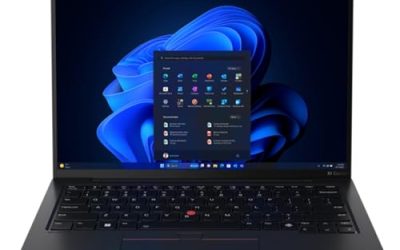
The X1 Carbon Gen 12 leads this list because it packs the strongest privacy hardware into the lightest frame here. Its 1080p camera carries a physical privacy shutter, and the Intel vPro platform adds hardware-based security and remote management for lost or stolen machines. The 14-inch OLED display renders text sharply at 2880 by 1800, and the 64GB of fast memory keeps dozens of browser tabs and encrypted volumes open at once. At about 2.4 pounds with a MIL-STD 810H tested chassis, it suits buyers who travel constantly and want privacy controls built into the machine itself.
Specs
- 14-inch OLED display, 2880 x 1800, anti-glare, 120Hz, 100 percent DCI-P3
- Intel Core Ultra 7 165U vPro processor, up to 4.9 GHz
- 64GB LPDDR5X memory at 6400 MHz
- 1TB PCIe Gen4 SSD
- 1080p FHD IR and RGB camera with privacy shutter
- Wi-Fi 6E and Bluetooth 5.3
- 57Wh battery, about 2.41 pounds
Best for: Travelers who want top privacy hardware in the lightest business laptop.
Watch out for: Sold by a third-party seller, so confirm the exact configuration and return terms before ordering.
HP EliteBook 840 G11

The EliteBook 840 G11 pairs a fingerprint sensor with HP Wolf Pro Security, a firmware-level suite that guards the BIOS and the operating system from the moment the machine powers on. Its 14-inch touchscreen runs at 1920 by 1200 with an anti-glare coating, and the 5MP infrared camera supports face sign-in without a password. With 32GB of DDR5 memory and a 1TB solid-state drive, it handles encrypted storage, virtual machines, and long research sessions without slowing down. The smart card reader adds one more login option for workplaces that issue ID cards.
Specs
- 14-inch WUXGA touchscreen, 1920 x 1200, IPS, anti-glare, 300 nits
- Intel Core Ultra 7 155H processor, up to 4.8 GHz, 16 cores
- 32GB DDR5-5600 memory
- 1TB PCIe Gen4 NVMe SSD
- 5MP IR camera with dual array microphones
- Fingerprint sensor and smart card reader
- HP Wolf Pro Security Edition, 3 years included
- 2 Thunderbolt 4 ports, HDMI 2.1, Wi-Fi 6E, Bluetooth 5.3
- Windows 11 Pro
Best for: Office and research work where fingerprint sign-in and firmware security matter most.
Watch out for: The listing names no camera shutter, so cover the lens when it is not in use.
Lenovo ThinkPad T14 Gen 5

The T14 Gen 5 is the workhorse of this group, with a Ryzen 7 PRO chip, 32GB of memory, and a 1TB drive in a sturdy business chassis built for daily use. Its 5MP camera combines an infrared sensor with a physical privacy shutter, and the fingerprint reader sits beside a backlit keyboard built for long typing sessions. The 14-inch touchscreen uses an anti-glare coating at 400 nits, which keeps the screen readable in bright rooms. Two Thunderbolt 4 ports, HDMI, and an Ethernet jack cover wired networks and external monitors without adapters.
Specs
- 14-inch WUXGA IPS touchscreen, 1920 x 1200, anti-glare, 400 nits
- AMD Ryzen 7 PRO 8840U processor, up to 5.1 GHz, 8 cores
- 32GB DDR5 memory at 4800 MHz
- 1TB NVMe M.2 SSD
- 5.0MP plus IR camera with privacy shutter
- Fingerprint reader and backlit keyboard
- 2 Thunderbolt 4 ports, HDMI 2.1, RJ-45 Ethernet
- Wi-Fi 6E and Bluetooth 5.3, 52.5Wh battery, 3.06 pounds
- Windows 11 Pro
Best for: Daily privacy work on a durable machine with a shuttered camera and wired network port.
Watch out for: The heaviest laptop in this guide, so it suits a desk more than a light travel bag.
Dell Latitude 7440

The Latitude 7440 stands out for its camera system, which pairs a 5MP infrared sensor with a physical shutter and Dell Intelligent Privacy features for guarding the screen from onlookers. Its magnesium chassis keeps the weight low while the fingerprint reader on the palm rest handles sign-in. The 14-inch touch display runs at 1920 by 1200 with a low blue light coating, and the Intel vPro chip supports remote management for IT teams. With 32GB of memory and a 512GB drive, it covers encrypted work and virtual machines comfortably.
Specs
- 14-inch FHD+ touch display, 1920 x 1200, anti-glare IPS, 300 nits
- Intel Core i7-1365U processor, up to 5.2 GHz, 10 cores, Intel vPro
- 32GB RAM, 512GB PCIe M.2 SSD
- 5MP IR camera with shutter, ExpressSign-In, Intelligent Privacy
- Fingerprint reader on the palm rest
- Thunderbolt 4, Wi-Fi 6E, Bluetooth, HDMI 2.0
- 57Wh battery, Windows 11 Pro
Best for: Buyers who want a shuttered camera plus screen privacy features in a light magnesium body.
Watch out for: The product page could not be opened directly, so confirm the exact configuration on the listing before ordering.
ASUS ExpertBook B9

The ExpertBook B9 is the lightest laptop here at about 2.2 pounds, yet it carries one of the fullest security sets: a webcam privacy shield, a TPM chip, a fingerprint sensor, and face recognition. Its magnesium-lithium chassis passed military durability tests, and the 66Wh battery supports long days away from an outlet. The 14-inch Full HD display uses an anti-glare coating, and the 2TB drive leaves room for encrypted archives and virtual machines. Two Thunderbolt 4 ports and an HDMI output connect it to monitors and docks without extra adapters.
Specs
- 14-inch FHD display, 1920 x 1080, LED, anti-glare
- Intel Core i7-1255U processor, up to 4.7 GHz
- 32GB LPDDR5 memory
- 2TB SSD
- Webcam privacy shield, IR camera, fingerprint sensor, face recognition, TPM
- Intel Iris Xe graphics, Wi-Fi 6E, Bluetooth
- 2 Thunderbolt 4 ports, HDMI, micro HDMI
- 66Wh battery, 2.2 pounds, Windows 11 Pro
Best for: Travelers who want the lightest machine with a complete set of hardware privacy controls.
Watch out for: The listing is an older model, so confirm stock and the exact configuration before ordering.
Which One Fits Your Situation
You travel constantly and pack light
Choose the ExpertBook B9 or the ThinkPad X1 Carbon Gen 12. Both weigh close to 2.2 or 2.4 pounds and carry a camera shutter, a fingerprint reader, and a TPM chip, so privacy controls travel with you. The ExpertBook adds the larger 2TB drive, while the X1 Carbon adds the sharper OLED display and the vPro platform.
You work with confidential sources or client files
Choose the ThinkPad X1 Carbon Gen 12 or the Dell Latitude 7440. The X1 Carbon pairs its shuttered camera with vPro remote management, while the Latitude adds Intelligent Privacy that dims the screen when someone looks over your shoulder. Both give you hardware controls that work even when software settings fail.
You want a durable daily machine for a fixed desk
Choose the ThinkPad T14 Gen 5. Its sturdy chassis, Ethernet jack, and shuttered camera suit a desk that stays put, and the Ryzen PRO chip with 32GB of memory handles encrypted drives and virtual machines all day. The fingerprint reader keeps sign-in quick without a password typed in front of visitors.
You need fingerprint sign-in and firmware security for office work
Choose the HP EliteBook 840 G11. Its fingerprint sensor, smart card reader, and HP Wolf Pro Security cover login and firmware protection in one package, and the touchscreen suits shared desks and meeting rooms. Confirm the listing names the fingerprint sensor in your exact configuration, since some builds drop it.
Common Mistakes
- Buying on the model name alone instead of checking the exact configuration, since fingerprint readers and camera shutters vary between builds of the same laptop.
- Trusting a software camera toggle when a physical shutter or shield gives stronger protection that no app can override.
- Skipping full-disk encryption and relying on a login password alone, which leaves files readable if the drive is removed.
- Choosing a machine with too little memory for encrypted volumes and virtual machines, then running out of room during sensitive work.
- Forgetting to check return terms and seller details on third-party listings before ordering a high-value laptop.
Frequently Asked Questions
What is the most important privacy feature on a laptop?
A physical camera shutter matters most because it blocks the lens with a cover you can see and move. Software toggles can fail or be bypassed, while a closed shutter stops video capture completely. After the shutter, look for a fingerprint reader and a TPM chip, which protect sign-in and stored encryption keys in hardware.
Do I need a laptop with a hardware kill switch?
A hardware kill switch cuts power to the camera, microphone, or wireless radios with a physical control, and it is the strongest option when it exists. Mainstream business laptops rarely include one, so most buyers cover the same ground with a camera shutter, a microphone mute key, and airplane mode. Check the listing carefully, since a shutter is not the same as a full kill switch.
Can these laptops run Linux?
Business lines such as ThinkPad, EliteBook, Latitude, and ExpertBook have long records of Linux support, and many privacy-focused users install a Linux distribution on them. Confirm driver support for the Wi-Fi card, fingerprint reader, and sleep states on your exact model before switching, since those parts cause the most setup trouble.
Is a fingerprint reader safer than a password?
A fingerprint reader is safer for daily sign-in because the biometric data stays on the device and cannot be phished or reused like a typed password. It works best beside a strong device password and full-disk encryption, which protect the machine when it is stolen or serviced. Keep a backup sign-in method ready in case the reader fails.
Related guides
More from Amazon
Programs that pair well with the guide above. Offers and eligibility are set by Amazon and may change.
Free shipping on eligible items, Prime Video and more. Eligible new members can start with a free trial.
Start a Prime free trialAd-free music streaming. Eligible new subscribers can start with a free trial.
Try Music Unlimited freeA Prime membership for ages 18-24 with a trial period. Eligibility is set by Amazon.
See Prime for Young AdultsAudiobooks and podcasts to listen to on the go. Eligible new members can start with a free trial.
Try Audible freeAs an Amazon Associate we earn from qualifying purchases.




Write Your Review
No reviews yet. Be the first to share your experience!