
Key takeaways
- Laptops for cybersecurity students chosen for virtual-machine work: 16GB to 32GB memory, many-core CPUs, useful ports including Ethernet, and fast SSD storage.
What's inside
As an Amazon Associate I earn from qualifying purchases. This post may contain affiliate links at no extra cost to you.
Cybersecurity coursework turns a laptop into a small lab. You will run two or three virtual machines at once for a networking exercise, keep a Linux environment beside your notes, and still join the lecture call. The real decision is memory and cores: a laptop that browses beautifully can fall apart the moment a second VM boots. Graphics cards and thin designs matter far less here than RAM headroom.
This guide is for cybersecurity students from first-year networking through advanced lab modules. It prioritises 16GB of memory as a floor, with a 32GB option for serious multi-VM labs, multi-core processors, and practical ports including wired Ethernet where the listing provides it. Specifications come from the Amazon listings of the named configurations, and no performance claims are made beyond what those specifications support on paper.
Quick Picks
As an Amazon Associate we earn from qualifying purchases
| Product | Best for | Key spec from title |
|---|---|---|
| Lenovo Legion 5i (RTX 4060) | Running several virtual machines at once | i7-13650HX, RTX 4060, 32GB RAM, 1TB SSD |
| Lenovo ThinkPad T14 Gen 6 | A portable lab machine with Thunderbolt ports | Intel Ultra 5 225U, 16GB DDR5, 2x Thunderbolt 4 |
| Lenovo Legion 5 (RTX 5060) | Wired Ethernet for networking labs | Ryzen 7 260, RTX 5060, OLED 165Hz, Ethernet |
| Lenovo LOQ 15 (Ryzen 7 8845HS) | Strong cores and memory for mid-degree labs | Ryzen 7 8845HS, RTX 4050, 16GB RAM |
How to Choose
Memory is the lab budget
Every virtual machine you boot takes a slice of memory before it does anything else. With 16GB, you can run one comfortable Linux VM beside your host system and coursework; with 32GB, like the Legion 5i in this guide, two or three lab machines can run together for Active Directory or network-segmentation exercises. Check the memory figure on the exact listing variant, because student budgets often get steered toward 8GB configurations that will frustrate lab work within a semester.
Cores let virtual machines share fairly
Virtualisation divides the processor among guests, so core count decides whether your lab crawls. The processors here range from eight cores to the Legion 5i’s fourteen-core Core i7 HX. More cores also speed up compiling, password-auditing coursework in controlled lab settings, and running local containers. Read the processor model on the listing rather than the family name; a current eight-core chip and an older four-core chip can share a badge and behave very differently.
Ports are lab equipment, not decoration
Networking modules assume you can plug in. The Legion 5 in this guide lists an RJ45 Ethernet port, which matters for packet exercises, home-lab switches and exam environments that forbid Wi-Fi. Thunderbolt 4 ports, as on the ThinkPad, add fast docks and external drives for VM libraries. Before buying, list what your course connects: console cables, USB network adapters and bootable drives all argue for checking the port section of the listing carefully.
Storage fills with virtual machines fast
A single lab VM can occupy tens of gigabytes, and a semester of them becomes a library. The 1TB SSDs in the Legion models here give that library room; a 512GB drive works if you delete old lab machines ruthlessly. SSD speed also decides how fast VMs snapshot and restore, which you will do constantly. Treat storage as lab infrastructure, and confirm the capacity on the listing rather than assuming the family headline applies.
The 4 Best Options
Lenovo Legion 5i (RTX 4060)

The Legion 5i is the multi-VM specialist. Its listing pairs a fourteen-core Core i7 HX with 32GB of memory and a 1TB SSD, which is exactly the combination that lets a domain controller, an attacker box and a target machine run together for lab exercises. The RTX 4060 also covers GPU-assisted coursework where a module calls for it. The 16-inch screen shows several windows at once, which suits long lab sessions at a desk. It is heavy, but the lab comes first.
Specs
- 16-inch QHD display, 165Hz with G-SYNC
- Intel Core i7-13650HX processor, fourteen cores as listed
- NVIDIA GeForce RTX 4060 graphics with 8GB GDDR6
- 32GB memory
- 1TB SSD storage
- Four-zone RGB backlit keyboard
- Windows 11 Home
Best for: Students whose modules run several virtual machines simultaneously.
Watch out for: Size and weight make it a desk machine; if your labs happen in lecture rooms across campus, plan your carrying honestly.
Lenovo ThinkPad T14 Gen 6

The ThinkPad T14 takes the portable route into security study. Its listing specifies an Intel Core Ultra 5, 16GB of DDR5 memory, a 512GB SSD and two Thunderbolt 4 ports, which together cover one or two VMs, fast external storage for VM libraries and one-cable docking. The fingerprint reader and 5MP webcam are practical for a student machine that also handles everyday coursework. It suits students whose labs are serious but scheduled, rather than running all day.
Specs
- 14-inch FHD+ display
- Intel Core Ultra 5 225U processor
- 16GB DDR5 memory
- 512GB SSD storage
- 5MP FHD webcam and fingerprint reader
- Backlit keyboard
- Wi-Fi 6E and two Thunderbolt 4 ports
- Business laptop in black as listed
Best for: Students who carry their lab laptop to classes and run VMs in sessions.
Watch out for: Memory is 16GB, so three or more simultaneous VMs will strain it; close host applications during big lab exercises.
Lenovo Legion 5 (RTX 5060)
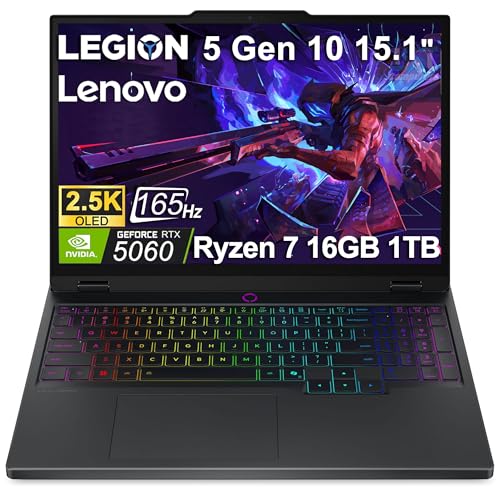
This Legion 5 earns its place on one line of its listing: the RJ45 Ethernet port. Wired networking is still the reliable path for packet capture exercises and home-lab work, and this machine adds an eight-core Ryzen 7, 16GB of DDR5 memory, a 1TB SSD and a 5MP webcam. The RTX 5060 is more graphics than most security modules need, but it future-proofs the machine for a long degree. Choose it when your course’s networking labs are as important as its virtualisation labs.
Specs
- 15.1-inch 2.5K OLED display, 165Hz with G-SYNC
- AMD Ryzen 7 260 processor
- NVIDIA GeForce RTX 5060 graphics with 8GB memory
- 16GB DDR5 memory
- 1TB SSD storage
- Wi-Fi 7 and RJ45 Ethernet port
- 5MP webcam
- Windows 11 Home
Best for: Networking-focused students who want wired Ethernet built in.
Watch out for: The OLED screen and gaming design add cost you may not need; if your budget is tight, the LOQ below covers the VM essentials.
Lenovo LOQ 15 (Ryzen 7 8845HS)

The LOQ is the value route into a proper lab laptop. Its listing specifies a Ryzen 7 8845HS, 16GB of memory, a 512GB SSD and an RTX 4050, which covers a host system plus one or two VMs, containers and coursework tools without the flagship trimmings. It is the machine for a student who needs lab capability now and would rather spend the difference on certifications, books or a home-lab switch. The specification is honest, and the compromises are visible rather than hidden.
Specs
- 15.6-inch Full HD display
- AMD Ryzen 7 8845HS processor
- NVIDIA GeForce RTX 4050 graphics with 6GB memory
- 16GB memory
- 512GB SSD storage
- Windows 11 Home, Luna Grey, model 83DX00B2US
Best for: Budget-conscious students who still need real virtualisation headroom.
Watch out for: The 512GB SSD is the tightest here for a VM library; archive old lab machines to an external drive each semester.
Which One Fits Your Situation
Your labs run several machines at once
The Legion 5i is built for you. Thirty-two gigabytes of memory and fourteen cores let a small virtual network live on one laptop, and the terabyte SSD holds the library that creates. If your degree’s later modules are lab-heavy, this is the buy-once option.
You carry the laptop to every class
Choose the ThinkPad T14. It keeps 16GB of memory and fast Thunderbolt ports in a 14-inch business body that suits lectures, with enough power for scheduled lab sessions. Your back will notice the difference from the gaming machines by the second week of term.
Networking is the heart of your course
The Legion 5’s built-in Ethernet port removes the dongle lottery from packet labs and home networking practice. Its memory and storage cover VM work too, so it doubles as an all-round lab machine for network-focused students.
Money is tight but labs are not optional
Take the LOQ. It keeps the essentials that lab work actually consumes: a strong eight-core-class processor, 16GB of memory and an SSD. Spend the savings on an external drive for VM archives and you have a complete, honest setup.
Common Mistakes
- Buying 8GB of memory and discovering in week three that a second virtual machine will not run acceptably.
- Choosing a laptop with no Ethernet port for a networking degree, then relying on adapters that go missing.
- Underestimating storage, so old lab VMs crowd out coursework and snapshots fail for lack of space.
- Paying for a premium graphics card while skimping on the memory and cores that lab work actually uses.
- Ignoring the exact listing variant and receiving a weaker configuration than the headline suggested.
Frequently Asked Questions
How much RAM does a cybersecurity student need?
Sixteen gigabytes is the working floor for virtualisation-based coursework, enough for a host system plus one or two lab machines. Thirty-two gigabytes, as in the Legion 5i here, is the comfortable choice when modules run small virtual networks. Eight gigabytes will frustrate lab work quickly.
Why does Ethernet matter for a student laptop?
Networking labs often involve wired switches, packet capture and environments where Wi-Fi is restricted or unreliable. A built-in RJ45 port, like the Legion 5’s, removes adapter problems. If your chosen laptop lacks one, budget for a reliable USB Ethernet adapter and test it before assessed labs.
Do cybersecurity students need a discrete graphics card?
Most coursework does not require one; memory and cores matter more. A discrete card helps for specific modules such as GPU-assisted password auditing in controlled labs and for general longevity. Every pick here includes one, but it is the RAM figures that should drive your decision.
Should I run lab machines on an external drive?
You can, and fast Thunderbolt or USB SSDs make it workable, which is why ports feature in this guide. Internal storage is simpler and faster for snapshots, though. A 1TB internal SSD, as in the Legion models, comfortably holds a semester of lab machines for most students.
Related guides
- Best Laptops to Play Roblox: From Budget Integrated Graphics to Dedicated GPUs
- Best Laptops for Zoom Teaching: Clear Video, Reliable Audio and All-Day Class Power
- Best Laptops for Video Editing and Music Production: Power, Screen and Storage
- Best Laptops for Network Engineers: Ethernet, RAM for Labs and Ports That Matter
More from Amazon
Programs that pair well with the guide above. Offers and eligibility are set by Amazon and may change.
Free shipping on eligible items, Prime Video and more. Eligible new members can start with a free trial.
Start a Prime free trialAd-free music streaming. Eligible new subscribers can start with a free trial.
Try Music Unlimited freeA Prime membership for ages 18-24 with a trial period. Eligibility is set by Amazon.
See Prime for Young AdultsAudiobooks and podcasts to listen to on the go. Eligible new members can start with a free trial.
Try Audible freeAs an Amazon Associate we earn from qualifying purchases.










Write Your Review
No reviews yet. Be the first to share your experience!