
Key takeaways
- Four function-first business laptops with strong keyboards, full port selections, and durable builds, chosen from their Amazon listings for November 2026.
What's inside
As an Amazon Associate I earn from qualifying purchases. This post may contain affiliate links at no extra cost to you.
Choosing a function-over-form laptop is a decision about what the machine does all day, not how it photographs on a desk. The keyboard you type on for hours, the ports that spare you a bag full of adapters, the memory you can add when your workload grows, and the chassis that survives a daily commute matter far more than a thin profile or a striking finish. A plain-looking laptop that keeps working without fuss beats a beautiful one that fights you every time you plug something in.
This guide is for office workers, students, field technicians, and anyone who buys a laptop as a tool. Every pick below is a business laptop sold on Amazon, chosen from the configuration named in its listing title, with the processor, memory, storage, display, and operating system the listing itself states. Nothing here earns its place for looks; each one earns it for keyboard, connectivity, durability, or room to grow.
Quick Picks
As an Amazon Associate we earn from qualifying purchases.
| Product | Best for | Key spec from title |
|---|---|---|
| Lenovo ThinkPad T14 Gen 5 | Heavy typing and long workdays | Intel Core Ultra 7 155U, 32GB RAM, 512GB SSD |
| HP EliteBook 840 G11 | Docking setups and later memory upgrades | Intel Core Ultra 7 165U, 16GB RAM, 512GB SSD |
| Dell Latitude 5440 | A dependable work laptop with long support | Intel Core i7-1355U, 16GB RAM, 512GB SSD |
| Lenovo ThinkPad E14 Gen 6 | A practical first business laptop | AMD Ryzen 5 7535U, 16GB RAM, 256GB SSD |
How to Choose
Start with the keyboard and the pointing device
You will touch the keyboard more than any other part of the laptop, so treat it as the first specification, not an afterthought. Look for full-size keys with real travel, a backlit layout for dim rooms, and a pointing stick or a large, precise trackpad, depending on how you work. Business lines such as ThinkPad, EliteBook, and Latitude keep deeper keyboards and spill-resistant designs because their buyers type all day. If possible, read the listing for the exact keyboard layout, since some configurations swap key placement or drop backlighting, and a keyboard you fight daily will sour an otherwise strong machine.
Count the ports before you count the millimeters
A laptop that needs a dongle for every accessory is not portable; it is incomplete. Check the listing for at least two USB-C ports, one or two full-size USB-A ports, an HDMI output, and a headphone jack before you buy. Thunderbolt 4 matters if you plan to run a dock with two monitors or fast external storage. Ethernet still matters in offices, labs, and hotels with weak wireless. Thin consumer machines often trade these ports away for a slimmer edge, while the business laptops in this guide keep them, which is exactly the trade function-over-form buyers should make.
Check what you can change later
A laptop you can upgrade lasts years longer than one sealed shut at the factory. Two memory slots let you add RAM when browsers and applications get heavier, and a second storage slot lets you add space without cloning your drive. Some models solder all memory to the board, so the amount you buy is the amount you keep forever. Before ordering, confirm in the listing or the manufacturer’s specification sheet whether the memory slots are accessible and how many storage slots the chassis has. Upgradability is the quietest feature on a spec sheet and the one you will miss most when it is gone.
Weigh durability and support over finish
A laptop that travels, gets bumped in a bag, and runs eight hours a day needs a chassis and a support plan built for that life. Business machines are tested against drops, vibration, and temperature swings, and they ship with spill-resistant keyboards and parts that repair shops can actually order. A multi-year support plan, such as the four-year coverage bundled with one pick below, turns a failure from a crisis into a service call. A brushed metal finish scratches just as easily as plastic; what matters is whether the hinges, keyboard, and ports still work after two years of daily use.
The 4 Best Options
Lenovo ThinkPad T14 Gen 5
The ThinkPad T14 Gen 5 is the archetype of a laptop built for work first. Its keyboard has the deep travel and firm feedback that long typing sessions demand, and the TrackPoint gives you a second way to move the cursor without lifting your hands from the home row. This configuration pairs an Intel Core Ultra 7 155U processor with 32GB of memory, so dozens of browser tabs, spreadsheets, and video calls run side by side without the slowdown that pushes people toward a replacement. The 14-inch touchscreen WUXGA panel keeps text sharp at 1920 x 1200.
Specs
- 14-inch touchscreen, WUXGA (1920 x 1200)
- Intel Core Ultra 7 155U processor
- 32GB DDR5 RAM
- 512GB SSD
- Windows 11 Pro
- English keyboard
Best for: Typists and multitaskers who want 32GB of memory from day one.
Watch out for: Confirm how the memory is fitted in this exact configuration before assuming a later upgrade is possible, since some configurations solder part of the RAM; also decide whether you will actually use the touchscreen, because it adds glare compared with a matte non-touch panel.
HP EliteBook 840 G11
The EliteBook 840 G11 suits buyers who want a machine that grows with them. HP’s specification sheet for this model lists both memory slots as customer accessible, with support for up to 64GB of DDR5 memory, so the 16GB fitted here is a starting point rather than a ceiling. The port selection is generous for a 14-inch machine, with two Thunderbolt 4 ports, two USB-A ports, and HDMI 2.1, which covers a dock, an external drive, and a monitor without a hub. A spill-resistant backlit keyboard and a fingerprint reader round out a design that expects to be used hard in offices and on the road.
Specs
- 14-inch touchscreen, WUXGA (1920 x 1200)
- Intel Core Ultra 7 165U processor
- 16GB DDR5 RAM
- 512GB PCIe Gen4 NVMe SSD
- Windows 11 Pro
- Touchscreen, fingerprint reader
Best for: Docking-station desk setups and buyers who plan to add memory later.
Watch out for: The fitted 16GB will feel tight if you run virtual machines or very large data sets, so budget for a second memory module; also check whether you need the touch panel, since other configurations of this model ship with a non-touch display.
Dell Latitude 5440
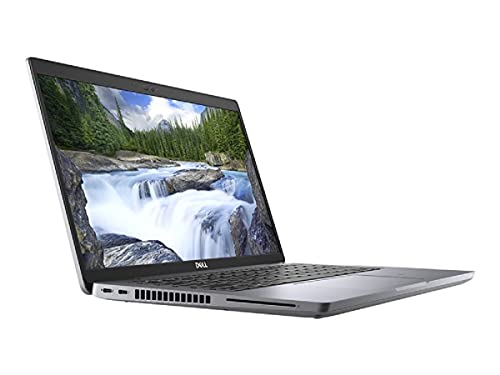
The Latitude 5440 is the steady choice in this guide: a 14-inch business laptop with a 13th-generation Intel Core i7-1355U processor, 16GB of memory, and a 512GB SSD, running Windows 11 Pro. Its anti-glare Full HD display reads well under office lighting without the reflections a glossy panel brings, and the keyboard is the full-size, backlit, business layout that Latitude buyers expect. What sets this configuration apart is the four years of ProSupport bundled with it, which means hardware problems are handled through Dell’s business support channel for the realistic life of the machine rather than a single year.
Specs
- 14-inch Full HD anti-glare display (1920 x 1080)
- Intel Core i7-1355U processor, 10 cores
- 16GB RAM
- 512GB SSD
- Windows 11 Pro
- 4 Years ProSupport included
Best for: Office workers and small teams who want long support coverage with their laptop.
Watch out for: The display is 1920 x 1080 rather than the taller 1920 x 1200 panel on the other picks, so you see slightly fewer lines of a document; also confirm the support term on the listing you buy, since it is tied to this configuration.
Lenovo ThinkPad E14 Gen 6
The ThinkPad E14 Gen 6 brings the ThinkPad keyboard and business build to a more practical entry point. Its AMD Ryzen 5 7535U processor has six cores, which is ample for office applications, video calls, and browser-heavy research, and the 16GB of DDR5 memory keeps multitasking smooth. The 14-inch WUXGA display runs at 1920 x 1200, giving documents and spreadsheets a taller view than a standard Full HD panel. Lenovo’s specification reference for this model line lists two DDR5 memory slots and room for a second storage drive, so this is a machine you can sensibly improve over time rather than replace.
Specs
- 14-inch display, WUXGA (1920 x 1200)
- AMD Ryzen 5 7535U processor
- 16GB DDR5 RAM
- 256GB SSD
- Windows 11 Pro
- English keyboard
Best for: A first business laptop for buyers who want ThinkPad build quality at a practical entry point.
Watch out for: The 256GB drive fills quickly once you store years of projects and media, so check whether this configuration has a second storage slot or plan for external storage; also confirm the display is the WUXGA panel named in the title, since other E14 configurations use different panels.
Which One Fits Your Situation
You type for a living
Pick the Lenovo ThinkPad T14 Gen 5. Its keyboard and TrackPoint are built for people who write, code, or answer email for most of the day, and the 32GB of memory means you never have to close applications to keep the machine responsive. The touchscreen is a bonus for scrolling through documents, though the real value is the typing experience and the headroom.
You dock at a desk every morning
Pick the HP EliteBook 840 G11. Two Thunderbolt 4 ports, two USB-A ports, and HDMI 2.1 let you connect monitors, storage, and peripherals through a dock without juggling adapters. The two accessible memory slots mean the machine can grow from 16GB to far more when your workload does, which suits a desk-bound laptop that stays in service for years.
You want one laptop for years, with support to match
Pick the Dell Latitude 5440. The four years of ProSupport bundled with this configuration is the deciding factor: when something goes wrong in year three, you call business support instead of shopping for a replacement. The anti-glare display and the 13th-generation Core i7 keep everyday work comfortable for the whole period.
You want business build quality at the lowest entry point
Pick the Lenovo ThinkPad E14 Gen 6. It delivers the ThinkPad keyboard, a taller WUXGA display, and a six-core Ryzen processor without the cost of the flagship T series. The 256GB drive is the compromise, so go in with a plan for storage, and you get a durable work machine that leaves room in the budget for accessories.
Common Mistakes
- Buying the thinnest laptop available and discovering it has one USB-C port and a shallow, cramped keyboard.
- Ignoring whether the memory is soldered until the laptop slows down two years later and cannot be upgraded.
- Paying for a touchscreen you will never tap, while giving up battery life and gaining glare.
- Choosing 256GB of storage for a machine expected to hold years of projects, photos, and media.
- Assuming every configuration of a model line has the same ports, panel, or keyboard; always check the listing title, not just the model name.
Frequently Asked Questions
What does function over form mean for a laptop?
It means judging a laptop by how well it works rather than how it looks. Keyboard comfort, port selection, durability, repairability, and upgradability come first, while thinness, color, and finish come second. A function-first laptop may look plain, but it types better, connects to more gear, and stays useful longer.
Are business laptops better than consumer laptops for work?
For daily office work, usually yes. Business lines such as ThinkPad, EliteBook, and Latitude are built around deeper keyboards, more ports, spill resistance, and longer support, and they keep parts available for years. Consumer laptops often trade those things away for a slimmer shape or a brighter display.
How much RAM should a function-first laptop have?
16GB is the practical minimum for office work, browsing, and video calls in 2026, and it is what three of the four picks here ship with. Choose 32GB if you run virtual machines, large spreadsheets, or dozens of tabs at once, or pick a model with accessible memory slots so you can add RAM later.
Can I upgrade the memory and storage later?
It depends on the model and the exact configuration. The HP EliteBook 840 G11 and the Lenovo ThinkPad E14 Gen 6 lines list accessible memory slots, while other machines solder memory to the board. Always confirm the slot layout and the number of storage slots for the specific configuration in the listing before you buy.
Related guides
More from Amazon
Programs that pair well with the guide above. Offers and eligibility are set by Amazon and may change.
Free shipping on eligible items, Prime Video and more. Eligible new members can start with a free trial.
Start a Prime free trialAd-free music streaming. Eligible new subscribers can start with a free trial.
Try Music Unlimited freeA Prime membership for ages 18-24 with a trial period. Eligibility is set by Amazon.
See Prime for Young AdultsAudiobooks and podcasts to listen to on the go. Eligible new members can start with a free trial.
Try Audible freeAs an Amazon Associate we earn from qualifying purchases.










Write Your Review
No reviews yet. Be the first to share your experience!