
Key takeaways
- Looking for the best Dell school laptops? Compare portable Dell Inspiron, XPS, and Latitude models for classes, homework, study, and everyday campus life.
What's inside
As an Amazon Associate I earn from qualifying purchases. This post may contain affiliate links at no extra cost to you.
The best Dell school laptops balance portability, battery life, a comfortable keyboard, and enough performance for everyday schoolwork. A good school laptop should handle word processing, research with many browser tabs open, video calls, presentations, and streaming, without feeling heavy in a backpack or running out of storage halfway through the term.
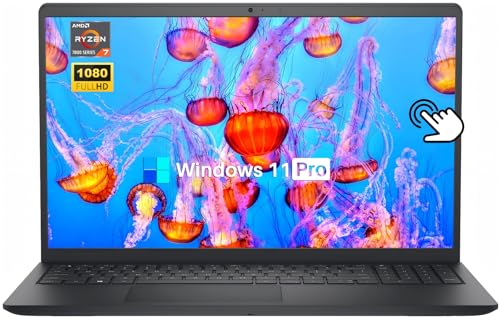

If you need a quick answer, start with the Dell Inspiron 14 2-in-1 (B0FVM4PPWH) for most students. Its 14-inch touchscreen, 360-degree hinge, 16GB of memory, and 1TB of storage cover note-taking, essays, group projects, and video lessons in a package that weighs just over 3 pounds. Students who want a larger screen should look at the Dell Inspiron 15 3535 Touchscreen (B0GSTWY3T3), while students who prioritise light weight should consider the Dell XPS 13 (B0H9YQ9G96).
This guide explains what to look for in a Dell laptop for school, then covers five Dell laptops suited to student life: classes, homework, study sessions, and online lessons.
Quick Picks
Our Short List of 3
All 5 Picks at a Glance
| Product | Specs | Action |
|---|---|---|
| Dell Inspiron 15 3535 Touchscreen (B0GSTWY3T3) | Check price on Amazon | |
| Dell Inspiron 14 2-in-1 (B0FVM4PPWH) | Check price on Amazon | |
 Dell XPS 13 (B0H9YQ9G96) | Check price on Amazon | |
 Dell Inspiron 15 3530 (B0CB6VXQLK) | Check price on Amazon | |
 Dell Latitude 3540 (B0CS655STJ) | Check price on Amazon |
How to Choose
Screen Size and Portability
Screen size is the first trade-off in a school laptop. A 13.4-inch or 14-inch laptop fits easily on a crowded classroom desk, in a small backpack pocket, and on a library table shared with other students. A 15.6-inch laptop gives more room for two windows side by side, which helps when you are writing an essay while keeping a source or a video lesson open. The cost is size and weight. If you walk between buildings or carry textbooks as well, a lighter 14-inch or 13.4-inch model is easier to live with. If the laptop mostly stays on one desk at home, a 15.6-inch model is a reasonable choice.
Weight matters as much as screen size. The models in this guide range from about 2.2 pounds for the XPS 13 to about 3.59 pounds for the Inspiron 15 3535, a difference you will notice after a full school day.
Processor and Memory for Schoolwork
For school, the processor and memory decide how smoothly the laptop handles everyday work. Word processing, spreadsheets, presentations, web research, and video calls do not need a gaming processor, but they do benefit from a modern multi-core processor and enough memory to keep many tabs and applications open at once.
As a practical baseline, look for 16GB of memory. That leaves room for a browser with many tabs, a document, a PDF reader, and a video call running together. The XPS 13 in this guide has 8GB of memory, which can still suit lighter schoolwork, but 16GB gives more headroom over a full school year. For storage, 512GB is a workable minimum, while 1TB gives more room for larger projects and files that accumulate over several terms.
Storage, Files, and School Software
School files add up fast: essays, slideshows, handouts, photos, and downloaded course materials all take space, and a full drive slows a laptop down. A solid-state drive (SSD) is the standard to look for, because it opens files faster than an older hard drive. All five laptops in this guide use SSD storage.
Before you buy, think about the software your school uses. Windows 11 covers common classroom tools, browsers, office software, and video-call applications. Windows 11 Pro, included on several models here, adds business-oriented features some schools use, but Windows 11 Home is sufficient for most schoolwork. Confirm that any specialist software your course requires runs on Windows and on the processor in the model you choose.
Battery Life and Charging
A school laptop should last through classes without constant searching for a power outlet. Battery life varies with screen brightness, Wi-Fi use, video calls, and the applications running, so treat manufacturer battery figures as a guide rather than a promise.
Look for USB-C charging or a compact charger if you plan to carry the charger in your bag. Some models charge through USB-C, others use a separate Dell power connector, and the port layout affects which cables and docks you can use at a desk.
Keyboard, Touchscreen, and Camera
You will type on a school laptop every day, so the keyboard deserves attention. A backlit keyboard helps in dim classrooms and evening study sessions, and a comfortable key layout reduces typing errors during long essays. A touchscreen is not essential, but it can help with note-taking, scrolling, and learning applications. A 2-in-1 with a 360-degree hinge folds into tablet, tent, or stand mode for reading, watching lessons, and presenting work.
The webcam and microphone matter for online lessons and group calls. A 720p webcam is the minimum found on many school laptops, while a 1080p camera gives a clearer image. Check that the webcam sits at the top of the screen.
Durability and Ports
School laptops get carried and opened many times a day. A sturdy chassis, a firm hinge, and a spill-resistant keyboard help a laptop survive school life. Business-style models such as the Latitude line are designed for that daily handling, while premium models such as the XPS line use aluminium construction.
Ports are easy to overlook until you need them. At minimum, look for USB-A and USB-C ports, an HDMI output for a classroom display or home monitor, a headphone jack, and Wi-Fi. An SD card reader is useful for photography or media classes. If you use wired accessories, a printer, or an external drive, count the ports and make sure you will not need an adapter for everyday tasks.
Windows 11, Security, and Long-Term Use
A school laptop is a multi-year purchase. Windows 11 includes built-in security features and regular updates, and a fingerprint reader, available on some models here, adds a convenient way to sign in without typing a password in a shared classroom.
Think ahead to the next school year. A laptop with 16GB of memory, 512GB or more of SSD storage, and a current-generation processor is more likely to stay responsive as school software updates and files grow.
The Best Dell School Laptops Reviewed
Dell Inspiron 15 3535 Touchscreen (B0GSTWY3T3)
The Dell Inspiron 15 3535 Touchscreen suits students who do most of their study at a desk and want room to work. Its 15.6-inch Full HD touchscreen shows documents, web pages, and video lessons clearly. The eight-core AMD Ryzen 7 7730U processor helps when several applications are open at once, and the 16GB of DDR4 memory and 512GB SSD give a solid base for schoolwork and research.
This model runs Windows 11 Pro and includes AMD Radeon integrated graphics, Wi-Fi, Bluetooth, HDMI, USB-C, USB-A, an SD card reader, and a headphone and microphone combination jack. The listed weight is 3.59 pounds, so it is portable enough for a backpack, but it is best suited to students who do not need the lightest possible laptop. The Amazon listing describes it as a student laptop as well as a business laptop.
Who it suits: students who want a large, clear screen for essays, research, and video lessons, and who study mainly at a desk or in the library. Who should skip it: students who walk long distances between classes with a heavy bag, or who want the lightest laptop in this guide.
Dell Inspiron 14 2-in-1 (B0FVM4PPWH)
The Dell Inspiron 14 2-in-1 is the most versatile pick in this guide, and a strong choice for most students. Its 14-inch Full HD+ touchscreen has a 1920 x 1200 resolution, and the 360-degree hinge lets it fold into laptop, tablet, tent, and stand modes: laptop mode for typing, tablet mode for reading and annotating, tent mode for watching a lesson, and stand mode for presenting work.
This configuration uses an Intel Core 5 120U processor with 10 cores, 16GB of DDR5 memory, and 1TB of SSD storage, running Windows 11 Pro. That covers word processing, spreadsheets, presentations, research with many tabs open, video calls, and school software without the storage pressure of a smaller drive. It includes a backlit keyboard with a fingerprint reader, Wi-Fi 6E, Bluetooth, two USB-C ports, two USB-A ports, HDMI, and a universal audio port. The listing describes it as lightweight at just over 3 pounds, and as a laptop for students and business use.
Who it suits: most school and college students who want one laptop for typing, reading, note-taking, and video lessons, and who carry a laptop between classes. Who should skip it: students who need a larger screen for constant split-screen work, or who prefer a traditional clamshell laptop without a touchscreen or folding hinge.
Dell XPS 13 (B0H9YQ9G96)
The Dell XPS 13 is the lightest and most portable Dell school laptop in this guide, and the best choice for students who carry a laptop all day. It weighs about 2.2 pounds and measures about half an inch thick, with a CNC-machined aluminium chassis in a Sky finish. That slim build slips easily into a backpack and takes up little room on a classroom desk.
The display is a 13.4-inch touchscreen with a 2560 x 1600 resolution and a 120Hz refresh rate, giving sharp text and smooth scrolling for reading, research, and video. This configuration uses an Intel Core 5 320 processor with six cores, 8GB of LPDDR5X memory, and a 512GB SSD, with Wi-Fi 7, Bluetooth, and Windows 11 Pro. It includes a backlit keyboard, a 1080p camera, and Windows Hello facial recognition. The smaller screen and 8GB of memory mean it is best for lighter to moderate schoolwork rather than heavy multitasking.
Who it suits: students who prioritise light weight, a premium build, and a sharp touchscreen, and whose schoolwork is mainly writing, research, presentations, and video calls. Who should skip it: students who need 16GB or more of memory for heavier multitasking, or who want a larger screen for split-screen study. Those students should look at the Inspiron 14 2-in-1 or the Inspiron 15 3530 instead.
Dell Inspiron 15 3530 (B0CB6VXQLK)
The Dell Inspiron 15 3530 is a large-screen Dell laptop for students who want strong multitasking performance and plenty of storage. This configuration uses a 13th-generation Intel Core i7-1355U processor with 10 cores, 16GB of memory, and a 1TB SSD, with a 15.6-inch Full HD touchscreen, Intel Iris Xe Graphics, Wi-Fi 6, Bluetooth, HDMI, and Windows 11 Home. The 1TB drive gives room for a growing collection of school files, lessons, photos, and projects.
The touchscreen and large display suit students who keep several windows open, such as a document, a research source, and a video lesson. The 16GB of memory helps keep those windows responsive, and the Core i7 processor handles school software, spreadsheets, and media work more comfortably than an entry-level processor. The listed weight is 3.82 pounds, so it is heavier than the smaller models here, and it is best suited to students who study mainly at a desk.
Who it suits: students who want a large screen, a Core i7 processor, and 1TB of storage for heavy multitasking and long-term school use. Who should skip it: students who need the lightest carry, or who want Windows 11 Pro rather than Windows 11 Home. Those students should consider the Inspiron 14 2-in-1 or the Latitude 3540 instead.
Dell Latitude 3540 (B0CS655STJ)
The Dell Latitude 3540 is a business-style Dell laptop that suits older students and students who want a sturdy, practical machine for school and future work. It uses a 13th-generation Intel Core i5-1335U processor with 10 cores, 32GB of DDR4 memory, and a 1TB PCIe SSD, with a 15.6-inch Full HD display, Wi-Fi 6E, Bluetooth, and Windows 11 Pro. The 32GB of memory is more than most schoolwork requires, and it leaves ample headroom for many open applications and large documents.
Latitude laptops are designed for daily business use, which translates well to school life: a practical layout, a full set of ports, and a build intended for regular carrying and handling. Windows 11 Pro adds features some schools and older students use. This configuration fits students who also use the laptop for part-time work, coding, data work, or media projects, and who want a laptop that can move from school into work.
Who it suits: older students, students who multitask heavily, and students who want a durable business-style laptop with Windows 11 Pro and generous memory. Who should skip it: younger students who want the lightest laptop possible, or who prefer a touchscreen or a 2-in-1 design for note-taking. Those students should look at the Inspiron 14 2-in-1 or the XPS 13 instead.
What to Check Before You Buy
Before you order a Dell school laptop, check the exact configuration on the Amazon listing. Dell model names such as Inspiron 15, Inspiron 14, XPS 13, and Latitude 3540 cover many different configurations, and the processor, memory, storage, screen, and operating system can vary between listings with the same model name. Confirm those details, and whether the listing includes Windows 11 Home or Windows 11 Pro.
Check the listed weight, dimensions, and port layout against how you will use the laptop. A laptop that looks portable on a product page may still feel heavy once the charger and textbooks are added to the bag. Make sure the ports cover your needs, including USB-C, USB-A, HDMI, and a headphone jack.
Check the return and warranty information on the listing as well. Some Amazon laptop listings are sold in upgraded configurations, where the original seal has been opened to install additional memory or storage. Read the listing carefully so you know what configuration you are buying and who provides warranty support. If a listing is unclear about the processor, memory, storage, or operating system, choose one that states those details clearly.
FAQ
What is the best Dell laptop for school?
For most students, the Dell Inspiron 14 2-in-1 (B0FVM4PPWH) is a strong all-round choice, combining a portable 14-inch touchscreen, a 360-degree hinge, 16GB of memory, and 1TB of storage. Students who want a larger screen should consider the Dell Inspiron 15 3535 Touchscreen (B0GSTWY3T3) or the Dell Inspiron 15 3530 (B0CB6VXQLK), while students who want the lightest carry should consider the Dell XPS 13 (B0H9YQ9G96).
How much memory does a school laptop need?
For most schoolwork, 16GB of memory is a practical target. It leaves room for a browser with many tabs, a document, a PDF reader, and a video call running together. A laptop with 8GB of memory, such as the XPS 13 in this guide, can still suit lighter schoolwork, but students who multitask heavily or keep many applications open will benefit from 16GB or more.
Is a touchscreen useful for school?
A touchscreen is useful, but not essential, for school. It helps with scrolling, tapping through presentations, annotating documents, and using learning applications. A 2-in-1 laptop with a 360-degree hinge, such as the Inspiron 14 2-in-1, adds tablet, tent, and stand modes that suit reading, watching lessons, and presenting work. Students who mainly type essays and research on the web can choose a traditional laptop without a touchscreen.
Should a student choose a 14-inch or a 15.6-inch Dell laptop?
Choose a 14-inch or 13.4-inch laptop if you carry the laptop between classes, use crowded desks, or travel with textbooks. Choose a 15.6-inch laptop if you study mainly at a desk and want more room for split-screen work. The larger screen is easier on the eyes for long study sessions, but it adds size and weight to your bag.
Is Windows 11 Pro needed for school?
Windows 11 Pro is not needed for most schoolwork. Windows 11 Home covers word processing, spreadsheets, presentations, browsers, and video calls. Windows 11 Pro adds business-oriented features that some schools and older students may use. If your school does not require Pro features, either version will work for classes and homework.
Bottom Line
The best Dell school laptops in this guide cover the main needs of student life: a portable touchscreen 2-in-1 for most students, large-screen Inspiron models for desk-based study and heavy multitasking, a light XPS 13 for students who carry a laptop all day, and a business-style Latitude for older students who want durability and Windows 11 Pro. Start with screen size and weight, then check the processor, memory, and storage. Confirm the exact configuration on the Amazon listing before you order.
Disclosure: As an Amazon Associate, we may earn from qualifying purchases.
Related guides
More from Amazon
Programs that pair well with the guide above. Offers and eligibility are set by Amazon and may change.
Free shipping on eligible items, Prime Video and more. Eligible new members can start with a free trial.
Start a Prime free trialAd-free music streaming. Eligible new subscribers can start with a free trial.
Try Music Unlimited freeA Prime membership for ages 18-24 with a trial period. Eligibility is set by Amazon.
See Prime for Young AdultsAudiobooks and podcasts to listen to on the go. Eligible new members can start with a free trial.
Try Audible freeAs an Amazon Associate we earn from qualifying purchases.










Write Your Review
No reviews yet. Be the first to share your experience!