
Key takeaways
- Find the best CPU for average user laptops, from Core i5 to Ryzen 5. Compare balanced laptops for work, browsing, streaming, and everyday productivity.
What's inside
As an Amazon Associate I earn from qualifying purchases. This post may contain affiliate links at no extra cost to you.
Finding the best CPU for average user laptops starts with a simple question: what does an average user actually do with a laptop? For most people, the answer is a familiar mix of email, web browsing, video calls, word processing, spreadsheets, streaming, online shopping, and light photo organisation. None of those tasks needs a workstation processor or a dedicated graphics card, but they do need a processor that stays responsive when several browser tabs, a video call, and a document are open at the same time.
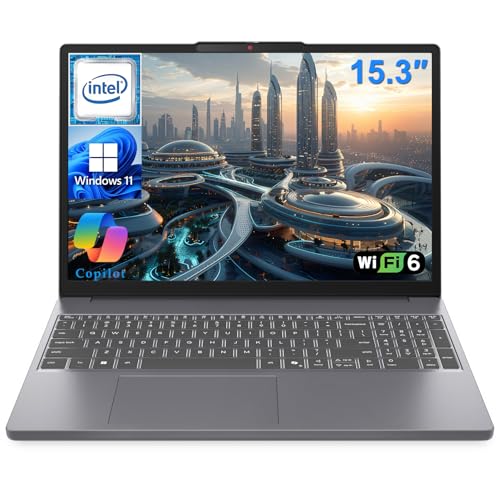

That is why the sweet spot for most buyers sits in the middle of the processor range. A modern Intel Core i5 or AMD Ryzen 5 laptop processor, paired with 16GB of memory and a fast solid-state drive, handles everyday work smoothly without the heat, fan noise, weight, or battery drain that often comes with higher-end chips. The laptops in this guide are built around that idea.
The quick answer is this: for most average users, a laptop with an Intel Core i5-1334U, Intel Core i5-13420H, AMD Ryzen 5 7520U, or AMD Ryzen AI 5 330 processor is a strong choice. The differences between those chips matter less than the overall package around them, including memory, storage, screen size, keyboard comfort, and battery life. If you choose a laptop with 16GB of memory, a 512GB SSD, and one of those processors, you are in the right place for everyday computing.
Quick Picks
| Product | Best For | Key Spec |
|---|---|---|
| Lenovo IdeaPad Slim 3 2026 | Balanced everyday performance | Intel Core i5-13420H, 16GB DDR5 RAM, 512GB SSD, 15.3-inch FHD display |
| HP 15-FD000 | Efficient everyday use with a touchscreen | Intel Core i5-1334U, 16GB DDR4 RAM, 512GB SSD, 15.6-inch FHD touch display |
| Acer Aspire 3 A315-24PT-R0UX | AMD-powered everyday value with touch | AMD Ryzen 5 7520U, 16GB LPDDR5 RAM, 512GB NVMe SSD, 15.6-inch FHD IPS touch display |
| ASUS Vivobook 16 | A larger screen and newer AI features | AMD Ryzen AI 5 330, 16GB memory, 512GB SSD, 16-inch WUXGA display |
How to Choose
Match the Processor to Everyday Work, Not to a Benchmark
An average user does not need the fastest processor on the market. A mid-range processor with enough cores and threads to juggle a browser, email, a video call, and office software is the practical target. Intel Core i5 and AMD Ryzen 5 processors are designed for exactly that kind of mixed workload. A Core i5-1334U or Ryzen 5 7520U leans toward efficiency and longer battery life, while a Core i5-13420H offers more headroom for heavier multitasking. A Ryzen AI 5 330 adds a neural processing unit for on-device AI features in Windows 11.
Aim for 16GB of Memory
Memory matters as much as the processor for an average user. With 8GB, a laptop can feel fine with a few tabs open and slow down once a video call, a large spreadsheet, and a dozen browser tabs are running together. With 16GB, that same mix has room to breathe. All four laptops in this guide come with 16GB of memory, which is the amount to look for if you want a laptop that stays comfortable for several years.
Choose a 512GB SSD as the Baseline
Storage affects how quickly a laptop starts, how fast applications open, and how much room you have for documents, photos, and downloaded files. A 512GB solid-state drive is a good baseline for an average user. It is large enough for the operating system, office software, a browser, and a reasonable library of files, while remaining fast enough that everyday tasks feel snappy. All four laptops here include a 512GB SSD.
Pick a Screen Size That Fits How You Work
Screen size is a comfort decision as much as a specification. A 15.3-inch or 15.6-inch display is the standard choice for an average user because it offers a full-size keyboard, room for two windows side by side, and a screen that is easy to read without making the laptop too heavy to carry around the house. A 16-inch display, such as the one on the ASUS Vivobook 16 in this guide, adds a little more vertical space, which helps when you are reading long documents or working in a spreadsheet. A touchscreen can also be useful for scrolling, tapping, and signing documents, and two of the laptops below include one.
Look at Battery Life and Everyday Practicality
A processor that is efficient on paper still needs a decent battery and sensible power management behind it. Efficient U-series processors, such as the Intel Core i5-1334U and AMD Ryzen 5 7520U, are built to stretch battery life during light work, while H-series processors such as the Intel Core i5-13420H trade some of that efficiency for stronger performance. For an average user, the practical question is how the laptop behaves during a normal day: how long it lasts away from a charger, how warm it gets on your lap, and how loud its fan becomes during a video call.
Check the Ports, Keyboard, and Webcam
Everyday laptops live or die on small details. A full-size keyboard with a numeric keypad helps if you work with numbers, while a backlit keyboard helps in dim rooms. Check that the laptop has the ports you use, such as USB-C, USB-A, and HDMI for an external monitor or television. A built-in webcam and microphone matter for video calls, and Wi-Fi 6 support helps keep a connection stable when several devices share the same network.
The Best CPU for Average User Laptops Reviewed
Lenovo IdeaPad Slim 3 2026 (B0GKGXZJB7)
The Lenovo IdeaPad Slim 3 2026 is the balanced pick in this guide, built around an Intel Core i5-13420H processor. That is an 8-core processor with 12 threads and a boost speed of up to 4.6 GHz, which gives it more headroom than the efficiency-focused chips in some of the other laptops here. In everyday terms, that headroom shows up when you have a browser full of tabs, a document, a spreadsheet, and a video call running at the same time. The laptop pairs that processor with 16GB of DDR5 memory and a 512GB SSD, so the whole package is matched to the processor rather than held back by too little memory or slow storage.
The display is a 15.3-inch Full HD anti-glare panel, which is a comfortable size for reading, writing, and streaming, and the anti-glare finish helps when you are working near a window or under bright indoor lighting. The laptop is described as lightweight and portable, and it includes Wi-Fi 6, Bluetooth, HDMI, and USB-C connectivity, along with Windows 11.
This laptop suits someone who wants a straightforward, capable everyday machine and does not want to think about the processor again after buying it. It is a good fit for home office work, study, email, browsing, and streaming, and the stronger processor gives it a little extra room for heavier multitasking. It is less suited to someone who wants the longest possible battery life above all else, since an H-series processor uses more power than a U-series chip, or to someone who needs a touchscreen, which this configuration does not emphasise.
HP 15-FD000 (B0FJFGL5Y4)
The HP 15-FD000 takes the efficiency route to the same goal. Its Intel Core i5-1334U is a 10-core processor with 12 threads and a boost speed of up to 4.6 GHz, built to deliver responsive everyday performance while using less power than an H-series chip. That design suits an average user who moves around the house, works from a kitchen table or a sofa, and does not want to stay tethered to a charger. The laptop pairs the processor with 16GB of DDR4 memory and a 512GB NVMe SSD, which is enough for a browser, office software, video calls, and a normal collection of files.
The 15.6-inch Full HD touchscreen display is a useful addition for everyday use. Touch input makes scrolling through web pages, tapping on-screen controls, and navigating Windows 11 feel natural, and the 1920 x 1080 resolution keeps text sharp. The laptop also includes Intel Iris Xe graphics, which handle streaming and light photo work, along with Wi-Fi 6, Bluetooth 5.3, a 720p HD camera for video calls, and Windows 11 Home. A full-size keyboard with a numeric keypad is included, which helps when you are entering numbers into a spreadsheet or a form.
This laptop suits an average user who values battery efficiency, a touchscreen, and a familiar 15.6-inch layout. It is a good fit for students, home workers, and anyone who spends most of their time in a browser and office applications. It is less suited to someone who wants the strongest possible processor for heavy multitasking, since the U-series chip is tuned for efficiency rather than maximum sustained performance, and buyers should confirm the exact configuration, including keyboard backlighting, before ordering.
Acer Aspire 3 A315-24PT-R0UX (B0CJV41KZN)
The Acer Aspire 3 A315-24PT-R0UX is the AMD option in this guide, powered by an AMD Ryzen 5 7520U quad-core processor with Radeon graphics. That processor is built for everyday family and home use, handling browsing, documents, streaming, and video calls without fuss. The laptop pairs it with 16GB of LPDDR5 memory and a 512GB NVMe SSD, which keeps the system responsive when several applications are open and gives files plenty of room. The combination of a Ryzen 5 processor, 16GB of memory, and a fast SSD is a reliable formula for an average user.
The 15.6-inch Full HD IPS touch display is a strong point. IPS panels tend to offer wider viewing angles than basic panels, which helps when you are sharing the screen with someone sitting beside you, and the touch layer adds an extra way to interact with Windows 11. The laptop includes Wi-Fi 6, a USB-C port with DisplayPort support, HDMI 2.1, and Windows 11 Home, along with a protective sleeve in the box.
This laptop suits an average user who wants an AMD-powered machine with a touchscreen and a slim design. It is a good fit for home, study, and light office work, and the IPS touch display makes it a pleasant machine for browsing and streaming. It is less suited to someone who needs a high-performance processor for demanding creative work or heavy multitasking, since the Ryzen 5 7520U is a quad-core efficiency chip rather than a high-end processor.
ASUS Vivobook 16 (B0G5X43HFF)
The ASUS Vivobook 16 is the newest-feeling laptop in this guide, built around an AMD Ryzen AI 5 330 processor. That is a Ryzen 5-class chip from the Ryzen AI 300 series, with four cores, eight threads, a boost speed of up to 4.5 GHz, and a dedicated neural processing unit for on-device AI features. For an average user, the practical meaning is a modern processor that handles everyday work and supports newer Windows 11 AI tools, such as Copilot features, alongside normal browsing, documents, and streaming. The laptop pairs the processor with 16GB of memory and a 512GB SSD, which matches the rest of the guide.
The 16-inch WUXGA display, with a resolution of 1920 x 1200, is the largest screen here, and the taller 16:10 aspect ratio gives you more vertical space for documents, web pages, and spreadsheets. That extra space is genuinely useful if you spend long stretches reading or writing. The laptop also includes AMD Radeon graphics, Wi-Fi 6, Bluetooth 5.3, a 1080p camera, and Windows 11 Home, in a slim Quiet Blue design.
This laptop suits an average user who wants a larger screen, a modern processor, and a machine that is ready for newer Windows features. It is a good fit for home office work, study, and long reading or writing sessions, where the taller display makes a real difference. It is less suited to someone who wants the most portable laptop possible, since a 16-inch machine is larger to carry, or to someone who prefers a touchscreen, which this configuration does not include.
What to Check Before You Buy
Before you order any laptop, confirm the exact configuration on the listing you are buying from. Laptop model names often cover several configurations with different processors, memory amounts, and storage sizes, so the processor name, memory amount, and SSD size in the listing are the details that matter. A laptop with the right model name but only 8GB of memory or a 256GB drive is a different machine in everyday use from the 16GB and 512GB versions in this guide.
Check the operating system and the software included as well. All four laptops here run Windows 11, which covers the browsers, office applications, and streaming services most average users need. If you rely on a specific application, confirm that it runs on the version of Windows included, and check whether the listing includes any additional software or accessories that you do or do not want.
Finally, check the return and warranty terms before you buy. A laptop is a purchase you will live with for years, so it is worth knowing how returns work if the keyboard, screen, or overall feel is not right for you. Keep the box and accessories until you have used the laptop for a few days and confirmed that it fits your routine.
FAQ
Is a Core i5 or Ryzen 5 enough for an average user?
Yes, for most average users a modern Core i5 or Ryzen 5 processor is enough. These processors handle browsing, email, video calls, documents, spreadsheets, and streaming comfortably, especially when paired with 16GB of memory and a 512GB SSD. A higher-end processor adds speed for demanding work such as heavy video editing or large-scale data processing, but it makes little difference to everyday tasks.
What is the best CPU for a laptop used mainly for browsing and streaming?
For browsing and streaming, an efficient mid-range processor such as the Intel Core i5-1334U or AMD Ryzen 5 7520U is a strong choice. These chips are designed to stay responsive during light work while using less power, which helps battery life and keeps the laptop cooler and quieter. Pair the processor with 16GB of memory and a Full HD display for a comfortable streaming and browsing experience.
How much RAM should an average user laptop have?
An average user should look for 16GB of memory. That amount gives a laptop room to run a browser with several tabs, a video call, and office software at the same time without slowing down. Laptops with 8GB can work for very light use, but they are more likely to feel constrained as software and browser demands grow over time.
Does a laptop CPU affect battery life?
Yes, the processor affects battery life, along with the screen, battery size, and power settings. Efficiency-focused processors, such as U-series Intel Core i5 and Ryzen 5 chips, are designed to use less power during light work, which can extend the time a laptop lasts away from a charger. Stronger H-series processors offer more performance but tend to use more power, so they suit users who prioritise responsiveness over maximum battery life.
Should an average user buy a laptop with a dedicated graphics card?
Most average users do not need a dedicated graphics card. The integrated graphics in modern Core i5 and Ryzen 5 processors handle streaming, video calls, photo viewing, and light photo editing. A dedicated graphics card is mainly useful for gaming, 3D work, or demanding video editing, and it adds cost, weight, heat, and battery drain that an average user is unlikely to benefit from.
Bottom Line
The best CPU for average user laptops is a balanced mid-range processor, not the fastest chip available. A modern Intel Core i5 or AMD Ryzen 5, paired with 16GB of memory and a 512GB SSD, covers the work most people actually do: browsing, email, video calls, documents, spreadsheets, and streaming. The Lenovo IdeaPad Slim 3 2026 is the balanced pick for stronger multitasking, the HP 15-FD000 is the efficient touchscreen option, the Acer Aspire 3 A315-24PT-R0UX is the AMD touchscreen choice, and the ASUS Vivobook 16 is the pick for a larger screen and newer AI features. Choose the laptop whose screen size, keyboard, ports, and battery behaviour fit your daily routine, confirm the exact configuration before you order, and you will have a machine that stays comfortable for everyday use.
Disclosure: As an Amazon Associate, we may earn from qualifying purchases.
Related guides
More from Amazon
Programs that pair well with the guide above. Offers and eligibility are set by Amazon and may change.
Free shipping on eligible items, Prime Video and more. Eligible new members can start with a free trial.
Start a Prime free trialAd-free music streaming. Eligible new subscribers can start with a free trial.
Try Music Unlimited freeA Prime membership for ages 18-24 with a trial period. Eligibility is set by Amazon.
See Prime for Young AdultsAudiobooks and podcasts to listen to on the go. Eligible new members can start with a free trial.
Try Audible freeAs an Amazon Associate we earn from qualifying purchases.









Write Your Review
No reviews yet. Be the first to share your experience!