
Key takeaways
- Discover the best laptops for teachers with docking station setups: Thunderbolt 4, USB-C charging, 14-inch displays and keyboards built for classroom days.
What's inside
- Quick Picks
- 1. Lenovo ThinkPad T14 Gen 6 (AMD) — Best Overall for a Teacher’s Desk Setup
- 2. Lenovo ThinkPad T14 Gen 5 (Intel) — Best for Multi-Monitor Classrooms
- 3. HP EliteBook 840 G11 — Best for Heavy Multitasking
- 4. Dell Latitude 5440 — Best Value Business Laptop for a Dock
- Buying Guide: How to Choose a Laptop for a Docking Station
- Frequently Asked Questions
- Conclusion
As an Amazon Associate I earn from qualifying purchases. This post may contain affiliate links at no extra cost to you.
A teacher’s laptop moves from a home desk to a classroom projector, to a staff room, and back again. A docking station makes that routine simpler, because one cable can connect a monitor, keyboard, mouse, webcam, and wired network at the same time. The laptop still has to do the hard work, though: a comfortable keyboard for marking, a screen that stays readable under classroom lights, a clear camera for video lessons, and enough memory to keep a browser, slides, a gradebook, and a video call open at once. That is why the best laptops for teachers with docking station setups are business laptops with the right ports. The key is Thunderbolt 4 with Power Delivery and DisplayPort support, so one cable can charge the laptop and drive displays while HDMI stays free for a projector. The four 14-inch Windows 11 Pro laptops below all have Thunderbolt 4, and every specification below comes from the Amazon listing for that exact configuration.


As an Amazon Associate, we earn from qualifying purchases made through links on this page, at no extra cost to you.
Quick Picks
Our Short List of 3
- Processor: AMD Ryzen AI 7 PRO 350
- Memory: 32GB DDR5-5600; Storage: 1TB SSD
- Display: 14-inch WUXGA touchscreen, 400 nits
- Docking ports: 2x USB-C (Thunderbolt 4 / USB4 40Gbps) with USB PD 3.0 and DisplayPort 2.1; HDMI 2.1 up to 4K/60Hz; Ethernet (RJ-45); 2x USB-A
- Processor: Intel Core Ultra 5 125U, 12 cores, up to 4.3GHz
- Memory: 32GB DDR5 RAM; Storage: 1TB NVMe SSD
- Display: 14-inch FHD+ IPS, 1920 x 1200, anti-glare
- Docking ports: 2x Thunderbolt 4; 2x USB-A 3.2 Gen 1 (1 always on); HDMI 2.1; Ethernet (RJ-45)

- Processor: Intel Core Ultra 7 155U, 12 cores, up to 4.8GHz
- Memory: 64GB DDR5; Storage: 2TB PCIe SSD
- Display: 14-inch IPS WUXGA
- Docking ports: 2x Thunderbolt 4; HDMI 2.1; 2x USB-A; headphone and microphone combination jack
All 4 Picks at a Glance
| Product | Specs | Action |
|---|---|---|
| 1. Lenovo ThinkPad T14 Gen 6 (AMD) — Best Overall for a Teacher’s Desk Setup |
| Check price on Amazon |
| 2. Lenovo ThinkPad T14 Gen 5 (Intel) — Best for Multi-Monitor Classrooms |
| Check price on Amazon |
| 3. HP EliteBook 840 G11 — Best for Heavy Multitasking |
| Check price on Amazon |
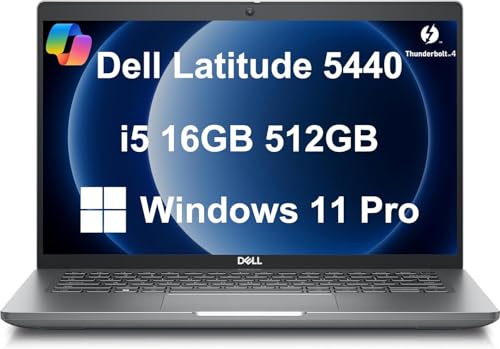 4. Dell Latitude 5440 — Best Value Business Laptop for a Dock |
| Check price on Amazon |
1. Lenovo ThinkPad T14 Gen 6 (AMD) — Best Overall for a Teacher’s Desk Setup
- Processor: AMD Ryzen AI 7 PRO 350
- Memory: 32GB DDR5-5600; Storage: 1TB SSD
- Display: 14-inch WUXGA touchscreen, 400 nits
- Docking ports: 2x USB-C (Thunderbolt 4 / USB4 40Gbps) with USB PD 3.0 and DisplayPort 2.1; HDMI 2.1 up to 4K/60Hz; Ethernet (RJ-45); 2x USB-A
The Lenovo ThinkPad T14 Gen 6 is the strongest all-round choice here for a teacher who wants one laptop for the classroom, the staff room, and a docking station at home. According to the Amazon listing, this configuration uses an AMD Ryzen AI 7 PRO 350 processor, 32GB of DDR5-5600 memory, and a 1TB SSD, with Windows 11 Pro installed. That combination covers the usual teaching workload with room to spare: a video call, a slide deck, a browser full of tabs, a document, and a gradebook can stay open together without the machine feeling crowded.
The display is a 14-inch WUXGA touchscreen rated at 400 nits, a brightness level that helps under classroom lights and near windows. The touchscreen is useful for annotating slides without reaching for a mouse. The listing also includes a backlit keyboard, a fingerprint reader, and a 5-megapixel RGB and infrared camera, which suits video lessons and remote parent meetings.
Docking is where this model earns its place at the top. According to the Amazon listing, it has two USB-C ports with Thunderbolt 4 and USB4 at 40Gbps, with USB Power Delivery 3.0 and DisplayPort 2.1, plus HDMI 2.1 up to 4K at 60Hz, two USB-A ports, an Ethernet RJ-45 port, and a headphone and microphone combination jack. The listing states that various docking solutions are supported via USB-C. In practice, a single Thunderbolt cable from a compatible dock can charge the laptop, connect a monitor, and link a keyboard, mouse, and wired network, while HDMI stays free for a projector.
Key specifications (according to the Amazon listing):
2. Lenovo ThinkPad T14 Gen 5 (Intel) — Best for Multi-Monitor Classrooms
- Processor: Intel Core Ultra 5 125U, 12 cores, up to 4.3GHz
- Memory: 32GB DDR5 RAM; Storage: 1TB NVMe SSD
- Display: 14-inch FHD+ IPS, 1920 x 1200, anti-glare
- Docking ports: 2x Thunderbolt 4; 2x USB-A 3.2 Gen 1 (1 always on); HDMI 2.1; Ethernet (RJ-45)
The Lenovo ThinkPad T14 Gen 5 with Intel is a good fit for a teacher who works with more than one screen. According to the Amazon listing, this configuration uses an Intel Core Ultra 5 125U processor with 12 cores and a maximum turbo frequency of up to 4.3GHz, 32GB of DDR5 RAM, and a 1TB NVMe SSD, with Windows 11 Pro installed. The 32GB of memory is the detail that makes the biggest difference in daily teaching, because it leaves room for a video call, a learning management system, a slide deck, and a spreadsheet to run at the same time.
The display is a 14-inch FHD+ IPS panel (1920 x 1200) with an anti-glare finish. Its taller 16:10 aspect ratio shows more of a document or gradebook, so there is less scrolling when marking work. The listing also includes a 5-megapixel webcam, a fingerprint reader, and a backlit keyboard.
For a docking station setup, the port list is the main attraction. According to the Amazon listing, this laptop has two Thunderbolt 4 ports, two USB-A 3.2 Gen 1 ports with one always-on port, HDMI 2.1, Ethernet (RJ-45), and a headphone and microphone combination jack. The listing states that it supports expansion to three monitors via HDMI and Thunderbolt 4 ports, with a maximum supported resolution of 4K at 60Hz. That makes it practical for a desk with a main monitor and a second display, or for a laptop screen, monitor, and projector working together. The listing also notes MIL-STD 810G military-grade certification, a useful reassurance for a laptop carried daily.
Key specifications (according to the Amazon listing):
3. HP EliteBook 840 G11 — Best for Heavy Multitasking
- Processor: Intel Core Ultra 7 155U, 12 cores, up to 4.8GHz
- Memory: 64GB DDR5; Storage: 2TB PCIe SSD
- Display: 14-inch IPS WUXGA
- Docking ports: 2x Thunderbolt 4; HDMI 2.1; 2x USB-A; headphone and microphone combination jack
The HP EliteBook 840 G11 is the pick for a teacher whose laptop is also a planning, recording, and administration machine. According to the Amazon listing, this configuration uses an Intel Core Ultra 7 155U processor with 12 cores and a maximum turbo frequency of up to 4.8GHz, 64GB of DDR5 memory, and a 2TB PCIe SSD, with Windows 11 Pro installed. The 64GB of memory and 2TB of storage are far above the minimum for teaching, and they make sense if you keep years of lesson files, videos, and resources on the laptop, or regularly run several large applications at once.
The display is a 14-inch IPS WUXGA panel, which gives a clear image from different viewing angles — useful when a student leans in to look at the screen, or when the laptop is used as a second display. The listing includes a backlit keyboard, a fingerprint reader, and an FHD webcam.
Docking support is straightforward. According to the Amazon listing, this EliteBook 840 G11 configuration has two Thunderbolt 4 ports, along with HDMI 2.1, two USB-A ports, and a headphone and microphone combination jack, supporting docking, external displays, and essential peripherals. With a compatible USB-C or Thunderbolt dock, one cable can handle charging, a monitor, and desk peripherals, while the second Thunderbolt 4 port remains free. The listing also notes Wi-Fi 6E and Bluetooth 5.3. This is the most powerful configuration in this guide, with the most headroom for several school years. Before ordering, check the exact configuration on the Amazon listing, because the EliteBook 840 G11 is sold in several combinations.
Key specifications (according to the Amazon listing):
4. Dell Latitude 5440 — Best Value Business Laptop for a Dock
- Processor: Intel Core i5-1345U vPro, 10 cores
- Memory: 16GB RAM; Storage: 512GB SSD
- Display: 14-inch FHD anti-glare
- Docking ports: 2x Thunderbolt 4 (USB4 Type-C); 2x USB 3.2 Gen 1 Type-A; HDMI 2.0; Ethernet (RJ-45)
The Dell Latitude 5440 is a sensible, budget-conscious choice for a teacher who wants a proper business laptop and a clean docking station setup without paying for the highest memory and storage tier. According to the Amazon listing, this configuration uses an Intel 10-core Core i5-1345U vPro processor, 16GB of RAM, and a 512GB SSD, with Windows 11 Pro with Copilot installed. That is enough for the core teaching tasks: video calls, slides, documents, a browser, and a gradebook, with a little room to spare.
The display is a 14-inch FHD anti-glare panel, a practical choice for bright classrooms. The listing includes a 1080p infrared webcam, useful for video lessons and Windows Hello sign-in, plus Wi-Fi 6E and Bluetooth 5.3.
The docking story is strong for the price. According to the Amazon listing, the Latitude 5440 has two Thunderbolt 4 (USB4 Type-C) ports, two USB 3.2 Gen 1 Type-A ports, HDMI 2.0, Ethernet (RJ-45), and an audio combination jack. The listing states that it can connect three external monitors via HDMI and Thunderbolt ports at 4K (3840 x 2160) at 60Hz. That means a teacher can keep the laptop on a dock, drive a main monitor, and still have a second display or projector available without unplugging the dock. Note the warranty wording: according to the listing, the computer has been resealed to upgrade the memory and SSD, with a three-year seller warranty on the upgraded parts and a one-year manufacturer warranty on the rest.
Key specifications (according to the Amazon listing):
Buying Guide: How to Choose a Laptop for a Docking Station
Start with the port, not the processor
Look for Thunderbolt 4 or USB4 with Power Delivery and DisplayPort support, because that combination lets one cable carry power, video, data, and a network connection. A USB-C port that only charges will not drive a monitor through a dock. Two Thunderbolt 4 ports are better than one, because you can leave the dock connected and still plug in a second display or drive. All four laptops here have two Thunderbolt 4 ports, plus HDMI and Ethernet.
Check what the dock needs
Check the power and display requirements of the dock you own or plan to buy. Some docks need 65 watts of Power Delivery, while others need 90 or 100 watts to charge a laptop while driving two monitors. Some support two displays at 4K, while others support only one at 4K. A Thunderbolt dock needs a Thunderbolt port to reach its full capacity, so match the laptop to the dock.
Choose memory for a full teaching day
A teacher’s laptop often runs a video call, slides, a browser with many tabs, a document, and a gradebook at the same time. For that workload, 16GB is a practical minimum, and 32GB is safer if you keep many tabs open or edit video for lessons. The Latitude 5440 here has 16GB, both ThinkPad T14 models have 32GB, and the EliteBook 840 G11 has 64GB.
Pick a screen you can read anywhere
A 14-inch display is a good balance: large enough for planning and marking, small enough to carry between rooms. Look for 300 nits or more, and an anti-glare finish for bright classrooms. A resolution of 1920 x 1200 shows more of a document than 1920 x 1080. The ThinkPad T14 Gen 6 here has a 400-nit touchscreen, the brightest display in this selection.
Do not forget the camera, microphone, and keyboard
A 5-megapixel camera or a 1080p webcam is a noticeable step up from an older 720p camera, and a privacy shutter is useful in a classroom. A backlit keyboard matters for early-morning or late-evening marking, and a fingerprint reader makes sign-in faster. All four laptops here include both, according to their Amazon listings. Also check that the laptop runs your school’s software, including its learning management system and video conferencing tools.
Frequently Asked Questions
Do I need a Thunderbolt laptop for a docking station?
Not always, but it helps. A full-featured USB-C port with DisplayPort and Power Delivery can work with many USB-C docks, while Thunderbolt 4 works with both USB-C and Thunderbolt docks, and can drive more displays at higher resolutions. If you own a Thunderbolt dock, choose a laptop with Thunderbolt 4.
Can one cable really connect everything on my desk?
Yes, with the right laptop and dock. A compatible Thunderbolt or USB-C dock can charge the laptop, drive one or two monitors, and connect a keyboard, mouse, webcam, and wired network through a single cable. The laptops here have two Thunderbolt 4 ports, so one can stay connected to the dock while the other remains free.
Is 16GB of RAM enough for a teacher?
For most teaching tasks, yes. A laptop with 16GB can handle video calls, slides, documents, a browser, and a gradebook at the same time, as in the Dell Latitude 5440 here. If you keep many tabs open or work with large video files, 32GB gives more headroom. Both ThinkPad T14 models here have 32GB, and the EliteBook 840 G11 has 64GB.
What is the difference between a USB-C dock and a Thunderbolt dock?
A USB-C dock uses a standard USB-C connection with DisplayPort and Power Delivery, and usually supports one or two displays. A Thunderbolt dock offers higher bandwidth, can often drive two 4K displays, transfer data faster, and charge the laptop at the same time. It needs a Thunderbolt port on the laptop to reach its full capacity.
Should I use the laptop screen or an external monitor with a dock?
Use both. An external monitor is better for planning, marking, and long writing sessions, because it is larger and sits at eye level. The laptop screen is useful as a second display for a video call or a reference document. With a dock, you can keep the laptop open beside the monitor, or close it and use only the external display.
Conclusion
The best laptops for teachers with docking station setups are business laptops with Thunderbolt 4, enough memory for a full teaching day, a readable 14-inch display, and a reliable keyboard and camera. The Lenovo ThinkPad T14 Gen 6 (AMD) is the best overall choice, with a bright touchscreen, 32GB of memory, and two Thunderbolt 4 ports with Power Delivery and DisplayPort 2.1. The Lenovo ThinkPad T14 Gen 5 (Intel) is the best choice for a multi-monitor classroom, with support for up to three monitors via HDMI and Thunderbolt 4. The HP EliteBook 840 G11 is the best choice for heavy multitasking, with 64GB of memory and 2TB of storage. The Dell Latitude 5440 is the best value choice, with two Thunderbolt 4 ports, support for three external monitors at 4K at 60Hz, and a practical 16GB and 512GB configuration. Before you order, open the Amazon listing for the exact configuration you want and check the processor, memory, storage, ports, and warranty wording. Docking compatibility depends on the exact port and power details, not just the model name. Once that check is done, a single cable can turn a teacher’s laptop into a full desk setup in seconds.
Related guides
More from Amazon
Programs that pair well with the guide above. Offers and eligibility are set by Amazon and may change.
Free shipping on eligible items, Prime Video and more. Eligible new members can start with a free trial.
Start a Prime free trialAd-free music streaming. Eligible new subscribers can start with a free trial.
Try Music Unlimited freeA Prime membership for ages 18-24 with a trial period. Eligibility is set by Amazon.
See Prime for Young AdultsAudiobooks and podcasts to listen to on the go. Eligible new members can start with a free trial.
Try Audible freeAs an Amazon Associate we earn from qualifying purchases.










Write Your Review
No reviews yet. Be the first to share your experience!