
Our Short List of 3

- Processor: Intel Core Ultra 9 185H, 16 cores
- Memory: 32GB LPDDR5X
- Storage: 1TB PCIe NVMe SSD
- Display: Dual 14-inch OLED touch, 2880 x 1800 each, 120Hz
- Processor: Intel Core Ultra 7 155H, 16 cores
- Memory: 16GB DDR5
- Storage: 2TB PCIe NVMe SSD
- Display: 16.3-inch FHD+ 1920 x 1200 InfinityEdge

- Processor: Intel Core Ultra 7 155H
- Memory: 16GB LPDDR5X
- Storage: 2TB PCIe NVMe SSD
- Display: 17-inch WQXGA 2560 x 1600 IPS, anti-glare
All 5 Picks at a Glance
| Product | Specs | Action |
|---|---|---|
| ASUS Zenbook Duo (UX8406MA-PS99T) |
| Check price on Amazon |
| Dell XPS 16 (9640) |
| Check price on Amazon |
| LG gram 17 (17Z90S-H.ADB7U1) |
| Check price on Amazon |
 Lenovo ThinkPad T16 Gen 3 |
| Check price on Amazon |
 HP Pavilion Plus 16 (16-ab1010nr) |
| Check price on Amazon |
Key takeaways
- Keep dozens of apps and tabs open at once without slowdowns. These picks pair 16GB or 32GB RAM, multi-core chips and big screens for window-heavy days.
What's inside
As an Amazon Associate I earn from qualifying purchases. This post may contain affiliate links at no extra cost to you.
Working with many windows open at once is a specific kind of workload. A typical heavy session might include two browser windows with dozens of tabs between them, a spreadsheet, a document editor, a chat client, an email app, a video call and a couple of background tools, all visible or one click away. That pattern punishes three things: memory, because every open window holds data in RAM; processor headroom, because calls, sync tools and page renders compete for cores; and screen space, because small or low-resolution displays force constant shuffling between stacked windows.
This guide is about the laptop hardware itself: memory capacity, multi-core processors, large or high-resolution displays, and the video outputs needed to spread windows across one or two external monitors. It is a different question from choosing a docking station, which is covered in a separate guide on this site; here the focus stays on machines that remain responsive with a crowded desktop and give those windows room to breathe. Every pick below carries at least 16GB of RAM, and several carry 32GB for genuinely heavy multitaskers.
As an Amazon Associate, we earn from qualifying purchases.
ASUS Zenbook Duo (UX8406MA-PS99T)
- Processor: Intel Core Ultra 9 185H, 16 cores
- Memory: 32GB LPDDR5X
- Storage: 1TB PCIe NVMe SSD
- Display: Dual 14-inch OLED touch, 2880 x 1800 each, 120Hz
Tier: premium
The Zenbook Duo answers the screen-space problem in the most direct way possible: it builds two displays into one laptop. Two 14-inch OLED touchscreens sit one above the other once the detachable Bluetooth keyboard is lifted away, and Windows treats them as two separate monitors, so a document can fill the upper panel while reference material, chat and a browser spread across the lower one. For window-heavy work away from a desk, nothing else in this roundup offers as much visible workspace.
The hardware underneath matches the concept. The Intel Core Ultra 9 185H brings 16 cores for parallel app loads, and 32GB of LPDDR5X memory gives dozens of windows room before the system starts leaning on the SSD. A 1TB PCIe SSD keeps app launches and file swaps quick, and Intel Arc graphics drive both panels plus an external display through the Thunderbolt 4 and HDMI outputs when the laptop is docked at a desk.
The trade-offs are thickness and the learning curve of a two-screen layout. Owners who split attention between a main task and constant reference material tend to adapt quickly; people who mostly maximise one window at a time will not use the second panel enough to justify it. Battery expectations should also be modest when both OLED panels run at full brightness.
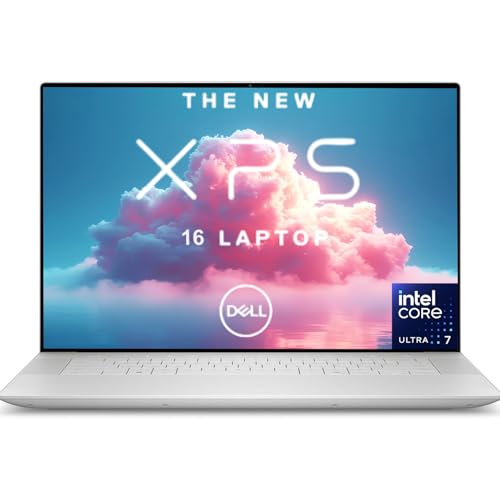
Dell XPS 16 (9640)
- Processor: Intel Core Ultra 7 155H, 16 cores
- Memory: 16GB DDR5
- Storage: 2TB PCIe NVMe SSD
- Display: 16.3-inch FHD+ 1920 x 1200 InfinityEdge
Tier: premium
The XPS 16 is the single-screen powerhouse of this group. Its 16.3-inch display uses a 16:10 aspect ratio, which adds vertical room that matters when windows are tiled side by side: two documents fit next to each other with more lines visible in each than on a typical 16:9 panel. The CNC-milled aluminium chassis and near-borderless InfinityEdge design keep the footprint closer to a 15-inch machine.
Performance headroom is generous. The Core Ultra 7 155H offers 16 cores, and the NVIDIA GeForce RTX 4050 dedicated graphics take display and rendering work off the main processor, which helps when video calls, screen sharing and graphics-heavy pages run at the same time. The 16GB of DDR5 memory meets the floor for heavy window use, and the 2TB SSD provides ample room for large local file collections. All three Thunderbolt 4 ports carry DisplayPort video, so two external monitors can join the internal panel for a three-screen desk setup.
The XPS 16 suits multitaskers who also run demanding single apps, such as photo editors or light 3D tools, alongside their window stack. Shoppers who want 32GB of memory as standard should look at the ThinkPad or Zenbook Duo in this list instead, and note that every peripheral connects over USB-C, so older USB-A accessories need an adapter or hub.
LG gram 17 (17Z90S-H.ADB7U1)
- Processor: Intel Core Ultra 7 155H
- Memory: 16GB LPDDR5X
- Storage: 2TB PCIe NVMe SSD
- Display: 17-inch WQXGA 2560 x 1600 IPS, anti-glare
Tier: mid-range
The gram 17 makes its case with the largest screen in this roundup and the lightest body. The 17-inch WQXGA panel packs 2560 x 1600 pixels into a 16:10 layout, enough room to tile three columns of windows or run two full documents beside a chat column without shrinking text to uncomfortable sizes. Despite the big display, the laptop weighs under three pounds, which makes it unusually practical for people who move between rooms or sites during the day.
The Core Ultra 7 processor and 16GB of LPDDR5X memory handle a crowded desktop of office apps, browsers and calls comfortably, and the 2TB SSD is the joint-largest storage allocation here. Port selection is the most complete of the thin-and-light picks: two Thunderbolt 4 ports for modern monitors and docks, a full-size HDMI port for a direct monitor or projector connection, two USB-A ports for existing peripherals, and a microSD slot.
This is the pick for readers whose multitasking is mostly many medium-weight windows rather than a few very heavy applications. The memory is fixed at 16GB, so anyone who already knows their workload swells past that should step up to a 32GB model instead of planning an upgrade that the soldered design does not allow.
Lenovo ThinkPad T16 Gen 3
- Processor: Intel Core Ultra 7 155U, 12 cores, up to 4.8 GHz
- Memory: 32GB DDR5
- Storage: 1TB PCIe NVMe SSD
- Display: 16-inch FHD+ 1920 x 1200 IPS
Tier: mid-range
The ThinkPad T16 Gen 3 is the business-grade workhorse of the group, configured here with 32GB of DDR5 memory and a 1TB SSD. That memory figure is the headline for this guide: with 32GB, a desktop full of browser windows, office documents, a database front end and a video call can stay open all day without the system resorting to heavy paging. The 12-core Intel Core Ultra 7 155U processor is tuned for sustained office workloads rather than short bursts, which suits long multitasking sessions.
The 16-inch FHD+ display uses the taller 1920 x 1200 resolution, and the port layout is built for desk work: two Thunderbolt 4 ports, HDMI, USB-A and a full-size Ethernet jack for a wired connection that stays stable during calls. A 5MP webcam, fingerprint reader and Windows 11 Pro round out a configuration aimed at managed work environments and independent professionals alike.
ThinkPad keyboards remain a draw for people who type across many windows all day, and the TrackPoint gives a pointing option that does not require lifting a hand to a mouse. The display resolution is the modest part of this configuration; buyers who tile many small windows may prefer the higher pixel counts of the LG gram 17 or HP Pavilion Plus 16, while buyers who prioritise memory headroom and ports will find this the most balanced desk machine here.
HP Pavilion Plus 16 (16-ab1010nr)
- Processor: Intel Core Ultra 7 155H, 16 cores and 22 threads
- Memory: 16GB LPDDR5x
- Storage: 512GB PCIe Gen4 NVMe SSD
- Display: 16-inch WQXGA 2560 x 1600 IPS, 120Hz
Tier: budget
The Pavilion Plus 16 delivers the core multitasking recipe at the most accessible tier in this roundup: a 16-inch WQXGA display with 2560 x 1600 resolution and a 120Hz refresh rate, 16GB of fast LPDDR5x memory, and a 16-core Intel Core Ultra 7 155H processor. That combination keeps window switching fluid and lets two or three documents sit side by side at readable sizes, which is exactly what window-heavy work demands.
Display output is well covered for the tier. A Thunderbolt 4 port and an HDMI 2.1 port can each drive an external monitor, so a two-screen desk setup is possible without giving up the internal display, and two USB-A ports handle a keyboard and mouse directly. The 512GB SSD is the smallest here, which is the main compromise; readers with large local archives should budget attention for storage management or cloud sync.
For students, home-office workers and anyone whose window count grew faster than their hardware, this is the sensible entry point into the category. It covers the fundamentals, memory, cores, pixels and monitor outputs, without paying for dedicated graphics or a dual-screen chassis.
How to Choose
Start with memory. RAM decides how many windows stay instantly responsive. 16GB is the working minimum for a desktop that mixes browsers, office apps, chat and calls, and it is the right target for most people. Step up to 32GB if your routine includes virtual machines, large spreadsheets with many linked files, data tools, design apps, or browser sessions that regularly run past a hundred tabs. Memory is soldered in most thin laptops, so choose the capacity you will need in three years, not the one that barely works today.
Count cores, then clock behaviour. Multitasking spreads work across cores, so processors with more cores and threads, like the 16-core chips in several picks here, keep calls and background sync from stealing time from the window in front of you. Efficiency-focused chips such as the Ultra 7 155U trade peak speed for cooler, quieter sustained running, which many desk workers prefer.
Measure screen space in pixels, not just inches. A 16-inch 1920 x 1200 panel and a 16-inch 2560 x 1600 panel are the same size but very different workspaces; the higher resolution fits more window content before text becomes too small to read. Taller 16:10 screens help documents and web pages. Dual-screen designs like the Zenbook Duo sidestep the question by adding a second full panel.
Plan your monitor outputs. If windows will spill onto external screens, confirm the laptop can drive them. Thunderbolt 4 and USB-C ports with DisplayPort support each run at least one external monitor, and HDMI offers a simple direct connection. Two video-capable ports plus the internal display is the practical target for a three-screen desk.
Mind storage and weight. A busy multitasker accumulates downloads, caches and project files, so 1TB is comfortable and 512GB is workable with cloud storage. Finally, match weight to your routine: a 17-inch screen at under three pounds, like the gram 17, travels far better than its size suggests, while heavier premium machines earn their keep at a fixed desk.
Frequently Asked Questions
How much RAM do I need for working with many windows open?
For a typical mix of browsers, office documents, chat and video calls, 16GB is the sensible minimum and keeps window switching responsive. If you add virtual machines, heavy data tools or very large tab collections to that mix, 32GB gives the system enough headroom to avoid slowing down as the day goes on.
Is a bigger screen or a second monitor better for multitasking?
They solve the same problem differently. A large, high-resolution laptop panel, such as a 17-inch 2560 x 1600 display, keeps everything in one place and travels with you. External monitors add more total space at a fixed desk and usually cost less per inch. Many people combine both: a high-resolution laptop for mobile work and one external monitor at home.
Can these laptops run two external monitors at once?
Yes, provided the ports support it. Models here with two Thunderbolt 4 ports, or a Thunderbolt 4 port plus HDMI, can drive two external displays while the internal screen stays active. Check that your monitors or cables match the ports, since some setups need USB-C to DisplayPort or HDMI cables rather than adapters stacked together.
Does a dedicated graphics card help with everyday window multitasking?
For office apps, browsers and calls, integrated graphics such as Intel Arc handle multiple windows and high-resolution displays without trouble. A dedicated card like the RTX 4050 in the XPS 16 helps when the window stack includes photo or video editing, 3D tools or GPU-accelerated apps, and it can ease the load on the main processor during screen sharing.
Final Verdict
Heavy window multitasking rewards three purchases: memory, cores and pixels. The ASUS Zenbook Duo is the standout for pure workspace, folding two full OLED screens into a laptop bag with 32GB of memory behind them. The Lenovo ThinkPad T16 Gen 3 is the balanced desk choice, pairing 32GB of RAM with the best port selection and business build. The LG gram 17 offers the biggest single screen at the lowest weight, the Dell XPS 16 adds dedicated graphics for mixed creative workloads, and the HP Pavilion Plus 16 covers the essentials at the most approachable tier. Match the pick to where your windows actually live, on the move, at one desk, or spread across external monitors, and any of these machines will keep a crowded desktop feeling calm.
Product and ASIN Reference
| Product | ASIN |
|---|---|
| ASUS Zenbook Duo UX8406MA-PS99T (Core Ultra 9, 32GB, 1TB) | B0CRD6PJDF |
| Dell XPS 16 9640 (Core Ultra 7, 16GB, 2TB, RTX 4050) | B0G75TL4V2 |
| LG gram 17 17Z90S-H.ADB7U1 (Core Ultra 7, 16GB, 2TB) | B0CTCZY4V8 |
| Lenovo ThinkPad T16 Gen 3 (Core Ultra 7, 32GB, 1TB) | B0DLGQ5TCW |
| HP Pavilion Plus 16-ab1010nr (Core Ultra 7, 16GB, 512GB) | B0CZSFV1TM |
Related guides
More from Amazon
Programs that pair well with the guide above. Offers and eligibility are set by Amazon and may change.
Free shipping on eligible items, Prime Video and more. Eligible new members can start with a free trial.
Start a Prime free trialAd-free music streaming. Eligible new subscribers can start with a free trial.
Try Music Unlimited freeA Prime membership for ages 18-24 with a trial period. Eligibility is set by Amazon.
See Prime for Young AdultsAudiobooks and podcasts to listen to on the go. Eligible new members can start with a free trial.
Try Audible freeAs an Amazon Associate we earn from qualifying purchases.










Write Your Review
No reviews yet. Be the first to share your experience!