
Our Short List of 3
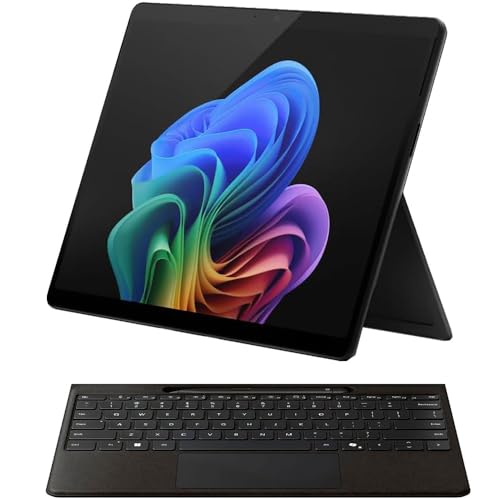
- CPU: Qualcomm Snapdragon X Elite
- RAM: 16GB
- Storage: 1TB SSD
- Display: 13-inch OLED touch, 2880 x 1920, 120Hz, Surface Slim Pen 2 support with 4,096 pressure levels

- CPU: Intel Core Ultra 7 258V
- RAM: 32GB LPDDR5X
- Storage: 1TB SSD
- Display: 14-inch OLED touch, 2880 x 1800, wide DCI-P3 color coverage, active pen included

- CPU: Intel Core Ultra 7 155H
- RAM: 16GB LPDDR5
- Storage: 1TB SSD
- Display: 16-inch Dynamic AMOLED 2X touch, 2880 x 1800, 120Hz, S Pen included with 4,096 pressure levels
All 5 Picks at a Glance
| Product | Specs | Action |
|---|---|---|
| Microsoft Surface Pro 11 — Premium |
| Check price on Amazon |
| Lenovo Yoga 9i 2-in-1 Aura Edition — Premium |
| Check price on Amazon |
| Samsung Galaxy Book4 Pro 360 — Mid-Range |
| Check price on Amazon |
 HP Spectre x360 14 — Mid-Range |
| Check price on Amazon |
 Lenovo Yoga 7i 2-in-1 14 — Budget |
| Check price on Amazon |
Key takeaways
- Procreate is iPad-only, so these pen-enabled 2-in-1 laptops offer the closest drawing workflow, with pressure-sensitive styluses and rich color displays.
What's inside
As an Amazon Associate I earn from qualifying purchases. This post may contain affiliate links at no extra cost to you.
Let’s clear up the most important fact first: Procreate is an iPad-only app. It is built exclusively for iPadOS and Apple Pencil, and no laptop — Windows, macOS, or ChromeOS — can run Procreate natively. Any roundup that claims otherwise is misleading you. If your heart is set on the exact Procreate app with its exact brush engine and gesture controls, the only honest answer is an iPad, and this guide is not for you.
So why do so many digital artists search for laptops for Procreate? Usually because they want that same natural, pen-on-glass drawing feeling — pressure-sensitive strokes, tilt support, palm rejection, a responsive canvas — inside a full computer that also runs desktop software, manages files like a proper machine, and plugs into a complete creative workflow. That is exactly what this guide covers: pen-enabled 2-in-1 laptops that deliver the closest Procreate-style drawing experience available on a laptop, using Windows drawing apps such as Clip Studio Paint, Krita, Adobe Photoshop and Fresco, Rebelle, and Concepts.
Every pick below is a convertible or detachable laptop with an active stylus digitizer, a color-rich touch display, and enough performance for large canvases with many layers. None of them runs Procreate itself, and we will not pretend otherwise — but each one gives artists the pen-first workflow that makes Procreate so appealing, with the added power of a real laptop underneath.
As an Amazon Associate, we earn from qualifying purchases.
Microsoft Surface Pro 11 — Premium
- CPU: Qualcomm Snapdragon X Elite
- RAM: 16GB
- Storage: 1TB SSD
- Display: 13-inch OLED touch, 2880 x 1920, 120Hz, Surface Slim Pen 2 support with 4,096 pressure levels
If one laptop family has defined pen-first computing, it is the Surface Pro line, and the Surface Pro 11 is its most polished form. The detachable design means the part you draw on is a slim tablet with a built-in kickstand, so the drawing surface sits at a natural angle on a desk or rests flat in your lap, just like sketching on a pad. Paired with the Surface Slim Pen 2, it offers 4,096 levels of pressure sensitivity, tilt support, and haptic feedback that mimics the subtle resistance of pen on paper.
The 13-inch OLED PixelSense Flow display is a genuine highlight for artists: the 2880 x 1920 resolution keeps fine line work crisp, the contrast of OLED makes dark scenes rich and layered, and the 120Hz refresh rate keeps strokes tracking closely under the pen tip. The Snapdragon X Elite processor handles large layered canvases in desktop drawing apps smoothly, and this configuration pairs it with generous memory and storage, so big project files and reference libraries are not a problem. This bundle includes the Surface Pro Keyboard, so it converts back into a full laptop for writing, browsing, and file management the moment you stop drawing.
Lenovo Yoga 9i 2-in-1 Aura Edition — Premium
- CPU: Intel Core Ultra 7 258V
- RAM: 32GB LPDDR5X
- Storage: 1TB SSD
- Display: 14-inch OLED touch, 2880 x 1800, wide DCI-P3 color coverage, active pen included
The Yoga 9i Aura Edition is the pick for artists who care most about color. Its 14-inch 2.8K OLED touchscreen covers the wide DCI-P3 color gamut used by digital art and video work, so the reds, teals, and skin tones you paint are the ones your audience will see. OLED contrast gives illustrations real depth, and the panel’s high brightness keeps the canvas readable in bright rooms where lesser screens wash out.
The 360-degree hinge folds the screen flat into tablet mode for drawing, and a pen is included in the box — an important detail, because it means the full drawing setup works from day one with nothing extra to buy. Inside, the Intel Core Ultra 7 258V processor and a large 32GB of memory give desktop art applications plenty of headroom for high-resolution canvases, while the 1TB SSD holds a serious library of finished pieces, brushes, and assets. The rotating soundbar hinge and slim metal chassis make it feel like a premium laptop when you are not drawing, too.
Samsung Galaxy Book4 Pro 360 — Mid-Range
- CPU: Intel Core Ultra 7 155H
- RAM: 16GB LPDDR5
- Storage: 1TB SSD
- Display: 16-inch Dynamic AMOLED 2X touch, 2880 x 1800, 120Hz, S Pen included with 4,096 pressure levels
Samsung’s Galaxy Book4 Pro 360 pairs the largest canvas in this roundup with one of the best styluses in the business. The 16-inch Dynamic AMOLED 2X display gives illustrators room to spread out — toolbars on one side, reference on the other, canvas in the middle — and its 2880 x 1800 resolution and 120Hz refresh rate keep both colors and pen strokes looking fluid.
The included S Pen is the headline feature for artists. It uses the same Wacom EMR technology found in dedicated drawing tablets, with 4,096 levels of pressure sensitivity, and it never needs charging or pairing — you simply pick it up and draw, and it attaches magnetically to the laptop when you are done. The Intel Core Ultra 7 processor, 16GB of memory, and 1TB of storage handle mainstream illustration and photo work comfortably, and the slim chassis stays easy to carry despite the big screen. For artists coming from Samsung tablets or phones, the familiar S Pen feel makes the transition especially easy.
HP Spectre x360 14 — Mid-Range
- CPU: Intel Core Ultra 7 155H
- RAM: 32GB LPDDR5
- Storage: 2TB SSD
- Display: 14-inch OLED touch, 2880 x 1800, 120Hz, MPP 2.0 tilt pen support
The Spectre x360 14 has been a favorite convertible for years, and this configuration is built for heavy creative multitasking: an Intel Core Ultra 7 155H processor, a very generous 32GB of memory, and 2TB of storage mean you can keep a drawing app, a browser full of references, and a chat app open at once without the canvas stuttering. That headroom matters when a single illustration file grows to dozens of layers at print resolution.
The 14-inch 2.8K OLED touchscreen delivers the deep blacks and wide color coverage illustrators want, in a slightly smaller and more portable frame than the Samsung above. The display supports HP’s MPP 2.0 tilt pen technology, so a compatible rechargeable tilt pen gives you pressure and angle-sensitive shading that feels close to working with a real pencil. The gem-cut metal chassis, strong speakers, and excellent keyboard also make it the most conventionally luxurious laptop here when the pen is put away.
Lenovo Yoga 7i 2-in-1 14 — Budget
- CPU: Intel Core Ultra 5 322
- RAM: 16GB LPDDR5X
- Storage: 2TB SSD
- Display: 14-inch OLED touch, 2256 x 1504, active pen support
The Yoga 7i is the sensible entry point into pen-enabled laptop drawing. You give up some of the flagship polish of its Yoga 9i sibling, but the essentials for a Procreate-style workflow are all here: a 14-inch 2K OLED touchscreen with rich color, a 360-degree hinge that folds flat for drawing, and active pen support, so pressure-sensitive sketching and inking in apps like Krita or Clip Studio Paint works the way artists expect.
This configuration runs an Intel Core Ultra 5 322 processor with 16GB of memory, which is comfortably matched to illustration, note-taking, and light photo editing, and it pairs that with a roomy 2TB SSD — more storage than several pricier picks in this list. At just over three pounds it is easy to carry between classes, studios, and coffee shops. For students, hobbyists, and anyone upgrading from a basic tablet who wants a real laptop keyboard and desktop software alongside the pen, this is the balanced choice.
How to Choose
Start with the pen technology. The stylus matters more than any other spec for drawing. Look for an active digitizer with at least 4,096 levels of pressure sensitivity, tilt support if you shade with the side of the pen, and palm rejection so you can rest your hand on the screen. Pens based on Wacom EMR technology, like Samsung’s S Pen, never need charging, while Microsoft Pen Protocol and AES pens usually need a battery or USB charging but are widely supported.
Prioritize the display. A drawing laptop’s screen is its canvas. OLED panels deliver the contrast and color accuracy that most closely match the rich look artists love in Procreate, and wide color gamut coverage (look for DCI-P3 coverage in the listing) keeps your colors honest. Resolution of 2.8K or similar on a 13- to 16-inch screen keeps lines smooth, and a 120Hz refresh rate reduces the visible lag between pen tip and stroke.
Match the form factor to your desk. Detachable designs like the Surface Pro put a light, pure tablet in your hands and are best for drawing on the couch or in bed. Convertibles with 360-degree hinges feel sturdier on a desk and keep a full keyboard attached, which suits artists who switch constantly between drawing and typing.
Do not skimp on memory and storage. Layered illustration files are demanding. Sixteen gigabytes of RAM is the comfortable minimum for serious canvas work, and 32GB gives high-resolution, many-layer projects room to breathe. Storage fills quickly with project files and backups, so a larger SSD saves you from juggling external drives.
Pick your drawing apps before you buy. Since Procreate itself is not available, your experience depends on the Windows app you choose. Clip Studio Paint is the closest in spirit for illustration and comics, Krita is a powerful free option, Adobe Fresco suits vector-and-raster painters, and Photoshop remains the standard for compositing and photo-based work. All five laptops here run these applications; the differences are in pen feel, screen quality, and headroom.
Frequently Asked Questions
Can any laptop actually run Procreate?
No. Procreate is developed exclusively for iPad and iPadOS, and there is no Windows, macOS, or ChromeOS version. The laptops in this guide cannot install or run Procreate. What they offer instead is the closest equivalent experience: pen-enabled touchscreens with pressure sensitivity running capable drawing apps such as Clip Studio Paint, Krita, and Adobe Fresco. If the genuine Procreate app is a must-have, you need an iPad with an Apple Pencil — no laptop qualifies.
Which Windows drawing app feels most like Procreate?
Clip Studio Paint is the most common recommendation for Procreate users moving to a laptop, because its brush engine, gesture shortcuts, and layer workflow feel familiar, and it is built for illustration and comics. Krita is the strongest free alternative with excellent brushes, and Adobe Fresco is a good fit if you like mixing vector and raster tools. Rebelle is worth a look if you love traditional watercolor and paint effects.
Is a pen included, or do I need to buy one separately?
It depends on the model. The Lenovo Yoga 9i Aura Edition and the Samsung Galaxy Book4 Pro 360 include a pen in the box, and this Surface Pro 11 bundle includes the keyboard while the Slim Pen 2 is a separate accessory. The HP Spectre x360 14 and Lenovo Yoga 7i support active pens that are often sold separately, so check the listing contents before ordering and budget for the matching pen if it is not included — pen compatibility is model-specific.
Does stylus pressure sensitivity really make a difference for drawing?
Yes — it is the single feature that separates a drawing laptop from a touchscreen laptop. Pressure sensitivity lets a stroke grow thicker and darker as you press harder, exactly like a real pencil or brush, and tilt support adds natural shading with the edge of the pen. Without an active digitizer, a screen only registers touch as on or off, which is fine for tapping and scrolling but frustrating for art. Every laptop in this guide has a proper active pen digitizer.
Final Verdict
There is no laptop that runs Procreate, and any buying guide that suggests otherwise is not being straight with you. What the best pen-enabled 2-in-1 laptops do offer is everything around that experience — natural pressure-sensitive drawing, beautiful color-accurate touchscreens, and full desktop software — in machines that also handle the rest of your computing life.
For the most tablet-like drawing feel, the Microsoft Surface Pro 11 is the standout, especially with the Slim Pen 2. For the finest color work in a classic laptop shape, choose the Lenovo Yoga 9i Aura Edition. The Samsung Galaxy Book4 Pro 360 wins on canvas size and its charge-free S Pen, the HP Spectre x360 14 is the multitasker’s pick with its big memory and storage, and the Lenovo Yoga 7i brings the same core drawing workflow to the most accessible tier. Pick based on the pen you like and the screen you want to stare at — the drawing will follow.
Product and ASIN Reference
| Product | ASIN |
|---|---|
| Microsoft Surface Pro 11 (Snapdragon X Elite, 16GB, 1TB, keyboard bundle) | B0DN2YY381 |
| Lenovo Yoga 9i 2-in-1 Aura Edition (Core Ultra 7 258V, 32GB, 1TB) | B0FTCGYXTM |
| Samsung Galaxy Book4 Pro 360 16-inch (Core Ultra 7, 16GB, 1TB) | B0FL7BLK6Q |
| HP Spectre x360 14 (Core Ultra 7 155H, 32GB, 2TB) | B0DM576K21 |
| Lenovo Yoga 7i 2-in-1 14 (Core Ultra 5 322, 16GB, 2TB) | B0HR31K3L9 |
Related guides
More from Amazon
Programs that pair well with the guide above. Offers and eligibility are set by Amazon and may change.
Free shipping on eligible items, Prime Video and more. Eligible new members can start with a free trial.
Start a Prime free trialAd-free music streaming. Eligible new subscribers can start with a free trial.
Try Music Unlimited freeA Prime membership for ages 18-24 with a trial period. Eligibility is set by Amazon.
See Prime for Young AdultsAudiobooks and podcasts to listen to on the go. Eligible new members can start with a free trial.
Try Audible freeAs an Amazon Associate we earn from qualifying purchases.










Write Your Review
No reviews yet. Be the first to share your experience!