
Key takeaways
- Looking for the best external blue ray drive for laptops? Compare four USB Blu-ray writers for movies, backups, and archiving, plus expert buying tips.
What's inside
As an Amazon Associate I earn from qualifying purchases. This post may contain affiliate links at no extra cost to you.
If you are searching for the best external blue ray drive for laptops, you are really looking for an external Blu-ray drive. “Blue ray” is a common misspelling of Blu-ray, the high-definition optical disc format, and every drive in this guide reads and writes Blu-ray discs, DVDs, and CDs through a USB connection. Most modern laptops ship without any optical drive at all, so an external model is the only way to watch a Blu-ray movie, install software from a disc, or burn a large backup to disc.
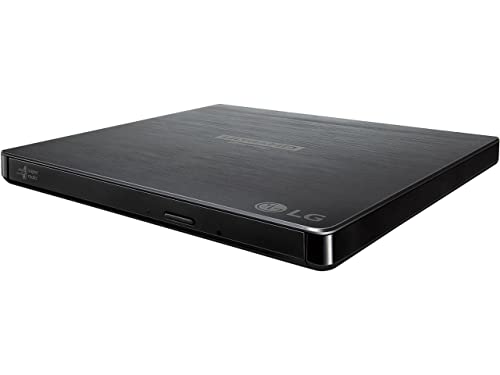

Quick answer: For most laptop owners, the LG BP60NB10 is the safest all-round pick, with 6x Blu-ray writing, BDXL and M-DISC support, and bundled software in an ultra-slim body. If you want 4K UHD Blu-ray reading in a portable metal enclosure, the Archgon Premium Aluminum UHD 4K writer is the stronger choice. For heavy archiving at a desk, the mains-powered ASUS BW-16D1X-U writes Blu-ray discs faster than any slim portable drive. The LG WP50NB40 is the budget-friendly bundle option, arriving with an M-DISC and burning software included.
Quick Picks
Our Short List of 3
All 4 Picks at a Glance
| Product | Specs | Action |
|---|---|---|
| LG BP60NB10 (B079LTC6ML) | Check price on Amazon | |
| Archgon Premium Aluminum UHD 4K Blu-Ray Writer (B07BC9F98J) | Check price on Amazon | |
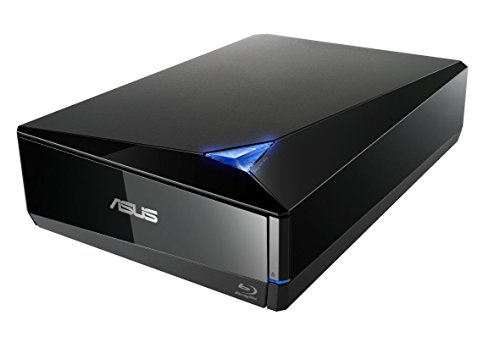 ASUS BW-16D1X-U (B071VP89X1) | Check price on Amazon | |
 LG WP50NB40 (B011327QXC) | Check price on Amazon |
How to Choose the Best External Blue Ray Drive for Laptops
Reader or writer
The first decision is whether you only need to read discs or also want to write them. A Blu-ray reader can play movies and copy files from discs, but it cannot burn a backup or create a disc. Every drive in this guide is a writer, which means it reads and writes Blu-ray, DVD, and CD media. A writer costs a little more than a reader-only model, but it covers both jobs, and it is the better choice if you ever plan to archive photos, videos, or documents to disc.
USB connection and power
Slim portable drives draw their power from the laptop’s USB port, so they need no wall outlet and travel well in a bag. Full-size desktop drives, such as the ASUS BW-16D1X-U, use a separate AC adapter, which gives them steadier power for long burns but ties them to a desk. Check your laptop’s ports before you buy. Many newer laptops have only USB-C ports, so a drive with a USB-A cable needs an adapter, while a drive that ships with both USB-C and USB-A cables connects directly either way.
USB 2.0 versus USB 3.0
USB 2.0 is fast enough for 6x Blu-ray writing, which is the top speed of most slim portable drives. USB 3.0 matters more for 16x desktop writers, where the faster interface keeps up with the higher burn speed, and it also helps when you are reading large amounts of data from a disc. Do not assume a drive is USB 3.0 just because the box says so; some listings describe a drive as USB 3.0 compatible while the drive itself connects over USB 2.0. The specification table on the product page is the reliable source.
4K UHD Blu-ray playback
Not every Blu-ray drive can handle 4K Ultra HD Blu-ray discs, and playback is a separate question from reading data. A drive that reads UHD discs still needs compatible playback software and a laptop that meets the software’s hardware requirements. On Windows, licensed UHD Blu-ray movie playback has become harder because the Intel SGX security feature it relied on was removed from newer processors. If watching commercial 4K UHD movies on your laptop is the main goal, confirm the software and hardware requirements before ordering. If your goal is data backup, ripping standard Blu-ray discs, or watching regular 1080p Blu-ray movies, any of the drives below will serve you.
BDXL and M-DISC support
A standard single-layer Blu-ray disc holds 25GB and a dual-layer disc holds 50GB. BDXL discs raise that to 100GB or 128GB on a single disc, which makes them useful for large photo libraries and video projects. M-DISC is a different kind of recordable disc designed for long-term archiving, with a data layer that resists the degradation ordinary recordable discs can suffer over time. If you are buying a drive mainly to preserve family photos or work files for years, BDXL and M-DISC support are worth having.
Portability versus speed
A slim drive weighing around half a pound slips into a laptop sleeve and works anywhere. A full-size drive writes discs much faster and is steadier during long burns, but it needs a power outlet and a flat surface, and it is not something you carry to a coffee shop. Match the form factor to where you will actually use the drive. A portable drive used at a desk is fine; a desktop drive bought for travel is a mistake.
Software and operating system
Blu-ray burning and movie playback need software, and what ships in the box varies. Some drives bundle CyberLink software for Windows, while others include only a download code or nothing at all. macOS has no built-in Blu-ray movie playback, so Mac users need third-party software for movies, although burning data discs and reading discs work through the system. Check the drive’s stated operating system support and whether the bundled software matches the system you use.
The Best External Blue Ray Drive for Laptops Reviewed
LG BP60NB10 (B079LTC6ML)
The LG BP60NB10 is the best external Blu-ray drive for most laptops because it balances portability, format support, and bundled software. It writes Blu-ray discs at up to 6x, reads and writes BDXL discs up to 100GB, and supports M-DISC for long-term archiving. It also supports Ultra HD Blu-ray, and it includes CyberLink software for Windows. LG’s Silent Play technology controls the disc spin speed to keep movie playback quieter, and its Jamless Play feature skips past damaged sections of a disc to keep playback smooth.
The drive connects over USB 2.0 and draws its power from the laptop, so there is no power brick to carry. Its ultra-slim body weighs about 0.6 pounds, which makes it easy to pack alongside a laptop. It works with Windows, macOS, and Linux for reading and burning data discs.
Who it suits: Laptop owners who want one portable drive for Blu-ray movies, DVD and CD playback, and occasional data backups, without needing a power outlet.
Who should skip it: Anyone who needs the fastest possible burn speeds or a USB 3.0 connection should look at the desktop ASUS below, and USB-C-only laptop owners should plan on an adapter since the drive ships with a USB-A cable.
Archgon Premium Aluminum UHD 4K Blu-Ray Writer (B07BC9F98J)
The Archgon Premium Aluminum writer is the best portable choice for 4K UHD Blu-ray. It reads UHD Blu-ray discs, writes standard Blu-ray discs at up to 6x, supports BDXL discs up to 128GB, and supports M-DISC. Its CNC-milled aluminum body is sturdier than the plastic shells on most slim drives, and it ships with a protective carrying case, which suits a drive that will travel in a bag.
Unlike most slim drives, it connects over USB 3.0 and ships with both USB-C and USB-A cables, so it plugs directly into older laptops and newer USB-C-only machines without an adapter. It is bus-powered, so no wall outlet is needed, and it works with Windows and macOS.
Who it suits: Laptop owners who want UHD Blu-ray reading in a portable drive, anyone with a USB-C-only laptop who wants to avoid adapters, and buyers who prefer a metal enclosure.
Who should skip it: Anyone who mainly burns large batches of discs at a desk will finish faster with the mains-powered ASUS, and Mac users should note that full UHD movie playback support is more limited on macOS than on Windows.
ASUS BW-16D1X-U (B071VP89X1)
The ASUS BW-16D1X-U is the fastest external Blu-ray writer in this guide and the best pick for serious archiving. It writes Blu-ray discs at up to 16x and reads them at up to 12x, which cuts burn times sharply compared with 6x portable drives. It supports BDXL discs up to 128GB and M-DISC, writes DVDs at up to 16x and CDs at up to 40x, and includes CyberLink Power2Go software.
This is a full-size desktop drive, not a portable one. It runs from its own AC adapter rather than USB power, connects over USB 3.0, and can sit flat on a desk or stand on its side. It works with Windows and macOS. Note that the Amazon US listing for this model is an import listing, so check the seller and warranty terms on the product page before ordering.
Who it suits: Anyone archiving large amounts of data to Blu-ray or BDXL discs, and anyone who burns discs often enough that 16x write speed saves meaningful time.
Who should skip it: Laptop owners who need a drive to carry around should skip it. It needs a wall outlet, it is far heavier than the slim drives here, and it is more drive than a casual movie watcher needs.
LG WP50NB40 (B011327QXC)
The LG WP50NB40 is the best bundle option for beginners. It is a slim, bus-powered portable drive that writes Blu-ray discs at up to 6x, writes DVDs at up to 8x, supports BDXL discs up to 100GB, and supports M-DISC. The bundle includes a Verbatim M-DISC BD-R disc and CyberLink burning software, so you can start archiving as soon as the drive arrives without buying media and software separately.
It connects over USB 2.0, which is fast enough for its 6x write speed, and it includes Silent Play technology for quieter movie playback. Its main limitation is the older USB 2.0 connection and the lack of UHD Blu-ray support, so it is a standard 1080p Blu-ray drive rather than a 4K one.
Who it suits: First-time buyers who want a complete starter kit, and anyone focused on standard Blu-ray movies, DVDs, and M-DISC archiving on a Windows laptop.
Who should skip it: Anyone who wants 4K UHD Blu-ray playback or a USB 3.0 connection should choose the Archgon instead, and USB-C-only laptop owners will need an adapter.
What to Check Before You Buy
Before you order, confirm four things. First, check your laptop’s ports: USB-A drives need an adapter on USB-C-only laptops, while drives that include both cables connect directly. Second, check the software situation for your operating system, especially for Blu-ray movie playback on a Mac, where no built-in player exists. Third, if you want to watch commercial 4K UHD Blu-ray movies, confirm that the drive, the playback software, and your laptop’s hardware all support it, because UHD movie playback on a PC has strict requirements. Fourth, buy the right media: standard Blu-ray discs for movies and everyday backups, BDXL discs for large archives, and M-DISC media when you want the longest archival life. Finally, remember that commercial Blu-ray movies carry region codes, so a disc bought in another region may not play on standard playback software set to your region.
FAQ
Is a “blue ray” drive the same as a Blu-ray drive?
Yes. “Blue ray” is a misspelling of Blu-ray, the optical disc format that stores high-definition video and large amounts of data. Any product described as an external blue ray drive for laptops is an external Blu-ray drive that connects over USB.
Do I need a Blu-ray writer, or is a reader enough?
A reader is enough if you only watch movies and copy files from discs. A writer is the better buy if you want to burn backups, create discs, or archive files to BDXL or M-DISC media, since writers also do everything a reader does.
Will an external Blu-ray drive work with a USB-C-only laptop?
Yes, with the right cable or adapter. Drives that ship with both USB-C and USB-A cables connect directly. Drives with only a USB-A cable need a USB-A to USB-C adapter, which is inexpensive and widely available.
Can these drives play 4K UHD Blu-ray movies?
Only drives that list UHD Blu-ray support can read 4K UHD discs, and reading the disc is only part of the job. You also need compatible playback software and a laptop that meets its hardware requirements, which is stricter on Windows than many buyers expect. For data backup and standard Blu-ray movies, UHD support does not matter.
Do external Blu-ray drives work on Macs?
Yes, for reading discs and burning data discs. macOS has no built-in Blu-ray movie player, so watching Blu-ray movies on a Mac needs third-party playback software. Check the drive’s stated macOS support before buying.
Bottom Line
The best external blue ray drive for laptops depends on how you will use it. The LG BP60NB10 is the best all-round portable pick for most laptop owners, with 6x Blu-ray writing, BDXL and M-DISC support, and bundled software in a slim body. The Archgon Premium Aluminum writer is the better portable choice if you want 4K UHD Blu-ray reading and direct USB-C connectivity. The ASUS BW-16D1X-U is the pick for heavy archiving at a desk, with 16x write speeds a portable drive cannot match. The LG WP50NB40 is the simplest starting point, arriving with an M-DISC and software in the box. Whichever you choose, confirm your laptop’s ports, your operating system’s software needs, and the media format you plan to use before ordering.
Disclosure: As an Amazon Associate, we may earn from qualifying purchases.
Related guides
More from Amazon
Programs that pair well with the guide above. Offers and eligibility are set by Amazon and may change.
Free shipping on eligible items, Prime Video and more. Eligible new members can start with a free trial.
Start a Prime free trialAd-free music streaming. Eligible new subscribers can start with a free trial.
Try Music Unlimited freeA Prime membership for ages 18-24 with a trial period. Eligibility is set by Amazon.
See Prime for Young AdultsAudiobooks and podcasts to listen to on the go. Eligible new members can start with a free trial.
Try Audible freeAs an Amazon Associate we earn from qualifying purchases.










Write Your Review
No reviews yet. Be the first to share your experience!