
Key takeaways
- best delas for i7 laptops: learn how to spot strong value in Intel Core i7 laptops, compare generations, RAM, storage, displays, and choose the right one.
What's inside
As an Amazon Associate I earn from qualifying purchases. This post may contain affiliate links at no extra cost to you.
If you are searching for the best delas for i7 laptops, you are really searching for deals for i7 laptops: a laptop with an Intel Core i7 processor that gives you strong performance for the money, without paying for features you will never use. An i7 laptop can be a smart choice for work, study, photo editing, programming, and gaming, but not every i7 laptop offers the same value. Two laptops can both carry the Core i7 name and still feel very different in everyday use, because the generation, the amount of memory, the type of storage, and the quality of the display all shape the experience.


The quick answer is to start with the processor generation, then insist on at least 16GB of RAM and a 512GB SSD, and then match the graphics and the screen to what you actually do. A recent i7 with 16GB of RAM and a fast SSD will handle office work, browsing with many tabs open, video calls, and light creative work. If you edit video, play demanding games, or run virtual machines, you will want a stronger i7 and a dedicated graphics card.
This guide explains what makes an i7 laptop a good value, which i7 generations matter most, and which specifications deserve your attention. It then looks at five i7 laptops that stand out as strong value picks for different needs, from everyday productivity to gaming and creative work.
Quick Picks
Our Short List of 3
All 5 Picks at a Glance
| Product | Specs | Action |
|---|---|---|
| ASUS VivoBook S 16X (B0B48WZRKC) | Check price on Amazon | |
| Acer Aspire 5 A515-57G-735F (B09ZVFHPPV) | Check price on Amazon | |
 ASUS ROG Strix G16 (B0BV8H8HVD) | Check price on Amazon | |
 Acer Nitro 5 AN515-58-78BT (B0C8ZND34S) | Check price on Amazon | |
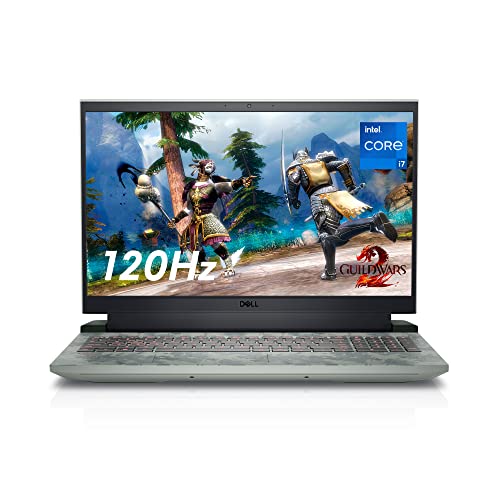 Dell G15 5520 (B09YBQYJLS) | Check price on Amazon |
How to Choose
Start With the i7 Generation, Not Just the i7 Name
The letters and numbers after Core i7 tell you more than the i7 badge on its own. A 13th generation i7, such as the Core i7-13650HX, is newer than a 12th generation i7, such as the Core i7-12700H or Core i7-1260P. Newer generations often bring better efficiency, more cores, and stronger performance in demanding tasks, although the exact model matters too. Check the full processor model in the product listing, and look for the generation number at the start of the model name. If a listing only says Core i7 without a model number, look for a listing that gives the full detail.
Match the Processor Type to Your Workload
Intel makes i7 processors for different kinds of laptops. U-series and P-series chips, such as the Core i7-1260P, are built with thin and light laptops in mind, balancing performance with battery life and portability. H-series and HX-series chips, such as the Core i7-12700H, Core i7-12650H, and Core i7-13650HX, are built for higher performance and are more common in gaming laptops and powerful workstations. If you carry your laptop all day and value a slim design, a P-series or U-series i7 may suit you well. If you edit video, compile code, or play demanding games, an H-series or HX-series i7 will usually give you more headroom.
Insist on 16GB of RAM for Comfortable Multitasking
Memory is one of the clearest markers of value in an i7 laptop. With 8GB of RAM, a laptop can feel cramped when you have a browser with many tabs, a video call, a document, and a messaging app open at the same time. With 16GB of RAM, the same workload feels far more comfortable. All five laptops in this guide come with 16GB of RAM, which is a good baseline for a value-focused i7 laptop. If you work with large photo libraries, edit video, or run virtual machines, look for a model that allows a memory upgrade later, and check whether the memory is DDR4 or DDR5.
Choose a 512GB SSD as the Practical Minimum
Storage affects how quickly your laptop starts, how fast applications open, and how much room you have for files. A 512GB SSD is a practical minimum for most buyers, giving you space for Windows, your applications, documents, photos, and a reasonable collection of games or media. All five laptops featured here include a 512GB SSD. When you compare models, check whether the drive is an NVMe SSD, which is generally faster than an older SATA SSD, and whether the laptop has a second storage slot for a future upgrade.
Decide Whether You Need Dedicated Graphics
Graphics are where many buyers either overspend or underspend. Integrated graphics, built into the processor, are enough for office work, streaming, web browsing, and light photo editing. A dedicated graphics card, such as the NVIDIA GeForce RTX 2050, RTX 3060, or RTX 4060, adds real capability for gaming, video editing, and 3D work. The RTX 2050 in the Acer Aspire 5 is a useful step up from integrated graphics for light creative work and casual gaming. The RTX 3060 and RTX 4060 in the gaming laptops below are stronger choices for demanding games and heavier creative workloads. If you do not play games or edit video, you do not need a powerful graphics card.
Look Closely at the Display and the Keyboard
The display is the part of the laptop you look at all day, so it deserves careful attention. A Full HD display with a resolution of 1920 x 1080 is the baseline for comfortable reading and working, and the 16-inch WUXGA display with a resolution of 1920 x 1200 in the ASUS VivoBook S 16X gives you a little extra vertical space for documents and web pages. For gaming, a higher refresh rate, such as 120Hz or 165Hz, makes motion look smoother. Brightness and viewing angles also matter, especially if you work near a window. The keyboard matters too: a backlit keyboard helps in dim rooms, and a comfortable key layout helps during long typing sessions.
Check Ports, Wireless, Battery Life, and Weight
A good value i7 laptop should fit into your daily routine without constant compromises. Check that it has the ports you need, such as USB-A, USB-C, HDMI, and a headphone jack, and whether it supports Thunderbolt 4, Wi-Fi 6, or Wi-Fi 6E. Battery life varies widely between thin productivity laptops and powerful gaming laptops, and gaming models often need to stay near a power outlet during heavy use. Weight matters if you carry the laptop in a bag all day. Before you buy, make a short list of the connections you use every week, and compare that list with the product listing.
The Best Best Delas for i7 Laptops Reviewed
ASUS VivoBook S 16X (B0B48WZRKC)
The ASUS VivoBook S 16X is a strong value pick for buyers who want a large screen and a capable i7 processor for everyday productivity. It pairs a 12th generation Intel Core i7-12700H processor with 16GB of RAM and a 512GB SSD, a combination that handles office work, research, streaming, and multitasking with ease. The 16-inch WUXGA display, with a resolution of 1920 x 1200 and a 16:10 aspect ratio, gives you more room for documents, spreadsheets, and web pages than a standard 15.6-inch Full HD screen.
This laptop suits students, office workers, and anyone who wants a comfortable machine for writing, browsing, video calls, and light creative work. The larger display and the solid i7 processor make it a practical choice for a home office or a study desk, and the 16GB of RAM helps it stay responsive when many applications are open at once.
You should skip this laptop if your main priority is demanding gaming or heavy video editing, where a dedicated graphics card and a higher refresh rate display would serve you better. It is also worth checking the weight if you plan to carry it in a small bag every day, since a 16-inch laptop is larger than a compact ultraportable.
Acer Aspire 5 A515-57G-735F (B09ZVFHPPV)
The Acer Aspire 5 A515-57G-735F is a versatile value pick that combines a 12th generation Intel Core i7-1260P processor with 16GB of DDR4 RAM, a 512GB NVMe SSD, and an NVIDIA GeForce RTX 2050 graphics card. That combination makes it more flexible than a laptop with integrated graphics alone, giving you extra capability for photo editing, light video work, and casual gaming. The 15.6-inch Full HD IPS display is a comfortable size for work and study, and the laptop includes Wi-Fi 6, Thunderbolt 4, a fingerprint reader, and a backlit keyboard.
This laptop suits buyers who want one machine for work, study, and occasional creative tasks. The i7-1260P processor is efficient enough for a slim design, while the RTX 2050 graphics add headroom for tasks that integrated graphics would struggle with. The fingerprint reader is useful for quick sign-in, and the ports, including Thunderbolt 4, HDMI 2.1, and Ethernet, make it easy to connect to a monitor and other accessories.
You should skip this laptop if you play demanding games at high settings or edit long, high-resolution video projects, where a stronger graphics card and a more powerful H-series processor would be a better match. It is also a 2023 model, so check the listing carefully to confirm the exact configuration before you buy.
ASUS ROG Strix G16 (B0BV8H8HVD)
The ASUS ROG Strix G16 is the strongest performance pick in this guide, built for buyers who want an i7 laptop that can handle gaming and demanding creative work. It uses a 13th generation Intel Core i7-13650HX processor, 16GB of DDR5 memory, a 512GB PCIe SSD, and an NVIDIA GeForce RTX 4060 laptop graphics card. The 16-inch display uses a 16:10 aspect ratio, a Full HD resolution, and a 165Hz refresh rate, which makes motion look smooth in games.
This laptop suits gamers and creators who need a powerful processor and a capable graphics card in the same machine. The i7-13650HX and RTX 4060 combination handles demanding games, video editing, and 3D work far better than a thin productivity laptop, and the DDR5 memory and fast PCIe storage help keep the system responsive under load.
You should skip this laptop if you want a light, quiet machine for carrying all day, or if your work is mainly writing, browsing, and office tasks. A gaming laptop of this kind is heavier and uses more power than a slim productivity laptop, so it is best suited to a desk or a gaming setup. If performance is your priority, however, this is the most capable i7 laptop in this selection.
Acer Nitro 5 AN515-58-78BT (B0C8ZND34S)
The Acer Nitro 5 AN515-58-78BT is a gaming-focused i7 laptop that pairs a 12th generation Intel Core i7-12650H processor with 16GB of RAM, a 512GB SSD, and an NVIDIA GeForce RTX 4060 graphics card with 8GB of dedicated memory. The 15.6-inch Full HD display runs at 165Hz, which suits fast-paced games, and the laptop runs Windows 11 Home.
This laptop suits gamers who want a 15.6-inch machine for regular play, as well as creators who need a dedicated graphics card for video editing and other graphics-heavy tasks. The 16GB of RAM supports multitasking while gaming or editing, and the 512GB SSD gives you room for Windows, applications, and a collection of games.
You should skip this laptop if you need long battery life away from a power outlet, or if you want a slim and light laptop for daily travel. Gaming laptops prioritise performance and cooling over portability, so they are heavier and use power more quickly under load. Check the listing for the exact configuration and operating system as well, since some listings show Windows 10 Home in the technical details while the title states Windows 11 Home.
Dell G15 5520 (B09YBQYJLS)
The Dell G15 5520 is a 15.6-inch gaming laptop built around a 12th generation Intel Core i7-12700H processor, with 16GB of dual-channel DDR5 memory, a 512GB M.2 PCIe Gen 4 SSD, and an NVIDIA GeForce RTX 3060 graphics card with 6GB of dedicated memory. The 15.6-inch Full HD display runs at 120Hz, and the laptop includes Wi-Fi 6 and Windows 11. The i7-12700H processor, with 14 cores, gives you strong multitasking performance.
This laptop suits buyers who want a capable gaming and multitasking machine with a proven i7 processor and a dedicated graphics card. It handles games, video editing, programming, and heavy multitasking well, and the 120Hz display makes motion smoother than a standard 60Hz screen.
You should skip this laptop if you want a thin, light laptop for all-day carrying, or if you need the latest generation of graphics card for the most demanding new games. The RTX 3060 is still capable for many games and creative tasks, but newer graphics cards offer more headroom for future titles. It is also an older model than the 13th generation laptops in this guide, so confirm the configuration in the listing before you buy.
What to Check Before You Buy
Before you buy any i7 laptop, confirm the full specification in the product listing, not just the headline. Check the exact processor model and generation, the amount and type of RAM, the size and type of storage, the graphics card, the display size and resolution, and the operating system. Two listings for the same laptop model can differ in memory, storage, or graphics, so the details matter more than the model name alone.
Next, think about how you will use the laptop over the next few years, not just this month. A laptop that is only just enough for your current work may feel slow after a software update or a change in your workload. Choosing 16GB of RAM and a 512GB SSD gives you more headroom, and a laptop with an upgradeable memory or storage slot gives you a path to extend its life. Check the return policy and the warranty as well.
FAQ
What does “delas” mean in “best delas for i7 laptops”?
“Delas” is a misspelling of “deals”. The phrase means deals for i7 laptops, or good-value i7 laptops. This guide focuses on value: i7 laptops that offer strong performance for the money, with the right balance of processor, memory, storage, graphics, and display for their intended use.
Which i7 generation should I choose?
For most buyers, a 12th generation i7 or newer is a good target, because it offers strong performance and modern features. A 13th generation i7, such as the Core i7-13650HX, is newer still and suits demanding gaming and creative work. An older i7 can still be a sensible choice when the rest of the specification is strong.
Is 16GB of RAM enough for an i7 laptop?
For most buyers, 16GB of RAM is a comfortable amount. It supports browsing with many tabs, video calls, office work, and light creative tasks without the laptop feeling cramped. If you edit video, work with large photo libraries, or run virtual machines, look for a laptop that allows a memory upgrade.
Do I need a dedicated graphics card in an i7 laptop?
It depends on what you do. Integrated graphics are enough for office work, streaming, browsing, and light photo editing. A dedicated graphics card, such as an RTX 2050, RTX 3060, or RTX 4060, is useful for gaming, video editing, and 3D work. If you do not play games or edit video, you can choose an i7 laptop with integrated graphics instead.
Is a 512GB SSD enough storage?
For most buyers, a 512GB SSD is a practical minimum. It gives you room for Windows, applications, documents, photos, and a reasonable collection of games or media. If you store many large video files or install many large games, look for a laptop with a larger SSD or a second storage slot.
Bottom Line
The best delas for i7 laptops are not simply the laptops with the most powerful processor on paper. They are the laptops that match their processor, memory, storage, graphics, and display to the work you actually do. For everyday productivity and a large screen, the ASUS VivoBook S 16X is a balanced choice. For versatile work with a graphics boost, the Acer Aspire 5 is a flexible option. For gaming and demanding creative work, the ASUS ROG Strix G16 offers the strongest performance in this guide, while the Acer Nitro 5 and the Dell G15 5520 give you capable gaming laptops in a 15.6-inch size.
Start with the processor generation, insist on 16GB of RAM and a 512GB SSD, and then choose the graphics and display that fit your workload. Check the full specification in the listing, confirm the ports and features you need, and choose the laptop that will still feel comfortable in two or three years.
Disclosure: As an Amazon Associate, we may earn from qualifying purchases.
Related guides
More from Amazon
Programs that pair well with the guide above. Offers and eligibility are set by Amazon and may change.
Free shipping on eligible items, Prime Video and more. Eligible new members can start with a free trial.
Start a Prime free trialAd-free music streaming. Eligible new subscribers can start with a free trial.
Try Music Unlimited freeA Prime membership for ages 18-24 with a trial period. Eligibility is set by Amazon.
See Prime for Young AdultsAudiobooks and podcasts to listen to on the go. Eligible new members can start with a free trial.
Try Audible freeAs an Amazon Associate we earn from qualifying purchases.










Write Your Review
No reviews yet. Be the first to share your experience!