
Key takeaways
- Best convertible laptops Linus fans will like: five 2-in-1 laptops with 360-degree hinges, touchscreens, and strong everyday performance for work and study.
What's inside
As an Amazon Associate I earn from qualifying purchases. This post may contain affiliate links at no extra cost to you.
If you searched for the best convertible laptops linus, you are probably looking for the kind of flexible 2-in-1 laptop that often appears in tech videos from Linus Tech Tips and similar channels: a machine that works as a normal laptop, folds back into a tablet, and still handles real work. This guide focuses on that idea. It does not claim any endorsement by Linus or Linus Tech Tips. Instead, it compares five convertible laptops listed on Amazon US and helps you choose the form factor that fits how you actually work, study, and watch videos.


The quick answer: for a balanced 16-inch convertible, start with the Lenovo Yoga 7i. For a premium 14-inch machine with a sharp display and generous memory and storage, look at the HP Spectre x360. For the lightest, most tablet-like option, the Microsoft Surface Pro 11 is the detachable pick. For a large, high-resolution touchscreen, consider the Samsung Galaxy Book4 360. For strong specifications in a compact 14-inch 2-in-1, the Lenovo IdeaPad Flex 5 is the practical choice.
Every laptop in this roundup is a genuine convertible. Each one either has a 360-degree hinge that folds the screen all the way back or, in the case of the Surface Pro 11, a detachable keyboard that lets the screen work on its own as a tablet. None of them is a standard clamshell laptop, and none of them is an accessory.
Quick Picks
Our Short List of 3
All 5 Picks at a Glance
| Product | Specs | Action |
|---|---|---|
| Lenovo Yoga 7i 2-in-1 16-inch (B0C9VPR1SY) | Check price on Amazon | |
| HP Spectre x360 2-in-1 14-inch (B0DM576K21) | Check price on Amazon | |
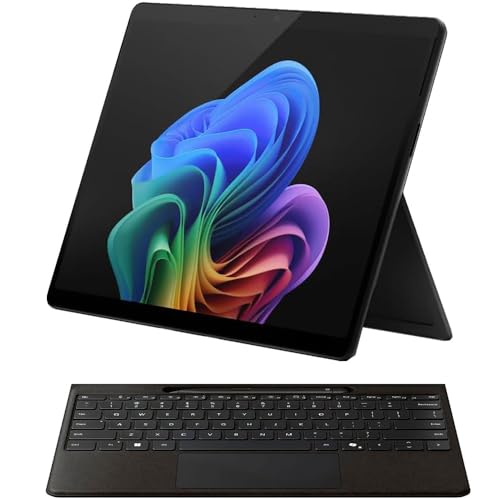 Microsoft Surface Pro 11 (B0DN2YY381) | Check price on Amazon | |
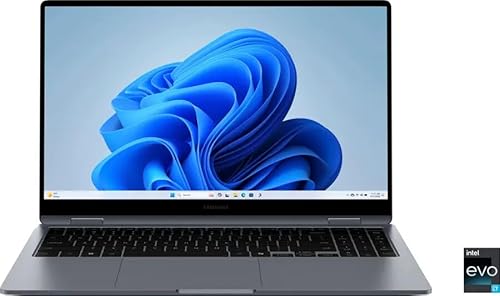 Samsung Galaxy Book4 360 (B0DK7R3ZZ1) | Check price on Amazon | |
 Lenovo IdeaPad Flex 5 14-inch (B0F9NRGKJD) | Check price on Amazon |
How to Choose
360-Degree Hinge or Detachable Keyboard
The first decision is the type of convertible you want. A 360-degree hinge, found on the Yoga 7i, Spectre x360, Galaxy Book4 360, and IdeaPad Flex 5, lets you rotate the screen through laptop, tent, stand, and tablet positions without removing anything. That design is convenient for presentations, video viewing, and note-taking, and you never have to keep track of a separate keyboard.
A detachable keyboard, found on the Surface Pro 11, works differently. The screen is a tablet with a built-in kickstand, and the keyboard attaches when you need to type. This suits holding the device, reading, annotating documents, or drawing. It is less convenient for typing on your lap, because a kickstand is less stable there than a hinged base.
Touchscreen Quality and Pen Support
A touchscreen is central to a convertible, so look beyond the simple fact that the screen responds to touch. Resolution, brightness, colour coverage, and the surface finish all affect how pleasant the screen is for reading, editing photos, and watching video. The Spectre x360 in this guide has a 2880 x 1800 touchscreen, the Galaxy Book4 360 has a high-resolution 15.6-inch touchscreen, and the IdeaPad Flex 5 has a 2.2K IPS touchscreen with full sRGB coverage according to its Amazon listing.
Pen support is the next question. If you plan to take handwritten notes, mark up PDFs, sketch, or sign documents, check whether a pen is included and whether the listing describes pen compatibility. If handwriting is central to your workflow, give pen support the same weight as processor speed.
Processor and Memory for Real Workloads
Convertible laptops are often used for the same work as any other laptop: browsing with many tabs open, office documents, video calls, light photo editing, and media playback. For that kind of work, a modern mid-range processor with 16GB of memory is a comfortable baseline. It leaves room for a browser, a video call, and a document editor at the same time.
In this roundup, the Spectre x360, Surface Pro 11, Galaxy Book4 360, and IdeaPad Flex 5 all have 16GB of memory or more. The Yoga 7i configuration listed here has 8GB, which is workable for lighter use but leaves less headroom. Check the memory specification on the exact listing before you buy, because memory is often soldered and cannot be upgraded later.
Screen Size and Portability
Screen size is a trade-off between workspace and weight. A 16-inch convertible gives you more room for side-by-side windows, spreadsheets, and timelines, but it is heavier and takes up more space in a bag. A 13-inch or 14-inch convertible is easier to carry, easier to hold in tablet mode, and easier to use on a train, a plane, or a small desk.
The Surface Pro 11 is the most portable option here because the tablet body is small and light. The Spectre x360 and IdeaPad Flex 5 are 14-inch machines that balance screen space and portability. The Yoga 7i and Galaxy Book4 360 are larger machines that suit a desk or a home office more than a crowded commute.
Storage, Ports, and Connectivity
Storage affects how many applications, documents, photos, and videos you can keep on the machine. A 512GB SSD is enough for most office and study use, especially if you store large files in cloud storage. A 1TB or 2TB SSD is better if you keep a large media library or work with large project files. The Spectre x360 listed here has 2TB of storage, the Surface Pro 11 and IdeaPad Flex 5 have 1TB, and the Yoga 7i and Galaxy Book4 360 have 512GB.
Ports matter just as much. Check for USB-C, USB-A, HDMI, a headphone jack, and a card reader if you connect external displays or use older peripherals. Thunderbolt 4, listed for the Spectre x360, supports high-speed external storage and external displays through a single cable. Compare the port list on the exact Amazon listing with the cables and devices you already own.
Battery Life and Everyday Comfort
Battery life depends on screen brightness, the applications you run, and whether you use Wi-Fi and Bluetooth continuously. A larger battery and a more efficient processor generally help, but a bright, high-resolution touchscreen can reduce run time. If you work away from a charger, check the battery specification on the listing rather than relying on a general claim.
Everyday comfort also includes the keyboard, the trackpad, the speakers, and the webcam. A backlit keyboard helps in dim rooms, a fingerprint reader helps with quick sign-in, and a clear webcam is useful for video calls. All five machines in this guide are Windows laptops with backlit keyboards, and several include fingerprint readers.
Windows, Software, and Compatibility
All five laptops run Windows. The Surface Pro 11 uses a Snapdragon processor based on the Arm architecture, so most modern Windows applications work well, but a small number of older or specialised applications may need an emulated version or an alternative. If you rely on a specific professional application, check its compatibility with Snapdragon-based Windows machines before you choose the Surface Pro 11. The other four use Intel or AMD processors, the most widely supported platform for Windows software.
The Best Best Convertible Laptops Linus Reviewed
Lenovo Yoga 7i 2-in-1 16-inch (B0C9VPR1SY)
The Lenovo Yoga 7i is a 16-inch 2-in-1 laptop with a WUXGA touchscreen, an Intel Core i5-1335U processor, 8GB of RAM, and a 512GB SSD. It runs Windows 11 Home and includes a backlit keyboard and a fingerprint reader. The 360-degree hinge lets you use it as a laptop, fold it into tent mode for video viewing, or fold it flat for tablet use. The 16-inch display gives you more room for documents and browser windows than a 14-inch machine, which suits home office work and study.
This Yoga 7i suits someone who wants a large, straightforward convertible for everyday tasks and values screen space over maximum portability. It is a good fit for writing, research, video calls, and media viewing. The 8GB of memory is the main limitation: enough for browsing, office work, and streaming, but with less room for heavy multitasking than the 16GB configurations here.
Who it suits: everyday users who want a large touchscreen and a familiar laptop layout. Who should skip it: heavy multitaskers who need more memory headroom, and travellers who want the lightest possible machine.
HP Spectre x360 2-in-1 14-inch (B0DM576K21)
The HP Spectre x360 is a premium 14-inch 2-in-1 laptop with a 2880 x 1800 touchscreen, an Intel Core Ultra 7 155H processor, 32GB of LPDDR5 memory, and a 2TB SSD. It includes a backlit keyboard, a fingerprint reader, Thunderbolt 4, Wi-Fi 6E, and Intel Arc graphics. The compact 14-inch body makes it easier to carry than the larger convertibles in this guide, while the high-resolution display makes text and images look sharp for reading, editing, and video viewing.
This Spectre x360 suits someone who wants a premium convertible for work and creative tasks and values memory, storage, and display quality. One detail to check: the Amazon listing for this configuration describes Windows 10 Home, which is unusual for a 2024 model, so confirm the operating system and included accessories on the exact listing before you buy.
Who it suits: professionals and students who want a sharp display, generous memory, and generous storage in a portable 14-inch body. Who should skip it: buyers who want a larger screen, and anyone who needs a discrete graphics card for demanding creative or gaming work.
Microsoft Surface Pro 11 (B0DN2YY381)
The Microsoft Surface Pro 11 is a detachable 2-in-1 with a 13-inch OLED touchscreen, a Snapdragon X Elite processor, 16GB of RAM, and a 1TB SSD. This Amazon listing is a bundle that includes the Surface Pro Keyboard, so you can use it as a laptop when you need to type and as a tablet when you want to hold it in your hands. The OLED display is suited to vivid video and photo viewing, and the thin tablet body is the most portable option in this roundup.
This Surface Pro 11 suits someone who values portability and tablet use above all else: note-taking, reading, annotating documents, travelling, and meeting rooms. The detachable keyboard and kickstand are less stable for typing on your lap than a hinged laptop base, and the Snapdragon processor means you should confirm compatibility if you rely on a specific older Windows application.
Who it suits: travellers, note-takers, and readers who want a tablet that can become a laptop. Who should skip it: buyers who mostly type on their lap, and anyone who needs a specific application that is not yet compatible with Snapdragon-based Windows machines.
Samsung Galaxy Book4 360 (B0DK7R3ZZ1)
The Samsung Galaxy Book4 360 is a 15.6-inch 2-in-1 laptop with a high-resolution touchscreen, an Intel Core 7 150U processor, 16GB of RAM, and a 512GB SSD. It runs Windows 11 Home and uses a 360-degree hinge to switch between laptop, tent, stand, and tablet modes. The large display is useful for side-by-side windows, spreadsheets, and video, and the 16GB of memory gives you more multitasking room than an 8GB configuration.
This Galaxy Book4 360 suits someone who wants a large touchscreen for work and media. It is a good fit for a home office or study desk, where the screen can be folded into tent mode for video viewing. Check the exact display resolution on the listing, because the Book4 360 family includes more than one display configuration.
Who it suits: home office users and students who want a large, bright touchscreen and 16GB of memory. Who should skip it: frequent travellers who want a smaller and lighter machine, and buyers who need more than 512GB of built-in storage.
Lenovo IdeaPad Flex 5 14-inch (B0F9NRGKJD)
The Lenovo IdeaPad Flex 5 is a 14-inch 2-in-1 laptop with a 2.2K IPS touchscreen, an AMD Ryzen 7 5700U processor, 16GB of LPDDR4X RAM, and a 1TB SSD. It runs Windows 11 and includes a backlit keyboard and a fingerprint reader. The Amazon listing describes a 360-degree hinge, a 2240 x 1400 display with full sRGB coverage, and a 52.5 Wh battery. The 14-inch size makes it easier to carry than the 16-inch convertibles in this guide, while the 1TB of storage gives you room for documents, applications, and media.
This IdeaPad Flex 5 suits someone who wants strong specifications in a compact convertible without choosing the most premium model in the group. The Ryzen 7 processor and 16GB of memory handle multitasking well, and the 2.2K touchscreen is suited to reading, writing, and media viewing.
Who it suits: students and office workers who want a compact 2-in-1 with 16GB of memory and 1TB of storage. Who should skip it: buyers who want a larger screen, and anyone who needs a discrete graphics card.
What to Check Before You Buy
Before you buy any convertible laptop, confirm the exact configuration on the Amazon listing you open. Laptop families reuse the same model name across many configurations, so the processor, memory, storage, display resolution, and operating system can differ between listings that look similar. Check the title, the specification table, and the included accessories, and make sure the ASIN matches the configuration you intend to buy.
Check the hinge and touchscreen in the listing description. A true convertible should describe a 360-degree hinge or a detachable keyboard, a touchscreen, and the modes it supports. If a listing does not mention those features, it may be a standard laptop in the same family rather than a convertible. Check whether a pen is included, and if it is not, check whether the listing describes pen compatibility before you buy a pen separately.
Check memory and storage carefully, because both are often soldered in thin convertibles and cannot be upgraded later. If you plan to keep the laptop for several years, favour 16GB of memory and at least 512GB of storage. Check the return policy and warranty on the listing, and keep the packaging until you have confirmed that the laptop starts, the touchscreen responds, the hinge moves smoothly, and the keyboard and trackpad work as expected.
Finally, think about how you will use the convertible modes. A 360-degree hinge is most useful if you actually fold the screen back for reading, presenting, or watching video. A detachable keyboard is most useful if you actually remove it and use the tablet on its own. Choose the form factor that matches your habits, not the one that sounds most impressive on a specification sheet.
FAQ
What does “linus” mean in best convertible laptops linus?
The word “linus” in this search most likely refers to Linus Tech Tips, a popular technology channel. This guide uses that context to focus on the kind of flexible 2-in-1 laptop that tech viewers often look for. It does not claim any endorsement by Linus or Linus Tech Tips.
Is a convertible laptop good for work and study?
Yes, when it has a modern processor, at least 16GB of memory for heavier multitasking, and a comfortable keyboard. The touchscreen and tablet mode add value for note-taking, reading, and presentations, but the laptop mode still needs to be comfortable for long typing sessions.
Should I choose a 360-degree hinge or a detachable keyboard?
Choose a 360-degree hinge if you want a stable laptop that can also fold into tent, stand, and tablet modes without removing anything. Choose a detachable keyboard, such as the Surface Pro 11, if you want the lightest tablet experience and you are comfortable typing on a desk or a table rather than on your lap.
How much memory and storage do I need in a convertible?
For most work and study, 16GB of memory and 512GB of storage are a comfortable baseline. The 8GB configuration in this guide can work for lighter use, but it leaves less room for multitasking.
Can a convertible laptop replace a tablet?
A convertible can replace a tablet for many people, especially for reading, note-taking, and video viewing. A detachable such as the Surface Pro 11 comes closest to a tablet experience because the keyboard can be removed.
Bottom Line
The best convertible laptops linus searchers will find most useful are the ones that match how they work, not the ones with the longest specification list. The Lenovo Yoga 7i is the straightforward large-screen choice for everyday work. The HP Spectre x360 is the premium 14-inch choice for display quality, memory, and storage. The Microsoft Surface Pro 11 is the tablet-first choice for portability. The Samsung Galaxy Book4 360 is the large-screen choice for a high-resolution touchscreen. The Lenovo IdeaPad Flex 5 is the practical 14-inch choice for strong specifications and generous storage.
Start with the form factor, then check the display, memory, storage, and ports on the exact listing. Confirm the configuration before you buy.
Disclosure: As an Amazon Associate, we may earn from qualifying purchases.
Related guides
More from Amazon
Programs that pair well with the guide above. Offers and eligibility are set by Amazon and may change.
Free shipping on eligible items, Prime Video and more. Eligible new members can start with a free trial.
Start a Prime free trialAd-free music streaming. Eligible new subscribers can start with a free trial.
Try Music Unlimited freeA Prime membership for ages 18-24 with a trial period. Eligibility is set by Amazon.
See Prime for Young AdultsAudiobooks and podcasts to listen to on the go. Eligible new members can start with a free trial.
Try Audible freeAs an Amazon Associate we earn from qualifying purchases.










Write Your Review
No reviews yet. Be the first to share your experience!