
Key takeaways
- Compare the best laptops specifications that matter — CPU, RAM, SSD, display, GPU and battery — with three laptop picks for work, study and everyday use.
What's inside
- Quick Picks
- How to Read Laptop Specifications
- 1. Apple 2025 MacBook Air 13-inch with M4 chip — Best Balanced Specifications for Everyday Use
- 2. Lenovo IdeaPad Slim 5 16-inch Touchscreen — Best Big-Screen Specifications for Multitasking
- 3. HP Pavilion 15 Laptop — Best Windows Value Specifications
- Buying Guide: Matching Specifications to Your Work
- Frequently Asked Questions
- Conclusion
As an Amazon Associate I earn from qualifying purchases. This post may contain affiliate links at no extra cost to you.
Shopping for a laptop is easier when you start with the specifications, not the brand name on the lid. Two laptops can look almost identical and cost a similar amount, yet feel completely different in daily use because one has 8GB of memory and a slow drive while the other has 16GB of memory and a fast solid-state drive. The best laptops specifications are not the biggest numbers on the box. They are the combination of processor, memory, storage, display, graphics, battery, ports, and build that matches the work you actually do.
This guide explains those specifications in plain language, shows how to compare them, and then applies that checklist to three laptops with very different strengths. One is built around efficiency and portability, one around a large screen and modern AI-ready processing, and one around familiar Windows value. According to the Amazon listing for each model, the specifications below are the ones that decide whether a laptop will feel fast, last through a working day, and still be useful in three or four years.
As an Amazon Associate, we earn from qualifying purchases made through links on this page.
Quick Picks
| Laptop | Key specifications | Best for |
|---|---|---|
| Apple 2025 MacBook Air 13-inch with M4 chip | Apple M4, 24GB unified memory, 512GB SSD, 13.6-inch Liquid Retina display, 12MP Center Stage camera, Touch ID, 2.73 pounds | Portable everyday work, study, and long battery-focused days |
| Lenovo IdeaPad Slim 5 16-inch Touchscreen | AMD Ryzen AI 5 340, 16GB DDR5, 512GB SSD, 16-inch 1920 x 1200 IPS touchscreen, Radeon 840M graphics, Wi-Fi 7 | Big-screen multitasking, business and home use, and AI-assisted work |
| HP Pavilion 15 Laptop | Intel Core i7-1165G7, 16GB DDR4, 512GB SSD, 15.6-inch Full HD IPS display, Intel Iris Xe graphics, Windows 11 Pro | Windows value, office work, and a larger screen on a tighter budget |
How to Read Laptop Specifications
A specification sheet is a promise about how a laptop will behave. A faster processor helps when you edit photos or run many applications at once. More memory helps when you keep dozens of browser tabs open. A larger, faster solid-state drive helps when you store large files. A better display helps every minute you look at the screen. Start by listing what you do most. If that list is email, documents, video calls, and streaming, you need a balanced mid-range specification, not a gaming machine. If you edit video or work with large spreadsheets, the processor, memory, and graphics matter far more. If you travel, weight, battery life, and screen brightness matter as much as raw speed.
Processor: the engine
The processor, or CPU, decides how quickly a laptop can complete work. For everyday use, a modern multi-core processor from Apple, AMD, or Intel is enough. Look for the generation as well as the name: a recent chip is usually more efficient than an older chip with a similar name, so it can do more work while producing less heat and using less battery. A six-core processor can handle multitasking more smoothly than a four-core processor from the same family, and a higher maximum clock speed helps with short bursts of work, such as opening a large file. The three picks below cover three approaches: Apple silicon built for efficiency, a newer AMD Ryzen AI chip with a dedicated neural processing unit, and an Intel Core i7 built for familiar Windows performance. That neural unit, measured in TOPS, handles on-device AI features such as transcription and background blur.
Memory: how much you can do at once
Memory, or RAM, is the workspace a laptop uses while it is running. When memory runs out, the machine has to move data to the much slower storage drive, and everything feels sluggish. For most people in 2026, 16GB is the sensible starting point: it leaves room for a browser with many tabs, a video call, and a document at the same time. 8GB can still work for very light use, but it leaves little headroom, and many newer laptops do not let you add more later. 24GB and 32GB make sense for photo and video editing, software development, and virtual machines. DDR5 memory, found in newer Windows laptops, is faster than DDR4, while Apple unified memory is shared between the processor and graphics and cannot be upgraded later, so choose the size carefully.
Storage: size, speed, and type
Storage decides how many files and applications you can keep, and how quickly they open. A solid-state drive, or SSD, is now the standard: far faster than an old hard disk drive, quieter, and more resistant to bumps. If a laptop still lists a hard disk drive as its main storage, treat that as a warning sign.
512GB is a good target for most buyers, holding the operating system, common applications, documents, and photos without constant housekeeping. 256GB can work if you store most files in the cloud, but it fills up quickly. 1TB is better for creators and anyone who keeps large media libraries offline. An NVMe SSD also transfers data faster than an older SATA SSD.
Display: size, resolution, and panel type
You will spend more time looking at the display than at any other part of a laptop. A 13-inch or 14-inch display is easier to carry, while a 15-inch or 16-inch display shows more at once, which helps with spreadsheets and side-by-side documents, but the laptop will be heavier.
Full HD, at 1920 x 1080 pixels, is clear on a 15-inch screen, while 1920 x 1200 adds useful vertical space for documents. An IPS panel usually offers wider viewing angles and more consistent colours than a basic TN panel. A touchscreen can help with note-taking, but it adds cost and weight. Around 300 nits of brightness is a practical minimum for indoor use, and 60Hz is standard for office work and study.
Graphics: integrated or dedicated
Graphics decide how well a laptop handles video playback, photo editing, 3D work, and games. Most everyday laptops use integrated graphics, which share memory with the processor. Modern integrated graphics, such as Intel Iris Xe, AMD Radeon 840M, and the graphics built into Apple M-series chips, are capable for office work, streaming, light photo editing, and casual games. A dedicated graphics card has its own memory and is much stronger for video editing, 3D rendering, and modern games, but it adds cost, heat, weight, and battery drain. If you do not do those things regularly, integrated graphics are usually the better choice.
Battery, weight, and ports
Battery life depends on screen brightness, Wi-Fi use, and how demanding your applications are, so use the listed figure as a rough guide, not a guarantee. A larger battery, measured in watt-hours, usually lasts longer, but a more efficient processor can matter just as much.
Weight decides whether you will enjoy carrying the laptop: under 3 pounds feels light, around 3.5 to 4 pounds is manageable, and over 4.5 pounds feels heavy if you carry it every day. For ports, look for at least one USB-C port, one or two USB-A ports, an HDMI port, and a headphone jack. Wi-Fi 6 or Wi-Fi 7 and Bluetooth 5.3 or newer are also worth checking.
1. Apple 2025 MacBook Air 13-inch with M4 chip — Best Balanced Specifications for Everyday Use

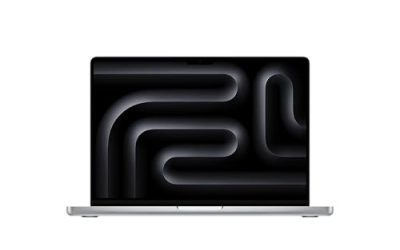
Apple 2025 MacBook Air 13-inch Laptop with M4 chip
The MacBook Air is the clearest example in this guide of specifications working together. According to the Amazon listing, this model uses the Apple M4 chip, 24GB of unified memory, and 512GB of SSD storage. That combination is generous for everyday work and leaves headroom for heavier tasks, such as editing photos, running many browser tabs, and using Apple Intelligence features, without moving up to a larger Pro model.
The display is a 13.6-inch Liquid Retina display, sharp for documents, video, and photo work. The listing also describes a 12MP Center Stage camera and Touch ID, practical for video calls and secure sign-in. At 2.73 pounds, and 11.97 x 8.46 x 0.44 inches according to the Amazon listing, it is one of the lightest laptops in this guide.
The key decision here is the 24GB of unified memory. Many base laptops still ship with 16GB, which is enough for most people, but 24GB gives this MacBook Air more room for multitasking and future software, and, because Apple unified memory is shared between the processor and graphics, it also helps with image and video work. This is the best pick if you want a portable laptop whose specifications are balanced rather than extreme. It has no dedicated graphics card or 16-inch screen, and it is not the right choice if you need Windows-only software. Check the Amazon listing for the Silver configuration linked here, model MC654LL/A.
Key specifications, according to the Amazon listing: Apple M4 chip; 24GB unified memory; 512GB SSD storage; 13.6-inch Liquid Retina display; 12MP Center Stage camera; Touch ID; 2.73 pounds; Silver finish.
2. Lenovo IdeaPad Slim 5 16-inch Touchscreen — Best Big-Screen Specifications for Multitasking

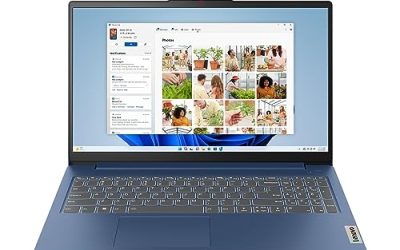
Lenovo IdeaPad Slim 5 Touchscreen Laptop
If screen space is your priority, the Lenovo IdeaPad Slim 5 takes a different approach. According to the Amazon listing, it has a 16-inch WUXGA IPS touchscreen with a resolution of 1920 x 1200 pixels, 300 nits of brightness, and a 60Hz refresh rate. That larger, taller display shows more of a document or spreadsheet at once, and the touchscreen adds a direct way to scroll and tap in Windows 11.
The processor is the AMD Ryzen AI 5 340, a six-core, 12-thread chip that runs from 2.0GHz up to 4.8GHz according to the Amazon listing. It includes an integrated AMD Ryzen AI neural processing unit rated at up to 50 TOPS, designed to handle on-device AI tasks. The graphics are integrated AMD Radeon 840M graphics, suitable for everyday work, streaming, and light creative tasks, rather than demanding games or heavy 3D rendering.
Memory and storage are modern mid-range specifications: 16GB of DDR5 memory running at 5600 MHz, and a 512GB SSD. The listing also describes Wi-Fi 7 and Bluetooth 5.4, a backlit keyboard, an FHD 1080p camera with infrared for Windows Hello, a privacy shutter, and a 60Wh battery. This is the best pick if you want a large screen, a modern AMD processor with AI acceleration, and current connectivity. It is larger than the MacBook Air, so it is better as a desk-first laptop that you sometimes carry.
Key specifications, according to the Amazon listing: AMD Ryzen AI 5 340, 6 cores and 12 threads, up to 4.8GHz; 16GB DDR5 memory at 5600 MHz; 512GB SSD; 16-inch 1920 x 1200 IPS touchscreen, 300 nits; AMD Radeon 840M graphics; Wi-Fi 7; Bluetooth 5.4; Windows 11 Home; backlit keyboard; FHD 1080p plus IR camera.
3. HP Pavilion 15 Laptop — Best Windows Value Specifications
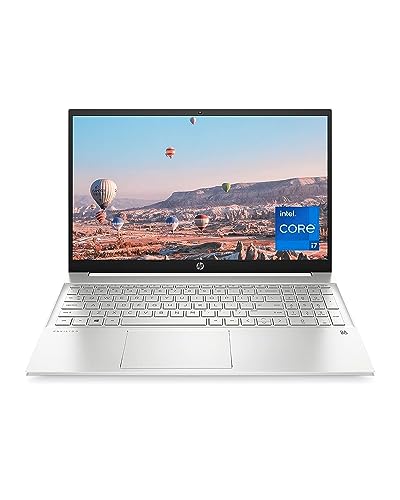
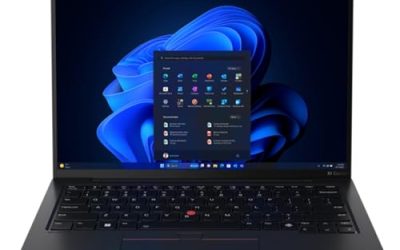
The HP Pavilion 15 is the value pick in this guide. According to the Amazon listing, it uses an 11th Gen Intel Core i7-1165G7 processor running up to 4.7GHz, with 16GB of DDR4 memory and a 512GB SSD. That is a familiar, balanced combination for office work: a capable i7 processor, enough memory for multitasking, and fast solid-state storage for quick starts and file access.
The display is a 15.6-inch Full HD IPS micro-edge display with a resolution of 1920 x 1080 pixels. IPS usually gives better viewing angles and more consistent colour than a basic panel. The graphics are integrated Intel Iris Xe graphics, which handle everyday work, video streaming, and light photo editing. The operating system is Windows 11 Pro, which adds business features compared with Windows 11 Home, and the laptop weighs 3.86 pounds according to the Amazon listing.
The trade-off is the older processor generation: it will not be as efficient or as strong for newer AI-assisted tasks as the AMD chip in the Lenovo or the Apple M4 chip. In return, you get a larger screen, Windows 11 Pro, and a proven i7, 16GB, and 512GB set that covers the basics well. The listing also describes an average battery life of 8 hours, 802.11ax Wi-Fi, Bluetooth, and three USB 3.0 ports.
Key specifications, according to the Amazon listing: Intel Core i7-1165G7, up to 4.7GHz; 16GB DDR4 memory; 512GB SSD; 15.6-inch Full HD IPS display, 1920 x 1080; Intel Iris Xe graphics; Windows 11 Pro; 3.86 pounds; model 15-eg0025nr.
Buying Guide: Matching Specifications to Your Work
Start with your heaviest task, the most demanding thing you do at least once a week. If it is video editing, choose a stronger processor, at least 16GB of memory, a larger SSD, and a good display. If it is running virtual machines or large datasets, prioritise memory and processor cores. If it is writing and video calls, prioritise the display, camera, battery, and weight.
Choose memory and storage for three years from now. Laptops are often kept for three to five years, so buy for the software you will use later. 16GB of memory and 512GB of storage are sensible minimums in 2026. If you edit media, develop software, or keep large files offline, consider 24GB or 32GB of memory and 1TB of storage.
Do not ignore the display and keyboard. A fast processor cannot fix a dim, low-resolution display or an uncomfortable keyboard. Check the resolution, panel type, and brightness, and look for a backlit keyboard if you work in low light. Check ports, wireless, and battery together too: look for a mix of USB-C, USB-A, HDMI, and a headphone jack, plus Wi-Fi 6 or Wi-Fi 7. Finally, compare like with like, because the same model name can hide different processors, memory, storage, and display panels, so always check the exact configuration in the Amazon listing before you decide.
Frequently Asked Questions
What are the most important laptop specifications?
The processor, memory, storage, display, and battery matter most. The processor decides how quickly work gets done, memory decides how much you can do at once, storage decides how much you can keep and how quickly files open, the display decides how comfortable the laptop is to use, and the battery decides how long you can work away from a charger.
How much RAM do I need in a laptop?
16GB is a good starting point for most people in 2026, handling a browser with many tabs, video calls, and documents at the same time. 8GB can work for very light use, but it leaves little room for future software. 24GB or 32GB is better for photo and video editing, software development, and virtual machines. If the memory cannot be upgraded later, choose the larger amount at purchase.
Is 512GB of SSD storage enough?
For most buyers, yes. 512GB holds the operating system, common applications, documents, photos, and a reasonable amount of video. 256GB can work if you use cloud storage, but it fills up quickly. 1TB is better if you edit video, keep large media libraries offline, or install many large applications. An SSD is also much faster than a traditional hard disk drive.
Does the processor matter more than the graphics card?
It depends on your work. For office work, study, and video calls, the processor and memory matter more, and modern integrated graphics are enough. For video editing, 3D work, and gaming, a dedicated GPU with its own video memory is worth prioritising. If you do both, look for a laptop that balances a strong processor with capable graphics.
What screen size and resolution should I choose?
A 13-inch or 14-inch laptop is easier to carry, while a 15-inch or 16-inch laptop shows more at once and is better for spreadsheets and video editing. Full HD at 1920 x 1080 is clear on a 15-inch screen, and 1920 x 1200 adds useful vertical space. An IPS panel usually offers better viewing angles and colour than a basic panel, and around 300 nits is a practical minimum for indoor use.
Conclusion
The best laptops specifications are not a single set of numbers. They are a match between what a laptop can do and what you do every day. A modern processor, 16GB or more of memory, a 512GB SSD, a clear IPS or Liquid Retina display, capable integrated graphics, and a battery that lasts through your working day will cover most people well. From there, the details decide the winner: a larger screen, a lighter body, a touchscreen, or Windows 11 Pro.
Of the three laptops in this guide, the MacBook Air with M4 offers the most balanced and portable set, with 24GB of unified memory and 512GB of storage in a 2.73-pound body. The Lenovo IdeaPad Slim 5 offers the largest screen and the most modern Windows set, with a Ryzen AI processor, DDR5 memory, a touchscreen, and Wi-Fi 7. The HP Pavilion 15 offers familiar Windows value, with an Intel Core i7, 16GB of memory, 512GB of storage, and a 15.6-inch Full HD IPS display.
Before you buy, re-check the exact configuration on the Amazon listing, including the processor, memory, storage, display, and operating system. Prices and availability can change, and the same model name can cover several configurations. Choose the laptop whose strongest specifications match your heaviest work.
Related guides
More from Amazon
Programs that pair well with the guide above. Offers and eligibility are set by Amazon and may change.
Free shipping on eligible items, Prime Video and more. Eligible new members can start with a free trial.
Start a Prime free trialAd-free music streaming. Eligible new subscribers can start with a free trial.
Try Music Unlimited freeA Prime membership for ages 18-24 with a trial period. Eligibility is set by Amazon.
See Prime for Young AdultsAudiobooks and podcasts to listen to on the go. Eligible new members can start with a free trial.
Try Audible freeAs an Amazon Associate we earn from qualifying purchases.




Write Your Review
No reviews yet. Be the first to share your experience!