
Key takeaways
- The best laptops for Zoom teaching compared on webcam, microphone, screen size, battery-friendly processors and ports, with four Windows laptops for online classes.
What's inside
- Quick Picks
- What Zoom Teaching Actually Needs
- 1. Acer Aspire 5 A515-45-R74Z — The Balanced Default
- 2. Dell Inspiron 15 3530 — For Teachers Who Keep Everything Open
- 3. HP Pavilion 15 — The Camera and Audio Pick
- 4. ASUS VivoBook 15 F515 — Slim Design, Larger SSD
- How to Choose a Laptop for Zoom Teaching
- FAQs
- Conclusion
As an Amazon Associate I earn from qualifying purchases. This post may contain affiliate links at no extra cost to you.
As an Amazon Associate we earn from qualifying purchases.
Teaching on Zoom is a different workload from ordinary laptop use. A class laptop has to hold a video call open for hours, share a screen full of slides or a document camera feed, run a browser with many tabs, keep lesson files close at hand, and do all of that without the fan drowning out your voice or the battery fading before the last session ends. The processor demands are modest. The details that decide whether teaching feels smooth or tiring are the webcam, the microphone, the screen, the keyboard, and how the machine handles several ordinary apps at once.
This guide compares four Windows laptops that fit that job in different ways: a balanced 15.6-inch Acer, a storage-rich Dell with a touchscreen, an HP Pavilion whose listing spells out its camera and audio hardware, and a lighter ASUS VivoBook with a larger SSD than its class usually offers. Every pick is a standard laptop, every specification below comes from the product listing for that exact model, and where a listing does not state a webcam resolution, this guide does not guess one. A teacher who is on camera all day should treat that honesty as useful information, because camera hardware varies more between listings than almost any other part.
Affiliate Disclosure: This article contains affiliate links to products on Amazon. If you buy through one of those links, we may earn a commission at no additional cost to you.
Quick Picks
- Acer Aspire 5 A515-45-R74Z — the balanced default: a Ryzen 5 5500U, a 15.6-inch Full HD IPS screen and Wi-Fi 6 in a straightforward teaching laptop.
- Dell Inspiron 15 3530 — the multitasker: 16GB of RAM, a 1TB SSD and a Full HD touchscreen for teachers who annotate on screen and keep many files locally.
- HP Pavilion 15 — the camera-and-audio pick: its listing names an HP Wide Vision 720p HD webcam, dual speakers with B&O audio and a fingerprint reader.
- ASUS VivoBook 15 F515 — the storage value pick: an Intel Core i5-1135G7, Iris Xe graphics and a 512GB SSD in a thin 15.6-inch design.
What Zoom Teaching Actually Needs
Zoom itself is not heavy software. A modern dual-core or better processor can join and host a meeting, and the laptops below all clear that bar with room to spare. The strain comes from everything around the call: screen sharing a slide deck while a learning platform, a grade book, a chat window and a dozen browser tabs stay open. That is why RAM and storage matter more here than raw processor speed. A machine with 8GB of RAM handles a call plus a normal teaching stack, while 16GB gives a teacher more headroom to leave everything open between classes without closing and reopening apps all day.
The webcam deserves separate attention. Students read facial expression and board work through that small lens, and a camera that is merely present is not the same as one a listing describes in detail. Only one laptop in this guide has a webcam resolution stated plainly in its listing, and it is called out below. For the others, plan on good room lighting, which improves any built-in camera, and keep an external camera in mind as a later upgrade if your listing unit arrives with a basic camera. Microphone quality follows the same logic: a quiet room and a headset jack matter, and every laptop here provides a way to plug in a headset rather than relying only on room audio.
Screen size shapes the working day. A 15.6-inch Full HD display leaves room for the gallery view beside shared content and makes long marking sessions easier on the eyes. Battery life is harder to compare honestly, because listings for these models do not publish a single figure that can be lined up fairly, so this guide focuses on the efficient U-series processors they share, which are designed for thin laptops that spend much of the day away from heavy loads. Keep the charger within reach for back-to-back teaching days regardless of model.
1. Acer Aspire 5 A515-45-R74Z — The Balanced Default
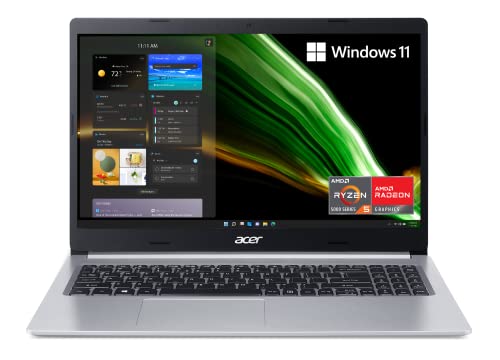
The Aspire 5 is the sensible starting point for a teacher who wants one laptop that does the whole job without specialising in any single part of it. Its AMD Ryzen 5 5500U is a six-core mobile processor with integrated AMD Radeon graphics, paired in this listing with 8GB of DDR4 RAM and a 256GB NVMe SSD. That combination covers Zoom hosting, screen sharing, browser-based teaching platforms and document work, and the SSD keeps start-up and file opening quick between classes.
The 15.6-inch Full HD IPS display is the right size for teaching: large enough to watch a class gallery while sharing slides, with IPS viewing angles that stay clear if you shift position or show the screen to someone beside you. The listing includes a backlit keyboard, which helps in a dim room during early or evening classes, and Wi-Fi 6 for a more capable wireless connection on a modern home or school network. The built-in webcam is present for video calls, although this listing does not state its resolution, so judge it with realistic expectations and good lighting rather than assuming a detailed camera specification that was never published for this unit.
Key specifications
- Processor: AMD Ryzen 5 5500U hexa-core mobile processor
- Graphics: Integrated AMD Radeon graphics
- Memory: 8GB DDR4 RAM
- Storage: 256GB NVMe SSD
- Display: 15.6-inch Full HD IPS
- Connectivity: Wi-Fi 6, backlit keyboard, Windows 11 Home
Pros
- Six-core Ryzen processor suited to calls plus a full browser workload
- Full HD IPS screen with comfortable viewing angles for long sessions
- Wi-Fi 6 and a backlit keyboard included
Cons
- 256GB of storage fills up if you keep large video recordings locally
- Webcam resolution is not stated in the listing
- 8GB of RAM is adequate rather than generous for heavy multitasking
View the Acer Aspire 5 on Amazon
2. Dell Inspiron 15 3530 — For Teachers Who Keep Everything Open

The Inspiron 15 3530 is built for the teacher whose desktop is a working system: timetable, slides, marking, class chat and reference material all open at once. This listing pairs an Intel Core i5-1335U, a ten-core processor with Intel Iris Xe graphics, with 16GB of RAM and a 1TB PCIe NVMe SSD. The extra memory is the headline for teaching, because it lets you move from one class to the next without shutting down the tools you were just using, and the large SSD holds a full library of lesson files, worksheets and recorded material on the machine itself.
Its 15.6-inch Full HD touchscreen adds a teaching-specific option the others handle differently: tapping, scrolling and annotating directly on the screen during a lesson, rather than steering everything with the touchpad. The listing also names a webcam, an SD card reader, a numeric keypad, HDMI and Wi-Fi 6. The card reader is quietly useful for moving photos or recordings from a camera card, HDMI connects a classroom display or a second home monitor, and the numeric keypad speeds up grade entry. As with the Acer, the listing does not publish a webcam resolution for this configuration, so treat the camera as a standard built-in unit and light your teaching space well.
Key specifications
- Processor: Intel Core i5-1335U, 10 cores, up to 4.6 GHz at Max Turbo Frequency
- Graphics: Intel Iris Xe graphics
- Memory: 16GB RAM
- Storage: 1TB PCIe NVMe M.2 SSD
- Display: 15.6-inch Full HD touchscreen
- Connectivity and extras: Webcam, SD card reader, numeric keypad, HDMI, Wi-Fi 6, Windows 11 Home
Pros
- 16GB of RAM and 1TB of storage, the most headroom in this guide
- Touchscreen supports direct on-screen annotation during lessons
- SD card reader and numeric keypad suit real classroom routines
Cons
- Touchscreen models reward careful handling of the display
- Webcam resolution is not stated in the listing
- The larger specification is more than a light Zoom-only user needs
View the Dell Inspiron 15 3530 on Amazon
3. HP Pavilion 15 — The Camera and Audio Pick

The Pavilion 15 earns its place because its listing is unusually specific about the hardware a teacher actually appears through. It names an integrated HP Wide Vision 720p HD webcam, and that stated resolution is exactly the kind of detail to look for when comparing teaching laptops, because it removes the guesswork the other listings leave open. The same listing describes a 15.6-inch diagonal Full HD 1080p IPS micro-edge BrightView display, so shared slides and student video tiles get a sharp, wide screen with slim borders that keep the laptop itself from growing.
Audio and access get equal attention. The listing includes B&O audio with dual speakers, a headphone and microphone combo jack for a headset, and a fingerprint reader for quicker sign-in between classes. Connections cover one SuperSpeed USB Type-C port, two SuperSpeed USB Type-A ports, HDMI 2.0, a media card reader and a backlit keyboard with a numeric keypad, along with Wi-Fi 6 and Bluetooth 5.0. Because Pavilion 15 listings are sold in more than one configuration, check the exact processor and memory shown on the product page for the unit you select, and confirm they match your workload before ordering. The camera, display and audio details above are the parts this listing states directly, and they are the reason it belongs in a teaching guide.
Key specifications
- Display: 15.6-inch diagonal Full HD 1080p IPS micro-edge BrightView
- Webcam: HP Wide Vision 720p HD webcam, as stated in the listing
- Audio: B&O audio with dual speakers, headphone and microphone combo jack
- Ports: USB Type-C, two USB Type-A, HDMI 2.0, media card reader
- Extras: Backlit keyboard with numeric keypad, fingerprint reader, Wi-Fi 6, Bluetooth 5.0
- Note: Processor and memory vary by configuration, so confirm them on the product page
Pros
- Webcam resolution is stated in the listing rather than left vague
- Dual speakers with B&O audio and a dedicated headset jack
- Fingerprint reader and a full set of ports for classroom peripherals
Cons
- Configuration varies between listings, so the exact unit needs checking
- A bright display finish can reflect strong room lighting
- Teachers wanting a touchscreen should choose the Dell instead
View the HP Pavilion 15 on Amazon
4. ASUS VivoBook 15 F515 — Slim Design, Larger SSD

The VivoBook 15 F515 suits a teacher who carries the laptop between home and school and wants storage room without moving up to the Dell’s full specification. Its Intel Core i5-1135G7 processor runs up to 4.2 GHz with Intel Iris Xe graphics, and this F515EA-DH55 listing includes 8GB of DDR4 RAM and a 512GB SSD. That storage figure is the quiet strength here: twice the room of the Acer in this guide, enough for a teaching library of documents, images and downloaded class material without constant tidying.
The 15.6-inch Full HD display covers the teaching basics of gallery view plus shared content, and the listing adds a fingerprint sensor for fast sign-in and Windows 11 Home. The VivoBook line is built around a thin and light 15.6-inch design, which matters if the laptop travels in a bag every day rather than living on one desk. The listing does not state a webcam resolution, following the pattern of most laptops in this class, so the same advice applies: teach in decent light, sit facing a window or lamp where possible, and use the headset option for clearer speech in a noisy home.
Key specifications
- Processor: Intel Core i5-1135G7, up to 4.2 GHz, 4 cores
- Graphics: Intel Iris Xe graphics
- Memory: 8GB DDR4 RAM
- Storage: 512GB SSD
- Display: 15.6-inch Full HD
- Extras: Fingerprint sensor, Windows 11 Home
Pros
- 512GB SSD gives breathing room for lesson files and recordings
- Thin 15.6-inch design suits teachers who carry their laptop daily
- Fingerprint sensor speeds up signing in between classes
Cons
- 8GB of RAM is the sensible minimum rather than multitasking headroom
- Webcam resolution is not stated in the listing
- No touchscreen for on-screen annotation
View the ASUS VivoBook 15 on Amazon
How to Choose a Laptop for Zoom Teaching
Start with the camera, because it is the part students actually see. If a listing states a webcam resolution, as the HP Pavilion listing does with its 720p HD camera, that is a point in its favour. If it does not, assume a standard built-in camera, light your room well, and budget attention for positioning: camera near eye level, light in front of you rather than behind, and a plain background where possible. A headset plugged into the combo jack will improve your voice more reliably than any speaker specification, so confirm that jack or plan on a USB headset.
Next, match memory and storage to your habits. A teacher who opens Zoom, a browser and a slide deck can work comfortably on 8GB of RAM, and the Acer and ASUS above are specified that way. A teacher who keeps a full school day of apps and tabs open, or who stores recorded lessons on the laptop, should prefer the Dell’s 16GB and 1TB combination or at least the ASUS’s 512GB SSD. Storage fills faster than expected once class recordings accumulate, so local habits should drive this choice more than processor names.
Then consider how you teach. Annotating on screen points to the Dell’s touchscreen. Presenting from the laptop in different rooms points to the lighter ASUS or the balanced Acer. Connecting a second monitor, a document camera or a classroom display points to checking the port list carefully, where the HP’s stated USB-C, dual USB-A and HDMI 2.0 set is the most detailed in this guide. Finally, remember that Zoom performance also depends on your internet connection and your router’s position in the home, which no laptop purchase can fix on its own. Wi-Fi 6 support, present across these picks, helps only when the rest of the network supports it too.
FAQs
How much RAM does a Zoom teaching laptop need?
For Zoom hosting with a browser, slides and documents open alongside, 8GB is a workable baseline and 16GB is more comfortable. The difference shows up between classes, when a 16GB machine can leave the whole teaching stack open instead of reloading it.
Does webcam resolution really matter for teaching?
It matters for how clearly students see you and anything you hold up to the camera. Prefer a listing that states the resolution, such as the 720p HD webcam named in the HP Pavilion listing. When a listing is silent, good lighting and camera position improve the picture more than any setting inside Zoom.
Is a 15.6-inch screen better than a smaller one for classes?
For most teachers, yes. A 15.6-inch Full HD screen fits the class gallery beside shared content and is easier to read during long marking sessions. A smaller laptop travels more easily, so teachers who move rooms all day may accept that trade.
Can these laptops run a second monitor?
The HP listing includes HDMI 2.0 and the Dell listing includes HDMI, both of which connect an external display for a two-screen teaching setup with students on one screen and materials on the other. Check the exact port list on the product page of the configuration you choose.
What else should I set up before the first class?
Update Zoom and Windows, test your camera and headset in a practice meeting, position a light in front of you, and keep the charger in the room. Those steps do more for a calm first class than any single hardware feature.
Conclusion
For most teachers, the Acer Aspire 5 is the balanced place to start, with a six-core processor, a Full HD IPS screen and Wi-Fi 6. Teachers who keep everything open and annotate on screen should step up to the Dell Inspiron 15 3530 and its 16GB of RAM, 1TB SSD and touchscreen. If appearing clearly on camera is the priority, the HP Pavilion 15 is the pick whose listing actually states its 720p HD webcam and pairs it with dual speakers and a headset jack. The ASUS VivoBook 15 rounds out the guide for teachers who travel light but still want a 512GB SSD. Choose by camera honesty, memory and how you actually teach, and any of the four will run a school day of Zoom classes without drama.
Related guides
- Best Laptops to Play Roblox: From Budget Integrated Graphics to Dedicated GPUs
- Best Laptops for Video Editing and Music Production: Power, Screen and Storage
- Best Laptops for Network Engineers: Ethernet, RAM for Labs and Ports That Matter
- Best Laptops for Digital Nomads: Light Machines for Working From Anywhere
More from Amazon
Programs that pair well with the guide above. Offers and eligibility are set by Amazon and may change.
Free shipping on eligible items, Prime Video and more. Eligible new members can start with a free trial.
Start a Prime free trialAd-free music streaming. Eligible new subscribers can start with a free trial.
Try Music Unlimited freeA Prime membership for ages 18-24 with a trial period. Eligibility is set by Amazon.
See Prime for Young AdultsAudiobooks and podcasts to listen to on the go. Eligible new members can start with a free trial.
Try Audible freeAs an Amazon Associate we earn from qualifying purchases.









Write Your Review
No reviews yet. Be the first to share your experience!