
Key takeaways
- The best laptops for Adobe Premiere Pro compared on CPU, GPU, memory, storage and display, from the MacBook Pro 16 with M4 Pro to RTX-powered Windows machines for 4K timelines.
What's inside
As an Amazon Associate I earn from qualifying purchases. This post may contain affiliate links at no extra cost to you.
As an Amazon Associate we earn from qualifying purchases.
Adobe Premiere Pro punishes weak hardware in very specific ways. A laptop that feels fast for documents and browsing can still stutter the moment you stack three 4K clips, add Lumetri Color, apply a noise reduction effect and ask for a clean export before a client call. The bottleneck is rarely one single part. Playback depends on the processor and graphics working together, timeline responsiveness depends on fast storage and enough memory, and color work depends on a screen you can actually trust.
This guide looks at laptops for Adobe Premiere Pro only, and every pick below was chosen for editing work rather than general use. The machines fall into two clear camps. On one side is Apple silicon, where the processor, graphics and media engines sit on one chip and Premiere Pro is built to use them on macOS. On the other side are Windows laptops with a discrete NVIDIA GeForce RTX graphics card, a high core count Intel or AMD processor, and cooling built for long renders. Neither camp is automatically better. The right choice depends on your codecs, your effects stack and whether you also need the same machine for other Windows-only tools.
A quick note on specifications: memory and storage figures come from each product listing and describe the exact configuration linked, not the wider model range. Always match the processor, graphics, memory and drive size on the listing page before you order.
Disclosure: This article contains affiliate links. If you buy through a link on this page, we may earn a commission at no additional cost to you.
Quick Picks
- Apple MacBook Pro 16 with M4 Pro — the strongest all-round Premiere Pro laptop here for editors who work in macOS, with a 14-core CPU, 20-core GPU, 24GB of unified memory and a 16.2-inch Liquid Retina XDR display built for HDR color work.
- Lenovo Legion Pro 7i Gen 9 — the Windows power pick, pairing an Intel Core i9-14900HX with an NVIDIA GeForce RTX 4080 Laptop GPU, 32GB of memory and a large 2TB solid-state configuration for heavy effects and long timelines.
- ASUS ROG Zephyrus G16 (2025) — the portable Windows option, with an Intel Core Ultra 9 285H, an NVIDIA GeForce RTX 5070 Ti Laptop GPU, 32GB of memory, a 2TB SSD and a 16-inch OLED display in a slimmer body.
- Razer Blade 16 (2025) — the maximum-specification option, listed with an NVIDIA GeForce RTX 5090 Laptop GPU, an AMD Ryzen AI 9 HX 370, 64GB of memory and 4TB of storage for editors who also push complex effects and large projects.
1. Apple MacBook Pro 16 with M4 Pro

The MacBook Pro 16 is the laptop most Premiere Pro editors picture first, and the M4 Pro configuration linked here earns that position on specifications rather than reputation. The listing describes a 14-core CPU and a 20-core GPU on the Apple M4 Pro chip, 24GB of unified memory, a 512GB SSD and a 16.2-inch Liquid Retina XDR display in Space Black. For Premiere Pro, that combination matters because the chip, graphics and memory pool are integrated, so the application is not passing frames between separate memory systems while you scrub.
In day-to-day editing terms, this is the machine for 4K timelines with color correction, titles and moderate effects, and for editors who cut on the move. The Liquid Retina XDR panel is a genuine editing tool rather than a luxury extra. The listing gives up to 1600 nits of peak brightness and up to 1000 nits of sustained brightness, which makes HDR previewing practical on the internal screen, and the larger 16.2-inch canvas leaves more room for the timeline, program monitor and scopes at the same time. Port selection also suits camera work, with three Thunderbolt 5 ports, an SDXC card slot, an HDMI port and a MagSafe 3 charging port listed, so ingesting cards does not have to start with a pocket full of adapters.
The limits are worth stating plainly. The 512GB drive is the smallest storage figure in this guide, and video projects fill space quickly, so most editors will work from fast external drives. Memory is fixed at 24GB, comfortable for typical 4K work but with less headroom for very large projects alongside other heavy applications. If your timelines combine multicam and heavy effects, step up within the range.
Specifications from the listing
- Processor: Apple M4 Pro with 14-core CPU and 20-core GPU
- Memory: 24GB unified memory
- Storage: 512GB SSD
- Display: 16.2-inch Liquid Retina XDR, up to 1600 nits peak brightness
- Ports listed: three Thunderbolt 5 ports, SDXC card slot, HDMI, MagSafe 3, headphone jack
- Operating system: macOS
Pros
- Integrated Apple silicon design suits Premiere Pro playback and exports
- Excellent HDR display for color work on the internal screen
- SDXC card slot and HDMI built in for camera and monitor workflows
- Consistent performance on battery or plugged in, according to the listing
Cons
- 512GB of storage is tight for video projects without external drives
- Memory is fixed at 24GB in this configuration
- macOS only, so Windows-only tools in your workflow will not run natively
View the Apple MacBook Pro 16 with M4 Pro on Amazon
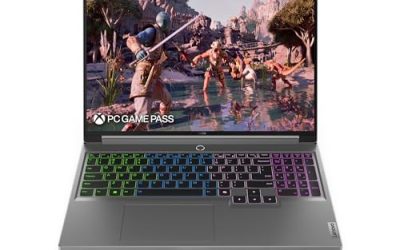
2. Lenovo Legion Pro 7i Gen 9

The Legion Pro 7i Gen 9 is a gaming laptop on paper, but its specification reads like a checklist for a demanding Premiere Pro workstation. The listing pairs an Intel Core i9-14900HX, described with 24 cores, with an NVIDIA GeForce RTX 4080 Laptop GPU with 12GB of graphics memory. It adds 32GB of memory and a 2TB solid-state configuration made up of two 1TB NVMe drives, behind a 16-inch IPS QHD+ display rated at 500 nits with a 240Hz refresh rate, running Windows 11 Pro.
For Premiere Pro, the value is in the combination of a high core count processor for timeline work and exports, a powerful discrete GPU for GPU-accelerated effects and color, and enough internal storage to keep active projects, cache and media on fast drives at the same time. Two separate NVMe drives also give editors a sensible layout option, keeping the application and operating system on one drive and project media or cache on the other, which is a long-standing editing habit for a reason. This is the pick for editors whose projects lean on effects, scaling, stabilization and layered timelines, and who want Windows compatibility for the rest of their software stack.
The trade-offs are the usual ones for this class. A laptop built around this level of hardware is a desk-first tool that happens to be movable. The 240Hz panel is fast and bright, but editors who grade critically should still check final work on a calibrated reference display. Fan noise under a long export is also part of life with high-wattage hardware.
Specifications from the listing
- Processor: Intel Core i9-14900HX, 24 cores
- Graphics: NVIDIA GeForce RTX 4080 Laptop GPU, 12GB
- Memory: 32GB
- Storage: 2TB NVMe SSD, configured as 1TB plus 1TB
- Display: 16-inch IPS QHD+, 500 nits, 240Hz
- Operating system: Windows 11 Pro
Pros
- Very strong processor and discrete GPU pairing for effects-heavy timelines
- 32GB of memory for larger projects and multitasking
- Generous 2TB of fast internal storage across two drives
- Windows 11 Pro for broad software and plug-in compatibility
Cons
- Large, performance-first design is less travel friendly
- Display is tuned for speed first, so critical grading still deserves a reference monitor
- Cooling fans will be audible during sustained exports
View the Lenovo Legion Pro 7i Gen 9 on Amazon
3. ASUS ROG Zephyrus G16 (2025)

The Zephyrus G16 answers a common editor complaint, which is that powerful Windows laptops tend to be bulky. This 2025 configuration is listed with an Intel Core Ultra 9 285H processor, an NVIDIA GeForce RTX 5070 Ti Laptop GPU, 32GB of memory and a 2TB SSD, with a 16-inch ROG Nebula OLED display at 2.5K resolution and Windows 11 Pro. That is a full Premiere Pro specification, not a lightweight compromise, in a machine designed to be carried between home, studio and set.
The OLED display is the headline for editors. A 2.5K OLED panel gives you deep blacks and strong contrast for checking footage, and the 16-inch size keeps the timeline usable without an external monitor for shorter sessions. The RTX 5070 Ti Laptop GPU handles the GPU-accelerated parts of Premiere Pro, including many effects and color tools, while the Core Ultra 9 processor covers timeline responsiveness and export work. With 32GB of memory and 2TB of storage, this configuration does not force the compromises that thinner laptops often do, which is exactly why it belongs in a Premiere Pro guide rather than a general portability roundup.
Balance still means choices. A slim chassis has less thermal headroom than a thick performance laptop, so very long, maximum-load exports are where the bigger machines here have their advantage. The OLED panel also deserves sensible care habits for static interface elements. For editors who travel constantly and still cut serious 4K work, those are reasonable trades.
Specifications from the listing
- Processor: Intel Core Ultra 9 285H
- Graphics: NVIDIA GeForce RTX 5070 Ti Laptop GPU
- Memory: 32GB
- Storage: 2TB SSD
- Display: 16-inch ROG Nebula OLED, 2.5K resolution
- Operating system: Windows 11 Pro
Pros
- Strong RTX graphics and Core Ultra 9 processor in a portable design
- OLED display with deep contrast for reviewing and editing footage
- 32GB of memory and 2TB of storage, with no obvious weak point
- Windows 11 Pro suits studio and plug-in heavy workflows
Cons
- Slim design has less cooling headroom than thicker performance laptops
- OLED care habits are worth following for static screen elements
- No built-in full-size card reader workflow is highlighted in the listing, so plan your ingest method
View the ASUS ROG Zephyrus G16 (2025) on Amazon
4. Razer Blade 16 (2025)

The Blade 16 is the maximum specification option in this guide, and the listing makes that plain. This 2025 configuration is described with an NVIDIA GeForce RTX 5090 Laptop GPU, an AMD Ryzen AI 9 HX 370 processor with 12 cores and 24 threads, 64GB of LPDDR5x memory and 4TB of PCIe Gen4 storage split across two 2TB drives. The display is a QHD+ 240Hz OLED panel, and the operating system is Windows 11. Razer also highlights a redesigned thin chassis for this generation, which is notable given the hardware inside.
For Premiere Pro, a specification like this is about headroom. The RTX 5090 Laptop GPU is there for editors who stack GPU-accelerated effects, work with demanding formats and want exports and previews to stay responsive when a timeline gets complicated. The 64GB of memory supports large projects alongside other applications, and 4TB of internal storage means entire active projects, media and cache can live on the machine without constant drive juggling. The Ryzen AI 9 HX 370 also brings a neural processing unit rated at 50 TOPS in the listing, which is relevant to the growing number of AI-assisted features in creative applications, even though core editing performance still comes from the CPU and GPU.
This level of specification is more than many editors need. If your work is straightforward 4K cutting with light color, the other picks cover it fully. The Blade 16 makes sense when timelines are genuinely heavy, when the same laptop handles other demanding creative work, or when you want headroom to grow into over a long ownership period.
Specifications from the listing
- Processor: AMD Ryzen AI 9 HX 370, 12 cores and 24 threads
- Graphics: NVIDIA GeForce RTX 5090 Laptop GPU
- Memory: 64GB LPDDR5x
- Storage: 4TB PCIe Gen4 SSD, configured as 2TB plus 2TB
- Display: QHD+ OLED, 240Hz
- Operating system: Windows 11
Pros
- Highest graphics, memory and storage specifications in this guide
- 64GB of memory for very large projects and heavy multitasking
- OLED display with a fast refresh rate for editing and checking footage
- Thin redesigned chassis for this level of hardware
Cons
- Specification far exceeds what simple 4K timelines require
- Performance hardware means audible cooling under sustained load
- Premium positioning means you pay for headroom you may not use
View the Razer Blade 16 (2025) on Amazon
How to Choose a Laptop for Adobe Premiere Pro
Start with your footage, not with a brand. Editors cutting 1080p and light 4K work need far less than editors living in multicam 4K, heavy effects and HDR delivery. Write down your typical codec, resolution, effects stack and export targets, then match the laptop to that list.
Processor and graphics both matter, in different jobs. The CPU drives timeline responsiveness, many export tasks and general application speed, so core count and generation are worth attention. The GPU accelerates many Premiere Pro effects, Lumetri Color work, scaling and playback tasks, which is why every Windows pick here uses a discrete NVIDIA GeForce RTX Laptop GPU and why the Apple pick uses a higher tier of Apple silicon with a 20-core GPU. Avoid judging a laptop by the GPU name alone, and check the exact configuration on the listing.
Memory is the quiet bottleneck. For comfortable 4K editing, 32GB is the sensible target in this guide, with 24GB of unified memory on the MacBook Pro configuration also workable for typical projects. Choose 64GB when projects are large, timelines are complex or you keep several demanding applications open at once. Storage speed and size matter just as much. Fast SSD space for the operating system, cache and active media keeps timelines responsive, and the 2TB and 4TB configurations here exist because video files are large and external drive juggling slows real work down.
Finally, judge the display as an editing tool. Resolution gives the timeline room, brightness makes HDR work practical, and panel type affects contrast and color checking. The OLED and Liquid Retina XDR screens in this guide are genuine advantages for editors, while a fast IPS panel is still perfectly usable when final color is checked on a reference display. Whichever laptop you choose, confirm the exact processor, graphics, memory and storage on the listing page match this guide, because the same model name is sold in many configurations.
FAQs
How much memory does Premiere Pro actually need on a laptop?
For light 1080p work, less is workable, but for the 4K editing this guide targets, 32GB is a comfortable aim and 24GB of unified memory on Apple silicon is a reasonable starting point. Large, effects-heavy projects and heavy multitasking are the cases where 64GB earns its place.
Is a MacBook or a Windows laptop better for Premiere Pro?
Neither is automatically better. The MacBook Pro with M4 Pro offers an integrated design and an outstanding HDR display on macOS. The Windows picks offer discrete NVIDIA GeForce RTX graphics, Windows-only software compatibility and, in some cases, larger internal storage. Choose based on your operating system needs, codecs and effects, not on platform loyalty.
Does Premiere Pro need a discrete GPU?
Many core editing tasks run on the processor, but a discrete GPU or a strong integrated GPU on Apple silicon accelerates a wide range of effects, color work, scaling and playback tasks. Every laptop in this guide was chosen with graphics performance in mind for that reason.
How much storage should an editing laptop have?
More than you first think. Project files, media, previews and cache grow quickly, which is why most picks here carry 2TB or more. The 512GB MacBook Pro configuration works best when paired with fast external storage for media and archives.
Can these laptops handle HDR and color grading work?
The MacBook Pro’s Liquid Retina XDR display and the OLED displays on the Zephyrus G16 and Blade 16 are well suited to reviewing HDR and color on the internal screen. For final critical grading, many professionals still check work on a calibrated reference display, whatever laptop they use.
Conclusion
For most Premiere Pro editors who want one machine that simply handles 4K work beautifully, the Apple MacBook Pro 16 with M4 Pro is the cleanest recommendation here, thanks to its integrated performance and its HDR display. Windows editors who want maximum timeline and effects power should look first at the Lenovo Legion Pro 7i Gen 9, while those who travel should give the ASUS ROG Zephyrus G16 a serious look for its balance of RTX graphics, memory, storage and portability. The Razer Blade 16 sits at the top for editors whose projects genuinely demand the highest specifications available in a laptop. Match the machine to your footage and effects, confirm the exact configuration on the listing, and any of these four will serve a Premiere Pro workflow well.
Related guides
- Best Laptops to Play Roblox: From Budget Integrated Graphics to Dedicated GPUs
- Best Laptops for Zoom Teaching: Clear Video, Reliable Audio and All-Day Class Power
- Best Laptops for Video Editing and Music Production: Power, Screen and Storage
- Best Laptops for Network Engineers: Ethernet, RAM for Labs and Ports That Matter
More from Amazon
Programs that pair well with the guide above. Offers and eligibility are set by Amazon and may change.
Free shipping on eligible items, Prime Video and more. Eligible new members can start with a free trial.
Start a Prime free trialAd-free music streaming. Eligible new subscribers can start with a free trial.
Try Music Unlimited freeA Prime membership for ages 18-24 with a trial period. Eligibility is set by Amazon.
See Prime for Young AdultsAudiobooks and podcasts to listen to on the go. Eligible new members can start with a free trial.
Try Audible freeAs an Amazon Associate we earn from qualifying purchases.









Write Your Review
No reviews yet. Be the first to share your experience!