
Key takeaways
- Compare the best laptops for software engineering students on CPU, RAM, SSD, display and portability for IDEs, compiling, virtual machines and coursework.
What's inside
As an Amazon Associate I earn from qualifying purchases. This post may contain affiliate links at no extra cost to you.
As an Amazon Associate we earn from qualifying purchases.
Disclosure: This article contains affiliate links, and we may earn a commission if you buy through links on this page, at no extra cost to you.
Introduction
Software engineering students ask more of a laptop than most other students. A typical day can mean an integrated development environment open next to lecture slides, a browser full of documentation tabs, a terminal running a local server, and a compiler or interpreter working through a project in the background. Add group projects, version control, database tools, and the occasional virtual machine or container, and a basic notebook that feels fine for essays can start to struggle very quickly.
The good news is that you do not need a workstation-class machine for a degree. What you need is balance: a modern multi-core processor that keeps builds and test runs moving, enough memory for an IDE plus everything around it, fast solid-state storage so projects open quickly, a screen that stays comfortable during long coding sessions, and a chassis light enough to carry between lectures, labs, and the library. Battery life matters too, because power outlets in lecture halls are never where you need them.
This guide compares four laptops that fit that brief in different ways. One is a thin macOS machine built around Apple silicon. Two are 14-inch Windows laptops with 16GB of memory and fast processors for heavier coursework. The fourth is a larger, simpler Windows option for students who want a bigger screen for side-by-side code and documentation. Every specification below comes from the product listing for that exact model, so you can match the hardware to the modules on your own timetable, from introductory programming through compilers, databases, and a final-year project.
Quick Picks
- Best for macOS development and portability: Apple MacBook Air 13-inch with M3 chip — light, quiet, and well suited to Unix-based toolchains and iOS-related coursework.
- Best all-round Windows choice: Lenovo ThinkPad E14 Gen 5 — Ryzen 7 power, 16GB of memory, business-style ports, and a keyboard made for long typing sessions.
- Best display in a compact body: ASUS Zenbook 14 — a Ryzen 7 8840HS processor, 16GB of memory, and an OLED touchscreen in a portable 14-inch design.
- Best larger screen on a simpler spec: Acer Aspire 5 A515-45-R74Z — a 15.6-inch Full HD IPS display and Ryzen 5 performance for everyday coding and study.
1. Apple MacBook Air 13-inch (M3) — B0CX23V2ZK

The MacBook Air with the M3 chip is the natural starting point for students whose courses lean on a Unix-style environment. macOS gives you a native terminal, and many programming courses, open-source tools, and deployment workflows assume a Unix-like system. For web development, Python, Java, and mobile modules that involve iOS, a Mac also removes a layer of setup friction, because the tools tend to be documented for macOS first.
According to the listing, this configuration pairs the Apple M3 chip, which has an 8-core CPU, with 8GB of unified memory and a 256GB SSD. The 13.6-inch Liquid Retina display runs at 2560 x 1664 resolution, which keeps small code fonts crisp and gives you more vertical detail than a basic Full HD panel. The machine weighs 2.7 pounds, connects over Wi-Fi 6E and Bluetooth 5.3, and includes two Thunderbolt and USB 4 ports plus a backlit keyboard and Touch ID.
For coursework, that combination covers introductory and intermediate programming comfortably: editors and IDEs open quickly from the SSD, and the processor handles compiling, running tests, and local development servers without drama. The honest limitation is memory and storage headroom. With 8GB of unified memory, running a heavy IDE, a browser with many tabs, and a virtual machine at the same time can feel tight, and 256GB fills up once you add several toolchains, containers, and project folders. Students planning heavy virtualisation or large local datasets should treat this as the portable, efficient option rather than the maximum-headroom option.
Key specifications from the listing
- Processor: Apple M3 chip with 8-core CPU
- Memory: 8GB unified memory
- Storage: 256GB SSD
- Display: 13.6-inch Liquid Retina, 2560 x 1664
- Graphics: Integrated Apple GPU
- Connectivity: Wi-Fi 6E, Bluetooth 5.3, two Thunderbolt / USB 4 ports
- Weight: 2.7 pounds
- Operating system: macOS
Pros
- Very light for daily carrying between classes
- High-resolution display keeps code sharp and readable
- macOS suits Unix-based toolchains and iOS coursework
- Quiet, fanless-style portability for libraries and lectures
Cons
- 8GB of memory limits heavy multitasking and virtual machines
- 256GB of storage can fill quickly with toolchains and projects
- Only two USB-C style ports, so hubs may be needed for accessories
2. Lenovo ThinkPad E14 Gen 5 — B0BYBKZ7XD

If your degree is Windows-based, the ThinkPad E14 Gen 5 is the most coursework-focused machine in this roundup. ThinkPads are built around the keyboard and practical ports, and for a software engineering student that matters more than it sounds: you will type thousands of lines of code on this machine, present from it, plug it into lab peripherals, and quite possibly use a wired network connection in a dorm or lab.
The listing for this configuration shows an AMD Ryzen 7 7730U processor, 16GB of RAM, and a 512GB SSD, with a 14-inch FHD+ display. It runs Windows 11 Pro and includes a fingerprint reader, a backlit keyboard, HDMI, an RJ45 Ethernet port, and Wi-Fi 6. That port selection is unusually practical for a student laptop: HDMI for presenting project demos, Ethernet for a stable connection when you are pushing large repositories or working in a lab, and USB connectivity for the usual mix of drives and peripherals.
In study terms, 16GB of memory is the point where a coding workload stops feeling constrained. An IDE, a browser, a database tool, and a local server can stay open together, and the Ryzen 7 processor has the multi-core strength for compiling larger projects and running coursework virtual machines more comfortably than entry-level chips. The 14-inch size keeps it portable for a backpack, while the 512GB SSD gives realistic room for multiple semesters of projects, virtual environments, and course software.
Key specifications from the listing
- Processor: AMD Ryzen 7 7730U
- Memory: 16GB RAM
- Storage: 512GB SSD
- Display: 14-inch FHD+
- Operating system: Windows 11 Pro
- Security and input: Fingerprint reader, backlit keyboard
- Ports and connectivity: HDMI, RJ45 Ethernet, Wi-Fi 6
Pros
- 16GB of memory suits IDEs, browsers, and tools running together
- Ryzen 7 processor handles compiling and coursework virtual machines well
- Ethernet and HDMI ports are genuinely useful in labs and presentations
- Windows 11 Pro fits many university software requirements
Cons
- Less sleek and light-focused than the thinnest ultraportables
- Integrated graphics are for coding and coursework, not heavy 3D work
- Students who need macOS-only tools should choose the MacBook instead
3. ASUS Zenbook 14 (UM3406HA) — B0DFWZ77LB

The Zenbook 14 is the pick for students who want strong performance and the best-looking screen in a machine that still travels well. Long debugging sessions are easier on a clear, comfortable display, and this model centres on an OLED touchscreen, which the listing highlights alongside Wi-Fi 6E.
Underneath, the listing shows an AMD Ryzen 7 8840HS processor, 16GB of memory, a 512GB SSD, and AMD Radeon 780M integrated graphics, in the model numbered UM3406HA-WS74T. The 8840HS is a performance-leaning mobile processor, so builds, data coursework, and multitasking have real headroom, while the 16GB and 512GB combination matches the level most software engineering students should aim for: enough memory for an IDE plus containers or a light virtual machine, and enough storage for toolchains without constant housekeeping.
This is also a sensible choice if your course mixes programming with data work or introductory machine learning in Python, where a stronger CPU and capable integrated graphics help with notebooks and visualisations, while still keeping the laptop in a normal student backpack size. As with the ThinkPad, there is no discrete graphics card in this listing, so students heading into game development or heavy 3D modules should check their course requirements carefully before choosing any integrated-graphics laptop.
Key specifications from the listing
- Processor: AMD Ryzen 7 8840HS
- Memory: 16GB
- Storage: 512GB SSD
- Graphics: AMD Radeon 780M integrated graphics
- Display: 14-inch OLED touchscreen
- Connectivity: Wi-Fi 6E
- Model: UM3406HA-WS74T
Pros
- Strong Ryzen 7 8840HS performance for compiling and multitasking
- OLED touchscreen is comfortable for long reading and coding sessions
- 16GB of memory and 512GB SSD hit the student sweet spot
- Portable 14-inch format for lectures, labs, and group work
Cons
- Integrated graphics only, so check game or 3D module requirements
- Touchscreen and OLED are luxuries if your budget is very tight
- Port selection is slimmer than a business laptop with Ethernet
4. Acer Aspire 5 A515-45-R74Z — B09J1MXS2Z
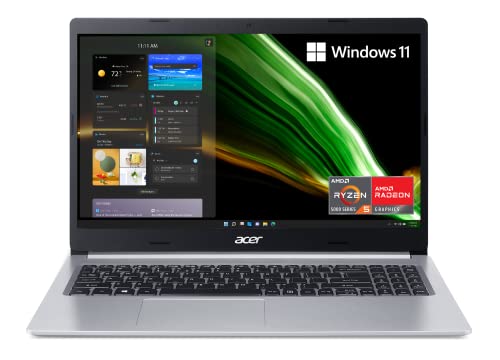
The Aspire 5 takes a different route: a bigger 15.6-inch screen and a straightforward specification for students whose work is mainly writing code, running coursework tools, and studying, rather than running several virtual machines at once. A larger display is a real advantage when you want code on one side of the screen and documentation, a brief, or lecture notes on the other.
The listing describes a 15.6-inch Full HD IPS display at 1920 x 1080, an AMD Ryzen 5 5500U hexa-core processor, AMD Radeon integrated graphics, 8GB of DDR4 memory, and a 256GB NVMe SSD. It also lists Wi-Fi 6, a backlit keyboard, Windows 11 Home, a weight of 3.88 pounds, and battery life of up to 11 hours. Connectivity in the listing includes USB Type-C, USB 3.2 and USB 2.0 ports, HDMI 2.0, and an RJ-45 Ethernet port, which is a practical mix for dorm rooms, libraries, and lab benches.
For first and second year programming, web development, and database coursework, this level of hardware is workable, especially if you keep projects tidy and close what you are not using. The trade-offs are clear in the specifications: 8GB of memory and 256GB of storage give less headroom than the 16GB and 512GB machines above, so this model suits lighter multitasking and students who store large files externally or in the cloud. In return, you get the biggest screen in this guide and a full-size feel for long study sessions at a desk.
Key specifications from the listing
- Processor: AMD Ryzen 5 5500U hexa-core
- Memory: 8GB DDR4
- Storage: 256GB NVMe SSD
- Display: 15.6-inch Full HD IPS, 1920 x 1080
- Graphics: AMD Radeon integrated graphics
- Connectivity: Wi-Fi 6, Bluetooth 5.0, HDMI 2.0, Ethernet RJ-45, USB Type-C and USB-A ports
- Operating system: Windows 11 Home
- Weight: 3.88 pounds
Pros
- Large 15.6-inch screen suits code beside documentation
- Ryzen 5 processor covers everyday programming coursework
- Ethernet, HDMI, and USB-C give practical desk and lab connectivity
- Backlit keyboard helps during evening study sessions
Cons
- 8GB of memory is the minimum comfortable level for IDE multitasking
- 256GB SSD needs tidy storage habits over a full degree
- Larger and heavier to carry than the 13 and 14-inch picks
How to Choose a Laptop for Software Engineering
Start with memory. An IDE on its own is not especially demanding, but students rarely run only an IDE. Add a browser, a terminal, a database viewer, chat for a group project, and a local server, and memory use climbs quickly. Treat 8GB as the floor for light coursework and 16GB as the comfortable target for a degree that includes virtual machines, containers, or larger projects.
Prioritise the processor over graphics for most modules. Compiling, running tests, indexing a codebase, and working with data are mainly processor tasks. A modern Ryzen 5, Ryzen 7, or Apple silicon chip matters more for most software engineering students than a gaming graphics card, unless your timetable includes game development, 3D graphics, or GPU-based machine learning modules with specific requirements.
Choose storage for toolchains, not just documents. Code files are small, but SDKs, emulators, containers, virtual machine images, and datasets are not. A 512GB SSD gives a student far more breathing room than 256GB, and fast NVMe storage makes opening projects and booting tools noticeably quicker either way.
Match the operating system to your course. Many departments teach on Windows, many assume a Unix-like environment, and iOS development requires a Mac. Read your course handbook before you buy, check whether required software is Windows-only or Mac-only, and ask whether the department provides lab machines or remote environments for anything your laptop cannot run.
Think about the screen and keyboard as study tools. You will read code for hours. A sharp IPS or OLED panel, enough resolution to show code and documentation side by side, and a comfortable backlit keyboard are not cosmetic extras for a programming student; they shape how long you can work comfortably in a library or a shared flat.
Check ports before you need them. HDMI saves stress when you present a project. Ethernet helps when shared Wi-Fi is unreliable during a deadline. USB-C with display support makes a single-cable desk setup with a monitor possible on supported models, which turns a student room into a far better place to finish a final-year project.
FAQs
Is 8GB of RAM enough for software engineering students?
It can be enough for introductory programming, web development, and light IDE use, especially if you close unused applications. For a full degree with virtual machines, containers, or several tools open at once, 16GB is the safer and more comfortable choice, as shown by the ThinkPad and Zenbook configurations in this guide.
Do software engineering students need a dedicated graphics card?
Most do not. Mainstream programming, databases, web and mobile development, and most data coursework rely on the processor, memory, and SSD. A dedicated graphics card only becomes important for specific modules such as game development, 3D graphics, or GPU-accelerated machine learning, so check your course requirements first.
Is a Mac or a Windows laptop better for programming?
Neither is universally better. macOS suits Unix-based toolchains and is required for iOS development, while Windows suits departments built around Windows software and offers models with ports such as Ethernet. The right answer is the operating system your course software expects, which is why this guide includes both.
What screen size works best for coding at university?
A 13 or 14-inch laptop is easiest to carry to every lecture and still works well for coding, especially with a high-resolution display. A 15.6-inch screen is better if you mainly work at a desk and want code and documentation side by side without an external monitor.
Should students buy for the first year or the final year?
Buy for the middle and later years if you can. First-year work is light, but projects grow, and memory and storage headroom decide whether the same laptop still feels capable when you are running a final-year project with servers, test suites, and documentation all open together.
Conclusion
For most software engineering students, the sweet spot is a modern multi-core processor, 16GB of memory, a 512GB SSD, and a screen and keyboard you can live with for long sessions. The Lenovo ThinkPad E14 Gen 5 hits that formula most completely for Windows users, with practical ports for labs and presentations. The ASUS Zenbook 14 matches the memory and storage target while adding a stronger processor tier and an OLED touchscreen for students who value the display. The Apple MacBook Air with M3 is the lightest and most portable option here and the natural choice for macOS and iOS-focused study, provided its 8GB memory and 256GB storage fit your modules. The Acer Aspire 5 trades some headroom for the biggest screen in the guide, suiting desk-based study and lighter multitasking. Check your course software requirements, pick the operating system first, and then choose the configuration whose memory and storage will still feel comfortable in your final year.
Related guides
- Best Laptops to Play Roblox: From Budget Integrated Graphics to Dedicated GPUs
- Best Laptops for Zoom Teaching: Clear Video, Reliable Audio and All-Day Class Power
- Best Laptops for Video Editing and Music Production: Power, Screen and Storage
- Best Laptops for Network Engineers: Ethernet, RAM for Labs and Ports That Matter
More from Amazon
Programs that pair well with the guide above. Offers and eligibility are set by Amazon and may change.
Free shipping on eligible items, Prime Video and more. Eligible new members can start with a free trial.
Start a Prime free trialAd-free music streaming. Eligible new subscribers can start with a free trial.
Try Music Unlimited freeA Prime membership for ages 18-24 with a trial period. Eligibility is set by Amazon.
See Prime for Young AdultsAudiobooks and podcasts to listen to on the go. Eligible new members can start with a free trial.
Try Audible freeAs an Amazon Associate we earn from qualifying purchases.










Write Your Review
No reviews yet. Be the first to share your experience!