
Key takeaways
- Compare the best AMD gaming laptops by Ryzen chip, graphics, display speed and storage, and see honestly which parts of each machine are actually AMD.
What's inside
As an Amazon Associate I earn from qualifying purchases. This post may contain affiliate links at no extra cost to you.
The real decision behind an AMD gaming laptop is not the badge on the lid. It is how much of the machine is actually AMD. Some models pair a Ryzen processor with a Radeon graphics chip for an all-AMD build, while others use Ryzen for the CPU and hand the graphics work to an NVIDIA card. Both routes can play well, but they differ in driver ecosystem, features and how the parts share power, so the honest starting point is knowing exactly which silicon sits inside the laptop you are paying for.
This guide is for three kinds of buyers: players who want a fully AMD machine on principle, players who care about frame rates first and brand second, and students or commuters who game at night but carry the laptop all day. Every pick below was chosen from the names and specifications printed on its Amazon product page, and each product section states plainly which components are AMD and which are not.
Quick Picks
As an Amazon Associate we earn from qualifying purchases.
| Product | Best for | Key spec from title |
|---|---|---|
| ASUS TUF Gaming A16 Advantage Edition | Players who want AMD graphics as well as an AMD CPU | Ryzen 7 7735HS with Radeon RX 7700S |
| ASUS ROG Zephyrus G14 (2024) | Gamers who travel and still want high frame rates | Ryzen 9 8945HS with RTX 4060 |
| Acer Nitro 16 AN16-41-R4CY | Big-screen gaming with wired networking | Ryzen 7 7840HS with RTX 4060 |
How to Choose
Decide how much AMD you actually want
An all-AMD laptop pairs a Ryzen CPU with a Radeon GPU, which keeps drivers, power sharing and features such as SmartShift inside one ecosystem. A Ryzen plus GeForce build gives up that single-vendor neatness but opens the door to NVIDIA features like DLSS. Neither is automatically faster. Decide first whether the all-AMD route matters to you, because it narrows the field fast: genuinely all-AMD gaming laptops are a small group, and the TUF Gaming A16 in this guide is the clearest current example of the type.
Match the Ryzen tier to your games and side tasks
Ryzen 5, 7 and 9 chips in gaming laptops all handle mainstream titles, but core counts and boost clocks decide how the machine copes when a game shares the CPU with voice chat, recording or a browser full of tabs. The Ryzen 7 7735HS and 7840HS below are eight-core parts aimed squarely at gaming, while the Ryzen 9 8945HS adds stronger burst performance for streaming or editing between sessions. Also check the letters: HS chips balance power and portability, while HX parts chase desktop-style speed in heavier chassis.
Read the graphics line before anything else
The GPU, not the CPU, sets your frame rate ceiling in most games, so compare this line of the listing first. The Radeon RX 7700S in the TUF A16 carries 8GB of GDDR6 memory and targets smooth high-refresh play at the panel’s native 1920 x 1200. The RTX 4060 laptops here also carry 8GB and add DLSS upscaling, which helps at higher resolutions. Watch the wattage where a listing states it: the Zephyrus G14 lists its RTX 4060 at 90W with ROG Boost, and a lower-wattage version of the same GPU name will not perform identically.
Check the display, memory and storage as one package
A fast GPU deserves a fast panel, so look for 120Hz or higher alongside the resolution your GPU can feed. All three picks here run at 120Hz to 165Hz. Memory is the next check: 16GB of DDR5 is the sensible floor for modern titles, and it appears in every pick below. Storage fills faster than buyers expect, so note that two of these machines ship with a 1TB SSD while the all-AMD TUF starts at 512GB, which suits a smaller, rotating game library rather than everything installed at once.
The 3 Best Options
ASUS TUF Gaming A16 Advantage Edition
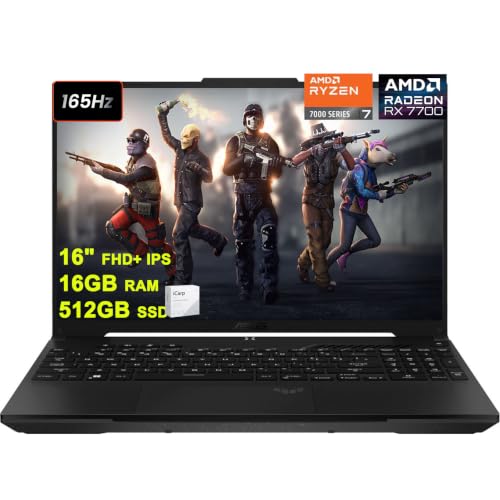
This is the pick for buyers who meant it when they said AMD. A Ryzen 7 7735HS processor and a Radeon RX 7700S graphics chip run the whole show, so the CPU, the discrete GPU and even the integrated graphics all come from AMD. The 16-inch 165Hz panel with FreeSync Premium and a MUX switch suits competitive and fast-paced single-player games at native resolution, and the TUF chassis keeps the design practical rather than flashy. It is the most single-minded machine in this guide, and that focus is exactly its appeal.
Specs
- Processor: AMD Ryzen 7 7735HS, 8 cores and 16 threads, up to 4.75 GHz boost
- Graphics: AMD Radeon RX 7700S with 8GB GDDR6
- Memory: 16GB DDR5
- Storage: 512GB SSD
- Display: 16-inch WUXGA 1920 x 1200, 165Hz, 7ms, full sRGB coverage, FreeSync Premium, MUX switch
- Connectivity: USB4 and USB Type-C ports, backlit keyboard, fast charging
- Operating system: Windows 11 Pro
Best for: Players who want an all-AMD build with a high-refresh 16-inch screen.
Watch out for: The 512GB SSD is the smallest storage in this guide, and the listing caps memory at 16GB, so heavy multitaskers should check the exact configuration before ordering.
ASIN: B0D4D9YJKW
ASUS ROG Zephyrus G14 (2024)

The Zephyrus G14 answers a different question: how much gaming power fits in a bag you barely notice. Its AMD side is the Ryzen 9 8945HS, an eight-core chip with strong boost clocks, while graphics come from NVIDIA, and this guide will not pretend otherwise. What you get for that compromise is a 14-inch OLED panel at 2880 x 1800 and 120Hz, a 1TB SSD, and an aluminum chassis that weighs 3.31 pounds. For a dorm desk, a train table or a carry-on, it is the easiest machine here to live with daily.
Specs
- Processor: AMD Ryzen 9 8945HS, 8 cores and 16 threads, 4.0 GHz base up to 5.2 GHz
- Graphics: NVIDIA GeForce RTX 4060 with 8GB GDDR6, ROG Boost up to 1940MHz at 90W
- Memory: 16GB LPDDR5
- Storage: 1TB SSD
- Display: 14-inch OLED, 2880 x 1800, 120Hz, 0.2ms response time
- Design: CNC aluminum chassis, 0.63 inches thin, 3.31 pounds, MUX switch
- Operating system: Windows 11 Home
Best for: Students and travelers who game seriously but carry their laptop everywhere.
Watch out for: The graphics are NVIDIA, not Radeon, and the memory is soldered LPDDR5, so choose the configuration carefully because you cannot add RAM later.
ASIN: B0D9JH9CW3
Acer Nitro 16 AN16-41-R4CY

The Nitro 16 is the straightforward big-screen option. A Ryzen 7 7840HS octa-core processor pairs with an RTX 4060, a 16-inch WUXGA panel running at 165Hz, and a 1TB Gen 4 SSD, which is a combination aimed at players who keep large libraries installed. Acer also keeps wired networking on board with Killer Ethernet alongside WiFi 6E, a detail competitive players still appreciate when a router sits nearby. The four-zone RGB keyboard and NitroSense software round out a machine that behaves like a small desktop replacement rather than a travel companion.
Specs
- Processor: AMD Ryzen 7 7840HS, octa-core, up to 5.1 GHz
- Graphics: NVIDIA GeForce RTX 4060 Laptop GPU
- Memory: 16GB DDR5
- Storage: 1TB PCIe Gen 4 SSD
- Display: 16-inch WUXGA 1920 x 1200 IPS, 165Hz
- Networking: WiFi 6E, Killer Ethernet E2600, Bluetooth 5.1
- Keyboard: 4-zone RGB backlit, with NitroSense control software
- Model: AN16-41-R4CY (NH.QLLAA.002)
Best for: Desk-based players who want a large, fast screen and room for big game installs.
Watch out for: Only the processor is AMD here, and this is a full-size 16-inch chassis, so confirm the dimensions and weight suit your desk and bag before buying.
ASIN: B0CY3SS4VL
Which One Fits Your Situation
You want AMD components throughout the machine
Choose the ASUS TUF Gaming A16 Advantage Edition. It is the only pick here where the discrete graphics are Radeon rather than GeForce, so the Ryzen CPU and RX 7700S GPU share one driver family and AMD’s power-sharing features. Its 165Hz FreeSync Premium panel is matched to the GPU’s strengths at 1920 x 1200, making it the cleanest expression of what most people picture when they search for an AMD gaming laptop.
You game in a dorm, on trains or between classes
Take the ROG Zephyrus G14. At 3.31 pounds with a 14-inch OLED screen, it slips into a normal backpack and still brings a Ryzen 9 processor, an RTX 4060 and a 1TB SSD. The sharp 2880 x 1800 display also pulls double duty for reading, notes and video when you are not playing, which matters when one machine has to cover your whole day.
You play at a desk and keep everything installed
The Acer Nitro 16 fits this routine. Its 1TB SSD holds a broad library without constant uninstalling, the 16-inch 165Hz panel gives fast games room to breathe, and the wired Ethernet port keeps online matches off congested WiFi. Pick it when the laptop mostly lives in one place and screen size matters more than portability.
You split time between gaming and heavier creative work
Start with the Zephyrus G14 if the work is portable, since its Ryzen 9 chip and high-resolution OLED suit editing timelines and detailed images. If the work stays at a desk and storage is the bottleneck, the Nitro 16 and its 1TB drive make the better base. Either way, keep expectations honest: these are gaming laptops first, and their listings sell gaming hardware, not workstation certification.
Common Mistakes
- Assuming every laptop in an AMD roundup is all-AMD, when many pair a Ryzen CPU with an NVIDIA GPU.
- Comparing GPU names without checking wattage, even though the same RTX 4060 can be configured at different power levels.
- Buying a high-resolution display the GPU cannot feed at native settings, then blaming the processor.
- Overlooking storage size and discovering a modern game library does not fit on a 512GB drive.
- Ignoring whether memory is soldered, which removes any option to upgrade RAM later.
Frequently Asked Questions
Is an all-AMD gaming laptop better than a Ryzen and GeForce mix?
Not automatically. An all-AMD build like the TUF Gaming A16 keeps drivers and power management in one ecosystem and supports features such as SmartShift and FreeSync end to end. A Ryzen and GeForce mix adds NVIDIA tools like DLSS and often appears in thinner designs. Judge the specific CPU, GPU, wattage and display in the listing rather than treating either recipe as universally superior.
Which Ryzen processor should I look for in a gaming laptop?
For most players, an eight-core Ryzen 7 HS chip such as the 7735HS or 7840HS is the sweet spot, feeding modern games without wasting power. Step up to a Ryzen 9 like the 8945HS if you also stream, record or edit video, where the extra headroom shows. Ryzen 5 models can work for lighter esports titles, but check core counts and clocks on the listing before assuming.
Does the graphics card wattage really change performance?
Yes. Laptop GPUs ship at different power limits under the same name, and higher wattage generally sustains higher clocks. The Zephyrus G14 listing, for example, states its RTX 4060 runs at 90W with ROG Boost. When a listing omits wattage, treat headline GPU names with caution and compare the rest of the specification, especially cooling design and display resolution, before deciding.
How much storage do modern games actually need?
More than most buyers plan for. A handful of large titles can fill a 512GB SSD once Windows and everyday software take their share, which is why two picks here ship with 1TB. If you rotate a few games at a time, 512GB is workable. If you keep a whole library installed or record gameplay, start at 1TB and save yourself the uninstall shuffle.
Related guides
- Best Laptops to Play Roblox: From Budget Integrated Graphics to Dedicated GPUs
- Best Laptops for Zoom Teaching: Clear Video, Reliable Audio and All-Day Class Power
- Best Laptops for Video Editing and Music Production: Power, Screen and Storage
- Best Laptops for Network Engineers: Ethernet, RAM for Labs and Ports That Matter
More from Amazon
Programs that pair well with the guide above. Offers and eligibility are set by Amazon and may change.
Free shipping on eligible items, Prime Video and more. Eligible new members can start with a free trial.
Start a Prime free trialAd-free music streaming. Eligible new subscribers can start with a free trial.
Try Music Unlimited freeA Prime membership for ages 18-24 with a trial period. Eligibility is set by Amazon.
See Prime for Young AdultsAudiobooks and podcasts to listen to on the go. Eligible new members can start with a free trial.
Try Audible freeAs an Amazon Associate we earn from qualifying purchases.










Write Your Review
No reviews yet. Be the first to share your experience!