
Key takeaways
- Compare creative laptops picked for color-accurate displays, discrete GPUs and fast storage, with the exact specs that matter for photo, video and 3D work.
What's inside
As an Amazon Associate I earn from qualifying purchases. This post may contain affiliate links at no extra cost to you.
Buying a creative laptop is really a decision about trust: whether the red on your screen is the red your client sees, and whether a timeline stays smooth at hour six of an edit. A fast processor alone does not settle either question. The display’s color coverage, the graphics chip behind your previews, and how much memory the machine keeps free decide whether the work feels easy or constantly interrupted.
This guide is for photographers, video editors, illustrators and 3D artists who buy one machine to earn money with. Every pick below was chosen from the specifications printed on its Amazon product page: the exact processor, graphics card, memory, storage and display resolution, rather than a brand’s marketing headline.
Quick Picks
As an Amazon Associate we earn from qualifying purchases.
| Product | Best for | Key spec from title |
|---|---|---|
| Apple MacBook Pro 14 with M4 Pro | Color-critical photo and video work | 14.2-inch Liquid Retina XDR display |
| Lenovo Yoga Pro 9i 16 | Windows editors who want a big, bright screen | 16-inch 3.2K Mini-LED 165Hz panel |
| ASUS ProArt P16 | 4K timelines and touch-based grading | 16-inch 4K OLED touch display |
| MSI Creator A16 AI+ | 3D scenes and heavy GPU rendering | NVIDIA GeForce RTX 4070 graphics |
How to Choose
Start with the display, not the processor
Color work fails quietly on a poor screen: you grade an image perfectly, then it shifts on every other display. Look for a panel that states its resolution and brightness plainly on the listing, and prefer higher-resolution screens for detail work. The MacBook Pro’s Liquid Retina XDR and the ProArt’s 4K OLED both publish peak brightness figures, which matters when you judge highlights in HDR footage. A dim, low-resolution panel forces you to guess, and guessing is what produces rework.
Match the GPU to your heaviest app
Integrated graphics handle photo editing and light illustration comfortably, but 3D viewport work, GPU effects in Premiere Pro and DaVinci Resolve, and AI denoise tools all lean on a discrete card. The RTX 4060 and RTX 4070 laptops below carry 8GB-class dedicated graphics memory, which keeps large timelines and Blender scenes responsive. Check the listing for the exact GPU name rather than a vague “dedicated graphics” label, and remember that the same GPU name can ship in different wattages, so the specific model number is worth reading.
Buy RAM for the files you open together
Creative work is rarely one app at a time. A typical session stacks Photoshop layers over a Lightroom catalog while a browser holds client references. Sixteen gigabytes is the floor for that; the four machines here each ship with 24GB or 32GB, which leaves headroom for caches and renders running in the background. Memory on most thin creator laptops is soldered, so the figure on the listing is the figure you live with. Choose as if you cannot upgrade later, because usually you cannot.
Storage speed shapes your whole day
Footage libraries, RAW archives and project caches punish slow drives. Every pick here uses an NVMe or PCIe SSD of at least 512GB, and the three 1TB models suit editors who keep active projects on the internal drive. Consider how you archive: if finished work moves to external drives quickly, a smaller internal SSD is workable; if a full season of shoots lives on the machine, start at 1TB. Also check whether the listing mentions a card reader if your camera workflow depends on one.
The 4 Best Options
Apple MacBook Pro 14 with M4 Pro

The 14-inch MacBook Pro is the default recommendation for photographers and editors who live inside macOS, because its Liquid Retina XDR display publishes the numbers color work depends on: 3024-by-1964 resolution, up to 1600 nits peak brightness and a 1,000,000:1 contrast ratio. The M4 Pro chip pairs a 12-core CPU with a 16-core GPU, and 24GB of unified memory keeps large Lightroom catalogs and layered Photoshop files moving without constant beachballs.
Specs
- Processor: Apple M4 Pro chip with 12-core CPU and 16-core GPU
- Memory: 24GB unified memory
- Storage: 512GB SSD
- Display: 14.2-inch Liquid Retina XDR, 3024-by-1964 resolution
- Brightness: up to 1600 nits peak, 1000 nits sustained
- Model number: MX2H3LL/A, Space Black
Best for: Photographers and video editors who want the most trustworthy built-in display.
Watch out for: The 512GB SSD fills quickly with footage, and memory and storage cannot be upgraded after purchase, so confirm this configuration matches your library size.
ASIN: B0DLHY2BJ6
Lenovo Yoga Pro 9i 16

Lenovo’s Yoga Pro 9i is the Windows pick for editors who want maximum screen drama without moving to a gaming chassis. Its 16-inch Mini-LED panel runs at 3200-by-2000 resolution with a 165Hz refresh rate and 1200 nits of brightness, so scrubbing a timeline feels fluid and HDR previews hold their highlights. Underneath, a Core Ultra 9 185H processor and GeForce RTX 4060 graphics give Resolve and Premiere the hardware acceleration they expect, backed by 32GB of memory.
Specs
- Processor: Intel Core Ultra 9 185H
- Graphics: NVIDIA GeForce RTX 4060 Laptop GPU
- Memory: 32GB RAM
- Storage: 1TB NVMe SSD
- Display: 16-inch 3.2K Mini-LED, 165Hz, 1200 nits
- Operating system: Windows 11 Pro
- Model: 83DN0008US, Luna Grey
Best for: Windows-based editors who cut long timelines and want a large, bright, high-refresh screen.
Watch out for: At 16 inches this is a desk-first machine; if you edit on trains and planes, the smaller picks here travel better.
ASIN: B0DBX5VKLH
ASUS ProArt P16
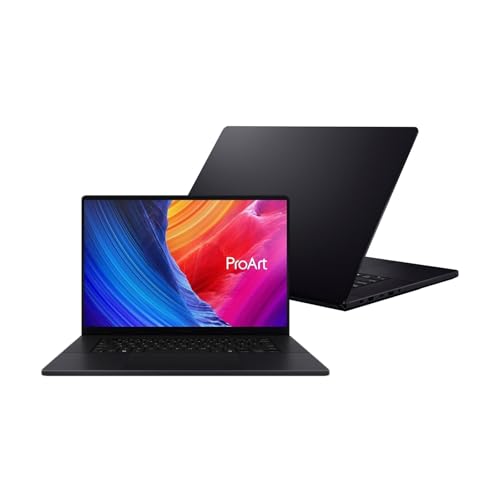
The ProArt P16 is built around a 16-inch 4K OLED touch display, which suits colorists and retouchers who work directly on the image and want per-pixel contrast when judging shadow detail. This configuration pairs AMD’s Ryzen AI 9 HX 370, a 12-core processor, with an RTX 4060 carrying 8GB of GDDR6 memory, so GPU effects and AI-assisted tools in the Adobe suite have real hardware behind them. The 32GB of LPDDR5X memory is onboard, and storage is a 1TB PCIe 4.0 NVMe drive.
Specs
- Processor: AMD Ryzen AI 9 HX 370, 12 cores, up to 5.1GHz
- Graphics: NVIDIA GeForce RTX 4060, 8GB GDDR6
- Memory: 32GB LPDDR5X (onboard)
- Storage: 1TB PCIe 4.0 NVMe SSD
- Display: 16-inch 4K OLED touch screen
- Operating system: Windows 11 Home
- Weight: 4.08 lbs
Best for: Colorists and retouchers who grade on a 4K OLED panel and use touch input.
Watch out for: This listing is an EXcaliberPC configuration with Windows 11 Home rather than Pro, and the memory is soldered, so check the exact configuration on the page before ordering.
ASIN: B0DHZN19TD
MSI Creator A16 AI+

MSI’s Creator A16 AI+ is the rendering pick of this group, because it steps the graphics up to an RTX 4070 while keeping a creator-focused 16-inch UHD+ MiniLED panel at 120Hz. The Ryzen AI 9 365 processor and 32GB of LPDDR5x memory feed the GPU during long exports, and the 1TB NVMe SSD holds active project folders without immediate archiving. It is the machine here most comfortable splitting time between editing, Blender scenes and motion graphics.
Specs
- Processor: AMD Ryzen AI 9 365
- Graphics: NVIDIA GeForce RTX 4070
- Memory: 32GB LPDDR5x
- Storage: 1TB NVMe SSD
- Display: 16-inch UHD+ MiniLED, 120Hz
- Connectivity: WiFi 7
- Operating system: Windows 11 Home
- Model: A3HVGG-094US, Lunar Gray
Best for: 3D artists and motion designers whose renders are GPU-bound.
Watch out for: It runs Windows 11 Home, and the Lunar Gray finish shows desk wear differently than black finishes; confirm the operating system edition suits your software licensing.
ASIN: B0DG7K7L74
Which One Fits Your Situation
You grade photos for print and clients
Choose the MacBook Pro 14. Print and client work punish color errors more than slow exports, and the XDR display’s published brightness and contrast figures give you the most predictable starting point. Its 24GB of memory handles layered files well; just plan external storage early, because the internal drive is the smallest here.
You edit long-form video on Windows
The Yoga Pro 9i fits best. Its 165Hz Mini-LED screen makes timeline scrubbing feel immediate, the RTX 4060 accelerates the effects editors actually use, and the 1TB drive holds a season of active projects. Windows 11 Pro also suits editors who hand the machine to clients or IT departments that expect Pro features.
You split time between editing and 3D
Take the MSI Creator A16 AI+. The RTX 4070 is the strongest graphics card in this group, and 3D viewport work notices that gap every day. The ProArt P16 is the alternative if a 4K OLED touch panel matters more to you than raw GPU headroom.
You work in studios and on location
The MacBook Pro’s 14-inch chassis is the easiest to carry between a studio desk and a location setup, while the ProArt P16 is the location pick for Windows users who need a big 4K screen in a bag. Both beat the 16-inch Lenovo and MSI for daily commuting.
Common Mistakes
- Choosing by processor name alone and ignoring the display’s stated brightness and resolution, which decide whether your color work transfers.
- Buying 16GB of memory for a workflow that stacks Photoshop, Lightroom and a browser, then discovering the RAM is soldered and cannot grow.
- Assuming every listing with the same laptop name has the same GPU wattage, SSD size or operating system edition; reseller configurations vary.
- Filling a 512GB internal drive with footage in the first month because no archive plan existed before the laptop arrived.
- Overlooking the operating system edition on the listing, then finding a studio tool or license that expects Windows 11 Pro.
Frequently Asked Questions
How much RAM does a creative laptop actually need?
For photo editing and illustration, 24GB to 32GB is the comfortable zone, and every laptop here meets it. Video editors working with 4K timelines and 3D artists should treat 32GB as the sensible target, since renders, caches and preview files all compete for the same memory while your main application stays open.
Is a discrete GPU necessary for photo editing?
Not strictly, but it changes how the work feels. Modern Lightroom and Photoshop features such as AI denoise and select tools lean on the GPU, and a discrete card like the RTX 4060 keeps those tasks quick. Pure shooters on a budget can start with integrated graphics; hybrid photo-video creators should not.
OLED or Mini-LED: which display is better for color work?
Both panel types appear here because both can serve color work well. OLED, as on the ProArt P16, gives per-pixel contrast that flatters shadow detail. Mini-LED, as on the Yoga Pro 9i and MSI Creator, reaches higher sustained brightness for HDR previews. Judge by the published resolution and brightness figures, not the panel label alone.
Can these laptops handle 4K video editing?
Yes, each configuration here pairs a modern multi-core processor with at least 24GB of memory and a fast SSD, which is the combination 4K timelines need. The RTX 4060 and RTX 4070 models add hardware acceleration for effects and exports, so they stay smoother as timelines gain layers, titles and color nodes.
Related guides
- Best Laptops to Play Roblox: From Budget Integrated Graphics to Dedicated GPUs
- Best Laptops for Zoom Teaching: Clear Video, Reliable Audio and All-Day Class Power
- Best Laptops for Video Editing and Music Production: Power, Screen and Storage
- Best Laptops for Network Engineers: Ethernet, RAM for Labs and Ports That Matter
More from Amazon
Programs that pair well with the guide above. Offers and eligibility are set by Amazon and may change.
Free shipping on eligible items, Prime Video and more. Eligible new members can start with a free trial.
Start a Prime free trialAd-free music streaming. Eligible new subscribers can start with a free trial.
Try Music Unlimited freeA Prime membership for ages 18-24 with a trial period. Eligibility is set by Amazon.
See Prime for Young AdultsAudiobooks and podcasts to listen to on the go. Eligible new members can start with a free trial.
Try Audible freeAs an Amazon Associate we earn from qualifying purchases.










Write Your Review
No reviews yet. Be the first to share your experience!