
Key takeaways
- Discover the best art laptops for drawing and design, with color-accurate OLED screens, stylus support, and strong graphics for creative work.
What's inside
As an Amazon Associate I earn from qualifying purchases. This post may contain affiliate links at no extra cost to you.
Choosing an art laptop is a decision about the screen you stare at and the pen in your hand, not raw benchmark numbers. A panel that shifts color between angles or crushes shadow detail will quietly ruin a finished illustration, and a machine that cannot keep up with large layered files will interrupt every brush stroke. The right choice balances color truth, pen feel, and enough graphics muscle for the software you actually open each day.
This guide is for illustrators who sketch straight onto the display, designers juggling photo edits and layouts, and students building a portfolio on one machine. Each laptop below is picked from its Amazon listing, using the screen, pen support, graphics, memory, and storage stated there, so you can compare what the listing itself promises before you buy.
Quick Picks
As an Amazon Associate we earn from qualifying purchases.
| Product | Best for | Key spec from title |
|---|---|---|
| Lenovo Yoga 9i 2-in-1 Aura Edition 14″ | Drawing directly on the screen with the included pen | 14-inch 2.8K OLED touchscreen with Yoga Pen |
| Acer Swift X 14 | Heavy photo, video, and 3D work on the move | 14.5-inch OLED display, NVIDIA GeForce RTX 4060 |
| Dell XPS 14 Premium DA14250 | A large color-true canvas for detailed illustration | 14.5-inch 3.2K OLED touchscreen, 100% DCI-P3 |
How to Choose
Color accuracy and the screen panel
An art laptop lives or dies by its display, so start there instead of with the processor. OLED panels show deeper blacks and stronger contrast than standard IPS screens, which makes shadow detail and saturated color easier to judge while you paint or grade photos. Look for the resolution and the color coverage stated on the listing: a 2.8K or 3.2K OLED panel gives you room to see fine line work, and a wide-gamut rating such as 100% DCI-P3 or a factory calibration claim tells you the screen was built with color work in mind. Brightness matters too, especially near a window, so check the nits figure before you commit.
Pen input and the hinge that makes it usable
A touchscreen alone does not make a laptop good for drawing; the pen and the hinge decide whether sketching feels natural or frustrating. A bundled pen with pressure and tilt support lets you vary line weight naturally, and a garaged or magnetically attached pen is far more likely to be with you when an idea strikes than one bought separately. The hinge matters just as much: a 360-degree convertible folds flat into a tablet so your wrist rests naturally, while a standard clamshell forces you to draw on a propped-up screen. If the listing does not mention a pen at all, plan on buying one separately or pairing the laptop with a drawing tablet.
Graphics power for brushes, layers, and renders
Illustration apps run happily on modest hardware, but the moment you add large canvases, dozens of layers, 3D previews, or video timelines, the graphics chip starts to matter. Integrated graphics handle sketching, photo retouching, and layout work without complaint, and they keep the machine thin, quiet, and light. A discrete GPU such as the RTX 4060 earns its place when you render 3D scenes, scrub through high-resolution video, or run AI-assisted tools that lean on the graphics card. Match the GPU to the heaviest task in your week rather than the lightest: buying too little graphics power shows up as lag exactly when a deadline is closest.
Memory, storage, and the ports your tools need
Art files grow fast, so treat 16GB of memory as the floor and 32GB as the comfortable choice for layered illustration, photo editing, and running a browser full of references at the same time. Check whether the memory is soldered, because on many thin laptops the amount you buy is the amount you keep. Storage deserves the same attention: a 1TB SSD holds a working library of projects, brushes, and textures without constant shuffling to external drives. Finally, count the ports against your real setup — a drawing tablet, an external monitor, and a card reader all need somewhere to plug in, and Thunderbolt ports make a single-cable desk setup far simpler.
The 3 Best Options
Lenovo Yoga 9i 2-in-1 Aura Edition 14″

The Yoga 9i is the most direct answer in this list for someone who draws on the machine itself. Its 14-inch 2.8K OLED touchscreen reaches 1,100 nits in HDR, so colors stay vivid and line work stays crisp, and the included Yoga Pen turns the folded-flat convertible into a sketchbook. Behind the screen, the Intel Core Ultra 7 258V with 32GB of memory and a 1TB SSD keeps layered files moving, while Wi-Fi 7 keeps reference downloads and cloud syncs quick. Integrated graphics mean heavy 3D rendering is not its strongest suit, but for illustration, design, and photo work it is the pen-first package here.
Specs
- 14-inch 2.8K (2880 x 1800) OLED touchscreen, up to 1,100 nits (HDR)
- Intel Core Ultra 7 258V processor, up to 4.8 GHz
- 32GB LPDDR5X-8533MT/s memory; 1TB SSD
- Yoga Pen included; touchscreen with stylus support
- Integrated graphics; Wi-Fi 7; Windows 11 Pro
- Color: Cosmic Blue
Best for: Illustrators and designers who sketch directly on the screen.
Watch out for: Integrated graphics will feel slow on heavy 3D renders, so confirm your heaviest app runs well on integrated graphics before buying.
Acer Swift X 14

The Swift X 14 trades the pen for raw creative horsepower, and for photo and video artists that trade pays off. Its 14.5-inch 2.8K OLED display runs at 120Hz with Calman Verified color accuracy and wide DCI-P3 coverage, so graded footage and retouched photos look true on the panel itself. The NVIDIA GeForce RTX 4060 with 8GB of video memory accelerates renders, effects, and AI-assisted editing, while the Intel Core Ultra 7 155H, 16GB of memory, and a 1TB SSD keep timelines responsive. There is no pen bundled here, so pair it with a drawing tablet if your work starts with a stylus.
Specs
- 14.5-inch OLED touchscreen display, 2880 x 1800, 120Hz, Calman Verified
- NVIDIA GeForce RTX 4060 graphics, 8GB GDDR6
- Intel Core Ultra 7 155H processor, up to 4.8 GHz
- 16GB LPDDR5X memory (maximum 16GB); 1TB SSD
- Windows 11 Home; Wi-Fi 6E; 2 Thunderbolt 4 ports, HDMI, microSD slot
- Fingerprint reader; backlit keyboard; 76Wh battery; 3.3 lb
Best for: Photo and video editors who need a discrete GPU in a portable body.
Watch out for: The listing mentions no included pen, and the 16GB memory cannot be upgraded later, so check that it covers your largest projects.
Dell XPS 14 Premium DA14250
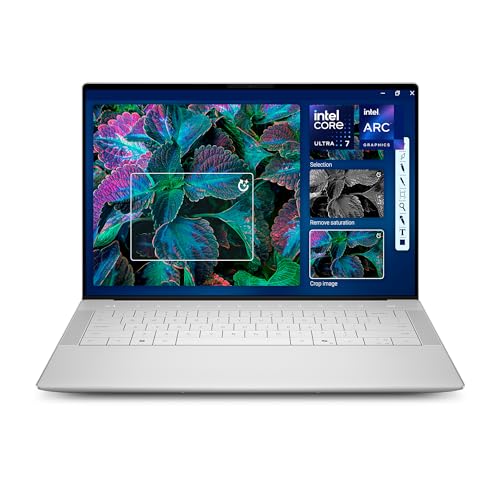
The Dell XPS 14 gives artists the largest canvas in this list without turning into a desktop replacement. Its 14.5-inch 3.2K OLED touchscreen shows 100% DCI-P3 color at up to 120Hz, which suits detailed illustration and careful color grading, and touch input lets you pinch, zoom, and annotate directly on the artwork. The Intel Core Ultra 7 255H with 32GB of memory and a 1TB SSD handles layered files and photo libraries comfortably, while Intel Arc integrated graphics cover illustration and editing even though heavy 3D work will run better on a discrete GPU. It is the pick when screen size and color matter more than pen input.
Specs
- 14.5-inch 3.2K (3200 x 2000) OLED touchscreen, 48-120Hz, 100% DCI-P3
- Intel Core Ultra 7 255H processor, up to 5.1 GHz
- Intel Arc Graphics (integrated)
- 32GB LPDDR5X memory; 1TB SSD
- 400 nits brightness; backlit keyboard with fingerprint reader
Best for: Artists who want the biggest color-accurate touchscreen canvas in a portable laptop.
Watch out for: No pen is included and there is no discrete GPU, so plan on a separate stylus or tablet and lighter 3D work.
Which One Fits Your Situation
You draw directly on the screen every day
Pick the Lenovo Yoga 9i. The included Yoga Pen, the folding hinge, and the bright 2.8K OLED screen are built around sketching, so you can move from rough lines to finished color without reaching for extra hardware. The 32GB of memory keeps big layered canvases responsive, and the convertible form lets you work flat like a sketchbook wherever you sit.
You edit photos and video as much as you draw
Pick the Acer Swift X 14. The RTX 4060 and the Calman Verified OLED panel are the combination that matters when timelines, effects, and color grading fill your day, and the 120Hz screen keeps playback smooth. Add a drawing tablet for sketching, since no pen comes in the box, and the machine covers the rest of a mixed creative workload.
You want the largest color-true canvas you can carry
Pick the Dell XPS 14. Its 14.5-inch 3.2K OLED touchscreen gives you more room for detailed line work and reference panels side by side, with full DCI-P3 color for grading you can trust. The 32GB of memory and 1TB of storage suit large photo libraries, and touch input covers zooming and annotation even without a bundled pen.
You split your week between a desk and travel
Pick the Acer Swift X 14 if your desk holds the peripherals. Its two Thunderbolt 4 ports, HDMI, and microSD slot connect a monitor, tablet, and card reader with little fuss, and the discrete GPU keeps renders moving when you are away from the desk. The 3.3 lb body and 76Wh battery make it the easiest of the three to carry between studios.
Common Mistakes
- Buying a laptop for its processor and ignoring the screen, then discovering colors shift when the work is printed or posted.
- Assuming every touchscreen works with any pen — check the listing for the pen standard and whether one is included.
- Choosing 8GB of memory to save money, then watching large layered files slow to a crawl.
- Picking a discrete GPU for sketching alone, when an integrated-graphics convertible with a pen would serve the work better.
- Forgetting to check ports and storage before ordering, then living with dongles and an external drive for every project.
Frequently Asked Questions
Do I need a laptop with a pen included?
Not always, but it removes a common headache. A bundled pen is guaranteed to work with the screen and is usually stored on or in the machine, so it is there when you need it. If your laptop has no pen, budget for a compatible stylus or a separate drawing tablet, and confirm the pen standard in the listing before you order.
Is OLED better than IPS for art work?
For most art work, yes. OLED panels show deeper blacks, stronger contrast, and wider color coverage, which makes it easier to judge shadows and saturated color while you paint or grade. The trade-off is that OLED screens can cost more and need care with static bright images, so weigh the color gain against how you use the machine day to day.
How much RAM do art apps need?
16GB is the practical minimum for illustration and photo editing, and it handles most single-app work well. Move to 32GB if you keep large layered files open alongside a browser full of references, or if you edit video and photos in the same session. Check whether the memory is soldered, since many thin laptops cannot be upgraded after purchase.
Can an integrated-graphics laptop handle digital art?
Yes, for drawing, painting, and photo editing. Integrated graphics handle brushes, layers, and high-resolution canvases without trouble, and they keep the laptop thin and quiet. Step up to a discrete GPU when your week includes 3D rendering, heavy video effects, or AI-assisted tools that use the graphics card, since those tasks slow down noticeably without one.
Related guides
- Best Laptops to Play Roblox: From Budget Integrated Graphics to Dedicated GPUs
- Best Laptops for Zoom Teaching: Clear Video, Reliable Audio and All-Day Class Power
- Best Laptops for Video Editing and Music Production: Power, Screen and Storage
- Best Laptops for Network Engineers: Ethernet, RAM for Labs and Ports That Matter
More from Amazon
Programs that pair well with the guide above. Offers and eligibility are set by Amazon and may change.
Free shipping on eligible items, Prime Video and more. Eligible new members can start with a free trial.
Start a Prime free trialAd-free music streaming. Eligible new subscribers can start with a free trial.
Try Music Unlimited freeA Prime membership for ages 18-24 with a trial period. Eligibility is set by Amazon.
See Prime for Young AdultsAudiobooks and podcasts to listen to on the go. Eligible new members can start with a free trial.
Try Audible freeAs an Amazon Associate we earn from qualifying purchases.










Write Your Review
No reviews yet. Be the first to share your experience!