
Key takeaways
- The best laptops for university of michigan engineering students: powerful Windows and Mac picks for CAD, MATLAB, and SolidWorks, with specs and Amazon links.
What's inside
- Quick Picks
- What Michigan Engineering Students Actually Need
- 1. Dell XPS 15 9530 — Best All-Round Laptop for Michigan Engineering
- 2. Lenovo LOQ 15 — Best Value Laptop with a Discrete GPU
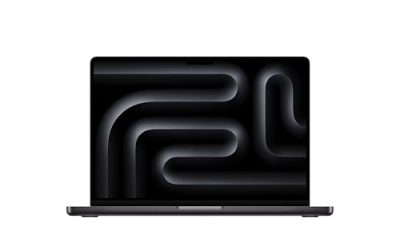
- 3. Apple MacBook Pro 14 with M4 Pro — Best Mac Option for Michigan Engineering
- 4. ASUS TUF Gaming A16 — Best Big-Screen Budget Alternative
- Buying Guide: How to Choose a Laptop for Michigan Engineering
- Frequently Asked Questions
- Conclusion
As an Amazon Associate I earn from qualifying purchases. This post may contain affiliate links at no extra cost to you.
Choosing a laptop for the College of Engineering at the University of Michigan is different from choosing a laptop for general college work. Engineering coursework at Michigan runs demanding software: CAD and 3D modelling, MATLAB, programming environments, simulation tools, and data analysis packages that can bring a basic ultrabook to a standstill. The University of Michigan’s CAEN (Computer Aided Engineering Network) guidance reflects that reality, recommending at least 16GB of memory, with 32GB suggested for Windows machines, at least 512GB of storage, with 1TB suggested, and an Intel Core i7, AMD Ryzen 7, or Apple M2 processor as a minimum. This guide focuses on laptops that meet or exceed those recommendations, so a first-year student can buy once and still have a machine that copes in junior and senior year. Every pick below is a laptop, and every specification quoted comes from its Amazon listing.


As an Amazon Associate, we earn from qualifying purchases made through links in this article, at no extra cost to you.
Quick Picks
Our Short List of 3
- Processor: 13th Gen Intel Core i7-13620H, 10 cores, up to 4.9GHz turbo
- Memory: 32GB DDR5 RAM at 4800MHz
- Storage: 1TB PCIe NVMe SSD
- Display: 15.6-inch display
- Processor: Apple M4 Pro chip, 12-core CPU, 16-core GPU
- Memory: 24GB unified memory
- Storage: 512GB SSD
- Display: 14.2-inch Liquid Retina XDR display, up to 1600 nits peak brightness
- Processor: AMD Ryzen 7 7735HS, octa-core
- Graphics: AMD Radeon RX 7700S, 8GB
- Memory: 16GB RAM
- Storage: 512GB SSD
All 3 Picks at a Glance
| Product | Specs | Action |
|---|---|---|
| 1. Dell XPS 15 9530 — Best All-Round Laptop for Michigan Engineering |
| Check price on Amazon |
| 3. Apple MacBook Pro 14 with M4 Pro — Best Mac Option for Michigan Engineering |
| Check price on Amazon |
| 4. ASUS TUF Gaming A16 — Best Big-Screen Budget Alternative |
| Check price on Amazon |
What Michigan Engineering Students Actually Need
CAEN notes that both Windows and macOS are commonly used by Michigan Engineering students, and that required software is available in campus labs and through remote access. That safety net matters if a particular application will not run on a student’s own laptop. At the same time, CAEN points out that most of its free engineering software runs on Windows. That single fact shapes this whole guide: a Windows laptop runs the widest range of engineering applications natively, without workarounds or remote sessions.
Sixteen gigabytes is the stated minimum, but 32GB is suggested for Windows machines: students routinely run CAD, a browser, and a document editor at once, and 16GB feels tight once a simulation or large dataset is added. Storage follows the same logic. The minimum is 512GB, but 1TB is suggested, and engineering files, software, and project archives consume storage quickly.
The processor minimum is an Intel Core i7, an AMD Ryzen 7, or an Apple M2 chip, so entry-level processors should be avoided entirely. A discrete graphics card is also important for CAD, 3D modelling, or GPU-accelerated simulation: integrated graphics can handle programming and light 2D work, but a discrete GPU makes a visible difference in SolidWorks, AutoCAD, and Revit. Portability matters too. Michigan’s North Campus, home to the College of Engineering, is a bus ride from Central Campus, and students carry their laptops all day. A 15-inch or 16-inch laptop is usually the best compromise between screen space and weight.
1. Dell XPS 15 9530 — Best All-Round Laptop for Michigan Engineering
- Processor: 13th Gen Intel Core i7-13620H, 10 cores, up to 4.9GHz turbo
- Memory: 32GB DDR5 RAM at 4800MHz
- Storage: 1TB PCIe NVMe SSD
- Display: 15.6-inch display
The Dell XPS 15 9530 is the most balanced pick in this guide: one machine that handles almost everything a Michigan Engineering student will encounter. According to the Amazon listing, this configuration pairs a 13th Gen Intel Core i7-13620H processor, with 10 cores and a maximum turbo frequency of up to 4.9GHz, with 32GB of DDR5 RAM at 4800MHz and a 1TB PCIe NVMe SSD. That lines up directly with CAEN’s suggested specification of 32GB of memory and 1TB of storage, on a Windows 11 Pro machine.
The 15.6-inch display gives enough room to work with CAD drawings, code, and spreadsheets side by side, without the bulk of a 17-inch desktop replacement. The XPS line is built as a premium thin-and-light machine rather than a gaming laptop, so it looks at home in a lecture hall, a lab, or an internship interview.
There are trade-offs. Search-indexed Amazon listings put this configuration at around $1,699 to $1,899, considerably more than the budget picks below. It is also a 2023 model sold in several configurations, so buyers should check the exact configuration on the Amazon product page before ordering. The configuration linked here is the 32GB RAM and 1TB SSD version with the Core i7-13620H processor. Students focused heavily on 3D rendering may want a more powerful discrete GPU, but for the broad mix of CAD, MATLAB, and programming that most Michigan Engineering students do, the XPS 15 9530 is a strong all-round choice.
Key specifications (according to the Amazon listing):
2. Lenovo LOQ 15 — Best Value Laptop with a Discrete GPU
The Lenovo LOQ 15 is the best-value pick for Michigan Engineering students who need a discrete graphics card without paying workstation prices. According to the Amazon listing, this configuration combines an AMD Ryzen 7 processor with an NVIDIA GeForce RTX 4060 Laptop GPU with 8GB of GDDR6 memory, running at a full 115W graphics power, plus 16GB of DDR5 RAM. The 15.6-inch display runs at 144Hz with 100% sRGB colour coverage and G-Sync support, which makes CAD viewports and 3D models look smooth and accurate.
The RTX 4060 is the key reason this laptop earns its place. Discrete NVIDIA graphics are well supported by engineering software, and the 8GB of dedicated video memory gives useful headroom for larger assemblies and GPU-accelerated tasks. Search-indexed Amazon listings put this laptop at around $929, which makes it one of the least expensive ways to get a current-generation RTX graphics card in a laptop. For a student whose budget cannot stretch to a premium workstation, the LOQ 15 delivers the graphics performance that matters most for CAD and simulation work.
The main compromise is memory. Sixteen gigabytes meets CAEN’s minimum but is below the suggested 32GB for Windows machines, which is acceptable for first-year and second-year work; many LOQ 15 configurations allow a memory upgrade later. Buyers should confirm the memory configuration on the Amazon product page, because the LOQ 15 is sold in many variants. It is also heavier and more gaming-styled than the XPS 15, with shorter battery life under load, so it suits students who mainly work at a desk or in a lab. For the price, its combination of a Ryzen 7 processor, an RTX 4060, and a high-refresh colour-accurate display is difficult to beat.
Key specifications (according to the Amazon listing):
- Processor: AMD Ryzen 7
- Graphics: NVIDIA GeForce RTX 4060 Laptop GPU, 8GB GDDR6, 115W
- Memory: 16GB DDR5 RAM
- Display: 15.6-inch Full HD IPS display, 144Hz, 100% sRGB, G-Sync
- Storage: check the configuration on the Amazon product page before ordering
- Check price on Amazon
3. Apple MacBook Pro 14 with M4 Pro — Best Mac Option for Michigan Engineering
- Processor: Apple M4 Pro chip, 12-core CPU, 16-core GPU
- Memory: 24GB unified memory
- Storage: 512GB SSD
- Display: 14.2-inch Liquid Retina XDR display, up to 1600 nits peak brightness
The MacBook Pro 14 with the M4 Pro chip is the best Mac option for a Michigan Engineering student, and it is the right choice for students who already live in the Apple ecosystem or whose department work is mainly programming, data analysis, and writing rather than Windows-only CAD. According to the Amazon listing, this configuration has an Apple M4 Pro chip with a 12-core CPU and a 16-core GPU, 24GB of unified memory, and a 512GB SSD, behind a 14.2-inch Liquid Retina XDR display with up to 1600 nits of peak brightness.
The M4 Pro handles compiling code, running MATLAB, working with large datasets, and multitasking with ease, and the 24GB of unified memory meets CAEN’s suggested 24GB figure for Mac machines. Battery life is a genuine advantage: the MacBook Pro lasts far longer away from a charger than most Windows laptops with discrete graphics, which matters on long days moving between North Campus and Central Campus.
The important caveat is software compatibility. Several engineering applications, including SolidWorks and Revit, are designed for Windows and do not run natively on macOS, although a Mac owner can still use campus labs and remote access for them. Students in mechanical, civil, or aerospace engineering, where CAD is central, should think carefully before choosing a Mac as their only computer. Students in computer science, electrical, or industrial engineering, where the software is more platform-neutral, will find the MacBook Pro an excellent fit. Search-indexed Amazon listings put this configuration at around $1,749.99 on discount, so buyers should check the current price on the product page.
Key specifications (according to the Amazon listing):
4. ASUS TUF Gaming A16 — Best Big-Screen Budget Alternative
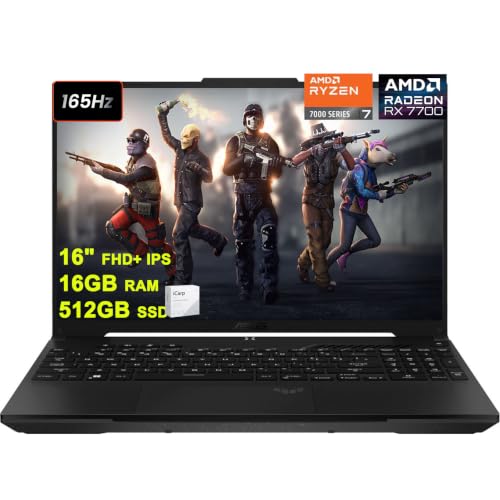
- Processor: AMD Ryzen 7 7735HS, octa-core
- Graphics: AMD Radeon RX 7700S, 8GB
- Memory: 16GB RAM
- Storage: 512GB SSD
The ASUS TUF Gaming A16 is a useful alternative for students who want a larger screen and a discrete graphics card at a lower price than the premium picks. According to the Amazon listing, this configuration has an AMD Ryzen 7 7735HS octa-core processor, 16GB of RAM, a 512GB SSD, and an AMD Radeon RX 7700S discrete graphics card with 8GB of memory, behind a 16-inch WUXGA display running at 165Hz with 100% sRGB colour coverage. It runs Windows 11 Pro.
The 16-inch display is the main attraction: more screen space makes CAD work, code, and research far more comfortable, and the 165Hz refresh rate keeps the interface feeling responsive. The Ryzen 7 processor meets the CAEN minimum, and the discrete Radeon graphics card gives the laptop genuine 3D capability. The TUF line is also built with durability in mind, which suits a student lifestyle.
There are two limitations. First, 16GB of RAM and 512GB of storage both sit at the CAEN minimums rather than the suggested levels, so a student keeping the laptop for four years may want to upgrade memory or add external storage later. Second, NVIDIA graphics cards are more widely supported in professional engineering software than the Radeon RX 7700S, so students whose coursework leans heavily on SolidWorks may prefer the RTX 4060 in the Lenovo LOQ 15. The TUF Gaming A16 makes most sense for students who value the larger screen and rugged build, and whose work mixes programming, simulation, and lighter CAD. Buyers should confirm the exact configuration on the Amazon product page, because the TUF Gaming A16 is sold in several variants.
Key specifications (according to the Amazon listing):
Buying Guide: How to Choose a Laptop for Michigan Engineering
Start with the software, not the laptop. Mechanical, aerospace, and civil engineering students spend the most time in CAD and simulation, and benefit most from a Windows laptop with a discrete NVIDIA GPU and 32GB of RAM. Computer science and electrical engineering students spend more time programming and using MATLAB, where a fast processor and plenty of memory matter more than graphics power, and a Mac becomes a realistic option. If the department publishes a laptop checklist, follow it; if it does not, the CAEN guidance above is a sound baseline.
Prioritise memory and storage over small processor differences. The gap between one recent Core i7 and another is rarely decisive, but the gap between 16GB and 32GB of RAM is noticeable as soon as several heavy applications are open at once. The same applies to storage: 512GB fills up faster than expected once engineering software and project files share the same drive, so a 1TB SSD is worth the extra cost if the budget allows.
Think about the screen and keyboard as working tools, not luxuries. A 14-inch display is the practical minimum, and a 15-inch or 16-inch display is more comfortable for CAD work. A sharp, colour-accurate display helps with modelling, while a backlit keyboard matters for late-night work. Weight is the counterweight to screen size: a laptop carried all day should ideally weigh under five pounds, and a 17-inch desktop replacement is usually too heavy for daily use across Michigan’s campuses.
Battery life and build quality decide whether a laptop survives four years. Students who move between classes should favour laptops with strong battery life, such as the MacBook Pro, or carry a charger and plan around power outlets. A sturdy chassis, a good warranty, and accidental damage cover are worth considering, because a laptop that travels daily takes knocks. Students should also check whether their department offers software licences, educational discounts, or a campus store deal before buying.
Finally, buy the configuration that is actually listed, not the model name alone. Every laptop in this guide is sold in multiple configurations, and the same model name can hide very different processors, memory, storage, and graphics cards. Check those specifications on the Amazon product page against the CAEN recommendations before ordering. Prices and availability change frequently, so the price on the product page at the time of purchase is the one that applies.
Frequently Asked Questions
What laptop does the University of Michigan recommend for engineering students?
CAEN does not mandate a specific brand or model. It recommends at least 16GB of memory, with 32GB suggested for Windows machines, at least 512GB of storage, with 1TB suggested, and an Intel Core i7, AMD Ryzen 7, or Apple M2 processor as a minimum. Both Windows and macOS are commonly used, but most of CAEN’s free engineering software runs on Windows, so a Windows laptop is the most straightforward choice.
Do Michigan Engineering students need a Windows laptop?
Not strictly, but a Windows laptop is the practical choice for most students. Required software is available in campus labs and through remote access, so a Mac owner is not locked out of any course. However, applications such as SolidWorks and Revit are designed for Windows, and running them natively is more convenient than relying on labs or remote sessions. Students whose work is mainly programming and data analysis can choose a Mac without the same compromise.
How much RAM do engineering students at Michigan need?
The CAEN minimum is 16GB, with 32GB suggested for Windows machines and 24GB suggested for Mac machines. Sixteen gigabytes is enough for first-year work and lighter CAD, but 32GB gives far more headroom for large assemblies and simulations over four years. Students buying a laptop to keep for their whole degree should aim for 32GB on Windows if the budget allows.
Is a discrete graphics card necessary for engineering school?
It depends on the discipline. Students doing CAD, 3D modelling, rendering, or GPU-accelerated simulation benefit clearly from a discrete graphics card such as the NVIDIA GeForce RTX 4060 or AMD Radeon RX 7700S. Students whose work is mainly programming, MATLAB, and writing can manage with integrated graphics, but a discrete GPU is still useful insurance if their coursework changes direction.
Can a MacBook run the software Michigan Engineering students need?
A MacBook can run much of the software Michigan Engineering students use, including MATLAB, programming environments, and data analysis tools. Some Windows-only applications, including SolidWorks and Revit, do not run natively on macOS, although Mac owners can use campus labs and remote access for them. Students in CAD-heavy disciplines should consider a Windows laptop as their primary machine.
Conclusion
The best laptop for a University of Michigan Engineering student is the one that matches their department’s software, meets CAEN’s recommended specifications, and survives four years of daily carrying between lectures, labs, and study spaces. For most students, the Dell XPS 15 9530 is the strongest all-round choice, with 32GB of RAM and 1TB of storage on a portable Windows machine. The Lenovo LOQ 15 is the best value for students who need discrete NVIDIA graphics on a tighter budget, while the ASUS TUF Gaming A16 offers a larger screen and a discrete GPU at a competitive price. The MacBook Pro 14 with the M4 Pro chip is the best option for students whose work is platform-neutral and who value battery life and portability, with the understanding that Windows-only CAD software will need the campus labs.
Whatever the choice, check the exact configuration on the Amazon product page before ordering, and compare it against the CAEN recommendations. A laptop bought against those specifications is far more likely to still be coping well in senior year than one bought on brand or appearance alone.
Related guides
More from Amazon
Programs that pair well with the guide above. Offers and eligibility are set by Amazon and may change.
Free shipping on eligible items, Prime Video and more. Eligible new members can start with a free trial.
Start a Prime free trialAd-free music streaming. Eligible new subscribers can start with a free trial.
Try Music Unlimited freeA Prime membership for ages 18-24 with a trial period. Eligibility is set by Amazon.
See Prime for Young AdultsAudiobooks and podcasts to listen to on the go. Eligible new members can start with a free trial.
Try Audible freeAs an Amazon Associate we earn from qualifying purchases.




Write Your Review
No reviews yet. Be the first to share your experience!