
Key takeaways
- Discover the best laptops under 450 for school, work and streaming, with verified specs, prices and honest trade-offs to help you pick the right one today.
What's inside
- Quick Picks
- 1. Acer Aspire Go 15 (AG15-32P-39R2) — Best Overall Value
- 2. HP 15.6-inch Laptop, 2027 Edition — Best for Office 365 Users
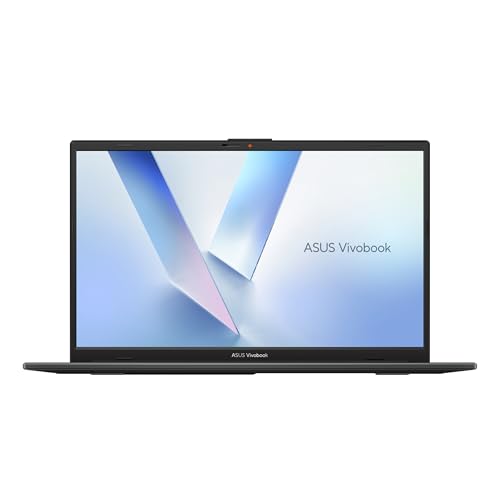
- 3. ASUS Vivobook Go 15 (N150) — Best Newer N150 Alternative
- 4. Lenovo IdeaPad 1 Student Laptop, 15.6-inch — Best Lowest-Cost Starter
- Buying Guide: How to Choose a Laptop Under $450
- Frequently Asked Questions
- Conclusion
As an Amazon Associate I earn from qualifying purchases. This post may contain affiliate links at no extra cost to you.
A budget of $450 buys a genuinely useful laptop in 2026, provided you spend it on the right balance of processor, memory, storage and screen. The best laptops under 450 are not gaming machines or video-editing workstations, and they are not meant to be. They are everyday machines for schoolwork, office documents, video calls, web browsing, email, streaming and light photo work, and the models that do those jobs well tend to share the same strengths: a Full HD display, 8GB of RAM where possible, fast solid-state storage, Wi-Fi 6 and Windows 11. This guide compares four Windows laptops from Acer, HP, ASUS and Lenovo that were listed on Amazon in this price range, explains what each one is best suited to, and sets out the trade-offs you should accept — and the ones you should not — before you buy.


As an Amazon Associate, we earn from qualifying purchases made through links in this article.
Quick Picks
Our Short List of 3
All 4 Picks at a Glance
| Product | Specs | Action |
|---|---|---|
| 1. Acer Aspire Go 15 (AG15-32P-39R2) — Best Overall Value | Check price on Amazon | |
| 2. HP 15.6-inch Laptop, 2027 Edition — Best for Office 365 Users | Check price on Amazon | |
 3. ASUS Vivobook Go 15 (N150) — Best Newer N150 Alternative | Check price on Amazon | |
 4. Lenovo IdeaPad 1 Student Laptop, 15.6-inch — Best Lowest-Cost Starter | Check price on Amazon |
Prices change frequently, so treat these as prices seen on Amazon around 24 November 2026 and check the current price before you buy.
1. Acer Aspire Go 15 (AG15-32P-39R2) — Best Overall Value
According to the Amazon listing, the Acer Aspire Go 15 AG15-32P-39R2 is a 15.6-inch laptop with a Full HD 1920 x 1080 IPS display, an Intel Core 3 Processor N355, 8GB of DDR5 memory, 128GB of UFS storage, Wi-Fi 6 and Windows 11 Home in S Mode. That combination explains why it works well as the default recommendation in this guide: the screen is the right resolution for documents, video and split-screen study, the DDR5 memory is a step up from the older DDR4 found in many budget machines, and the Core 3 N355 is designed for the kind of multitasking most people actually do — a browser with several tabs, a word processor, a video call and a music app running at the same time.
The 15.6-inch size gives you a full-size keyboard area and a roomy display, and it is still light enough to carry to a library or classroom. According to the Amazon listing, the Aspire Go 15 is positioned as an AI-ready laptop, which here mainly means current Windows 11 features and Copilot access.
The main limitation is storage. At 128GB, the UFS storage listed for this configuration fills up quickly once Windows, updates, a few large apps and a photo library are added. That does not make the laptop a bad choice, but it does make it a better choice for someone who stores most files in the cloud, uses streaming rather than large local media libraries, or is comfortable adding external storage later. The listing also notes Windows 11 Home in S Mode, which limits app installation to the Microsoft Store until you switch out of S Mode. Switching out is free, but it is a step you should expect if you need desktop apps from outside the Store. Choose the Acer Aspire Go 15 if you want the strongest all-round specification for the lowest price seen in this guide, and if you mainly work in a browser, in Office apps and in video calls.
2. HP 15.6-inch Laptop, 2027 Edition — Best for Office 365 Users
According to the Amazon listing, the HP 15.6-inch Laptop in its 2027 Edition configuration pairs an Intel N150 processor with 4GB of RAM, 128GB of storage plus 1TB of cloud storage, Microsoft 365, Wi-Fi 6, a numeric keypad and Windows 11 Home. It was listed at $360 in a deal roundup dated 12 November 2026, which puts it comfortably under the $450 ceiling while adding something the other laptops in this guide do not bundle in the same way: a year of Office 365 and a large cloud-storage allowance.
That bundle matters for school or a home office: Word, Excel, PowerPoint and OneDrive are already part of many daily routines, and having them included removes a separate subscription cost in the first year. The numeric keypad and full-size keyboard also suit spreadsheet work and long typing sessions.
The trade-off is memory. At 4GB of RAM, this HP is the most limited laptop in this guide for multitasking. It will handle one or two apps at a time well — a document and a browser, for example — but it will slow down sooner than an 8GB machine when you open many tabs, run a video call alongside a large spreadsheet, or keep several Office apps open at once. The Intel N150 is an efficient, low-power processor suited to basic computing, not a performance chip. The 128GB of local storage is also modest, although the 1TB of cloud storage in the bundle softens that limit if you are happy to keep files online. Choose this HP if the Office 365 bundle, the numeric keypad and the straightforward 15.6-inch layout matter more to you than maximum multitasking headroom.
3. ASUS Vivobook Go 15 (N150) — Best Newer N150 Alternative
According to the Amazon listing, the ASUS Vivobook Go 15 in its N150 configuration has a 15.6-inch Full HD 60Hz display, an Intel Processor N150, Intel UHD Graphics, 8GB of RAM, 128GB of SSD storage and Windows 11 Home in a Mixed Black finish. It was listed at $379.99 in a comparison updated on 24 November 2026, with stock shown as in stock at that time. That price puts it at the upper end of this guide, but it also buys the most balanced version of the N150 formula: the same efficient processor as the HP above, paired with twice the memory.
That 8GB of RAM is the key difference. In everyday use, memory is often what separates a laptop that feels smooth from one that feels sluggish, especially when a browser, a document and a video call are open together. The Vivobook Go 15 is therefore a better fit than a 4GB machine for someone who keeps many tabs open, works with larger documents, or wants a little more headroom for the next two or three years. The Full HD display is also an important part of the value: at this price, a 1366 x 768 screen is still common, and it makes text noticeably less sharp. A 1920 x 1080 panel, as listed here, makes reading, writing and video much more comfortable.
According to the Amazon listing, the Vivobook Go 15 is a thin, portable Windows laptop. It is designed to be carried, used on a lap or a small desk, and packed away without fuss. The 128GB SSD is fast for starting Windows and opening apps, but it is small by modern standards, so the same cloud-first or external-storage advice applies here as it does to the Acer. Choose the ASUS Vivobook Go 15 if you want an N150 laptop without the 4GB compromise, and if you prefer ASUS’s Vivobook design and portability over the larger, more office-focused HP.
4. Lenovo IdeaPad 1 Student Laptop, 15.6-inch — Best Lowest-Cost Starter
According to the Amazon listing, the Lenovo IdeaPad 1 Student Laptop has a 15.6-inch Full HD display, an Intel Dual Core processor, 8GB of RAM, 128GB of SSD storage plus 128GB of eMMC storage, Wi-Fi 6, a webcam, Bluetooth, one year of Office 365 and Windows 11 Home. It was listed at $219, with a higher new-condition price of $299 shown on the same listing, which makes it the lowest-cost entry point in this guide when it is available at the lower price.
The appeal here is straightforward: for the least money, you still get a Full HD screen, 8GB of RAM, Wi-Fi 6 and a year of Office 365. That is a useful combination for a first laptop, a second laptop for a household, or a machine for a younger student. The dual-storage setup — a 128GB SSD plus 128GB of eMMC — gives you more total space than a single 128GB drive, although eMMC storage is slower than a proper SSD, so it is best used for documents and files rather than for apps you open constantly.
The limitation is the processor. An Intel Dual Core chip in this class is adequate for browsing, email, documents, video calls and streaming, but it is not a good match for heavy multitasking, large spreadsheets, photo editing or anything that needs sustained processing power. Buyers should also check the exact configuration on the listing before ordering, because IdeaPad 1 models are sold in several similar-looking variants with different processors, memory and storage. The model number on the listing, IdeaPad 1 15IJL7, is the detail to match against the configuration you intend to buy. Choose the Lenovo IdeaPad 1 if budget is the deciding factor and your workload is light.
Buying Guide: How to Choose a Laptop Under $450
A $450 budget rewards careful choices, so judge every laptop on the same points before you look at brand or colour.
Start with the screen. A Full HD 1920 x 1080 display should be your minimum target. It makes text sharper and video look better than a 1366 x 768 panel. All four laptops here are listed with a Full HD display, and the Acer is also listed as IPS, which usually means wider viewing angles.
Treat 8GB of RAM as the practical minimum. Memory is the single most important specification for how smooth a budget laptop feels in daily use. With 8GB, you can keep a browser, a document and a video call open without constant slowdowns. With 4GB, you can still work, but you will need to close tabs and apps more often. That is why the Acer, ASUS and Lenovo picks in this guide are listed with 8GB, while the HP is listed with 4GB and is best suited to lighter, more focused work.
Understand the processor names. Budget laptops use efficient, low-power processors such as the Intel N150, Intel Core 3 N355, AMD Athlon Silver and Ryzen 3. They are designed for browsing, documents, streaming and video calls, not for gaming or heavy video editing. A newer Core 3 or Ryzen chip will usually feel more capable than an older Celeron or Athlon, but the gap matters less than the gap between 4GB and 8GB of RAM.
Plan for 128GB or 256GB of storage. Most laptops under $450 ship with 128GB or 256GB of storage, and that is enough if you use cloud storage, streaming and a small set of apps. It is not enough if you store large photo libraries, download films, or install many large programs. Before you buy, check whether the listing describes the storage as SSD, UFS or eMMC. An SSD is fastest for starting the laptop and opening apps. UFS is also fast in many budget machines, while eMMC is slower and is best treated as extra file storage.
Check Windows 11, S Mode and the extras. All four laptops here are listed with Windows 11. Two are listed with Windows 11 Home in S Mode, which limits apps to the Microsoft Store until you switch out — a free step to plan for if you need Chrome or Zoom. Also check for Wi-Fi 6, Bluetooth, a webcam, USB ports and a numeric keypad.
Match the laptop to the workload. A laptop under $450 is a good choice for school, university, home office work, browsing, email, streaming and light photo work. It is not a good choice for modern gaming, 4K video editing, large-scale programming with virtual machines, or professional 3D work. If your workload includes any of those, you will be happier saving for a higher tier. If your workload is in the first group, spending more than $450 will often buy you a nicer screen or a metal chassis rather than a fundamentally better experience.
Check the exact configuration before you buy. A single model name can cover several processors, memory sizes and storage options. Always match the model number, processor, RAM and storage on the Amazon listing to the configuration described here, and confirm the current price, because sale prices can change by $30 to $80 in a single week.
Frequently Asked Questions
What is the best laptop under $450 for students?
For most students, the Acer Aspire Go 15 AG15-32P-39R2 is the strongest all-round choice here, because according to the Amazon listing it combines a Full HD IPS display, an Intel Core 3 N355 processor and 8GB of DDR5 RAM at a price seen at $299.99. The HP is a good alternative if the bundled Microsoft 365 and numeric keypad matter more, while the Lenovo is the lowest-cost option for lighter schoolwork.
Can a laptop under $450 handle Zoom, Google Docs and streaming?
Yes, for the workloads most people mean by that question. According to the Amazon listings, all four laptops in this guide have a Full HD display, Wi-Fi 6 and Windows 11, and three of them have 8GB of RAM, which is enough for video calls, browser-based documents, email and streaming at the same time. Performance will be best if you keep the number of open browser tabs reasonable and close apps you are not using, especially on the 4GB HP model.
Is 8GB of RAM enough on a budget laptop?
For everyday use in 2026, 8GB is enough for browsing, Office work, video calls, streaming and light photo work, and it is listed on three of the four laptops here. It gives you useful headroom for two to three years without pushing the price over $450. If you regularly work with very large spreadsheets and many apps at once, 16GB helps, but that usually means a higher price tier.
Should I choose an Intel N150, a Core 3 N355 or a Ryzen processor under $450?
All three can work well for everyday tasks, and the choice matters less than the memory and screen that come with them. According to the Amazon listings, the Core 3 N355 in the Acer Aspire Go 15 is paired with DDR5 memory and a Full HD IPS display, which makes it a strong all-round package. The Intel N150 in the HP and ASUS models is an efficient, low-power chip suited to basic computing and long battery life. Compare the full configuration — processor, RAM, storage and screen — rather than the processor name alone.
How long will a laptop under $450 last?
With light to moderate use, a laptop in this price range should last three to four years for school, office and browsing tasks, provided you keep Windows updated and avoid filling the storage completely. The main limits over time are usually storage and memory. Choosing 8GB of RAM, a Full HD display and an SSD, as in the Acer and ASUS picks here, gives you the best chance of a laptop that still feels usable in its third year.
Conclusion
The best laptops under 450 are not the cheapest laptops you can find, and they are not the most powerful laptops you can buy. They are the machines that spend a limited budget on the things that matter most for everyday work: a sharp Full HD screen, enough memory to multitask without frustration, fast storage for starting up and opening apps, and a current version of Windows. On that measure, the Acer Aspire Go 15 AG15-32P-39R2 stands out as the best overall value in this guide, with a Core 3 N355 processor, 8GB of DDR5 RAM and a Full HD IPS display at a price seen at $299.99.
If you need Microsoft 365 and a numeric keypad, the HP is the more practical choice, even with 4GB of RAM. If you want the Intel N150 without giving up 8GB of memory, the ASUS Vivobook Go 15 is the better-balanced N150 option. If budget is the deciding factor, the Lenovo IdeaPad 1 offers a Full HD display, 8GB of RAM and a year of Office 365 at the lowest price seen here. Whichever model you choose, match the exact configuration on the Amazon listing, check the current price, and be honest about your workload.
Related guides
More from Amazon
Programs that pair well with the guide above. Offers and eligibility are set by Amazon and may change.
Free shipping on eligible items, Prime Video and more. Eligible new members can start with a free trial.
Start a Prime free trialAd-free music streaming. Eligible new subscribers can start with a free trial.
Try Music Unlimited freeA Prime membership for ages 18-24 with a trial period. Eligibility is set by Amazon.
See Prime for Young AdultsAudiobooks and podcasts to listen to on the go. Eligible new members can start with a free trial.
Try Audible freeAs an Amazon Associate we earn from qualifying purchases.


Write Your Review
No reviews yet. Be the first to share your experience!