
Key takeaways
- Find the best light laptops under 600 for class, commuting, and everyday work. Compare weight, battery life, memory, storage, and screens before you choose.
What's inside
As an Amazon Associate I earn from qualifying purchases. This post may contain affiliate links at no extra cost to you.
Finding the best light laptops under 600 means balancing two things that often pull in opposite directions: a chassis light enough to carry all day, and hardware strong enough for real work. A laptop that weighs little but struggles with a dozen browser tabs is no help, and a powerful machine that feels like a brick in a backpack defeats the purpose of buying light. Every pick below is a light laptop in the under-600 tier, not a heavy machine that happens to be cheap and not a featherweight machine from a far higher tier.


The quick answer is that a 14-inch or slim 15.6-inch laptop with a modern Ryzen 5 or Intel Core 5 processor, 8GB of memory or more, and a solid-state drive covers most everyday needs in this tier. Students and commuters should lean toward the 14-inch picks for the smallest bag footprint, while anyone who wants a larger screen for split windows should look at the slim 15.6-inch models. Memory and storage matter as much as weight here, because 4GB of memory and 128GB of storage fill up fast.
Quick Picks
Our Short List of 3
All 4 Picks at a Glance
| Product | Specs | Action |
|---|---|---|
| Lenovo IdeaPad Slim 3 (B0C6BQ21D7) | Check price on Amazon | |
| HP 15-fc0499nr (B0DWPKQ3LH) | Check price on Amazon | |
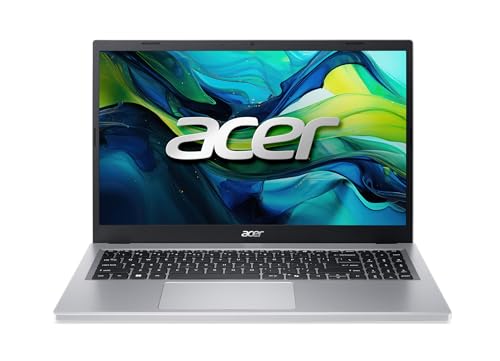 Acer Aspire Go 14 (B0FGDW8VVZ) | Check price on Amazon | |
 ASUS Vivobook 14 (B0FY7NKKQH) | Check price on Amazon |
How to Choose
Weight: What Counts as Light in This Tier
Weight is the first number to check. In this tier, a 14-inch laptop around 3.3 pounds or less is genuinely light, while a slim 15.6-inch laptop in the 3.5 to 3.9 pound range is light for its screen size. Check the listing weight rather than the marketing language, and remember that the charger adds weight too, so a laptop with strong battery life lets you leave the charger behind more often.
Screen Size: 14 Inches or 15.6 Inches
Screen size is the biggest trade-off in a light laptop. A 14-inch screen keeps the whole machine smaller and lighter, which suits commuters, students who move between classrooms, and anyone who works from a small desk. A 15.6-inch screen gives more room for two windows side by side, which suits spreadsheet work, writing with research open, and long reading sessions. Choose the screen size first, then compare the machines in that size.
Processor: Ryzen 5 and Core 5 Are the Sweet Spot
The processor decides how smoothly a laptop handles everyday multitasking. In this tier, the AMD Ryzen 5 7520U and the Intel Core 5 120U are the configurations to look for, because both handle a browser with many tabs, office documents, video calls, and streaming without the hesitation that weaker chips show. The Intel Processor N100 in the lightest pick below is a step down in raw power and suits basic tasks rather than heavy multitasking. Check the exact model number on the listing, because the same laptop family can be sold with very different chips. Integrated graphics are standard across this guide, which is fine for everyday work and streaming, but none of these machines is built for demanding games or heavy video editing.
Memory and Storage: 8GB and 256GB Are the Floor
Memory and storage decide how long a laptop stays comfortable. In this tier, 8GB of memory and a 256GB solid-state drive are the practical floor for everyday work, and 16GB of memory with a 512GB drive is the more comfortable combination for anyone who keeps many tabs open or stores a large photo and document library. The 4GB and 128GB configuration in the lightest pick is workable only for light use with few programs open at once. Every pick in this guide uses solid-state storage, which keeps start-up and loading times short. Check whether the memory is soldered or upgradeable, because some slim laptops cannot be upgraded later.
Battery Life: Hours Away From an Outlet
Battery life decides whether a light laptop is actually portable. A machine that needs its charger by midday forces you to carry the charger and plan your day around power. Look for the battery capacity in watt-hours as well as the manufacturer’s runtime figure, and treat the runtime figure as an estimate for light use rather than a promise for heavy multitasking. Screen brightness, video calls, and many open tabs all shorten real battery life.
Display Quality: Resolution and Brightness Matter Daily
The display is the part of a laptop you look at for hours, so resolution and brightness deserve as much attention as weight. A Full HD display at 1920 by 1080 shows text crisply and gives enough room for comfortable reading and writing, while an HD display at 1366 by 768 shows fewer lines at once and looks softer, especially with small text. The WUXGA display on the 14-inch Acer pick, at 1920 by 1200, adds a little extra vertical space for scrolling through documents and web pages. Brightness matters outdoors and in bright rooms, and an anti-glare finish helps there too. A touchscreen is a useful extra for tapping and scrolling, but it should not be the reason to accept a weaker display or less memory.
Ports, Keyboard, and Everyday Practicalities
The small details decide whether a light laptop is pleasant to use every day. Check for at least one USB-C port, one or two USB-A ports, and an HDMI port for connecting to a monitor or a projector, because a laptop with too few ports needs adapters for ordinary tasks. A backlit keyboard helps in dim rooms, and a full-size keyboard with a numeric keypad is useful for spreadsheet work, though it usually comes with the larger 15.6-inch models. Wi-Fi 6 is the connectivity standard to expect in this tier. Finally, check the operating system on the listing: Windows 11 Home is the standard here, and some listings use Windows 11 Home in S mode, which limits software installation until it is switched out of S mode through the Microsoft Store settings.
The Best Light Laptops Under 600 Reviewed
Lenovo IdeaPad Slim 3 (B0C6BQ21D7)
The Lenovo IdeaPad Slim 3 is the everyday-carry pick in this guide. It pairs an AMD Ryzen 5 7520U processor with 8GB of LPDDR5 memory and a 256GB solid-state drive, with a 15.6-inch Full HD display and Windows 11. At 1.62 kg, it is light for a 15.6-inch laptop, and the Ryzen 5 processor handles a browser, documents, and streaming together for everyday work and study.
This laptop suits a student or a commuter who carries a laptop every day, as well as anyone who wants a clean, straightforward Windows laptop with a large screen. The 256GB drive is enough for a focused setup with a modest file library, especially if larger files are kept on an external drive or in cloud storage.
Who should skip it: a buyer who plans to install several large programs, keep many projects on the machine at once, or run virtual machines should choose a 16GB model with a 512GB drive instead. The memory in this configuration is soldered, so it cannot be upgraded later.
Acer Aspire 3 A315-24PT-R0UX (B0CJV41KZN)
The Acer Aspire 3 A315-24PT-R0UX is the strongest all-round pick in this roundup for multitasking. It pairs an AMD Ryzen 5 7520U processor with 16GB of LPDDR5 memory and a 512GB NVMe solid-state drive, which gives the most headroom in this tier. The 15.6-inch Full HD IPS touch display shows documents and web pages clearly, and the touch layer is an extra for tapping and scrolling rather than the main way to work. Windows 11 Home is the full version, and Wi-Fi 6 keeps downloads and updates moving.
This laptop suits a student or home worker who keeps a browser, documents, and streaming open at the same time, and anyone who wants the most memory and storage in this guide without moving to a heavier machine. The 512GB drive leaves room for a large document library, photos, and several programs.
Who should skip it: a buyer who wants the smallest machine possible should look at one of the 14-inch picks instead. A buyer who needs a dedicated graphics card for gaming or heavy creative work should look at a different tier altogether.
HP 15-fc0499nr (B0DWPKQ3LH)
The HP 15-fc0499nr pairs an AMD Ryzen 5 7520U processor with 8GB of LPDDR5 memory and a 512GB PCIe NVMe solid-state drive, and it adds a 15.6-inch touch display and Windows 11 Home. The generous storage is its main strength: a 512GB drive leaves room for documents, photos, and programs without constant housekeeping. It also includes Wi-Fi 6, Bluetooth, and a full-size keyboard with a numeric keypad, which suits spreadsheet work. At 3.52 pounds, it is light for a 15.6-inch touchscreen laptop, and its battery is rated for around 10 hours of mixed use.
This laptop suits a home worker or student who wants plenty of storage and a touch display for occasional navigation, and who is comfortable with 8GB of memory for a focused setup. The numeric keypad is a genuine advantage for anyone who enters numbers often.
Partial-fit flag: the display is HD at 1366 by 768 rather than Full HD, so it shows fewer lines of text at once and text is less crisp than on the Full HD picks in this roundup. Who should skip it: anyone who wants the sharpest text and the most screen space for split windows should choose one of the Full HD models above instead.
Acer Aspire Go 14 (B0FGDW8VVZ)
The Acer Aspire Go 14 is the lightest laptop in this guide, and the best choice for anyone who puts bag weight first. It weighs 3.28 pounds, with a slim profile and a 14-inch WUXGA display at 1920 by 1200, which gives extra vertical space for scrolling through documents and web pages. It uses an Intel Processor N100 with 4GB of LPDDR5 memory and 128GB of storage, and it runs Windows 11 Home in S mode. Battery life is rated for up to 8.5 hours of light use.
This laptop suits a student or traveler who needs a genuinely light machine for notes, browsing, email, documents, and streaming, and who carries it everywhere. The 14-inch size fits easily into a small bag, and the sharper WUXGA display is a pleasant surprise at this level.
Partial-fit flag: the 4GB of memory and 128GB of storage are entry-level limits, not a comfortable standard. This machine suits light use with few programs open at once, and it will feel cramped sooner than the 8GB and 16GB picks if many tabs and programs are open together. Who should skip it: anyone who multitasks heavily or stores a large local file library should choose one of the Ryzen 5 or Core 5 picks instead.
ASUS Vivobook 14 (B0FY7NKKQH)
The ASUS Vivobook 14 is the compact 14-inch pick for everyday work. It pairs a 10-core Intel Core 5 120U processor with 8GB of RAM and a 256GB solid-state drive, with a 14-inch Full HD display and Windows 11. The Core 5 processor gives it more multitasking headroom than the entry-level N100 pick, while the 14-inch chassis keeps it smaller and easier to carry than the 15.6-inch models.
This laptop suits a commuter or student who wants a compact machine with a capable processor, and anyone who finds a 15.6-inch laptop too large for their desk or bag. The combination of a Core 5 processor, 8GB of memory, and a Full HD display covers everyday work, study, and streaming without the compromises of an entry-level configuration.
Partial-fit flag: this ASIN is listed as a bundled configuration that includes an 8-in-1 hub, so the exact contents of the bundle should be checked on the listing before ordering. Who should skip it: a buyer who wants a larger screen, more memory, or more storage should choose one of the 15.6-inch picks instead, because this is a compact machine built for portability rather than maximum capacity.
What to Check Before You Buy
Before ordering any laptop in this guide, confirm the exact configuration on the Amazon listing, because the same model name can cover different processors, memory sizes, and storage capacities. Check the processor model number, the memory size, the storage size and type, the display resolution, and the operating system, including whether it is Windows 11 Home or Windows 11 Home in S mode.
Check the listed weight and dimensions against your bag, and check the battery capacity in watt-hours as well as the runtime figure. Confirm the return policy and the warranty terms, and keep the original packaging until the laptop has been set up and checked. When the laptop arrives, confirm that the processor, memory, storage, and display match the listing, run the system updates, and test the keyboard, trackpad, webcam, speakers, and ports before the return window closes. If anything does not match the listing, contact the seller promptly rather than working around the difference.
A final point on fit: a light laptop in this tier is built for everyday work, study, and streaming. It is not built for demanding games, heavy video editing, or professional 3D work, and buying one for those jobs will lead to disappointment no matter how light it is. Match the machine to its real job, and the weight advantage will pay off day after day.
FAQ
What is the best light laptop under 600 for students?
For most students, the Lenovo IdeaPad Slim 3 is the most balanced choice, because it combines a light 15.6-inch chassis with a Ryzen 5 processor, a Full HD display, and enough memory and storage for coursework. Students who carry their laptop everywhere should look at the Acer Aspire Go 14 or the ASUS Vivobook 14 instead, while students who keep many tabs and programs open should favor the Acer Aspire 3 with 16GB of memory.
How light should a laptop be for daily carrying?
A 14-inch laptop around 3.3 pounds or less is genuinely light for daily carrying, and a slim 15.6-inch laptop in the 3.5 to 3.9 pound range is light for its screen size. The exact number matters less than the total load: a light laptop with a long-lasting battery lets you leave the charger at home, while a heavier laptop with a short battery forces you to carry the charger as well.
Is 8GB of memory enough in a light laptop in this tier?
For everyday work, 8GB of memory is enough for a browser with a moderate number of tabs, office documents, email, and streaming. It becomes tight when many tabs, large spreadsheets, and several programs are open at once. Buyers who multitask heavily should choose the 16GB Acer Aspire 3 in this guide, and buyers who choose an 8GB model should check whether the memory can be upgraded later, because some slim laptops have soldered memory.
Is a 14-inch or a 15.6-inch light laptop better?
Neither size is better in general; the better size depends on how the laptop is used. A 14-inch laptop is smaller and lighter, which suits commuting, small desks, and frequent movement between rooms. A 15.6-inch laptop gives more screen space for two windows side by side, which suits writing with research open, spreadsheets, and long reading sessions. Choose the screen size first, then compare the machines in that size.
Should I choose a touchscreen in this tier?
A touchscreen is a useful extra for tapping, scrolling, and occasional navigation, but it should not decide the purchase on its own. In this guide, the Acer Aspire 3 and the HP 15-fc0499nr both include touchscreens, and the Aspire 3 pairs its touchscreen with a Full HD display, 16GB of memory, and 512GB of storage. If a touchscreen model forces a weaker display or less memory, the non-touch model is usually the better choice for daily work.
Bottom Line
The best light laptops under 600 are the ones that stay light without giving up the basics: a capable processor, enough memory, solid-state storage, a clear display, and a battery that lasts through a real day. The Lenovo IdeaPad Slim 3 is the most balanced everyday choice, the Acer Aspire 3 A315-24PT-R0UX is the pick for heavy multitasking, the HP 15-fc0499nr suits buyers who want a touchscreen with generous storage, the Acer Aspire Go 14 is the lightest machine in the guide for basic tasks, and the ASUS Vivobook 14 is the compact 14-inch option with a capable Core 5 processor. Choose the screen size first, then the memory and storage that match how many programs and files the laptop will actually carry, and check the exact configuration on the listing before ordering.
Disclosure: As an Amazon Associate, we may earn from qualifying purchases.
Related guides
More from Amazon
Programs that pair well with the guide above. Offers and eligibility are set by Amazon and may change.
Free shipping on eligible items, Prime Video and more. Eligible new members can start with a free trial.
Start a Prime free trialAd-free music streaming. Eligible new subscribers can start with a free trial.
Try Music Unlimited freeA Prime membership for ages 18-24 with a trial period. Eligibility is set by Amazon.
See Prime for Young AdultsAudiobooks and podcasts to listen to on the go. Eligible new members can start with a free trial.
Try Audible freeAs an Amazon Associate we earn from qualifying purchases.








Write Your Review
No reviews yet. Be the first to share your experience!