
Key takeaways
- Find the best laptops under 800 pounds for study, work and everyday use. Compare five capable 15.6-inch models, specs, screens and storage before you choose.
What's inside
As an Amazon Associate I earn from qualifying purchases. This post may contain affiliate links at no extra cost to you.
Introduction
Finding the best laptops under 800 pounds starts with understanding what that figure means. In this guide, “800 pounds” means £800 sterling: a sensible upper limit for a capable everyday laptop, rather than a figure tied to any single shop or currency conversion. The laptops below are budget-class machines in that £800 class, chosen from listings on Amazon US. Every model here is a full Windows laptop with a proper keyboard, a 15.6-inch display, and enough memory and storage for study, office work, and everyday computing.


The quick answer is that most buyers in this bracket should look for a modern Ryzen 5 or Core i5 processor, 16GB of memory where possible, a 512GB solid-state drive, a Full HD screen, and Windows 11. That combination handles documents, spreadsheets, video calls, browsing with many tabs open, and media streaming without the constant slowdowns that come with very low memory or a small, slow drive.
Quick Picks
Our Short List of 3

All 4 Picks at a Glance
| Product | Specs | Action |
|---|---|---|
| Lenovo IdeaPad Slim 3 (B0C6BQ21D7) — Best for a Step Up in Everyday Speed | Check price on Amazon | |
| Acer Aspire 5 (B0CV62R75W) — Best for Multitasking and Touchscreen Use | Check price on Amazon | |
| Dell Inspiron 15 3525 (B0CKMZ1DMH) — Best for Balanced Work and Study | Check price on Amazon | |
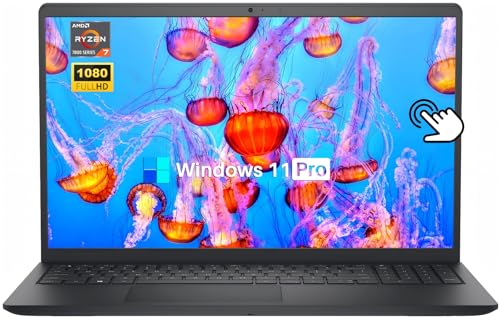 Dell Inspiron 15 3535 (B0GSTWY3T3) — Best for Touchscreen and Heavier Workloads | Check price on Amazon |
How to Choose
Processor: Match the Chip to Your Workload
The processor most affects how responsive a laptop feels when you open programs, switch between tabs, and run several applications at once. For the best laptops under 800 pounds, a modern Ryzen 3, Ryzen 5, Ryzen 7, or Core i5 processor is the right territory. A Ryzen 3 is fine for writing, browsing, email, and video playback. A Ryzen 5 or Core i5 handles heavier multitasking more comfortably, including large spreadsheets, photo editing, and video calls running alongside other programs. A Ryzen 7 adds extra cores for demanding multitasking. Do not judge a processor by its number alone: the generation matters, and so does the rest of the machine.
Memory: 8GB Is the Minimum, 16GB Is the Comfortable Choice
Memory, or RAM, decides how many things your laptop can keep open at once without slowing down. With 8GB, you can work on documents, browse with a moderate number of tabs, and join video calls without much trouble. With 16GB, you can keep a browser full of tabs, a word processor, a spreadsheet, email, and a video call open together, and the machine stays responsive. That extra headroom matters more over time, as browsers and applications tend to use more memory with each update. In this roundup, the two Lenovo IdeaPad Slim 3 models come with 8GB, while the Acer Aspire 5 and both Dell Inspiron models come with 16GB. If your work is light, 8GB is a reasonable starting point. If you plan to keep the laptop for several years or regularly juggle many tabs and programs, favour a 16GB model.
Storage: Choose a 512GB SSD When You Can
Storage affects both how much you can keep on the laptop and how quickly files and programs open. A solid-state drive, or SSD, is much faster than an older mechanical hard drive, and every laptop in this guide uses an SSD. A 256GB SSD is enough if most of your files live in cloud storage, you stream films and music rather than downloading them, and you install only a small set of programs. A 512GB SSD is the more comfortable choice for most buyers, because it leaves room for a larger program library, downloaded course materials, photos, and future Windows updates without constant tidying. Students who download lecture recordings, large PDFs, and software for coursework will fill 256GB faster than they expect, so plan to use cloud storage or an external drive if you choose a 256GB model.
Screen: Full HD and Comfort Matter Every Day
Every laptop in this guide has a 15.6-inch Full HD display, which means a resolution of 1920 x 1080 pixels. That is the right standard for this budget class: text stays sharp, web pages and documents are easy to read, and films look clear. A smaller or lower-resolution screen would be a false economy on a laptop you use for hours each day. Beyond resolution, consider the panel type and whether you want touch. An IPS panel, such as the one on the Acer Aspire 5, generally gives wider viewing angles and more consistent colours than a basic TN panel. A touchscreen, included on the Acer Aspire 5 and the Dell Inspiron 15 3535, can be handy for scrolling and tapping through menus, but it is not essential for everyone. If you type for long periods, also look at the keyboard layout and whether a backlit keyboard is included.
Battery Life, Weight, and Portability
A 15.6-inch laptop is a desktop-replacement size rather than an ultraportable, so expect a machine that is comfortable on a desk and portable enough to carry in a bag. Weight, thickness, and battery life still vary between models, and they matter if you move between rooms, take the laptop to lectures, or work away from a power socket. The Lenovo IdeaPad Slim 3 models are positioned as lightweight everyday laptops, which makes them a natural fit for carrying between home, college, and the office. Battery life depends heavily on what you do: bright screens, video calls, and demanding programs drain the battery faster than reading and writing documents.
Windows 11 and Long-Term Value in the £800 Class
All five laptops in this guide run Windows 11, which is the current version of Windows and the one most study and work software is designed for. That matters for compatibility: your browser, office suite, video-calling app, and course software should install and run without workarounds. Some configurations ship with Windows 11 Home and others with Windows 11 Pro, and the difference mainly affects business features such as advanced device management, rather than everyday writing, browsing, and streaming. Before you buy, list the programs you need and check that they run on Windows 11 and on the processor and memory you are considering. At this budget, long-term value comes from getting the fundamentals right: a solid keyboard, a clear Full HD screen, enough memory, and a fast SSD will serve you well for years, while a machine with a flashy processor but cramped memory and storage will frustrate you sooner.
The Best Laptops Under 800 Pounds Reviewed
Lenovo IdeaPad Slim 3 (B0C3MNPB8P) — Best for Everyday Study and Home Use
The Lenovo IdeaPad Slim 3 with the AMD Ryzen 3 7320U processor is the most straightforward laptop in this roundup, and for many buyers that is exactly the point. It pairs a 15.6-inch Full HD display with 8GB of memory, a 256GB solid-state drive, and Windows 11, in a lightweight design that is easy to carry between rooms or take to class. The Ryzen 3 7320U is an efficient everyday processor, suited to writing, research, email, spreadsheets, streaming, and video calls. It is not built for heavy video editing or demanding games, but for the daily work most people actually do, it keeps things moving without fuss.
Who should skip it? Anyone who regularly edits large photos or videos, runs several demanding programs at once, or wants plenty of spare memory for the next few years should look at the 16GB models below instead.
Lenovo IdeaPad Slim 3 (B0C6BQ21D7) — Best for a Step Up in Everyday Speed
The second Lenovo IdeaPad Slim 3 in this guide keeps the same sensible formula — a 15.6-inch Full HD display, 8GB of memory, a 256GB SSD, and Windows 11 — but steps up to the AMD Ryzen 5 7520U processor. That change matters for everyday multitasking: the Ryzen 5 handles more open tabs, larger documents, and busier days with less hesitation, and it gives you more breathing room when a video call, a browser, and a word processor are all running at once. The Abyss Blue finish gives this configuration its own look, while the slim, lightweight design stays the same. This model suits buyers who like the IdeaPad Slim 3 design but want a stronger processor for daily work and study.
Who should skip it? If you need 16GB of memory or 512GB of storage, this is not the right pick, because it keeps the 8GB and 256GB configuration of the model above. Buyers who store a large photo library on the laptop or install many large programs should consider the Acer or Dell models below.
Acer Aspire 5 (B0CV62R75W) — Best for Multitasking and Touchscreen Use
The Acer Aspire 5 stands out in this roundup because it combines a stronger processor, generous memory, and a touchscreen in one 15.6-inch laptop. It uses the Intel Core i5-13420H processor, 16GB of LPDDR5 memory, and a 512GB Gen 4 SSD, with a 15.6-inch Full HD IPS touchscreen, Wi-Fi 6, and a backlit keyboard. That combination is well suited to busy days: you can keep a browser, documents, email, and a video call open together, and the laptop has the memory and storage to cope. The IPS touchscreen adds flexibility for scrolling and tapping, and the backlit keyboard helps when you work in dimmer rooms. This model suits students and home workers who multitask heavily and want a laptop that will stay comfortable as their workload grows.
Who should skip it? Anyone who does not want a touchscreen, or who prefers a simpler non-touch screen, may be happier with one of the other models here. Check the listing for the exact items included with the configuration you choose, including the protective sleeve shown with this configuration.
Dell Inspiron 15 3525 (B0CKMZ1DMH) — Best for Balanced Work and Study
The Dell Inspiron 15 3525 is a balanced all-rounder in the £800 laptop class. It pairs the AMD Ryzen 5 5500U processor with 16GB of memory, a 512GB SSD, AMD Radeon Graphics, and a 15.6-inch Full HD display, running Windows 11 Home. The Ryzen 5 5500U is a capable everyday processor with enough cores to handle multitasking, office work, study, and media streaming, and the 16GB of memory means you can keep several programs open without the machine feeling crowded. The 512GB SSD gives you room for programs, documents, and downloaded files. This model suits buyers who want a dependable, no-nonsense laptop for work and study, without extra features they will not use.
Who should skip it? If you want a touchscreen, this is not the model for you — the Dell Inspiron 15 3535 below adds one, along with a stronger processor. If your work involves demanding creative software or modern games, remember that this is an everyday laptop with integrated graphics, not a dedicated gaming or workstation machine.
Dell Inspiron 15 3535 (B0GSTWY3T3) — Best for Touchscreen and Heavier Workloads
The Dell Inspiron 15 3535 is the most powerful laptop in this roundup, and the natural pick if you want the most headroom in the £800 class. It uses the AMD Ryzen 7 7730U processor with eight cores, 16GB of DDR4 memory running at 3200MHz, a 512GB SSD, and a 15.6-inch Full HD touchscreen, with Windows 11. The Ryzen 7 processor handles heavier multitasking with ease, including large spreadsheets, many browser tabs, video calls, and creative work running side by side. This model suits students and professionals who push their laptop hard during the day and want it to stay responsive, including anyone who works with large documents and presentations or attends long video meetings while taking notes.
Who should skip it? If your work is light — mainly writing, browsing, and email — the extra processor power may be more than you need, and one of the Ryzen 3 or Ryzen 5 models above will cover your day comfortably. Confirm the exact configuration on the Amazon listing before you buy, because the same model name can be sold in several variants.
What to Check Before You Buy
Before you choose one of the best laptops under 800 pounds, confirm the exact configuration on the Amazon listing: processor, memory, storage, screen type, touchscreen or non-touch, operating system edition, and colour. Laptop names are reused across many variants, and a single letter in a model number can mean a different processor or a different amount of memory. The ASIN in each section above identifies the exact listing referenced in this guide, so use it to check you are looking at the same configuration. Think about memory and storage together: a laptop with a strong processor but only 8GB of memory and 256GB of storage can feel cramped sooner than a slightly less powerful machine with 16GB and 512GB. Check the ports against the accessories you already own, including USB-C and HDMI, and consider the keyboard and screen in the context of how many hours you will use them. Finally, remember what the £800 figure means in this guide: it describes a budget class of capable everyday laptops, not a fixed amount for any single listing, so always read the current listing carefully.
FAQ
What should I look for in the best laptops under 800 pounds?
Look for a modern Ryzen 5, Ryzen 7, or Core i5 processor, 16GB of memory if you can, a 512GB SSD, a 15.6-inch Full HD display, and Windows 11. That combination covers study, office work, video calls, browsing, and streaming comfortably. If your work is light, an 8GB model with a 256GB SSD, such as the Lenovo IdeaPad Slim 3 models in this guide, can still be a good fit.
Is 8GB of memory enough for a laptop in this budget class?
Yes, for light to moderate use. With 8GB you can write documents, browse with a moderate number of tabs, manage email, and join video calls without much trouble. It becomes tight when you keep many tabs and programs open at once, or when you work with large files. If you multitask heavily or plan to keep the laptop for several years, choose a 16GB model such as the Acer Aspire 5 or either Dell Inspiron in this guide.
Is a 256GB SSD enough, or should I choose 512GB?
A 256GB SSD is enough if most of your files are in cloud storage, you stream media rather than downloading it, and you install only a small set of programs. A 512GB SSD is the safer choice for most buyers, because Windows updates, programs, downloaded course materials, and photos take up space over time. Three of the five laptops in this guide include 512GB.
Do I need a touchscreen on a budget laptop?
No, a touchscreen is a convenience rather than a necessity for most buyers. It is handy for scrolling, tapping through menus, and using touch-friendly apps, and both the Acer Aspire 5 and the Dell Inspiron 15 3535 in this guide include one. If you mainly type, read, and work in documents and spreadsheets, a non-touchscreen model such as the Lenovo IdeaPad Slim 3 or the Dell Inspiron 15 3525 will serve you just as well.
Are these laptops suitable for students?
Yes. All five laptops in this guide run Windows 11, have a 15.6-inch Full HD display, and include enough memory and storage for essays, research, presentations, spreadsheets, and video calls. Students who carry their laptop between lectures may prefer the slimmer Lenovo IdeaPad Slim 3 models, while students who multitask heavily may prefer the 16GB models from Acer and Dell. Check that any specialist course software you need runs on Windows 11 before you buy.
Bottom Line
The best laptops under 800 pounds are the ones that get the everyday fundamentals right: a modern processor, enough memory to multitask, a fast SSD with room to grow, a clear Full HD screen, and Windows 11. For most buyers, the Acer Aspire 5 (B0CV62R75W) is the best all-round pick in this guide, because it combines a Core i5-13420H processor, 16GB of memory, a 512GB SSD, and a Full HD IPS touchscreen. If you want the strongest processor and the most headroom, choose the Dell Inspiron 15 3535 (B0GSTWY3T3) with its Ryzen 7 processor, 16GB of memory, and 512GB SSD. If you want a balanced, dependable machine without a touchscreen, the Dell Inspiron 15 3525 (B0CKMZ1DMH) covers work and study well. And if your work is lighter, either Lenovo IdeaPad Slim 3 — the Ryzen 3 model (B0C3MNPB8P) or the Ryzen 5 model (B0C6BQ21D7) — is a sensible place to start. Whichever you choose, confirm the exact configuration on the Amazon listing first.
Disclosure: As an Amazon Associate, we may earn from qualifying purchases.
Related guides
More from Amazon
Programs that pair well with the guide above. Offers and eligibility are set by Amazon and may change.
Free shipping on eligible items, Prime Video and more. Eligible new members can start with a free trial.
Start a Prime free trialAd-free music streaming. Eligible new subscribers can start with a free trial.
Try Music Unlimited freeA Prime membership for ages 18-24 with a trial period. Eligibility is set by Amazon.
See Prime for Young AdultsAudiobooks and podcasts to listen to on the go. Eligible new members can start with a free trial.
Try Audible freeAs an Amazon Associate we earn from qualifying purchases.









Write Your Review
No reviews yet. Be the first to share your experience!