
Key takeaways
- Find the best new 17 inch laptops with touch screen for work, study and streaming, with large sharp displays, strong memory and long battery life compared.
What's inside
As an Amazon Associate I earn from qualifying purchases. This post may contain affiliate links at no extra cost to you.
Introduction
The best new 17 inch laptops with touch screen give you a desktop-sized workspace that still fits in a laptop bag, plus the freedom to tap, scroll, pinch and sign directly on the display. That combination is harder to find than it sounds. Most large laptops skip touch entirely, and most touchscreen laptops stop at 14 or 15 inches. The models in this guide are all new 17-inch or 17.3-inch touchscreen laptops currently listed on Amazon US, and each one is a full laptop, not a tablet with a keyboard attached.

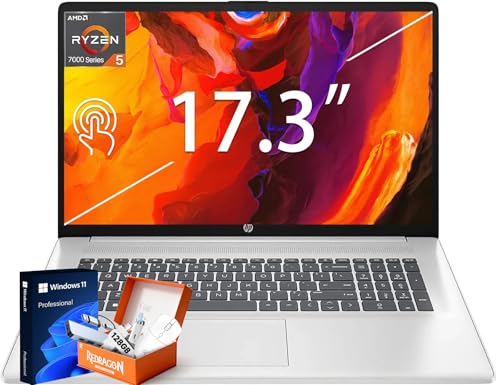
The quick answer is straightforward. If you carry your laptop often and want the sharpest screen in this size, the LG gram 17 is the standout pick. If you want a full high-definition touchscreen at a more modest level of spending, the HP OmniBook 3 is the value pick. If you want the most memory for heavy multitasking, the 32GB HP 17 is the pick for large spreadsheets and dozens of open browser tabs. The other two picks cover everyday work and light use. A 17-inch touchscreen suits someone who keeps two documents open side by side or marks up a PDF with a finger or a stylus.
Quick Picks
Our Short List of 3
All 3 Picks at a Glance
| Product | Specs | Action |
|---|---|---|
| HP OmniBook 3 17.3 Touchscreen (B0H3TFZNB5) | Check price on Amazon | |
| HP 17 Touchscreen 16GB (B0GS255HXW) | Check price on Amazon | |
 HP 17.3 Touchscreen i3 (B0HJQXY4VR) | Check price on Amazon |
How to Choose
New, Not Older Stock
A new machine here means a current-generation model listed as new on Amazon US, with a current processor family such as Intel Core Ultra or a recent AMD Ryzen 5, and Windows 11 as the installed system. Check the listing for the model year, the processor model, and the condition field before you order. Some HP listings in this category are sold as upgraded configurations, where the seller opens the original seal to install extra memory or storage. That does not make the laptop a bad buy, but confirm the seller, the return terms, and the warranty coverage for the upgraded parts.
Screen Size, Resolution, and Touch
Screen size is the reason to buy a 17-inch laptop, but resolution decides how good that size feels. A 17.3-inch HD+ panel at 1600 by 900 pixels is readable at arm’s length and fine for documents, email, and streaming, yet text can look soft next to a sharper panel. A full high-definition panel at 1920 by 1080 pixels is the practical minimum for most buyers in this size. A WQXGA panel at 2560 by 1600 pixels, as on the LG gram 17, is clearly sharper, gives a taller 16:10 shape that shows more of a document, and suits creative work and long reading sessions. Anti-glare tames reflections near windows, while glossy glass can act like a mirror in sunlight. Around 250 nits is workable indoors, while 300 nits or more is more comfortable near a window.
Processor and Memory
The Intel Core Ultra 7 258V in the LG gram 17 is a current, efficient chip with an integrated neural processing unit for on-device artificial intelligence features in Windows 11, and it pairs with fast DDR5 memory. The AMD Ryzen 5 7430U in the two mid-range HP 17 models is a six-core chip that handles office apps, browsers, streaming, and light content creation without strain. The AMD Ryzen 5 130 in the HP OmniBook 3 is a newer everyday chip for home office and student work. The Intel Core i3-N305 in the budget HP is an eight-core chip for light use, and it suits browsing, email, and video calls rather than demanding multitasking. 16GB is a sensible floor for comfortable multitasking on Windows 11, and 32GB leaves headroom for dozens of tabs and large spreadsheets. 8GB is workable for light use only. Memory on many thin laptops is soldered and cannot be upgraded later.
Storage You Will Not Outgrow
A 512GB solid-state drive is the practical minimum once documents, photos, downloads, and apps accumulate, and it is the smallest drive in this guide. A 1TB drive is comfortable for most buyers and leaves room for years of files, and it appears on four of the five picks here. A 2TB drive suits a large photo or video library, but it usually arrives only on upgraded configurations, so confirm whether it is a single internal drive or a split with an external module. A PCIe NVMe solid-state drive boots quickly, and that is what these listings specify.
Weight, Battery, and Ports
Weight is the hidden cost of a 17-inch screen. The LG gram 17 weighs about 3.2 pounds, which is lighter than many 15-inch laptops and is the reason it works as a portable machine. The HP models weigh roughly 4.4 to 4.8 pounds, which is manageable for moving between rooms or carrying in a large bag, but noticeable on a long walk. The LG gram 17 carries a 77 watt-hour battery, and the manufacturer lists up to 23.5 hours of video playback, which reflects light use rather than a full workday of heavy apps. The HP models list shorter runtimes. Look for USB-C, at least two USB-A ports, HDMI, and a headphone jack. The LG gram 17 adds two Thunderbolt 4 ports and Wi-Fi 7, while the HP models include Wi-Fi 6, Bluetooth, USB-C, and HDMI on most configurations.
Keyboard, Security, and Software
A 17-inch body has room for a full-size keyboard with a numeric keypad, and every pick here includes one, which is a genuine advantage for spreadsheets, data entry, and accounting work. A backlit keyboard helps in dim rooms and on evening calls, and it appears on the LG gram 17, the HP OmniBook 3, and most HP 17 configurations. Check for a fingerprint reader and a webcam privacy shutter if you work in shared spaces, libraries, or cafes. The HP models in this guide commonly list one or both, while the LG gram 17 lists a full high-definition camera and a backlit keyboard. Windows 11 Pro appears on the LG gram 17 and on the two Ryzen HP 17 models. Windows 11 Home appears on the OmniBook 3 and the budget HP. Some listings mention Microsoft 365 or Office for the web, which is not the same as full desktop Office installed on the machine.
The Best New 17 Inch Laptops With Touch Screen Reviewed
LG gram 17 Touchscreen (B0FC6GXCQY)
The LG gram 17 is the pick for anyone who wants a true 17-inch touchscreen without carrying a heavy desktop replacement. It pairs a 17-inch WQXGA touchscreen at 2560 by 1600 pixels with an Intel Core Ultra 7 258V processor, 32GB of DDR5 memory, a 1TB solid-state drive, and Intel Arc graphics, all in a chassis that weighs about 3.2 pounds and measures about 0.74 inches thin. The display uses a 16:10 shape, an anti-glare finish, and a wide color gamut, which makes long documents, photo editing, and streaming look crisp rather than washed out. The machine carries two Thunderbolt 4 ports, two USB 3.2 ports, HDMI, Wi-Fi 7, and a backlit keyboard, and it runs Windows 11 Pro as a Copilot+ PC.
This laptop suits professionals, students, and frequent travellers who need a large screen they can actually carry, and anyone who marks up documents or presents from the laptop. It is less suited to buyers who need dedicated graphics for heavy gaming, because it uses integrated graphics only. This listing ships with accessories, so confirm the processor, memory, and storage match the configuration named here.
HP OmniBook 3 17.3 Touchscreen (B0H3TFZNB5)
The HP OmniBook 3 is the value pick for buyers who want a full high-definition touchscreen without paying for an ultra-light chassis. It has a 17.3-inch full high-definition IPS touchscreen at 1920 by 1080 pixels, with an anti-glare finish and a brightness level listed around 300 nits, which is more comfortable near windows than the HD+ panels on the cheaper HP models. It runs on an AMD Ryzen 5 130 processor, with 16GB of DDR5 memory, a 1TB solid-state drive, and AMD Radeon 660M graphics, and it includes a backlit keyboard with a numeric keypad, Wi-Fi 6, Bluetooth, USB-C, and HDMI. The machine weighs about 4.43 pounds and runs Windows 11 Home. The IPS panel keeps colours and contrast steady when you view the screen from an angle or share it with a person beside you.
This laptop suits home office work, student use, and family use, where the screen size matters more than extreme portability. It is less suited to buyers who need Windows 11 Pro features, and less suited to buyers who carry a laptop all day, because it is heavier than the LG gram 17. Confirm the exact processor on the listing, because the OmniBook 3 line appears in several processor configurations.
HP 17 Touchscreen 32GB (B0HC6NSDV8)
The HP 17 with 32GB of memory is the pick for heavy multitasking on a large touchscreen. It pairs an AMD Ryzen 5 7430U processor with six cores and speeds up to 4.3 GHz, 32GB of DDR4 memory, a 1TB solid-state drive, and Windows 11 Pro, on a 17.3-inch HD+ anti-glare touchscreen at 1600 by 900 pixels. It includes Wi-Fi 6, Bluetooth 5.4, fast charging, a numeric keypad, and a Copilot key, and the chassis weighs about 4.82 pounds. The 32GB of memory is the defining feature: it leaves room for dozens of browser tabs, large spreadsheets, office apps, and streaming to run together without the slowdown that a smaller memory amount can cause on Windows 11.
This laptop suits remote workers, small business owners, and students who live in a browser and a spreadsheet. It is less suited to buyers who edit high-resolution photos all day, because the HD+ resolution is modest for a screen this large. Some listings are sold as upgraded packages, so confirm the seller and whether the memory and storage are installed by the seller or by the factory.
HP 17 Touchscreen 16GB (B0GS255HXW)
The HP 17 with 16GB of memory is the everyday version of the same machine, and it is the sensible middle pick in this guide. It uses the same AMD Ryzen 5 7430U processor, the same 17.3-inch HD+ anti-glare touchscreen at 1600 by 900 pixels, and the same 1TB solid-state drive, but it pairs them with 16GB of DDR4 memory instead of 32GB. It runs Windows 11 Pro, includes Wi-Fi 6, a Copilot feature set, fast charging, a 720p camera, and a numeric keypad, and the listing is a 2025 model. 16GB is enough for ordinary multitasking: office apps, a browser with a reasonable number of tabs, video calls, and streaming run together without strain.
This laptop suits home workers, students, and family use, where the screen size is the main attraction and the workload is steady rather than extreme. It is less suited to buyers who run virtual machines or edit large video files, because those workloads are where the 32GB sibling earns its place. It shares the same HD+ trade-off as the 32GB model, so if sharp text matters more than memory, look at the HP OmniBook 3 or the LG gram 17 instead.
HP 17.3 Touchscreen i3 (B0HJQXY4VR)
The HP 17.3 with an Intel Core i3-N305 processor is the light-use pick, and it is here because a large touchscreen does not have to mean a large workload. It has a 17.3-inch HD+ BrightView touchscreen at 1600 by 900 pixels and 250 nits, an Intel Core i3-N305 processor with eight cores and speeds up to 3.8 GHz, 8GB of DDR4 memory, and a 512GB solid-state drive. It includes Wi-Fi 6, a numeric keypad, a webcam, and HDMI, and it runs Windows 11. The eight-core processor handles browsing, email, video calls, and streaming without strain, and the large screen makes those simple tasks easier on the eyes. The 512GB drive is enough for documents, photos, and a modest app library, though it fills faster than the 1TB drives on the other picks.
This laptop suits casual use, a family computer, or a student who mainly writes and researches. It is less suited to buyers who keep dozens of tabs open, edit photos or video, or store a large media library, because 8GB of memory and 512GB of storage can feel tight once those habits grow. Confirm the exact memory and storage on the listing, because this model line appears in several upgraded configurations.
What to Check Before You Buy
Confirm the screen first, because two laptops with the same 17.3-inch size can have very different panels. Check the resolution, whether the panel is IPS, whether the finish is anti-glare or glossy, and whether the listing actually says touchscreen, because some 17-inch models with similar names do not include touch. Confirm the processor model, not just the brand, and confirm the memory and storage amounts, checking whether they are factory-installed or seller-upgraded. Confirm the operating system edition, Windows 11 Home or Windows 11 Pro, and check whether full desktop Office is included or only Office for the web. Confirm the weight and the ports you need, especially USB-C and HDMI, and read the specification table on the Amazon listing rather than relying on the title alone.
FAQ
Is a touchscreen useful on a 17-inch laptop?
Yes, for many buyers it is. Touch is useful for scrolling long documents, zooming maps and photos, tapping icons, signing a document, and navigating Windows 11 when the laptop sits on a desk or a counter. It is less essential for typing-heavy work, where the keyboard and trackpad do most of the job, but it is convenient when you present work or share the screen.
How much memory should I choose in a new 17-inch touchscreen laptop?
Choose 16GB as a sensible floor for comfortable multitasking on Windows 11, and choose 32GB if you keep dozens of browser tabs, large spreadsheets, and several apps open at once, or if you plan to keep the laptop for years. 8GB suits light use only, such as browsing, email, and video calls.
Are these laptops good for gaming?
These are productivity laptops with integrated graphics, not gaming laptops. They handle casual games and older titles, but they are not substitutes for a dedicated gaming laptop with a discrete graphics card and a high refresh-rate display. If gaming is a priority, look for a 17-inch gaming laptop with dedicated graphics instead.
Can I upgrade the memory or storage later?
It depends on the model. Many HP 17-inch machines allow storage upgrades, while memory is often soldered on newer thin designs and cannot be changed later. The LG gram 17 memory is typically not user-upgradable either. Check the specification table on the exact listing.
What is the difference between HD+, full high-definition, and WQXGA on a 17-inch screen?
HD+ at 1600 by 900 pixels is readable at arm’s length but can look soft for small text. Full high-definition at 1920 by 1080 pixels is sharper and is the practical minimum for most buyers in this size. WQXGA at 2560 by 1600 pixels is clearly sharper still, shows more of a document in a taller 16:10 shape, and suits photo editing and long reading sessions.
Bottom Line
Choose the LG gram 17 if you carry your laptop often and want the sharpest screen and the lightest chassis. Choose the HP OmniBook 3 if you want a full high-definition touchscreen at a more modest level of spending. Choose the HP 17 with 32GB if you keep many windows open and want memory headroom for years. Choose the HP 17 with 16GB if you want the same everyday machine with a sensible amount of memory and storage. Choose the HP 17.3 with the Core i3-N305 if your use is light and the large screen is the main attraction. In every case, confirm the exact configuration on the Amazon listing before you order, because the processor, memory, storage, screen resolution, and bundle can all vary between listings with similar names.
Disclosure: As an Amazon Associate, we may earn from qualifying purchases.
Related guides
More from Amazon
Programs that pair well with the guide above. Offers and eligibility are set by Amazon and may change.
Free shipping on eligible items, Prime Video and more. Eligible new members can start with a free trial.
Start a Prime free trialAd-free music streaming. Eligible new subscribers can start with a free trial.
Try Music Unlimited freeA Prime membership for ages 18-24 with a trial period. Eligibility is set by Amazon.
See Prime for Young AdultsAudiobooks and podcasts to listen to on the go. Eligible new members can start with a free trial.
Try Audible freeAs an Amazon Associate we earn from qualifying purchases.









Write Your Review
No reviews yet. Be the first to share your experience!