
Key takeaways
- Find the best Dell laptops for college, from the portable XPS 13 to the Inspiron 14 2-in-1 and powerful G15. Compare specs, battery, and fit for your major.
What's inside
As an Amazon Associate I earn from qualifying purchases. This post may contain affiliate links at no extra cost to you.
Introduction
Finding the best Dell laptops for college means balancing portability, battery life, performance, and screen size against the way you actually work through a semester. A laptop that stays on a dorm desk all day has different priorities from one that travels between lectures, the library, and a part-time job. Dell covers that whole range, from the slim XPS 13 to the larger Inspiron 16 Plus, so the right choice depends less on the brand and more on your major, your bag, and how many programs you run at once.


The quick answer is that most students will be well served by a Dell Inspiron 14 or Inspiron 15 with 16GB of RAM and a 512GB SSD, while students who carry their laptop everywhere will appreciate the lighter XPS 13, and students in engineering, design, or gaming will want the extra graphics power of the Dell G15 or the larger, sharper display of the Inspiron 16 Plus.
Quick Picks
Our Short List of 3
All 3 Picks at a Glance
| Product | Specs | Action |
|---|---|---|
| Dell XPS 13 9345 (B0FYRW4N42) | Check price on Amazon | |
| Dell Inspiron 15 3525 (B0CKMZ1DMH) | Check price on Amazon | |
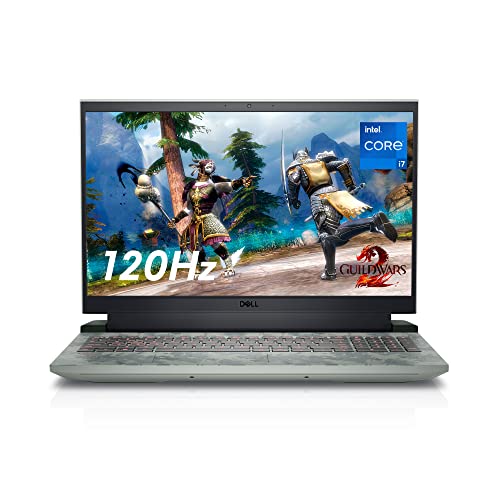 Dell G15 5520 (B09YBQYJLS) | Check price on Amazon |
How to Choose
Screen Size and Portability
Screen size is the first trade-off to settle, because it affects weight, bag space, and how comfortable a laptop feels on a small lecture-hall desk. A 13.4-inch laptop such as the XPS 13 slips easily into a backpack and leaves room for notebooks, while a 14-inch model such as the Inspiron 14 7445 2-in-1 is a useful middle ground. A 15.6-inch laptop gives you more room for split-screen work, and a 16-inch display is the most comfortable for long editing or coding sessions, but it is also the heaviest to carry across campus every day.
Processor and Memory
The processor and memory decide how smoothly a laptop handles research tabs, word processing, video calls, and the software your courses require. For general coursework, a modern Ryzen 5 or Intel Core i5 processor with 16GB of RAM is a sensible baseline, and it leaves room for a browser full of tabs alongside a document and a video call. Students in computer science, engineering, data analysis, or media production should look toward a Core i7, Ryzen 7, or Snapdragon X Elite chip, and consider whether 16GB of RAM will be enough for the tools they will run in later years. Storage matters too: a 512GB SSD holds the operating system, applications, and a large set of course files, while a 1TB SSD gives extra breathing room for large projects, photo libraries, and video files.
Battery Life and Charging
Battery life matters more in college than in many other settings, because outlets are not always free in a lecture hall or a busy library. A laptop that can last through a morning of classes without a charger gives you one less thing to plan around, and a compact charger is easier to carry than a large power brick. Keep in mind that screen brightness, video calls, and demanding software all draw more power than simple note-taking, so real-world battery life will vary with how you use the machine.
Keyboard, Touchscreen, and Webcam
You will type on this laptop for thousands of hours, so the keyboard deserves more attention than it usually gets. A comfortable keyboard with good key travel and a backlight makes late-night writing and early-morning lectures easier, and a precise trackpad reduces frustration when you are editing documents or working in a browser. A touchscreen and a 2-in-1 hinge, as on the Inspiron 14 7445, add handwriting and annotation options that suit students who mark up slides or sketch diagrams. The webcam and microphone also matter now that group projects and office hours often happen over video, so look for a clear webcam and a microphone that picks up your voice without too much background noise.
Ports, Wi-Fi, and Durability
Ports decide what you can connect without carrying extra adapters. A laptop with USB-C, USB-A, HDMI, and a headphone jack covers most classroom and dorm setups, from an external monitor to a presentation display. Wi-Fi 6 or Wi-Fi 6E helps in crowded campus networks, and Bluetooth is useful for wireless headphones and a mouse. Durability is easy to overlook until a laptop spends a semester in a backpack, so consider the build quality, the hinge, and whether the chassis feels solid when you open and close the lid. A laptop that survives daily carrying, the occasional bump, and a full academic year of use is worth more than a slightly thinner model that feels fragile.
Your Major and Your Software
Your major should shape the final choice more than any single specification. Humanities, social science, business, and education students usually need a reliable laptop for writing, research, spreadsheets, and presentations, and a mid-range Inspiron fits that work well. Computer science and engineering students may need to run development tools, virtual machines, or simulation software, which calls for a stronger processor and more memory. Design, film, and architecture students benefit from a larger, higher-resolution display and a dedicated graphics card, while students who also game in their free time will appreciate a machine such as the G15 that handles both coursework and demanding games. Before you buy, check your department’s software list and confirm that the laptop you choose can run the programs your courses require.
Storage and Future-Proofing
A college laptop should last for several years, so it helps to buy with your later courses in mind, not just your first semester. A 512GB SSD is a practical minimum for most students, and 1TB is a better fit if you work with large media files or install several large applications. Regular backups matter as much as the hardware itself, because a lost essay or a corrupted project file can cost more time than any specification difference.
The Best Dell Laptops for College Reviewed
Dell XPS 13 9345 (B0FYRW4N42)
The Dell XPS 13 9345 is the most portable laptop in this guide, and it suits students who carry their laptop everywhere and want a machine that feels light at the end of a long day. Its 13.4-inch FHD+ display keeps the footprint small, while the Qualcomm Snapdragon X Elite processor, 16GB of RAM, and 512GB SSD handle everyday coursework, research, video calls, and writing without fuss. The slim design and Windows 11 Home setup make it a natural fit for lectures, libraries, and study sessions, and the fingerprint reader adds a quick way to sign in between classes.
This laptop suits students in writing-heavy, business, or social science programs who value portability and battery-friendly efficiency over a large screen or a dedicated graphics card. It also suits students who already use a monitor or a second display at their desk and want a light machine for the road. Students who should skip it include those who need a large screen for detailed design work, those who run software that requires a traditional Intel or AMD processor, and those who want a dedicated graphics card for gaming or heavy rendering. If portability is your top priority and your software runs well on this platform, the XPS 13 9345 is a strong match.
Dell Inspiron 15 3525 (B0CKMZ1DMH)
The Dell Inspiron 15 3525 is a straightforward, practical choice for general college coursework. Its 15.6-inch FHD display gives you room to work with two windows side by side, and the AMD Ryzen 5 5500U processor, 16GB of RAM, and 512GB SSD cover writing, research, spreadsheets, streaming lectures, and video calls. Wi-Fi and Bluetooth keep you connected on campus, and Windows 11 Home provides the familiar environment most students already know. The larger screen makes it comfortable for long study sessions at a desk, and the numeric keypad is a useful extra for students who work with numbers.
This laptop suits students who want a reliable, easy-to-use machine for everyday classes without paying for features they will not use. It is a good fit for humanities, business, education, and social science majors, and for students who mainly work at a desk or in a dorm room. Students who should skip it include those who carry their laptop across campus all day and want the lightest possible machine, and those who need a dedicated graphics card for engineering, design, or gaming work. For a general-purpose college laptop, the Inspiron 15 3525 covers the essentials well.
Dell Inspiron 14 7445 2-in-1 (B0BVZ7P9SW)
The Dell Inspiron 14 7445 2-in-1 is the most flexible laptop in this guide, and it suits students who want one device for typing, reading, presenting, and annotating. Its 14-inch FHD+ IPS touchscreen folds back on a 360-degree hinge, so you can use it as a laptop, a tablet, or a tented display for watching lectures and sharing work with a group. The AMD Ryzen 5 8640HS processor, 16GB of DDR5 RAM, and 512GB SSD provide responsive performance for coursework, research, and multitasking, and the backlit keyboard and FHD webcam support late study sessions and video calls.
This laptop suits students who take handwritten notes, mark up slides and PDFs, or present their work in class, and it suits anyone who wants a touchscreen without giving up a full keyboard. It is a good fit for education, design, health science, and business students who move between different kinds of work during the day. Students who should skip it include those who prefer a larger screen for split-screen work, and those who want a dedicated graphics card for demanding creative or engineering software. If flexibility matters as much as raw performance, the Inspiron 14 7445 2-in-1 is a strong option.
Dell Inspiron 16 Plus 7640 (B0D273XDFY)
The Dell Inspiron 16 Plus 7640 is the best fit in this guide for students who want a large, sharp display and plenty of storage. Its 16-inch 2.5K display shows more detail than a standard FHD screen, which helps when you are editing photos, working with spreadsheets, writing code, or reading long documents. The Intel Core i7-13620H processor, 16GB of LPDDR5 RAM, and 1TB SSD give it room for demanding coursework and large files, and Windows 11 Home keeps the setup familiar.
This laptop suits design, media, computer science, and data students who benefit from screen space and a stronger processor, and it suits students who want a single laptop to serve as both a class machine and a dorm workstation. Students who should skip it include those who walk long distances between classes with a heavy bag, and those who want the longest possible battery life from a smaller, lighter machine. If you value screen space and storage over portability, the Inspiron 16 Plus 7640 is a sensible choice.
Dell G15 5520 (B09YBQYJLS)
The Dell G15 5520 is the most powerful laptop in this guide for students who need graphics performance as well as everyday computing power. Its 15.6-inch FHD display runs at 120Hz, which gives smooth motion for gaming and video work, and the Intel Core i7-12700H processor, 16GB of DDR5 RAM, and 512GB SSD handle demanding applications alongside coursework. The NVIDIA RTX 3060 graphics card with 6GB of dedicated memory supports engineering software, 3D work, video editing, and gaming, while Wi-Fi 6 keeps connections stable on busy campus networks.
This laptop suits engineering, computer science, architecture, and media students who run graphics-heavy software, and it suits students who want one machine for both study and gaming. Students who should skip it include those who want the lightest laptop for carrying all day, and those whose coursework is mainly writing and research, where a lighter Inspiron would be more comfortable and easier to carry. If your major or your free time calls for a dedicated graphics card, the G15 5520 is the clearest fit in this guide.
What to Check Before You Buy
Before you buy, confirm the exact configuration listed on the product page, because Dell sells each model in several versions with different processors, memory, storage, and displays. Check the screen size and resolution, the processor model, the amount of RAM, the SSD capacity, and the operating system, and make sure they match the version you intended to buy. Look at the weight and dimensions if you will carry the laptop every day, and check the battery capacity and the type of charger included.
Next, confirm the software your courses require and whether it runs on the processor and operating system of the laptop you have chosen. Some specialized programs have specific system requirements, and a machine that is excellent for writing may not be the right fit for a particular engineering or design tool. Check the ports as well, and think about whether you will need an adapter for an external monitor, a projector, or a wired network connection.
Finally, plan for storage and backups from the start. A 512GB SSD is enough for many students, but a 1TB SSD gives you more room if you work with large files. Set up cloud storage or an external drive for your coursework, and keep a backup of important documents, because a laptop can be repaired or replaced far more easily than a lost semester of work. A short check of the configuration, the software list, and your backup plan will save you time and frustration after the laptop arrives.
FAQ
How much RAM do I need for a college laptop?
For most college work, 16GB of RAM is a practical baseline, because it handles a browser with many tabs, a word processor, a spreadsheet, and a video call at the same time. Students who run development tools, virtual machines, large datasets, or media-editing software may benefit from more memory, so check your department’s software requirements before you decide.
Is a 13-inch or 15-inch Dell laptop better for college?
A 13-inch laptop such as the XPS 13 is easier to carry and fits better on small desks, while a 15-inch laptop such as the Inspiron 15 3525 gives you more screen space for split-screen work. Choose the smaller size if you walk between classes all day, and the larger size if you mainly work at a desk and value screen space.
Do I need a dedicated graphics card for college?
Most students do not need a dedicated graphics card for writing, research, and presentations, and integrated graphics handle those tasks well. A dedicated graphics card, such as the RTX 3060 in the Dell G15 5520, is useful for engineering, architecture, 3D design, video editing, and gaming, so let your major and your software guide the decision.
Is a 2-in-1 laptop useful for college?
A 2-in-1 laptop such as the Dell Inspiron 14 7445 is useful if you take handwritten notes, annotate slides and PDFs, or present your work in tablet or tent mode. If you mainly type and rarely use a touchscreen, a traditional laptop with a larger screen or a lighter design may be a better fit.
How much storage should a college laptop have?
A 512GB SSD is a practical minimum for most students, because it holds the operating system, applications, and a large set of course files with room to spare. A 1TB SSD, as in the Dell Inspiron 16 Plus 7640, is a better fit if you work with large media files, install several large programs, or want extra room for projects across four years.
Bottom Line
The best Dell laptop for college is the one that matches your major, your bag, and the way you study. The Dell XPS 13 9345 is the easiest to carry, the Dell Inspiron 15 3525 is the most straightforward choice for everyday coursework, and the Dell Inspiron 14 7445 2-in-1 is the most flexible for note-taking and presenting. The Dell Inspiron 16 Plus 7640 gives you a larger, sharper display and more storage for demanding work, while the Dell G15 5520 adds the graphics power that engineering, design, and gaming students need. Start with your software list and your daily routine, choose the screen size and performance level that fit them, and confirm the exact configuration before you buy.
Disclosure: As an Amazon Associate, we may earn from qualifying purchases.
Related guides
More from Amazon
Programs that pair well with the guide above. Offers and eligibility are set by Amazon and may change.
Free shipping on eligible items, Prime Video and more. Eligible new members can start with a free trial.
Start a Prime free trialAd-free music streaming. Eligible new subscribers can start with a free trial.
Try Music Unlimited freeA Prime membership for ages 18-24 with a trial period. Eligibility is set by Amazon.
See Prime for Young AdultsAudiobooks and podcasts to listen to on the go. Eligible new members can start with a free trial.
Try Audible freeAs an Amazon Associate we earn from qualifying purchases.









Write Your Review
No reviews yet. Be the first to share your experience!