
Key takeaways
- Looking for the best Core i7 HQ laptops? Compare the top i7-7700HQ laptops with GTX graphics, 16GB RAM, and fast SSD storage for gaming and heavy work.
What's inside
As an Amazon Associate I earn from qualifying purchases. This post may contain affiliate links at no extra cost to you.
If you are shopping for the best Core i7 HQ laptops, you are looking for a very specific kind of machine. The HQ suffix marks Intel’s high-performance mobile processors: quad-core chips with a 45W thermal design power, built for sustained heavy work rather than thin-and-light efficiency. Every laptop in this guide runs an Intel Core i7 HQ-series processor, most commonly the i7-7700HQ, a quad-core, eight-thread chip that runs at 2.8 GHz and boosts up to 3.8 GHz.
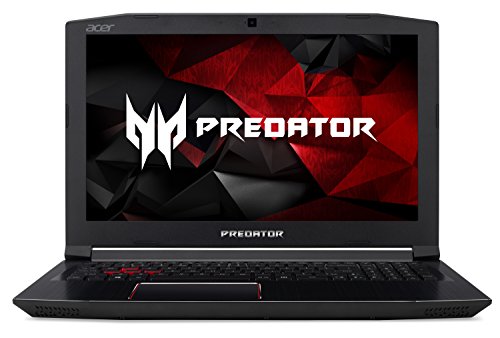
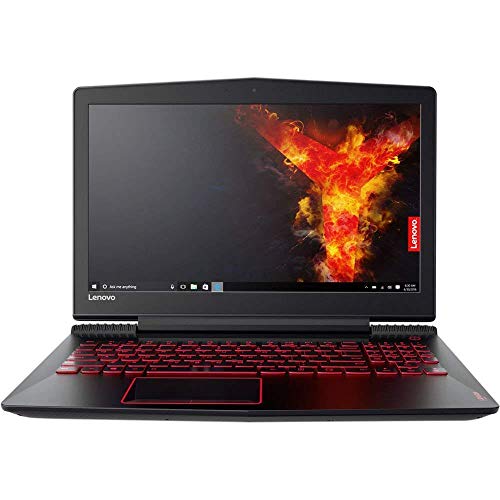
Quick answer: the Acer Predator Helios 300 (G3-572-7526) is the strongest all-round pick among Core i7 HQ laptops, pairing the i7-7700HQ with a GeForce GTX 1060, 16GB of RAM, and a 256GB SSD plus a 1TB hard drive. If you want a larger-feeling screen and a 4K option, the Dell Inspiron 15 7577 is the alternative to look at first, while the Lenovo Legion Y520 is the best-balanced choice for work and play in one machine.
These laptops are older models. HQ-series chips were the standard for performance laptops in Intel’s 6th and 7th generation lineups, so these machines are now mostly sold as remaining stock or renewed units. That does not make them weak: a quad-core i7-7700HQ still handles modern games at 1080p, video editing, programming, virtual machines, and heavy multitasking without breaking a sweat. The trick is confirming the exact processor before you buy, because many listings simply say “Core i7” and hide whether the chip is an HQ, H, or U model. This guide only includes laptops where the HQ-series processor is confirmed.
Quick Picks
Our Short List of 3
All 4 Picks at a Glance
| Product | Specs | Action |
|---|---|---|
| Acer Predator Helios 300 G3-572-7526 (B0756TR4ZR) | Check price on Amazon | |
| Lenovo Legion Y520 80YY0074US (B07PLPS675) | Check price on Amazon | |
 ASUS ROG Strix GL553VD-DS71 (B01NCOS5ZG) | Check price on Amazon | |
 MSI GL62M 7RDX-1408 (B071K1Q8TK) | Check price on Amazon |
How to Choose
Confirm the Exact HQ Chip
The single most important check is the processor model number. Genuine HQ-series chips include the i7-7700HQ, i7-6700HQ, i7-6820HK, i7-4720HQ, and i7-4710HQ. The suffix is everything: an i7-7700HQ is a 45W quad-core chip, while an i7-7500U is a 15W dual-core chip with a similar-sounding name and far less sustained performance. Always look for the full model number in the listing’s specifications, not just the words “Core i7” in the title. If a listing does not show the exact processor model, treat it as unconfirmed and move on.
Match the Graphics Card to Your Workload
HQ laptops were usually sold as gaming or workstation machines, so most pair the processor with a dedicated NVIDIA graphics card. A GTX 1060 with 6GB of video memory is the sweet spot for 1080p gaming, GPU-accelerated video editing, and 3D work. A GTX 1050 or GTX 1050 Ti is enough for lighter games, older titles, and general creative work, but it will struggle with demanding modern games at high settings. If your work is mostly CPU-bound, such as compiling code or running virtual machines, the graphics card matters less, and you can prioritize RAM and storage instead.
Get at Least 16GB of RAM
The i7-7700HQ is a strong multitasking processor, but it needs enough memory to use that strength. 16GB of DDR4 RAM is the right baseline for gaming with other applications open, video editing, and running virtual machines. Several HQ laptops ship with 8GB, which is workable for lighter use but becomes a bottleneck quickly when you open a browser with many tabs alongside a game or an editing program. The good news is that most of these laptops have user-accessible memory slots, so RAM is one of the easiest upgrades if you buy an 8GB model.
Prioritize SSD Storage
An HQ laptop with only a spinning hard drive feels far slower than its processor suggests, because the drive becomes the bottleneck for booting, loading programs, and opening large files. Look for a configuration with at least a 128GB or 256GB SSD for Windows and your main programs, ideally paired with a 1TB hard drive for bulk storage. A pure SSD setup is even better for speed, though it usually means less total capacity. If a laptop you like has no SSD, check whether it has an empty M.2 slot, since adding one later is a straightforward upgrade on most of these models.
Check the Display Before You Commit
Most HQ laptops use a 15.6-inch Full HD (1920 x 1080) IPS display, which is a good balance of size, sharpness, and readability. A few configurations, such as the Dell Inspiron 15 7577, were also sold with a 4K UHD panel, which is sharper for photo and video work but demands more from the graphics card in games. Check whether the panel is IPS or TN: IPS panels have wider viewing angles and more accurate colors, which matter for creative work, while TN panels can look washed out from the side. A 60Hz refresh rate is standard on these models.
Cooling and Thermals Matter More Than Specs
A 45W quad-core processor generates real heat, and an HQ laptop lives or dies by its cooling system. Dual-fan designs with large rear or side vents handle sustained loads better than single-fan designs, and they keep the processor from throttling during long gaming or rendering sessions. Gaming-branded HQ laptops were engineered with the heat output of the i7-7700HQ in mind. Keep the vents clear, use the laptop on a hard surface, and clean dust from the fans regularly to keep performance consistent over time.
Ports and Upgradeability
Because these are older machines, check the port selection against your current setup. Most HQ laptops include multiple USB 3.0 ports, HDMI output, Ethernet, and an SD card reader, which is more generous than many modern thin laptops. Also confirm how easy the machine is to open: the best HQ laptops let you reach the RAM slots, storage bays, and battery with a standard screwdriver, and a RAM and SSD upgrade can make a 2017-era machine feel current for everyday work.
The Best Core i7 HQ Laptops Reviewed
Acer Predator Helios 300 G3-572-7526 (B0756TR4ZR)
The Acer Predator Helios 300 is the strongest all-round Core i7 HQ laptop in this guide. It pairs the Intel Core i7-7700HQ processor with a GeForce GTX 1060 graphics card with 6GB of dedicated video memory, 16GB of DDR4 RAM, a 256GB SSD, and a 1TB hard drive. The 15.6-inch Full HD IPS display keeps games and video looking sharp, and the combination of an SSD for programs and a large hard drive for files is exactly the storage setup to look for in an HQ laptop.
This laptop suits buyers who want one machine that handles gaming, video editing, and heavy multitasking without compromise. The GTX 1060 is the most capable graphics card among the laptops in this guide, and 16GB of RAM means the processor is rarely held back by memory. The dual-fan cooling system was designed around the heat output of the i7-7700HQ, so the chip holds its boost speeds during long sessions.
Who should skip it: buyers who need a light laptop for carrying all day. At just under 6 pounds, the Helios 300 is a desktop replacement more than a travel companion, and its battery life reflects its performance-first design. Buyers who only need a machine for documents, browsing, and video calls will find more power here than they need.
Dell Inspiron 15 7577 (B0767YVXFK)
The Dell Inspiron 15 7577 is the HQ laptop to choose if display quality is a priority. It runs the same Intel Core i7-7700HQ processor and GeForce GTX 1060 graphics card as the Helios 300, with 16GB of DDR4 RAM, a 256GB SSD, and a 1TB hard drive. The difference is the screen: this configuration has a 15.6-inch Full HD display, and the 7577 line also offered a 4K UHD panel for buyers who want maximum sharpness for photo and video work.
Dell built the 7577 with a more understated design than the gaming-branded laptops in this guide, which makes it a better fit for an office or classroom. The keyboard is full-size with a numeric keypad, the chassis feels solid, and the port selection includes USB-C, HDMI, and Ethernet alongside standard USB ports. For a buyer who wants HQ performance in a machine that does not look like a gaming laptop, this is the natural pick.
Who should skip it: buyers who want the lightest possible 15-inch laptop, since the 7577 is still a substantial machine, and buyers who need the latest connectivity standards, as this is a 2017-era design. Also confirm the exact display in the listing before buying, since the 7577 was sold in both Full HD and 4K configurations.
Lenovo Legion Y520 80YY0074US (B07PLPS675)
The Lenovo Legion Y520 is the most balanced laptop in this roundup. It combines the Intel Core i7-7700HQ processor with a GeForce GTX 1060 graphics card with 6GB of video memory, 16GB of RAM, and a 256GB PCIe SSD, all behind a 15.6-inch Full HD IPS display. The PCIe SSD loads Windows and programs faster than the SATA SSDs in some competing HQ laptops.
Lenovo’s Legion line was designed to work as both a gaming laptop and a daily machine, and the Y520 reflects that. The keyboard is comfortable for long typing sessions, the red backlighting is restrained, and the overall design is quieter than the more aggressive gaming laptops in this guide. It is a strong choice for a student or professional who games in the evening and works on the same machine during the day.
Who should skip it: buyers who need a large amount of built-in storage, since this configuration relies on a single 256GB SSD with no secondary hard drive. That is enough for Windows, a handful of games, and everyday files, but a large media library will need an external drive or a storage upgrade. Buyers who want a bigger screen should look at 17-inch HQ laptops instead.
ASUS ROG Strix GL553VD-DS71 (B01NCOS5ZG)
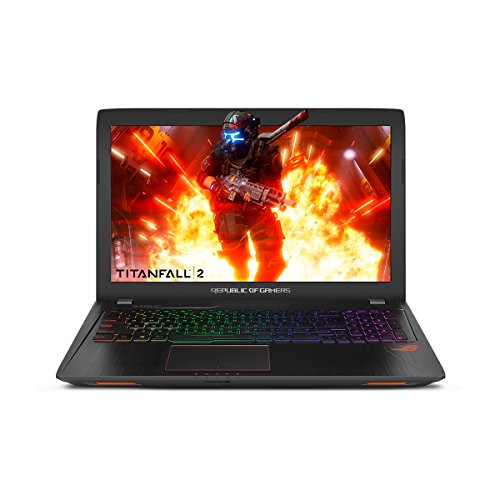
The ASUS ROG Strix GL553VD-DS71 is a well-rounded HQ laptop with a focus on keyboard quality and cooling. It runs the Intel Core i7-7700HQ processor with a GeForce GTX 1050 graphics card with 4GB of video memory, 16GB of DDR4 RAM, and a 1TB hard drive, with a 15.6-inch Full HD display. The ROG Strix keyboard uses a desktop-style layout with highlighted WASD keys and red backlighting, and the dual-fan cooling system is one of the better designs in this class.
This laptop suits buyers who value the typing and gaming experience as much as raw specifications. The GTX 1050 handles popular competitive games and older titles at 1080p, and the i7-7700HQ keeps the system responsive under heavy multitasking. It is also a good pick for buyers who plan to add an SSD later, since the GL553VD has room for a storage upgrade and the processor and RAM are already strong.
Who should skip it: buyers who play demanding modern games at high settings, since the GTX 1050 is a step below the GTX 1060 in the laptops above. Buyers who want fast storage out of the box should also look elsewhere, because this configuration ships with a hard drive only and no SSD.
MSI GL62M 7RDX-1408 (B071K1Q8TK)
The MSI GL62M 7RDX-1408 is the most affordable way into a genuine Core i7 HQ laptop. It runs the Intel Core i7-7700HQ processor with a GeForce GTX 1050 graphics card with 2GB of video memory, 8GB of RAM, a 128GB SSD, and a 1TB hard drive, with a 15.6-inch display. The SteelSeries keyboard with red backlighting is a highlight at this level, and the Cooler Boost cooling system uses dual fans to manage the heat of the quad-core processor.
This laptop suits buyers who want HQ processor performance on a tighter budget and are willing to accept a more modest graphics card. The i7-7700HQ itself is identical to the chip in the more expensive laptops in this guide, so CPU-heavy work such as programming, virtual machines, and photo editing runs just as well. The SSD plus hard drive combination also means fast boot times with plenty of storage.
Who should skip it: buyers who want to play demanding modern games, since the 2GB GTX 1050 is the weakest graphics card in this guide, and buyers who multitask heavily, since 8GB of RAM is the minimum for this class of machine. Both limits are fixable with upgrades, but buyers who do not want to open the laptop should choose a 16GB model instead.
What to Check Before You Buy
Before ordering any Core i7 HQ laptop, confirm the exact processor model in the listing’s specifications, since “Core i7” alone does not guarantee an HQ chip. Read the full specification table and look for the model number, such as i7-7700HQ, rather than relying on the title. Check whether the listing is for a new, renewed, or used unit, and confirm what is included in the box, since older laptops are sometimes sold without the original charger or battery. Verify the storage configuration, since the same model was sold with different SSD, hard drive, and RAM combinations. Confirm the display resolution and panel type, especially for the Dell Inspiron 15 7577, which was sold in both Full HD and 4K versions. Finally, check the seller’s return policy before buying, since older laptops vary more in condition than current models, and a return option protects you if the unit arrives with a worn battery or a different configuration than listed.
FAQ
What does HQ mean in an Intel Core i7 processor?
HQ stands for high performance, quad core. HQ-series processors are 45W mobile chips with four physical cores and eight threads, designed for laptops that prioritize sustained performance over battery life. They were the standard performance chips in Intel’s 6th and 7th generation mobile lineups, and they are considerably faster under sustained load than the 15W U-series chips found in thin laptops.
Is the i7-7700HQ still good?
Yes, for most everyday and gaming workloads. The i7-7700HQ is a quad-core, eight-thread processor running at 2.8 GHz with a boost up to 3.8 GHz, and it handles modern games at 1080p, video editing, programming, and heavy multitasking. It is slower than current-generation laptop processors, but paired with 16GB of RAM, an SSD, and a GTX 1060, it remains a capable machine.
What is the difference between an i7 HQ and an i7 U processor?
The main differences are core count, power, and sustained performance. An HQ chip such as the i7-7700HQ has four cores, eight threads, and a 45W power rating, while a U chip such as the i7-7500U has two cores, four threads, and a 15W power rating. The HQ chip is much faster for rendering, compiling, virtual machines, and gaming, while the U chip runs cooler and gives longer battery life in thin laptops.
Can you upgrade the RAM and storage in an HQ laptop?
In most cases, yes. The HQ laptops in this guide were built with user-accessible RAM slots and storage bays, so adding memory or swapping a hard drive for an SSD is a common upgrade. Check the specific model’s service manual before buying parts, since the number of RAM slots and the type of storage slot vary by model. A RAM and SSD upgrade is the most cost-effective way to extend the life of an HQ laptop.
Should I buy a new or renewed Core i7 HQ laptop?
Because HQ laptops are older models, many listings are renewed or remaining stock rather than brand-new units. A renewed unit can be a good value if the seller has inspected it and offers a return policy, but confirm the battery condition and the exact configuration before buying. A listing that does not state the processor model, RAM, or storage in full should be treated with caution.
Bottom Line
The best Core i7 HQ laptops are older machines, but the HQ designation still means something: a true quad-core processor built for sustained performance. The Acer Predator Helios 300 is the strongest overall pick, with the i7-7700HQ, a GTX 1060, 16GB of RAM, and the right storage combination. The Dell Inspiron 15 7577 is the pick for buyers who want a sharper display and a more understated design, the Lenovo Legion Y520 is the best balance of work and play, the ASUS ROG Strix GL553VD is the pick for keyboard and cooling quality, and the MSI GL62M is the most affordable entry point into HQ performance. Whichever model you choose, confirm the exact processor model number before you buy, since that detail separates a genuine HQ laptop from an ordinary Core i7 machine.
Disclosure: As an Amazon Associate, we may earn from qualifying purchases.
Related guides
More from Amazon
Programs that pair well with the guide above. Offers and eligibility are set by Amazon and may change.
Free shipping on eligible items, Prime Video and more. Eligible new members can start with a free trial.
Start a Prime free trialAd-free music streaming. Eligible new subscribers can start with a free trial.
Try Music Unlimited freeA Prime membership for ages 18-24 with a trial period. Eligibility is set by Amazon.
See Prime for Young AdultsAudiobooks and podcasts to listen to on the go. Eligible new members can start with a free trial.
Try Audible freeAs an Amazon Associate we earn from qualifying purchases.









Write Your Review
No reviews yet. Be the first to share your experience!