
Key takeaways
- The 5 best laptops for running CAD programs, from certified mobile workstations to powerful creator machines, picked for AutoCAD, SolidWorks, and Fusion 360.
What's inside
As an Amazon Associate I earn from qualifying purchases. This post may contain affiliate links at no extra cost to you.
CAD software punishes the wrong laptop in a very specific way: a model that rotates smoothly on a desktop stutters on an underpowered machine, and a render that should take minutes takes an hour. The real decision is not the brand on the lid. AutoCAD, SolidWorks, and Fusion 360 each lean on different hardware: single-core speed for modeling, a capable GPU for shaded views and rendering, plenty of memory for large assemblies, and a color-accurate screen for reviewing drawings. Buying for the heaviest project in the course keeps the laptop useful for years.


This guide is for engineering students, architects, and professionals who run CAD daily. Every pick below was chosen from the name and specifications listed on its Amazon product page, with attention to the processor, graphics, memory, and display that CAD work actually demands.
Quick Picks
As an Amazon Associate we earn from qualifying purchases.
| Product | Best for | Key spec from title |
|---|---|---|
| Lenovo ThinkPad P14s Gen 4 (Intel) | Certified workstation in a 14-inch body | Core i7-1360P, RTX A500, 16GB |
| Lenovo ThinkPad P14s Gen 4 (AMD) | More memory for large assemblies | Ryzen 7 PRO 7840U, 32GB, 1TB SSD |
| HP ZBook Firefly 14 G10 | Portable workstation for site and studio | 13th Gen Core i7, 4GB dedicated GPU |
| ASUS ProArt StudioBook 16 (RTX 4060) | Big OLED screen for detailed drawings | Core i9-13980HX, RTX 4060, 32GB |
| ASUS ProArt StudioBook 16 (RTX 4070) | Faster rendering on the same platform | Core i9-13980HX, RTX 4070, 32GB |
How to Choose
Processor: single-core speed matters most for modeling
Most CAD modeling operations run on a single thread, so a processor with strong single-core performance keeps sketching, extruding, and editing responsive. Core count still matters for rendering and simulation, where the work splits across threads, but the first priority is a modern high-clock processor. A current-generation Core i7 or Ryzen 7 is the right starting point, and a flagship Core i9 makes sense when rendering and simulation fill the schedule alongside modeling. Check the processor generation as well, since a newer chip often beats an older one with a higher model number.
Graphics: certified workstation GPUs versus gaming GPUs
Professional CAD software is tested and certified against workstation graphics cards such as NVIDIA’s RTX A-series, which are built for stable drivers and accurate viewport rendering. Gaming GPUs such as the RTX 4060 and RTX 4070 are faster in raw rendering and work well in most CAD tools, but they lack the same certification and can behave differently in some professional workflows. If the course or the employer specifies certified drivers, choose a workstation GPU; if the work is mostly modeling and rendering in tools that accept gaming cards, a GeForce GPU offers more speed for the money.
Memory and storage for large assemblies
A small part file runs fine on modest hardware, but a full assembly with hundreds of components needs memory. Sixteen gigabytes is the floor for serious CAD work, and 32GB is the safer choice when assemblies, simulations, and a browser full of reference drawings run at the same time. Storage should be a fast NVMe SSD of at least 512GB, since CAD libraries, project files, and template collections grow quickly, and slow storage makes every file open and save feel sluggish.
Screen accuracy and size for drawings
A CAD laptop’s screen is a working surface, not just a display. A 14-inch panel is portable and fine for modeling on the go, while a 16-inch panel shows more of a drawing and reduces panning and zooming. Resolution matters too: a high-resolution display keeps fine lines and small text readable. For work where color matters, such as presentations and client reviews, an OLED or factory-calibrated panel with accurate colors is worth the upgrade over a basic display. Brightness matters as well, since a dim screen washes out near a window or on a bright site.
The 5 Best Options
1. Lenovo ThinkPad P14s Gen 4 (Intel)
The ThinkPad P14s Gen 4 in its Intel configuration is a true mobile workstation in a 14-inch body, built for engineers who need certified graphics in a portable machine. Its Core i7-1360P processor and NVIDIA RTX A500 graphics card run AutoCAD and SolidWorks with the driver stability that professional software expects, while 16GB of memory and a 1TB NVMe SSD handle everyday assemblies and project libraries. The 14-inch WUXGA display is sharp enough for drawings, and the ThinkPad keyboard stays comfortable through long modeling sessions.
Specs
- Intel Core i7-1360P processor
- NVIDIA RTX A500 4GB graphics
- 16GB LPDDR5x RAM
- 1TB NVMe SSD
- 14″ WUXGA display (1920 x 1200)
Best for: An engineer who needs certified workstation graphics in the most portable package here.
Watch out for: The 16GB of memory is the floor for CAD, so very large assemblies may push it; the AMD version below doubles it.
2. Lenovo ThinkPad P14s Gen 4 (AMD)
The AMD version of the ThinkPad P14s Gen 4 is the same workstation platform with a different balance: a Ryzen 7 PRO 7840U processor and 32GB of memory instead of the Intel chip and discrete workstation card. That extra memory is what large assemblies need, letting SolidWorks hold hundreds of components without slowing to a crawl. The 1TB SSD gives project libraries room to grow, and the 14-inch WUXGA display and Windows 11 Pro setup keep the machine ready for both the office and the job site.
Specs
- AMD Ryzen 7 PRO 7840U processor
- AMD Radeon integrated graphics
- 32GB RAM
- 1TB SSD
- 14″ WUXGA display (1920 x 1200)
- Windows 11 Pro
Best for: A student or engineer whose assemblies are large and whose priority is memory over a certified GPU.
Watch out for: The integrated graphics are weaker for shaded views and rendering than the RTX A500 in the Intel version, so check the software list first.
3. HP ZBook Firefly 14 G10
The HP ZBook Firefly 14 G10 is the lightest true workstation in this guide, built for engineers who move between the studio, the site, and the client meeting. Its 13th-generation Core i7 processor and 4GB of dedicated graphics handle AutoCAD and Fusion 360 with workstation-class stability, while 16GB of memory and a 512GB SSD cover everyday project work. The 14-inch display keeps the machine compact, and the ZBook line is tested to the durability standards that field work demands.
Specs
- 13th Gen Intel Core i7 processor
- 4GB dedicated graphics
- 16GB RAM
- 512GB SSD
- 14″ display
Best for: An engineer or architect who carries the laptop to sites and meetings and needs workstation stability in a light body.
Watch out for: The 512GB SSD is the smallest storage in this guide, so large project libraries need an external drive or cloud storage.
4. ASUS ProArt StudioBook 16 (RTX 4060)
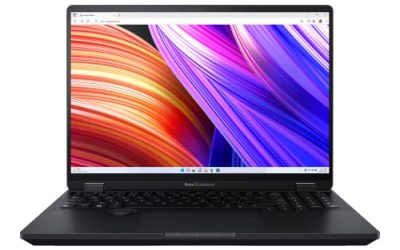
The ASUS ProArt StudioBook 16 with the RTX 4060 is the big-screen creator machine of this set, built for detailed drawing and rendering work. Its Core i9-13980HX processor and 32GB of DDR5 memory chew through large assemblies and renders, while the 1TB SSD holds project files and libraries. The 16-inch 3.2K OLED touchscreen shows drawings with sharp lines and accurate colors, which makes reviewing work and presenting to clients far easier than on a smaller, dimmer panel.
Specs
- Intel Core i9-13980HX processor
- NVIDIA GeForce RTX 4060 graphics
- 32GB DDR5 RAM
- 1TB SSD
- 16″ 3.2K OLED touchscreen display
- Windows 11 Home
Best for: A designer or engineer who wants a large, color-accurate screen and fast rendering in one machine.
Watch out for: It is the largest and heaviest machine here, so it suits a desk more than a daily commute.
5. ASUS ProArt StudioBook 16 (RTX 4070)
The RTX 4070 version of the ProArt StudioBook 16 is the same platform as the RTX 4060 model with a stronger graphics card, and that single change matters for rendering-heavy work. The Core i9-13980HX processor, 32GB of DDR5 memory, and 1TB SSD are identical, as is the 16-inch 3.2K OLED touchscreen, so the choice between the two comes down to how much rendering and GPU-accelerated simulation the workload includes. For users who render daily, the faster GPU pays for itself in saved waiting time.
Specs
- Intel Core i9-13980HX processor
- NVIDIA GeForce RTX 4070 graphics
- 32GB DDR5 RAM
- 1TB SSD
- 16″ 3.2K OLED touchscreen display
- Windows 11 Home
Best for: A user who renders frequently and wants the fastest GPU in this guide on the same proven platform.
Watch out for: The step up from the RTX 4060 model only shows in rendering and GPU-heavy tasks; modeling speed is nearly identical.
Which One Fits Your Situation
Certified graphics for professional CAD
The Lenovo ThinkPad P14s Gen 4 in its Intel configuration or the HP ZBook Firefly 14 G10 fits when the software or the employer specifies certified drivers. The ThinkPad pairs its RTX A500 card with a 1TB SSD, while the ZBook is lighter and easier to carry to sites. Both give workstation-class stability in a 14-inch body, so the choice comes down to storage and weight.
Large assemblies that need memory
The AMD version of the ThinkPad P14s Gen 4 is the pick when assemblies grow large. Its 32GB of memory holds hundreds of components without slowing down, which matters more for big SolidWorks projects than a faster GPU. The integrated graphics are the trade-off, so this suits modeling-heavy work rather than rendering-heavy work.
Detailed drawings and client presentations
The ASUS ProArt StudioBook 16 in either graphics configuration fits when the screen itself is a tool. Its 16-inch 3.2K OLED touchscreen shows fine lines and accurate colors, and the Core i9 with 32GB of memory renders quickly. Choose the RTX 4070 version when rendering fills the day, and the RTX 4060 version when modeling fills it.
A portable workstation for the field
The HP ZBook Firefly 14 G10 is the answer when the laptop travels to sites, meetings, and classrooms. Its light body, workstation graphics, and durable build make it easy to carry and hard to break, while the 512GB SSD keeps everyday projects close at hand. Pair it with an external monitor at the desk when a larger drawing area is needed.
Common Mistakes
- Buying a gaming laptop for professional CAD without checking whether the software needs certified workstation drivers.
- Choosing 8GB of RAM and then watching a large assembly slow to a crawl every time a new component is added.
- Picking a small, dim screen for drawing work, then spending the day panning and zooming because fine lines are hard to read.
- Forgetting that rendering uses the GPU and modeling uses mostly one CPU core, so a machine can be fast at one and slow at the other.
- Ignoring storage speed and size, then waiting on every file open while project libraries grow past the drive’s capacity.
Frequently Asked Questions
Do I need a workstation GPU for CAD?
It depends on the software and the workplace. Professional tools are certified against workstation cards such as NVIDIA’s RTX A-series, which offer stable drivers and predictable viewport behavior. Gaming GPUs such as the RTX 4060 and 4070 are faster at rendering and work well in most CAD tools, but they lack the same certification, so check the software requirements before choosing.
Is 16GB of RAM enough for CAD?
Sixteen gigabytes is the floor for serious CAD work and it handles small to medium assemblies, AutoCAD drawings, and Fusion 360 models. Large SolidWorks assemblies, simulations, and rendering benefit from 32GB, which is why the memory-heavy picks in this guide ship with that amount. If the work includes big assemblies, buy the memory first.
Can a 14-inch laptop run CAD well?
Yes. A 14-inch mobile workstation such as the ThinkPad P14s or the ZBook Firefly runs full CAD software with certified graphics and a capable processor. The trade-off is screen space: a 14-inch display shows less of a drawing at once, so users who review large drawings all day often pair the laptop with an external monitor at the desk.
What matters more for CAD: CPU or GPU?
Modeling mostly uses one CPU core, so single-core speed decides how responsive sketching and editing feel. Rendering, shaded views, and simulation use the GPU, so graphics power decides how fast those tasks finish. A good CAD laptop needs both: a fast modern processor for modeling and a capable GPU for rendering and viewport work.
Related guides
More from Amazon
Programs that pair well with the guide above. Offers and eligibility are set by Amazon and may change.
Free shipping on eligible items, Prime Video and more. Eligible new members can start with a free trial.
Start a Prime free trialAd-free music streaming. Eligible new subscribers can start with a free trial.
Try Music Unlimited freeA Prime membership for ages 18-24 with a trial period. Eligibility is set by Amazon.
See Prime for Young AdultsAudiobooks and podcasts to listen to on the go. Eligible new members can start with a free trial.
Try Audible freeAs an Amazon Associate we earn from qualifying purchases.





Write Your Review
No reviews yet. Be the first to share your experience!