
Key takeaways
- Find the best laptops for vinyl cutting for Cricut and Silhouette work, with fast processors, 16GB RAM, bright screens and USB ports for smooth designs.
What's inside
- Quick Picks
- 1. Lenovo IdeaPad Slim 3 — Best Overall Value
- 2. HP Pavilion 15.6-inch — Best Battery Life Pick
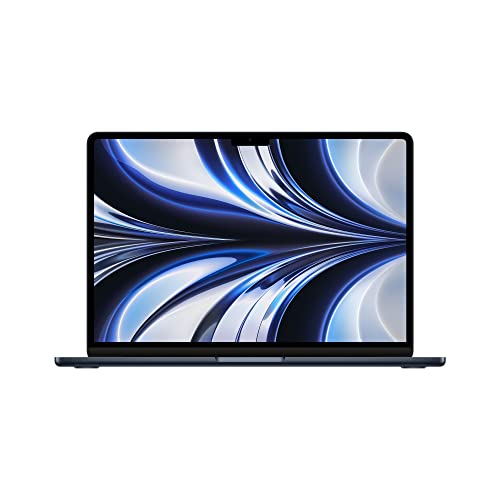
- 3. Apple MacBook Air M2 — Best Mac Pick
- 4. Acer Aspire 5 15 Slim — Best for Colour and Detail
- 5. ASUS Vivobook 15.6-inch — Best Large-Screen Windows Pick
- Buying Guide: How to Choose a Laptop for Vinyl Cutting
- Frequently Asked Questions
- Conclusion
As an Amazon Associate I earn from qualifying purchases. This post may contain affiliate links at no extra cost to you.
Vinyl cutting looks simple: choose a design, send it to the machine, and peel away the excess vinyl. In practice, the laptop in the middle does a surprising amount of work. It runs Cricut Design Space or Silhouette Studio, opens large SVG and PNG files, manages fonts, layers, and print-then-cut layouts, and keeps a steady Bluetooth or USB connection to the cutter while the blade is moving. A slow machine can turn that process into frozen previews, lagging edits, and lost connections at the worst possible moment.

The best laptops for vinyl cutting are not the cheapest laptops on the shelf, and they are not necessarily gaming laptops either. The right choice is a reliable Windows or Mac laptop with a modern multi-core processor, at least 8GB of RAM and preferably 16GB, a fast SSD, a clear Full HD or better display, and the ports a cutter needs. A touchscreen helps with zooming and arranging small elements, while a 15.6-inch screen makes fine lines easier to see. This guide covers five laptops that fit that brief.
As an Amazon Associate, we earn from qualifying purchases made through links in this article.
Quick Picks
Our Short List of 3
All 4 Picks at a Glance
| Product | Specs | Action |
|---|---|---|
| 1. Lenovo IdeaPad Slim 3 — Best Overall Value | Check price on Amazon | |
| 3. Apple MacBook Air M2 — Best Mac Pick | Check price on Amazon | |
 4. Acer Aspire 5 15 Slim — Best for Colour and Detail | Check price on Amazon | |
 5. ASUS Vivobook 15.6-inch — Best Large-Screen Windows Pick | Check price on Amazon |
1. Lenovo IdeaPad Slim 3 — Best Overall Value
The Lenovo IdeaPad Slim 3 is the most balanced choice in this guide for most vinyl cutters. It combines a large touchscreen, a capable AMD processor, 16GB of RAM, and a spacious 1TB SSD, a combination that suits both everyday cutting and heavier design work. If you run Cricut Design Space or Silhouette Studio alongside a browser, a font manager, and an image editor, that extra memory and storage headroom helps keep the workflow smooth.
According to the Amazon listing, this configuration uses an AMD Ryzen 7 7730U processor, 16GB of RAM, and a 1TB SSD, with a 15.6-inch Full HD touchscreen display. It also lists a backlit keyboard, Wi-Fi, HDMI, and Bluetooth, and it runs Windows 11.
For vinyl cutting, the screen size and touch support are the most useful features. A 15.6-inch display gives you room to view a full sheet layout, while touch input makes it easier to pinch to zoom, drag small shapes into place, and tap through menus. The Ryzen 7 processor and 16GB of RAM are well matched to the software, and a 1TB SSD leaves plenty of space for design libraries, fonts, and SVG collections.
Who should choose it? Crafters who want one dependable laptop for design, cutting, and everyday use, without paying a premium for features they will not use. It is especially suitable if you prefer a larger screen, want touch input, and expect to keep a growing library of designs on the laptop itself.
2. HP Pavilion 15.6-inch — Best Battery Life Pick
The HP Pavilion 15.6-inch laptop is a practical choice for crafters who move around the house, take their cutter to workshops, or sell at craft fairs. Its headline feature is battery life, which matters when you are away from a power outlet and still need to finish a design, send a cut, or show a customer a preview on screen.
According to the Amazon listing, this HP Pavilion has a 15.6-inch HD touchscreen with an anti-glare finish, 16GB of RAM, and a 1TB SSD. It uses an Intel Core processor with speeds up to 4.1GHz, includes USB Type-C and HDMI ports, and runs Windows 11 Home. The listing also states up to 11 hours of battery life, which is generous for a large-screen laptop in this class.
The anti-glare touchscreen is useful in bright rooms and near windows, where reflections can make it hard to see fine cut lines and small text. The combination of 16GB of RAM and a 1TB SSD also means you are not forced to choose between smooth multitasking and enough space for your files. Before you buy, check that the exact configuration you choose has the ports you plan to use, because Pavilion configurations can vary, and a USB-A port or adapter may be needed for some older cutter cables.
Who should choose it? Anyone who crafts in different rooms, travels to markets or classes, or simply dislikes being tied to a charger. If long battery life and a large anti-glare touchscreen are high on your list, this HP Pavilion is a strong fit.
3. Apple MacBook Air M2 — Best Mac Pick
The Apple MacBook Air M2 is the best Mac option in this guide, and it is ideal for crafters who already use an iPhone, iPad, or other Apple devices, or who simply prefer macOS. It is light, silent, and easy to carry, yet it has enough performance for design software, photo editing, and everyday multitasking.
According to the Amazon listing, this MacBook Air uses the Apple M2 chip, with 16GB of RAM and a 256GB SSD. It has a 13.6-inch Liquid Retina display, a backlit keyboard, and a 1080p FaceTime HD camera.
The 13.6-inch display is smaller than the 15.6-inch Windows laptops in this guide, but it is sharp and bright, which helps when you are checking small text, thin lines, and colour choices in a design. The main trade-off is storage. At 256GB, this configuration has far less built-in space than the 1TB Windows laptops above, so you will need to be more organised with files, use cloud storage, or add an external drive if your design library grows large. The 16GB of unified memory is a strength, however, and it helps the M2 chip handle several apps at once without slowing down.
Who should choose it? Mac users, designers who value a sharp display and a quiet, portable machine, and anyone who wants a laptop that is easy to carry to workshops and markets. If you need a very large internal drive, choose a higher-storage configuration or plan for external storage from the start.
4. Acer Aspire 5 15 Slim — Best for Colour and Detail
The Acer Aspire 5 15 Slim is the pick for crafters who care about seeing their designs accurately. Its IPS touchscreen offers wider viewing angles and more consistent colour than a basic TN panel, which makes it easier to judge vinyl colours, layered designs, and print-then-cut artwork before you commit to a cut.
According to the Amazon listing, this Acer Aspire 5 uses a 13th Gen Intel Core i5-13420H processor and Intel UHD Graphics, with 16GB of LPDDR5 RAM and a 512GB Gen 4 SSD. The display is a 15.6-inch Full HD 1920 x 1080 IPS touchscreen, and the listing also mentions Wi-Fi 6, a backlit keyboard, and a protective sleeve. The model number given in the listing is A515-58PT-50UJ.
That processor is a good match for vinyl cutting software, especially if you also use heavier design tools. The Core i5-13420H has enough cores and speed to handle large SVG files, multiple layers, and background apps without the interface feeling sluggish. The touchscreen makes it easier to tap to select layers, drag shapes precisely, and zoom into fine details. Storage sits in the middle of this guide at 512GB, which is enough for most crafters, especially if you store finished projects in the cloud or on an external drive.
Who should choose it? Crafters who spend a lot of time designing on screen, who want a sharp IPS touchscreen, and who also run image editors or browser-based design tools alongside their cutting software.
5. ASUS Vivobook 15.6-inch — Best Large-Screen Windows Pick
The ASUS Vivobook 15.6-inch laptop rounds out this guide with a strong Intel Core i7 processor, a large touchscreen, and a full numeric keypad. That keypad may seem like a small detail, but it is useful for entering exact measurements, quantities, and sizes when you are setting up repeat cuts, labels, or production runs.
According to the Amazon listing, this ASUS Vivobook uses an Intel Core i7-1255U processor, with 16GB of RAM and a 1TB SSD. It has a 15.6-inch Full HD touchscreen, a backlit keyboard, a numeric keypad, a webcam, HDMI, and Wi-Fi 6, and it runs Windows 11 Home. The model name given in the listing is F1502Z, and the colour is Blue.
The Core i7 processor and 16GB of RAM give this laptop plenty of headroom for multitasking. You can keep Design Space or Silhouette Studio open, switch to a browser to check a font or a tutorial, and return to your design without waiting for the laptop to catch up. The 1TB SSD gives you room for a large design library, while Wi-Fi 6 supports fast downloads and Bluetooth supports a wireless connection to a compatible cutter.
Who should choose it? Crafters and small-business sellers who want a powerful, large-screen Windows laptop with a numeric keypad and generous storage. It is a good fit if you cut in batches, run several apps at once, and want a machine that will stay useful as your projects get more ambitious.
Buying Guide: How to Choose a Laptop for Vinyl Cutting
Check software compatibility first
Cricut Design Space and Silhouette Studio both need a full desktop operating system: Windows 10 or later, or a recent version of macOS. According to the software makers, Chromebooks, tablets, and phones do not run the full desktop versions, so they are not suitable as your main cutting laptop. Windows laptops should use an Intel or AMD processor, because Silhouette has noted that ARM-based Windows processors are not supported for Silhouette Studio. Apple Silicon Macs, such as the M2 MacBook Air in this guide, run the Mac version of the software, and that is supported. If you are unsure, check the current system requirements on the Cricut or Silhouette website before you buy.
Aim for 16GB of RAM
Both Cricut and Silhouette list 4GB or 8GB as a minimum in different places, but 16GB is the sensible target for real-world use. Cutting software on its own is not very heavy, yet most crafters also have a browser, an image editor, a font app, and several design files open at the same time. With 16GB, those apps can share memory without forcing the laptop to slow down. All five laptops in this guide have 16GB.
Choose a modern multi-core processor
A modern Intel Core i5 or i7, AMD Ryzen 5 or Ryzen 7, or Apple M-series chip is a good baseline. These processors handle large SVG files, high-resolution images, and background tasks without long delays. An older dual-core processor may open Design Space, but it can struggle when you add layers or export a print-then-cut file. You do not need a gaming processor or a dedicated graphics card for vinyl cutting. Integrated graphics are enough for 2D design work, and they keep the laptop cooler, quieter, and cheaper.
Pick a clear, comfortable display
A Full HD display with a resolution of 1920 x 1080 is the minimum to aim for. It shows small text and fine lines clearly, and it gives you enough space to see toolbars, layers, and the design canvas at the same time. An IPS panel is preferable to a basic TN panel, because it keeps colours and contrast more consistent when you tilt the screen. Screen size is a personal choice, but 15.6 inches is a sweet spot for many crafters: large enough to work comfortably, but still portable. A touchscreen is genuinely useful for zooming, dragging, and tapping small controls.
Do not overlook ports and wireless connections
Your cutter needs a reliable connection to the laptop. Many Cricut and Silhouette machines support Bluetooth, which is convenient and keeps your desk tidy, but a wired USB connection can be more stable for long cuts. Check that the laptop has Bluetooth and at least one USB-A port, or plan to use a USB-C adapter or hub if it only has USB-C ports. An HDMI port is useful if you want to connect an external monitor, and Wi-Fi 6 helps with fast downloads and cloud syncing.
Storage: 512GB is good, 1TB is better
Vinyl cutting files are usually small on their own, but fonts, images, design bundles, and exported projects add up over time. A 512GB SSD is enough for most hobbyists, especially if you use cloud storage, while a 1TB SSD gives you more freedom to keep everything on the laptop. Three of the laptops in this guide have 1TB. Choose an SSD rather than a traditional hard drive: SSDs are faster, quieter, and more resistant to bumps.
Frequently Asked Questions
Do I need a powerful laptop for vinyl cutting?
No, you do not need a high-end gaming laptop, but you do need a competent modern laptop. Cricut Design Space and Silhouette Studio run best on a recent multi-core processor with at least 8GB of RAM and preferably 16GB, plus a fast SSD and a clear Full HD display. A laptop that meets those requirements will handle most decal, sticker, label, and heat-transfer projects smoothly, including multi-layer designs. A very old laptop with 4GB of RAM and a slow hard drive is more likely to freeze or lag.
Can I use a Chromebook for Cricut or Silhouette?
No, not as your main cutting laptop. Cricut states that Design Space is not supported on Chromebooks, and Silhouette Studio has the same limitation: it needs Windows or macOS. A Chromebook cannot run the full desktop software, so it cannot send cuts to the machine in the normal way. Choose a Windows laptop with an Intel or AMD processor, or a Mac, instead. All five laptops in this guide meet that requirement.
How much RAM do I need for Cricut Design Space?
Aim for 16GB of RAM if your budget allows it. The minimum requirements are lower, but 16GB gives you room to run Design Space or Silhouette Studio alongside a browser, an image editor, and a font manager without slowing down. It also helps with large SVG files and print-then-cut projects that use high-resolution images.
Is a touchscreen laptop better for vinyl cutting?
A touchscreen is helpful, but it is not essential. It makes it easier to zoom into fine details, drag small shapes, and tap through menus, which can speed up detailed design work. A good non-touch laptop with a mouse works perfectly well, and many experienced crafters prefer a mouse for precise placement. If you like working directly on screen, choose one of the touchscreen models in this guide, such as the Lenovo IdeaPad Slim 3, the HP Pavilion, the Acer Aspire 5, or the ASUS Vivobook.
Do I need a USB port to connect my vinyl cutter?
Most modern Cricut and Silhouette machines support Bluetooth, so a wired connection is not always required. A USB connection can still be more stable for long or complex cuts, and some older machines need it. Before you buy, check whether the laptop has a USB-A port for your cutter cable, or whether you will need a USB-C adapter or hub. Also confirm that Bluetooth is included if you plan to cut wirelessly, and keep the laptop close to the cutter during a cut to avoid dropouts.
Conclusion
The best laptops for vinyl cutting are reliable, well-specified machines that run Cricut Design Space or Silhouette Studio without fuss, and that give you a clear screen, enough memory, and a stable connection to your cutter. You do not need the most expensive laptop on the market, but you should avoid the cheapest, lowest-specification models, because they are the ones most likely to lag, freeze, or run out of storage just as your design library grows.
For most people, the Lenovo IdeaPad Slim 3 is the best overall choice, thanks to its large touchscreen, Ryzen 7 processor, 16GB of RAM, and 1TB SSD. If battery life and a low-glare screen matter most, the HP Pavilion is a strong alternative. Mac users should look at the MacBook Air M2, which is light, quiet, and sharp, while the Acer Aspire 5 suits crafters who want an IPS touchscreen for colour-accurate design work. The ASUS Vivobook completes the list with a Core i7 processor, a numeric keypad, and generous storage for batch cutting and small-business use. Before buying, check your cutting software requirements, confirm the ports you need, and leave room in your budget for vinyl, transfer tape, and blades.
Related guides
More from Amazon
Programs that pair well with the guide above. Offers and eligibility are set by Amazon and may change.
Free shipping on eligible items, Prime Video and more. Eligible new members can start with a free trial.
Start a Prime free trialAd-free music streaming. Eligible new subscribers can start with a free trial.
Try Music Unlimited freeA Prime membership for ages 18-24 with a trial period. Eligibility is set by Amazon.
See Prime for Young AdultsAudiobooks and podcasts to listen to on the go. Eligible new members can start with a free trial.
Try Audible freeAs an Amazon Associate we earn from qualifying purchases.









Write Your Review
No reviews yet. Be the first to share your experience!