
Key takeaways
- The best PC laptops for business are Windows machines from ThinkPad, EliteBook and Latitude lines, with Pro security, strong keyboards and ports that still work with office docks.
What's inside
- Quick Picks
- 1. Lenovo ThinkPad X1 Carbon Gen 12 — Best Ultralight Flagship
- 2. Lenovo ThinkPad T14 Gen 5 — Best Everyday Workhorse
- 3. HP EliteBook 840 G11 — Best for Hybrid Meetings
- 4. Dell Latitude 7450 — Best Premium Touchscreen Option
- How to Choose a Business PC Laptop
- Frequently Asked Questions
- Conclusion
As an Amazon Associate I earn from qualifying purchases. This post may contain affiliate links at no extra cost to you.
As an Amazon Associate we earn from qualifying purchases.
When people search for the best PC laptops for business, they usually mean something specific: a Windows laptop, not a MacBook and not a Chromebook, that can survive daily commuting, long video calls, heavy spreadsheet and document work, and the security policies of a real workplace. That is the definition used in this guide. Every machine below is a Windows PC laptop from a dedicated business line, the kind of model that IT departments deploy in fleets and that individual professionals buy when reliability matters more than gaming power or entertainment features.
Business laptops earn their keep in quiet ways. They offer Windows Pro editions with device management and encryption tools, fingerprint readers and camera shutters for privacy, keyboards designed for eight hours of typing, and ports that connect to the docks, monitors and wired networks already sitting in offices. They are also built to be serviced and supported for years, which matters when a laptop is a work tool rather than a gadget. The four picks below cover the main business shapes: an ultralight flagship for executives and frequent flyers, a balanced workhorse for everyday staff, a conferencing-focused machine for hybrid teams, and a premium thin model with a sharper touchscreen for people who present and annotate on the move.
A note on how to read this guide: configurations of business laptops vary a lot, even under the same model name. Always check the exact processor, memory, storage and operating system edition on the product page of the specific unit you are considering, because fleet models are sold in many variants.
Disclosure: This article contains affiliate links to products on Amazon. If you buy through those links, the site may earn a commission at no additional cost to you.
Quick Picks
- Best ultralight flagship: Lenovo ThinkPad X1 Carbon Gen 12 — a featherweight 14-inch flagship with a Core Ultra 7 processor, generous memory and storage, and the classic ThinkPad keyboard.
- Best everyday workhorse: Lenovo ThinkPad T14 Gen 5 — a durable 14-inch business standard with an AMD Ryzen PRO processor and a practical WUXGA display.
- Best for hybrid meetings: HP EliteBook 840 G11 — a 14-inch Windows 11 Pro machine with an Intel Core Ultra 7 vPro processor aimed at managed, meeting-heavy work.
- Best premium touchscreen option: Dell Latitude 7450 — a 14-inch ultralight with a sharp QHD+ touch display, Core Ultra 7 vPro power and Windows 11 Pro.
1. Lenovo ThinkPad X1 Carbon Gen 12 — Best Ultralight Flagship
The ThinkPad X1 Carbon Gen 12 is the machine executives and frequent travellers reach for when weight is the first priority and compromises are not welcome. This configuration pairs an Intel Core Ultra 7 155U processor with 32GB of LPDDR5 memory and a 1TB solid-state drive, which is enough headroom for large mailboxes, many browser tabs, virtual meetings and local files without constant housekeeping. The 14-inch WUXGA display at 1920 x 1200 gives documents and spreadsheets more vertical room than an older Full HD panel, which makes long reading and editing sessions noticeably easier.
At roughly 2.48 pounds in the listing specifications, the X1 Carbon disappears into a carry-on or a slim briefcase, and that low weight is the main reason road warriors accept a flagship business model over a heavier workstation. The keyboard remains a highlight of the line: deep, quiet keys and the familiar TrackPoint pointing stick in the middle of the deck, which many long-time business users still prefer for precise cursor work without moving their hands. The chassis is built for travel, and the port selection is designed to work with USB-C docking, so one cable at a hotel desk or office hot-desk can drive monitors and charge the machine.
This is a laptop for people whose office changes daily: airport lounges, client sites, branch offices and home. The generous memory and storage in this configuration also suit consultants who keep several client environments, large presentation files and offline archives on one machine.
Key specifications
- Processor: Intel Core Ultra 7 155U
- Memory: 32GB LPDDR5 (soldered)
- Storage: 1TB SSD, M.2 PCIe NVMe
- Display: 14-inch WUXGA IPS, 1920 x 1200
- Weight: about 2.48 lb in listing specifications
- Operating system: Windows 11
Pros
- Very light for a full-featured 14-inch business laptop
- Large 32GB memory and 1TB storage in this configuration
- Excellent keyboard with TrackPoint for touch typists
- Business-grade build from Lenovo’s flagship ThinkPad line
Cons
- Memory is soldered, so choose the capacity you need at purchase
- Integrated graphics only, so it is not a machine for heavy 3D workloads
- Flagship positioning means it is aimed at buyers who value weight above all
See the Lenovo ThinkPad X1 Carbon Gen 12 on Amazon
2. Lenovo ThinkPad T14 Gen 5 — Best Everyday Workhorse
If the X1 Carbon is the executive flagship, the ThinkPad T14 Gen 5 is the backbone machine: the 14-inch business laptop that companies hand out by the hundreds because it balances performance, durability and manageability. This configuration, model 21MC000NUS, runs an AMD Ryzen 5 PRO 8540U processor with 16GB of DDR5 memory and a 256GB SSD. The PRO processor line is AMD’s business tier, built for managed deployments, and it handles office applications, conferencing, web platforms and data work with ease.
The 14-inch WUXGA screen at 1920 x 1200 matches the taller format that has become the business standard, giving documents and timelines more visible rows. At about 3.15 pounds the T14 is heavier than the X1 Carbon, but that trade brings a sturdier, more service-friendly design that suits staff who dock at a desk most days and travel occasionally. ThinkPad keyboards, the TrackPoint, and a practical mix of USB and HDMI connectivity for docks and meeting-room screens are all present, which is exactly what a general-purpose fleet laptop needs.
The honest limitation of this configuration is storage: 256GB fills quickly if you keep large local archives, video recordings or big application suites. It suits cloud-first workers whose files live in company storage, and buyers who need more local room should look for a larger-storage variant of the same model rather than a different machine.
Key specifications
- Processor: AMD Ryzen 5 PRO 8540U
- Memory: 16GB DDR5
- Storage: 256GB SSD
- Display: 14-inch WUXGA, 1920 x 1200
- Weight: about 3.15 lb in listing specifications
- Model: 21MC000NUS
Pros
- Business-tier Ryzen PRO processor designed for managed fleets
- Durable, practical ThinkPad T-series design
- Comfortable keyboard and TrackPoint for long typing days
- Taller 1920 x 1200 display suits documents and spreadsheets
Cons
- 256GB storage is tight for media-heavy local work
- Heavier than ultralight flagship models
- Integrated graphics, so not intended for demanding creative rendering
See the Lenovo ThinkPad T14 Gen 5 on Amazon
3. HP EliteBook 840 G11 — Best for Hybrid Meetings
The HP EliteBook 840 G11 is HP’s mainstream 14-inch business laptop, and this configuration is specified the way hybrid teams actually work. It runs an Intel Core Ultra 7 165U processor with vPro technology, 16GB of memory and a 512GB SSD, and it ships with Windows 11 Pro. The vPro platform is there for organisations that manage devices remotely: IT staff can provision, update and support machines without physically touching them, which is a genuine operational advantage for distributed companies.
For the person carrying it, the appeal is simpler. The 14-inch WUXGA display at 1920 x 1200 in an IPS panel gives clear text and wide viewing angles for sharing a screen across a meeting table. The EliteBook line is designed around conferencing, with camera and audio hardware tuned for calls, and the chassis includes the security hardware business buyers expect, such as a fingerprint reader on many configurations and firmware-level protection. At 16GB of memory and 512GB of storage, this configuration sits in the sensible middle: enough for multitasking across mail, documents, browsers and call software all day, without paying for capacity many staff never use.
Choose the EliteBook 840 G11 if your workday is a chain of video meetings, shared documents and browser-based platforms, and if your organisation values remote manageability. Solo buyers get the same benefit in a different form: a machine built and supported as a long-term business tool rather than a short-cycle consumer model.
Key specifications
- Processor: Intel Core Ultra 7 165U with vPro technology
- Memory: 16GB
- Storage: 512GB SSD
- Display: 14-inch WUXGA IPS, 1920 x 1200
- Operating system: Windows 11 Pro
- Model: A6SY6UT#ABA configuration
Pros
- Intel vPro platform supports remote fleet management
- Windows 11 Pro included for business security and management features
- Balanced 16GB memory and 512GB storage for everyday workloads
- Conferencing-oriented EliteBook design for hybrid work
Cons
- Integrated graphics only, as expected in this class
- Memory and storage are mid-range rather than maximum configurations
- Business features such as vPro matter most inside managed organisations
See the HP EliteBook 840 G11 on Amazon
4. Dell Latitude 7450 — Best Premium Touchscreen Option
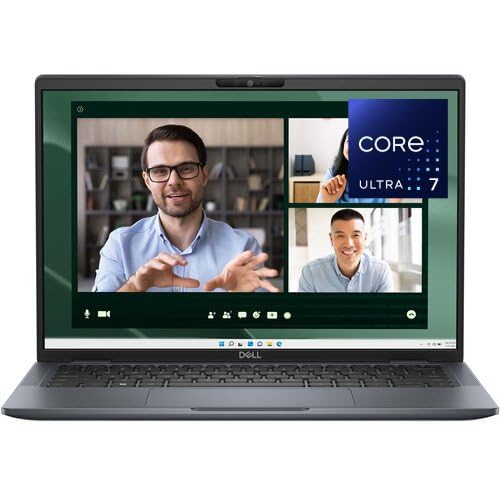
The Dell Latitude 7450 is Dell’s premium 14-inch business line, and this ultralight configuration adds something the other picks do not emphasise: a sharp touchscreen. The display is a 14-inch QHD+ panel at 2560 x 1600 with multi-touch, which makes text exceptionally crisp and gives presenters and managers a screen they can tap, scroll and annotate during small meetings. Underneath, an Intel Core Ultra 7 165U vPro processor, 16GB of memory and a 512GB NVMe SSD provide the same managed, business-grade foundation as the EliteBook, and the machine runs Windows 11 Pro.
The listing for this configuration also highlights Wi-Fi 7 wireless, a webcam, HDMI and Thunderbolt connectivity, a backlit keyboard and a fingerprint reader among its special features. That combination suits senior staff and consultants who move between offices, present from their own machine in client meeting rooms, and want one laptop that docks at a desk, works on a train and presents standing up. Latitude is Dell’s fleet line, so serviceability, security hardware and dock compatibility are designed in rather than added on.
The trade-offs are the usual ones for an ultralight premium model: integrated graphics, and a specification fixed at purchase, so confirm memory and storage against your workload before ordering. If your days are mostly docked typing, a non-touch workhorse may serve you just as well; if you present and collaborate on screen, the QHD+ touch panel is the reason to pick this one.
Key specifications
- Processor: Intel Core Ultra 7 165U vPro
- Memory: 16GB
- Storage: 512GB NVMe SSD
- Display: 14-inch QHD+ touchscreen, 2560 x 1600, anti-glare IPS
- Wireless: Wi-Fi 7 and Bluetooth per listing
- Operating system: Windows 11 Pro
- Features listed: backlit keyboard, fingerprint reader, webcam, HDMI, Thunderbolt
Pros
- Sharp QHD+ touchscreen suits presenting and annotating
- Core Ultra 7 vPro platform for managed business use
- Windows 11 Pro with modern Wi-Fi 7 connectivity
- Premium ultralight Latitude design for frequent travel
Cons
- Touch and QHD+ resolution are wasted on purely docked, keyboard-only work
- Integrated graphics only
- Configuration is fixed, so verify memory and storage before buying
See the Dell Latitude 7450 on Amazon
How to Choose a Business PC Laptop
Start with the operating system edition. For business use, Windows 11 Pro adds device management, BitLocker encryption and remote desktop hosting that the Home edition lacks. If your company manages laptops centrally, Pro is not optional. All of the dedicated business lines in this guide are built around Pro deployments, though the exact edition can vary by configuration, so check the listing of the unit you buy.
Match the processor tier to the job. Core Ultra 5 and Ryzen 5 PRO processors handle office work comfortably. Core Ultra 7 and vPro variants add headroom and, in the vPro case, remote management features that IT departments use. Knowledge workers running many applications at once benefit more from 16GB or 32GB of memory than from a small processor step.
Treat memory and storage as purchase-day decisions. Many modern business laptops solder their memory, so the capacity you order is the capacity you keep. Sixteen gigabytes is the sensible floor for multitasking in 2026-era office workloads, and 32GB suits consultants and analysts with heavy local workloads. For storage, 512GB is the comfortable middle; 256GB only works well for cloud-first users.
Prioritise the display and keyboard. A 1920 x 1200 screen shows more of a document than older 1080p panels, and higher-resolution touch panels such as the Latitude’s QHD+ screen help presenters. If you type all day, the keyboard matters more than any benchmark: ThinkPad, EliteBook and Latitude decks are all designed for long typing sessions, which is a real reason to buy from a business line.
Check ports and docking. USB-C with Thunderbolt allows single-cable docking to monitors and power. HDMI still matters for meeting rooms. If your office uses wired networking or legacy peripherals, confirm the ports or plan on a dock.
Think about support and security. Fingerprint readers, camera shutters, TPM security chips and multi-year business support are standard expectations in this class. For a machine that holds company data, those features are part of the product, not extras.
Frequently Asked Questions
What makes a laptop a business laptop rather than a consumer laptop?
Business laptops use Pro operating system editions, management and security hardware such as vPro, TPM chips and fingerprint readers, more durable and serviceable designs, and support structures aimed at companies. The ThinkPad, EliteBook and Latitude lines in this guide are built specifically for that market.
Are these laptops all Windows machines?
Yes. This guide defines PC laptops for business as Windows laptops, so every pick runs Windows. MacBooks and Chromebooks are capable machines, but they are outside the intent of this keyword and are not included.
How much memory does a business laptop need?
Sixteen gigabytes is a sound baseline for email, documents, browsers and video calls running together. Choose 32GB if you work with large spreadsheets, many simultaneous applications, virtual machines or big local datasets, especially because memory often cannot be upgraded later.
Is a touchscreen useful for business work?
It depends on the role. For docked desk work, touch adds little. For presenting, reviewing documents with colleagues, signing forms and annotating, a touchscreen such as the Latitude 7450’s QHD+ panel is genuinely useful. Buy it for a job, not as a default.
Should a small business buy vPro models?
vPro pays off when someone manages the machines remotely, even if that someone is an outside IT provider. For a single unmanaged laptop it is less critical, but it does no harm, and the processors that carry it are strong performers in their own right.
Can these laptops handle creative or engineering software?
They handle everyday productivity, data work and light creative tasks well. All four picks use integrated graphics, so sustained 3D rendering, heavy video production or CAD workloads call for a mobile workstation with dedicated graphics instead.
Conclusion
The best PC laptops for business are not the flashiest machines in a store; they are the Windows laptops built to be managed, secured, carried and typed on for years. Choose the ThinkPad X1 Carbon Gen 12 if low weight and generous memory and storage top your list. Choose the ThinkPad T14 Gen 5 for a durable everyday fleet machine, keeping its modest storage in mind. Choose the EliteBook 840 G11 for a vPro-equipped, meeting-ready 14-inch laptop with Windows 11 Pro, and choose the Latitude 7450 if a sharp QHD+ touchscreen and premium ultralight design fit the way you present and travel. Whichever you pick, confirm the exact configuration on the product page before ordering, because business models are sold in many variants and the details decide whether a laptop fits your work.
Related guides
More from Amazon
Programs that pair well with the guide above. Offers and eligibility are set by Amazon and may change.
Free shipping on eligible items, Prime Video and more. Eligible new members can start with a free trial.
Start a Prime free trialAd-free music streaming. Eligible new subscribers can start with a free trial.
Try Music Unlimited freeA Prime membership for ages 18-24 with a trial period. Eligibility is set by Amazon.
See Prime for Young AdultsAudiobooks and podcasts to listen to on the go. Eligible new members can start with a free trial.
Try Audible freeAs an Amazon Associate we earn from qualifying purchases.










Write Your Review
No reviews yet. Be the first to share your experience!