
Key takeaways
- Compare four laptops that ship with Ubuntu or Linux, from a light everyday machine to a 128GB workstation, with specs taken from each Amazon listing.
What's inside
As an Amazon Associate I earn from qualifying purchases. This post may contain affiliate links at no extra cost to you.
Choosing a laptop for Ubuntu is a decision about what works on the first boot, not about raw benchmark numbers. A machine that ships with Ubuntu or carries Ubuntu certification saves hours of driver hunting, while a Windows-only machine with an unusual Wi-Fi chip or fingerprint sensor can leave a fresh install half-working. The real question is how much of the hardware the operating system already understands before you type a single command.

This guide covers four laptops whose Amazon listings name Ubuntu or Linux outright, from a light everyday machine to a heavy workstation built for containers and local AI work. Each pick below is described from the specifications and operating system stated on its Amazon listing, so you can match the machine to the work you actually do.
Quick Picks
As an Amazon Associate we earn from qualifying purchases.
| Product | Best for | Key spec from title |
|---|---|---|
| Dell XPS 13 9350 | A certified ultraportable for travel and long days | Ultra 7 258V, 32GB DDR5, 512GB SSD |
| Lenovo IdeaPad Slim 3 | Everyday Ubuntu work and coding on a touchscreen | Ryzen 7 5825U, 16GB RAM, 512GB SSD |
| NIMO 16-Inch Linux Laptop | Containers, virtual machines, and local AI work | Ryzen AI Max+ 395, 128GB RAM, 1TB SSD |
| ASUS Vivobook Go 14 | Light study, writing, and browsing on a budget | Celeron N4500, 4GB RAM, 128GB eMMC |
How to Choose
Ubuntu pre-installed, Ubuntu certified, or install it yourself
The safest starting point is a laptop whose listing states the operating system by name. A factory Ubuntu install or an Ubuntu-certified model means the manufacturer validated that hardware against a specific Ubuntu release, including Wi-Fi, graphics, and sleep behavior. A seller-installed Ubuntu machine is different: the seller opens the box and installs the system, so support comes from the seller rather than the manufacturer. Installing Ubuntu yourself on a Windows laptop can work well on mainstream Intel and AMD hardware, but you should check the listing for the exact Wi-Fi chip, fingerprint reader, and webcam, because those are the parts most likely to need extra setup.
Processor and memory for the work you run
Match the processor and memory to the heaviest job the laptop will do every week, not the lightest. Browsing, writing, and video calls run comfortably on a dual-core Celeron or a modest Ryzen chip, while compiling code, running containers, or editing large files benefits from eight or more cores. Memory matters just as much: 4GB covers basic tasks but leaves little room for a browser with many tabs, 16GB is a practical baseline for development, and 128GB exists for people running many virtual machines or local AI models at once. Since most of these laptops solder memory to the board, the amount you buy is the amount you keep.
Storage, screen, and keyboard for long days
Storage type shapes daily speed more than most buyers expect. A NVMe SSD loads projects and boots the system quickly, while eMMC storage is noticeably slower and fills up fast, so a 128GB eMMC machine needs external storage or cloud space for anything beyond essentials. Screen size is a trade-off between desk space and portability: a 14-inch display travels easily, while a 15.6-inch or 16-inch panel gives code and documents more room. Check the resolution and refresh rate in the listing, and remember that a touchscreen, a numeric keypad, and a backlit keyboard are genuinely useful for some workflows and irrelevant for others.
Ports, wireless, and battery for a machine that moves
A laptop that leaves the desk needs the right connections without a bag full of adapters. Count the USB-A and USB-C ports, look for HDMI if you present on external screens, and note whether a port supports charging or video output, because not every USB-C port does both. Wi-Fi 6 or Wi-Fi 7 and recent Bluetooth keep video calls and wireless peripherals stable, and a fingerprint reader is only useful if the listing ties it to Linux support. Battery figures in listings describe ideal conditions, so treat them as a comparison between models rather than a promise, and check whether the battery and storage are user-replaceable before you commit.
The 4 Best Options
Dell XPS 13 9350
The XPS 13 9350 is the premium pick here, and its appeal is the combination of a compact 13.4-inch body with Ubuntu 24.04 LTS named in the listing. Ubuntu lists this model as certified with Ubuntu 24.04 LTS, which makes it the strongest choice for anyone who wants a thin ultraportable that boots into a supported Ubuntu setup. The Core Ultra 7 processor and 32GB of DDR5 memory handle development, multitasking, and video calls without strain, while Thunderbolt 4 ports and Wi-Fi 7 cover docks and fast wireless. It is the laptop to choose when portability matters as much as the operating system.
Specs
- 13.4-inch FHD+ (1920 x 1200) display, 120Hz, 500-nit brightness
- Intel Core Ultra 7 258V processor, 8 cores, up to 4.8 GHz
- 32GB DDR5 RAM, 512GB SSD
- Intel Arc 140V graphics
- Ubuntu Linux 24.04 LTS-64 named in the listing
- 2x Thunderbolt 4, Wi-Fi 7, Bluetooth 5.4
- Backlit keyboard, fingerprint reader, FHD webcam
- Battery life up to 26 hours, as stated in the listing
Best for: A certified ultraportable for travel, long battery life, and daily Ubuntu work.
Watch out for: Confirm the Ubuntu option and the storage size on the product page before ordering, because the listing names both Windows 11 Pro and Ubuntu and gives different storage figures in different places.
Lenovo IdeaPad Slim 3
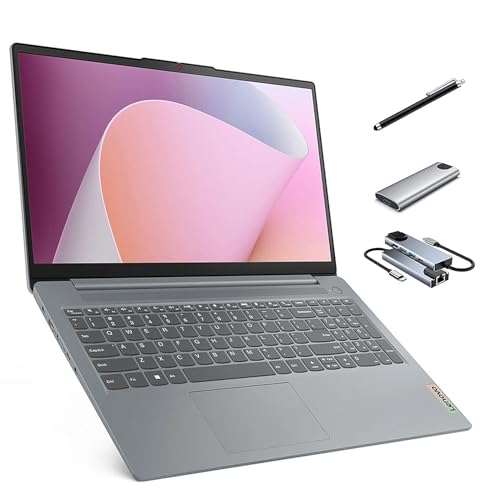
The IdeaPad Slim 3 is the straightforward everyday Ubuntu laptop, with Ubuntu Linux pre-installed so there is no operating system swap. Its eight-core Ryzen 7 5825U processor and 16GB of memory cover coding, office work, and study without the weight or complexity of a workstation, and the 15.6-inch Full HD touchscreen adds a practical way to scroll documents and tap through applications. The listing notes military-grade durability testing and a low blue light certified display, which suit a machine that travels between home, campus, and office. It is the balanced pick for buyers who want Ubuntu ready on the first boot at a mainstream size.
Specs
- 15.6-inch Full HD (1920 x 1080) touchscreen display
- AMD Ryzen 7 5825U processor, 8 cores, 16 threads, up to 4.5 GHz
- 16GB RAM, 512GB SSD
- Ubuntu Linux pre-installed
- Integrated AMD Radeon Graphics
- 88 percent screen-to-body ratio, TUV Low Blue Light certification
- 14.15 x 9.25 x 0.7 inches, 5.0 pounds
- 2x USB-A, 1x USB-C, 1x HDMI, SD card reader, headphone and microphone combo jack
- Webcam with privacy shutter, numeric keypad, stylus pen included
Best for: Everyday Ubuntu work, coding, and study on a 15.6-inch touchscreen.
Watch out for: The listing describes a bundle with a stylus pen, external portable SSD, and USB hub, so confirm exactly which accessories ship with the configuration you select.
NIMO 16-Inch Linux Laptop
The NIMO 16 is the specialist here, built for workloads that outgrow a mainstream laptop. Its 16-core Ryzen AI Max+ 395 processor and 128GB of LPDDR5x memory are aimed at running dozens of Docker containers, virtual machines, and large IDE compilations at the same time, and the Radeon 8060S graphics carry a 126 TOPS AI figure for local model work. Linux comes pre-loaded, so the machine is ready for development without an install step, and the 99Wh battery pairs with a 230W adapter for sustained heavy use. Choose this one only if your work genuinely needs that scale, because it is the heaviest and most powerful machine here.
Specs
- 16-inch display, 165Hz refresh rate
- AMD Ryzen AI Max+ 395 processor, 16 cores, up to 5.1 GHz
- 128GB LPDDR5x RAM, 1TB SSD
- Radeon 8060S graphics, 40 compute units, 126 TOPS AI performance
- Linux pre-loaded
- 99Wh battery, 230W DC adapter
Best for: Containers, virtual machines, and local AI work that needs very large memory.
Watch out for: The listing names Linux without naming Ubuntu specifically, so confirm the exact distribution on the product page, and note that another listing of this model states a 4TB SSD instead of 1TB.
ASUS Vivobook Go 14
The Vivobook Go 14 is the lightest and simplest Ubuntu laptop here, suited to writing, study, browsing, and media streaming rather than heavy development. Its 14-inch Full HD display, compact 12.8 by 8.54 inch body, and 2.87-pound weight make it easy to carry all day, and the listing includes a USB hub and HDMI cable alongside a 128GB USB flash drive for extra portable storage. The Celeron N4500 processor and 4GB of memory set clear limits, so this is a machine for focused everyday tasks, not for compiling large projects or running virtual machines.
Specs
- 14-inch Full HD (1920 x 1080) display, 60Hz refresh rate
- Intel Celeron N4500 processor, 2 cores, up to 2.8 GHz
- 4GB RAM, 128GB eMMC plus 128GB USB flash drive
- Linux Ubuntu OS
- Integrated Intel UHD Graphics
- 12.8 x 8.54 x 0.71 inches, 2.87 pounds
- Wi-Fi 5, Bluetooth, numeric keypad, webcam
- USB hub and HDMI cable included
Best for: Light study, writing, and browsing in a portable 14-inch Ubuntu laptop.
Watch out for: The listing states the computer is professionally upgraded and customized, with the manufacturer box opened by engineers for customizing and testing, so warranty and support come through the seller rather than ASUS.
Which One Fits Your Situation
A light laptop for writing, browsing, and study
Pick the ASUS Vivobook Go 14 when the main jobs are notes, documents, video calls, and streaming. Its 2.87-pound body and 14-inch display travel easily, Ubuntu is already installed, and the included flash drive adds storage without extra shopping. Keep expectations modest: 4GB of memory and eMMC storage suit focused tasks, not multitasking with dozens of tabs or large projects.
An everyday Ubuntu machine for work and coding
Pick the Lenovo IdeaPad Slim 3 when you want one machine for the whole working day. Ubuntu comes pre-installed, the eight-core Ryzen 7 processor and 16GB of memory handle coding and office work together, and the 15.6-inch touchscreen gives documents and code room to breathe. It is heavier than the Dell and the ASUS, but it covers the widest range of daily jobs in this guide.
A portable workstation for containers and local AI
Pick the NIMO 16 when your work involves many containers, virtual machines, or local AI models. Its 128GB of memory and 16-core processor are far beyond what the other laptops offer, and Linux is pre-loaded for immediate development. Accept the trade-offs: a larger 16-inch body, a heavier machine, and a listing that needs a careful read on distribution and storage.
A certified ultraportable for travel and long battery life
Pick the Dell XPS 13 9350 when portability and official Ubuntu support matter most. The 13.4-inch body, 32GB of memory, and Ubuntu 24.04 LTS certification make it the most travel-friendly choice here, with Thunderbolt 4 and Wi-Fi 7 for docks and modern networks. Before ordering, confirm the Ubuntu option and the storage size on the product page, since the listing carries conflicting details.
Common Mistakes
- Buying a Windows-only laptop and assuming every part, from Wi-Fi to the fingerprint reader, will work under Ubuntu without checking the listing.
- Choosing 4GB of memory for container or virtual-machine work, then discovering the machine cannot run the workload at all.
- Treating eMMC storage like a fast SSD, and running out of space after installing a few large applications.
- Confusing two listings of the same model that carry different operating systems, storage sizes, or bundle accessories.
- Skipping the return window and support terms on seller-installed Ubuntu machines, where support comes from the seller rather than the manufacturer.
Frequently Asked Questions
Do I need a laptop with Ubuntu pre-installed?
Not always, but it removes the riskiest step. A pre-installed Ubuntu machine or an Ubuntu-certified model means the hardware was validated against a specific release, so Wi-Fi, graphics, and sleep usually work immediately. Installing Ubuntu yourself is realistic on mainstream Intel and AMD hardware, yet it requires checking the exact wireless chip, fingerprint reader, and webcam first.
Can I install Ubuntu on a laptop that ships with Windows?
In many cases, yes, and mainstream Intel and AMD laptops are the best candidates. Download the Ubuntu image, create a bootable USB drive, and test the live session before installing so you can check Wi-Fi, sound, and the trackpad. Keep a backup of the existing system and confirm the storage layout, because shrinking a Windows partition the wrong way can cause data loss.
How much RAM do I need for Ubuntu development work?
For writing, browsing, and light scripting, 8GB is workable, while 16GB is the practical baseline for development with an editor, a browser, and a database or container running together. Virtual machines and local AI models raise the requirement sharply, which is why the workstation pick in this guide carries 128GB. Since memory is soldered on most of these laptops, choose the amount your heaviest regular workload needs.
Is a seller-installed Ubuntu laptop the same as a factory Ubuntu laptop?
No, and the distinction matters for support. A factory Ubuntu laptop ships from the manufacturer with Ubuntu and usually carries manufacturer support for that configuration. A seller-installed machine is a Windows laptop that the seller opens, modifies, and installs Ubuntu on, so warranty and driver questions go to the seller. Read the listing carefully to see which type you are buying.
Related guides
More from Amazon
Programs that pair well with the guide above. Offers and eligibility are set by Amazon and may change.
Free shipping on eligible items, Prime Video and more. Eligible new members can start with a free trial.
Start a Prime free trialAd-free music streaming. Eligible new subscribers can start with a free trial.
Try Music Unlimited freeA Prime membership for ages 18-24 with a trial period. Eligibility is set by Amazon.
See Prime for Young AdultsAudiobooks and podcasts to listen to on the go. Eligible new members can start with a free trial.
Try Audible freeAs an Amazon Associate we earn from qualifying purchases.










Write Your Review
No reviews yet. Be the first to share your experience!