
Key takeaways
- Looking for the best DAC for laptops? Compare portable USB-C DACs and desktop DAC-amps for clearer sound, stronger headphone output, and simple setup.
What's inside
As an Amazon Associate I earn from qualifying purchases. This post may contain affiliate links at no extra cost to you.
The best DAC for laptops is a small device that takes over audio conversion from your laptop’s built-in sound hardware and sends a cleaner signal to your wired headphones or powered speakers. Most laptops include a headphone jack or a USB-C port, but the internal audio path is often noisy, quiet, or limited in the formats it can handle. A dedicated DAC, short for digital-to-analog converter, moves that conversion outside the laptop, where it can be shielded from electrical interference and paired with a stronger headphone amplifier.
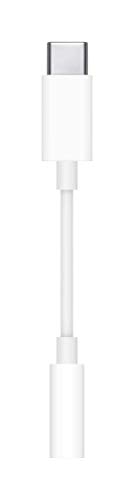

If you want a quick answer, start with a compact USB-C dongle DAC. The iFi GO Link and the FiiO KA11 cover most laptop listeners well: they plug straight into a USB-C port, need no separate power supply, and support high-resolution audio formats that a basic built-in jack cannot. If you use demanding headphones or want a balanced output, step up to the FiiO KA13. If you want the simplest possible fix for a laptop with no headphone jack, the Apple USB-C to 3.5mm adapter is the most straightforward option. For a compact, well-built portable DAC with broad format support, the Audioengine DAC3 rounds out the list.
This guide explains how to choose a DAC for laptop use, what the specifications actually mean, and which models fit different headphones, desks, and travel habits. Every product below is a DAC or DAC-amp combination designed to connect to a laptop over USB, and every one connects to wired headphones through a standard headphone jack.
Quick Picks
Our Short List of 3
All 5 Picks at a Glance
| Product | Specs | Action |
|---|---|---|
| Apple USB-C to 3.5mm Headphone Jack Adapter (B07K25P3N1) | Check price on Amazon | |
| iFi GO Link (B0BN6MM822) | Check price on Amazon | |
 FiiO KA11 (B0CS6DXTJ2) | Check price on Amazon | |
 FiiO/JadeAudio KA13 (B0CJ6RKV6X) | Check price on Amazon | |
 Audioengine DAC3 (B0BGYT7N1P) | Check price on Amazon |
How to Choose
USB-C or USB-A Connection
Most modern laptops use USB-C, and most portable DACs in this guide connect through USB-C. That makes setup simple: plug the DAC into the laptop, plug headphones into the DAC, and select it as the audio output in your system settings. If your laptop only has USB-A ports, look for a DAC that includes a USB-A adapter in the box or use a USB-C to USB-A adapter. The iFi GO Link includes a USB-A adapter, which makes it a practical choice for older laptops. Before buying, check which ports your laptop actually has and whether you will need to keep a port free for charging or a hub.
Dongle DAC or Desktop DAC-Amp
A dongle DAC is a small device that hangs from a short cable or plugs directly into a USB port. It draws power from the laptop, needs no separate charger, and fits in a laptop bag or pocket. A desktop DAC-amp is larger, sits on a desk, and usually has its own power supply, a volume knob, and more inputs and outputs. For most laptop owners, a dongle is the better starting point because it works everywhere the laptop goes.
High-Resolution Audio Support
High-resolution support is usually listed as a maximum PCM sample rate and bit depth, such as 32-bit/384kHz, plus DSD support such as DSD256. These numbers describe the largest audio files the DAC can decode, not the quality of every song you play. Standard streaming and video audio will sound the same whether the DAC supports 384kHz or 96kHz. High-resolution support matters when you listen to high-resolution files or a streaming tier that supplies them. If your library is mostly standard-quality audio, put more weight on output power, connection type, and build quality than on the maximum sample rate.
Output Power and Headphone Impedance
Output power, measured in milliwatts at a given impedance, tells you how much drive the DAC can supply to headphones. Efficient earphones and low-impedance headphones need very little power and work well with almost any dongle DAC. High-impedance headphones, typically rated at 150 ohms or more, and some planar magnetic models need more power to reach a comfortable listening volume with full dynamics. The FiiO KA13, at 550mW, is the strongest option in this guide for demanding headphones. The FiiO KA11, at 245mW at 16 ohms, is a strong middle ground. The Apple adapter and the iFi GO Link suit efficient headphones and earphones best. If you are unsure about your headphones, check the impedance and sensitivity figures in the headphone specifications and match them to the DAC’s output figures.
Balanced or Single-Ended Output
Most headphones connect through a standard 3.5mm single-ended jack, and every DAC in this guide includes one. A balanced output, usually a 4.4mm jack, uses separate signal paths for the left and right channels and can deliver more power with less crosstalk. It only helps if your headphones have a detachable balanced cable or a cable you can swap for a balanced one. If your headphones end in a fixed 3.5mm plug, a balanced output adds nothing. The FiiO KA13 is the only model in this guide with a 4.4mm balanced output, so it is the natural choice for listeners who already own balanced cables.
Portability, Size, and Build
A DAC for a laptop should be easy to carry and hard to break. Look at the length of the cable, the weight, and the housing material. A very short, stiff dongle can put strain on a laptop’s USB-C port when the laptop moves. A flexible cable, like the one on the iFi GO Link, or a small metal body, like the ones on the FiiO KA11 and KA13, handles daily bag travel better. If the DAC will live on a desk, size matters less and a volume knob or a stable base matters more. Also consider whether the DAC has physical buttons: the KA13 has volume controls on the device, while the Apple adapter and the iFi GO Link rely on the laptop’s volume controls.
Operating System and Driver Support
Most USB DACs for laptops work without extra software on Windows and macOS, using the standard USB audio class. That is the case for the models in this guide: plug them in and select them as the output device. Some features, such as firmware updates or companion apps for equalizer settings, may be Windows-only or may need a download from the maker’s website. If you use Linux, check the maker’s support pages for the specific model before buying, since app support varies more than basic audio support. If you switch between a work laptop and a personal laptop, a driver-free DAC avoids repeated setup.
The Best DAC for Laptops Reviewed
Apple USB-C to 3.5mm Headphone Jack Adapter (B07K25P3N1)
The Apple USB-C to 3.5mm Headphone Jack Adapter is the simplest way to add a headphone jack to a laptop that does not have one, or to replace a noisy built-in jack. It is a short cable with a USB-C plug on one end and a 3.5mm socket on the other, with a built-in DAC that supports 24-bit/48kHz audio. It works with USB-C laptops, including MacBook Air and MacBook Pro models, as well as Windows laptops with a USB-C port. There are no buttons, no battery, and no software to install.
Who it suits: laptop owners who want the smallest, lightest fix for a missing or poor headphone jack, and listeners using efficient wired earphones or headphones for music, video calls, and everyday listening.
Who should skip it: listeners with high-impedance headphones who need more output power, and anyone who wants high-resolution format support beyond 48kHz or a balanced output. The US version of this adapter is the one to look for, since the version sold in some other regions has lower output.
iFi GO Link (B0BN6MM822)
The iFi GO Link is a portable USB-C DAC and headphone amplifier built around an ESS ES9219 Sabre DAC chip. It supports PCM audio up to 32-bit/384kHz, DSD256, and MQA, and it delivers 70mW at 32 ohms through its gold-plated 3.5mm headphone socket. The magnesium alloy housing is light at 11 grams, and the flexible cable ends in a USB-C plug with a USB-A adapter included in the box. An LED on the device changes colour to show the format of the incoming audio, which makes it easy to confirm that high-resolution files are playing at their native rate.
Who it suits: laptop owners who want a clear step up from a basic adapter without adding bulk, and travellers who move between USB-C and USB-A laptops. The included USB-A adapter and the light, flexible cable make it easy to carry and easy to connect to older machines.
Who should skip it: listeners with very demanding headphones who need the higher output of the FiiO KA13, and anyone who wants a balanced headphone output or physical volume buttons on the device. Note that the included adapters have changed over time, so check the current listing to confirm exactly which adapters are in the box.
FiiO KA11 (B0CS6DXTJ2)
The FiiO KA11 is a compact USB-C dongle DAC and headphone amplifier built around a CS43131 DAC chip. It supports PCM audio up to 32-bit/384kHz and delivers 245mW at 16 ohms, which is strong output for a device of its size. The KA11 connects through USB-C and works with Windows, macOS, Android, and iOS devices, so the same dongle can serve a laptop, a phone, and a tablet. Its small metal body and short cable keep it pocketable, and it draws power from the laptop, so there is no battery to charge.
Who it suits: laptop owners who want a compact dongle with noticeably more drive than a basic adapter, and listeners who switch between a laptop and a phone and want one DAC for both. It is a good match for a wide range of efficient and moderately demanding headphones.
Who should skip it: listeners who need a balanced 4.4mm output, a desktop unit with a volume knob, or a DAC with its own battery. The KA11 is a single 3.5mm-output dongle, so it does not suit headphones that only come with a balanced cable.
FiiO/JadeAudio KA13 (B0CJ6RKV6X)
The FiiO/JadeAudio KA13 is the most powerful portable DAC in this guide. It uses dual CS43131 DAC chips with dual op-amps and delivers up to 550mW of output, with support for PCM audio up to 32-bit/384kHz and DSD256. It has both a 3.5mm single-ended output and a 4.4mm balanced output, so it works with standard headphones and with balanced cables. Physical volume buttons on the device give direct control without reaching for the laptop, and the aluminium housing is built for daily carrying.
Who it suits: laptop owners with demanding headphones, including high-impedance models, and listeners who already own balanced cables or plan to use them. It is also a good choice for a laptop that doubles as a home listening station, since the extra output covers a wider range of headphones.
Who should skip it: listeners who only use efficient earphones and want the smallest, lightest dongle, and anyone who does not need a balanced output or the extra power. The KA13 is larger than the KA11 and the Apple adapter, and its capabilities go beyond what basic earphones require.
Audioengine DAC3 (B0BGYT7N1P)
The Audioengine DAC3 is a portable USB-C DAC and headphone amplifier built around an ESS ES9281A PRO DAC chip. It supports 32-bit audio with MQA, PCM, and DSD formats, and it connects to laptops, phones, and tablets through USB-C. The aluminium body is compact and durable, and the 3.5mm headphone output works with standard wired headphones. It is powered through USB, so it needs no separate charger or battery, and it works without extra drivers on Windows and macOS.
Who it suits: laptop owners who want a compact, well-built portable DAC with broad format support, and listeners who value a straightforward USB-C device that works across a laptop and a phone. It fits well in a laptop bag alongside a pair of wired headphones.
Who should skip it: listeners who need a balanced output, the highest output power in this guide, or a desktop unit with a volume knob and line outputs for powered speakers. The DAC3 is a portable single-output DAC, so it does not replace a desktop DAC-amp for a full desk setup.
What to Check Before You Buy
Before you buy a DAC for your laptop, confirm the connection, the headphones, and the audio you actually listen to. Check whether your laptop has a free USB-C port or only USB-A, and whether you will need the port for charging at the same time. Check the headphone plug: a standard 3.5mm plug works with every DAC in this guide, while a balanced cable needs a 4.4mm output like the one on the FiiO KA13.
Next, check the headphones. Look up their impedance and sensitivity and compare them with the DAC’s output figures. Efficient earphones work with any of these models. High-impedance or low-sensitivity headphones need the stronger output of the KA13. Also check whether your headphones have a microphone you rely on for calls: some DAC dongles pass microphone audio and some do not, so confirm this in the listing if call quality matters to you.
Finally, check the formats and the operating system. If your music library or streaming tier includes high-resolution files, a DAC that supports 32-bit/384kHz and DSD, such as the iFi GO Link, the FiiO KA11, or the FiiO KA13, will decode them natively. If you only listen to standard-quality audio and video, format support is less important than output power and connection type. Confirm that the DAC works without extra drivers on your operating system, and check the listing for exactly which cables and adapters are included, since bundled adapters can change between production runs.
FAQ
Do I need a DAC if my laptop already has a headphone jack?
Not always. A laptop headphone jack is fine for efficient earphones and casual listening. A separate DAC helps when the built-in jack produces audible hiss, sounds quiet with your headphones, or cannot decode the high-resolution files you listen to. It also helps when your laptop has no headphone jack at all, which is the case for an increasing number of thin laptops.
Will a DAC make my headphones louder?
A DAC with a built-in headphone amplifier can deliver more output than a laptop’s built-in jack, which usually means higher comfortable volume and better control of the headphone drivers. The difference is largest with high-impedance headphones. With efficient earphones, the main benefit is usually cleaner sound rather than extra volume.
Can I use a portable DAC with powered speakers?
Yes, in many cases. A portable DAC with a 3.5mm output can connect to powered speakers with a 3.5mm-to-RCA or 3.5mm-to-3.5mm cable, depending on the speaker inputs. The portable models in this guide are designed mainly for headphones.
Does a USB-C DAC work on both Windows and Mac laptops?
Most USB DACs, including the ones in this guide, work on Windows and macOS without extra drivers, using the standard USB audio class. Plug the DAC in, select it as the output device in your system sound settings, and it should work. Companion apps for equalizer settings or firmware updates may be limited to one operating system, so check the maker’s support pages if you need those features.
What is the difference between a dongle DAC and a desktop DAC?
A dongle DAC is small, draws power from the laptop, and is designed to travel with it. A desktop DAC-amp is larger, usually has its own power supply, and often adds a volume knob, more inputs, and line outputs for speakers. Choose a dongle when you move around with your laptop. Choose a desktop unit when the DAC stays in one place and drives headphones and speakers at a fixed desk.
Bottom Line
The best DAC for laptops depends on your headphones and how you use your laptop. For the simplest fix, the Apple USB-C to 3.5mm adapter adds a clean headphone output with no setup. For most listeners, the iFi GO Link or the FiiO KA11 is the sweet spot: both are compact, USB-powered, and support high-resolution audio, with the KA11 delivering stronger output. Listeners with demanding headphones or balanced cables should choose the FiiO KA13 for its dual DAC chips, 550mW output, and 4.4mm balanced jack. The Audioengine DAC3 is a solid portable alternative with broad format support and a durable aluminium body. Pick the connection type and output power that match your laptop and your headphones first, and let the maximum sample rate decide only between models that already fit.
Disclosure: As an Amazon Associate, we may earn from qualifying purchases.
Related guides
More from Amazon
Programs that pair well with the guide above. Offers and eligibility are set by Amazon and may change.
Free shipping on eligible items, Prime Video and more. Eligible new members can start with a free trial.
Start a Prime free trialAd-free music streaming. Eligible new subscribers can start with a free trial.
Try Music Unlimited freeA Prime membership for ages 18-24 with a trial period. Eligibility is set by Amazon.
See Prime for Young AdultsAudiobooks and podcasts to listen to on the go. Eligible new members can start with a free trial.
Try Audible freeAs an Amazon Associate we earn from qualifying purchases.










Write Your Review
No reviews yet. Be the first to share your experience!