
Key takeaways
- Find the best laptops for pictures and music with vivid displays, strong speakers, and smooth performance for photo viewing and listening.
What's inside
As an Amazon Associate I earn from qualifying purchases. This post may contain affiliate links at no extra cost to you.
A laptop that handles pictures and music well has to do two jobs at once: show your photos beautifully and play your music clearly. One without the other leaves half the experience behind. A dull screen flattens a photo collection, and tinny speakers make a favorite album sound like it is playing from a phone in another room.
The machines below were picked for exactly that balance. Each one pairs a display worth looking at with speakers worth listening to, plus the storage and performance to keep a media library close at hand. Every model is a real laptop sold on Amazon US, with specifications taken from its Amazon listing. Choose the one that matches how you enjoy your media, and both your eyes and ears will notice the difference.
Quick Picks
As an Amazon Associate we earn from qualifying purchases.
| Product | Best for | Key spec from title |
|---|---|---|
| Apple MacBook Air 13 M4 | Photos and music together | 13.6″ Liquid Retina, four-speaker sound |
| HP Envy x360 15 | Convertible media viewing | 15.6″ touchscreen, Bang & Olufsen audio |
| Dell Inspiron 16 5630 | Big-screen media | 16″ FHD+ display, 16GB/1TB |
| ASUS Vivobook S 14 OLED | OLED pictures, rich sound | 14″ WUXGA OLED, 32GB/1TB |
| HP Pavilion 15 | Everyday media enjoyment | 15.6″ FHD display, 16GB/512GB |
How to Choose
Display quality for photos
Photos deserve a screen that shows them properly, so look beyond resolution alone. An OLED or high-quality IPS panel renders colors with depth, while a basic TN panel washes them out and shifts hue when you tilt the screen. Brightness matters too: a panel around 300 nits or more stays readable in a bright room, and a higher resolution reveals fine detail when you zoom into a shot. Check the listing for panel type and brightness, because those two details shape your photo viewing more than any other specification.
Speaker quality for music
Laptop speakers vary enormously, and the difference is obvious the moment you press play. Front-facing or upward-firing speakers sound fuller than downward-firing ones that bounce audio off a desk, and tuned audio systems from known brands usually deliver cleaner bass and clearer vocals. Look for mentions of speaker brands, wattage, or audio tuning in the listing, and treat a generic speaker description as a warning sign. If you listen without headphones most of the time, speaker quality should rank near the top of your list.
Storage for a media library
A media library grows quietly until the drive is full, so give yourself room from the start. A 512GB SSD holds a large photo collection and a music library comfortably, while 1TB is the safer choice if you keep high-resolution images and lossless audio. Solid-state storage also loads thumbnails and album art instantly, which makes browsing a large library feel effortless. Check the drive size and type on the listing, and remember that an external drive is a workaround, not a substitute for enough internal storage.
Performance for smooth playback
Viewing photos and playing music are light tasks on their own, but they share the machine with everything else you run. Sixteen gigabytes of memory keeps a photo app, a music player, and a browser smooth at the same time, while a modern multi-core processor handles high-resolution images without stutter. A fast SSD matters here as well, because it loads large image files and album libraries without delay. You do not need a gaming processor for media, but you do need enough headroom that playback never stutters.
The 5 Best Options
Apple MacBook Air 13 M4

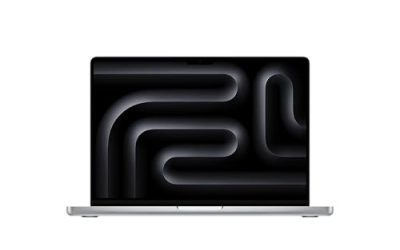
The MacBook Air 13 M4 is the most balanced media laptop here, because it pairs a bright 13.6-inch Liquid Retina display with a four-speaker sound system that fills a room better than most laptops its size. Photos look crisp and color-rich on the Retina panel, and the speakers carry vocals and bass with surprising clarity for such a thin machine. The M4 chip and 16GB of unified memory keep a photo library and a music app open side by side without a hiccup, all in a 2.73-pound body that moves from room to room easily.
Specs
- 13.6-inch Liquid Retina display
- Apple M4 chip with 10-core CPU
- 16GB unified memory, 256GB SSD storage
- Four-speaker sound system, three-mic array
- 12MP Center Stage camera, Touch ID, macOS
Best for: People who want the best combination of a vivid display and genuinely good speakers in a light laptop.
Watch out for: The 256GB base storage is tight for a large photo and music library.
HP Envy x360 15
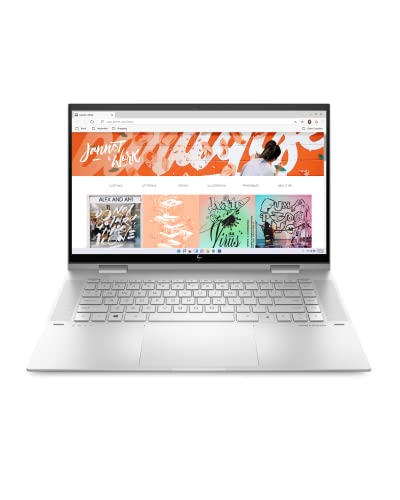
The Envy x360 15 turns media into a shared experience, because its 15.6-inch touchscreen folds back into tent mode for watching a slideshow or playing music for a room. Bang and Olufsen audio tuning gives the speakers a warmer, fuller sound than most laptops in this group, and the large display shows photos at a size that suits a group. With an Intel Core i7 processor, 16GB of memory, and a 1TB SSD, it holds a serious media library and plays it smoothly. It is the pick for people who enjoy their media with others.
Specs
- 15.6-inch Full HD touchscreen display
- Intel Core i7-1260P processor
- 16GB RAM, 1TB SSD storage
- Bang and Olufsen audio, backlit keyboard
- Windows 11 Home, 2-in-1 convertible
Best for: Sharing slideshows and music with family or friends, thanks to tent mode and tuned speakers.
Watch out for: The Full HD display is less sharp than the OLED and Retina panels in this guide.
Dell Inspiron 16 5630

The Inspiron 16 5630 gives you a big 16-inch FHD+ canvas for photos and a full terabyte of storage for music and images. The larger display shows more of a photo at once, which helps when you sort through a shoot or enjoy a slideshow, and the 16GB of memory keeps the photo app and music player responsive together. An Intel Core i7-1360P processor handles high-resolution files without delay, and the Windows 11 Pro setup suits a home office that doubles as a media room. It is a straightforward, roomy choice for a large library.
Specs
- 16-inch FHD+ (1920 x 1200) display
- Intel Core i7-1360P processor
- 16GB LPDDR5 RAM, 1TB SSD storage
- Intel Iris Xe graphics, backlit keyboard
- Windows 11 Pro, fingerprint reader
Best for: People with a large photo and music library who want a big screen and a full terabyte of storage.
Watch out for: The speakers are adequate rather than standout, so headphones help for serious listening.
ASUS Vivobook S 14 OLED

The Vivobook S 14 OLED is the visual star of this group, with a 14-inch WUXGA OLED display that makes photos glow. OLED contrast gives blacks real depth and colors a richness that standard panels cannot match, so a photo collection looks its best on this screen. Inside, an Intel Core Ultra 7 processor with 32GB of memory and a 1TB SSD handles large libraries effortlessly, and the slim chassis keeps it portable. If pictures matter most to you and music is a close second, this is the screen to choose.
Specs
- 14-inch WUXGA OLED display
- Intel Core Ultra 7 258V processor
- 32GB RAM, 1TB SSD storage
- Backlit keyboard, Windows 11 Home
- 1.3 kg, thin metal chassis
Best for: Photo lovers who want OLED color and contrast above all else, with plenty of memory and storage.
Watch out for: The compact 14-inch screen shows less of a slideshow at once than the 15- and 16-inch models here.
HP Pavilion 15

The HP Pavilion 15 is the everyday media machine in this lineup, with a 15.6-inch Full HD display and a straightforward setup for photos and music. Its 16GB of memory and 512GB SSD hold a solid library and keep browsing smooth, and the full-size keyboard suits a desk where you sort photos and queue up playlists. The 2026 model runs Windows 11 with a modern Intel processor, so playback and photo apps stay responsive. It is the sensible pick when you want a capable media laptop without paying for premium extras.
Specs
- 15.6-inch Full HD display
- Intel Core processor
- 16GB RAM, 512GB SSD storage
- Backlit keyboard, Windows 11 Home
- Wi-Fi 6, Bluetooth, 2026 model
Best for: Everyday photo viewing and music listening on a full-size screen at a practical level.
Watch out for: The display and speakers are solid rather than exceptional, so it does not wow the way the OLED models do.
Which One Fits Your Situation
You enjoy photos and music equally
Choose the MacBook Air 13 M4. Its Liquid Retina display shows photos vividly and its four-speaker system plays music with real presence, so neither half of your media feels like an afterthought. The light body and 16GB of memory make it easy to enjoy both anywhere in the house without ever reaching for an external speaker or monitor.
You share media with others
Choose the HP Envy x360 15. Tent mode turns it into a display for slideshows, and the Bang and Olufsen speakers fill a room with warmer sound than most laptops manage. The 1TB SSD holds a library big enough to share, and the touchscreen makes browsing photos feel natural for everyone gathered around.
You keep a huge library
Choose the Dell Inspiron 16 5630. The 1TB SSD and 16-inch display give you storage and screen space in one machine, and the i7 processor keeps a large photo app responsive. It is the most practical pick for a collection that keeps growing, while the full-size keyboard makes sorting and tagging photos faster.
You care most about picture quality
Choose the ASUS Vivobook S 14 OLED. The OLED panel shows photos with depth and color that standard displays cannot match, and the 32GB of memory plus 1TB SSD mean nothing slows the experience down. It is the best screen in this guide for looking at pictures, and the slim 1.3 kg body makes it easy to carry to a shoot.
Common Mistakes
- Picking a laptop for its speakers and forgetting that a dull screen ruins every photo.
- Buying a 256GB drive and then deleting music to make room for photos.
- Assuming all Full HD displays look the same, when panel type changes everything.
- Listening to laptop speakers in a noisy store and expecting the same sound at home.
- Storing a whole library on one drive with no backup, then losing it to a single failure.
Frequently Asked Questions
What display is best for viewing photos on a laptop?
An OLED panel is the best choice for photo viewing, because it shows deep blacks and rich color that make images feel alive. A high-quality IPS panel is the next best option and still shows color accurately. Avoid basic TN panels, which wash out color and shift hue when you change your viewing angle, and look for a bright screen if you view photos in daylight.
How important are laptop speakers for music?
Speaker quality matters a lot if you listen without headphones, because the difference between a tuned speaker system and a basic one is obvious. Front-facing or upward-firing speakers with audio tuning from a known brand sound fuller and clearer. If you mostly use headphones, speakers matter less, and you can prioritize the display and storage instead.
How much storage do I need for photos and music?
A 512GB SSD is enough for a moderate collection of photos and music, while 1TB is the safer choice if you keep high-resolution images or lossless audio files. Photo libraries grow faster than most people expect, so err on the larger side. An SSD also loads thumbnails and album art instantly, which makes browsing a big library far more pleasant.
Can one laptop be good for both photos and music?
Yes, and the best media laptops balance both: a vivid display for photos and a tuned speaker system for music. The MacBook Air 13 M4 and HP Envy x360 15 in this guide do both well. The trick is to check both specifications before you buy, because many laptops excel at one and neglect the other.
Related guides
More from Amazon
Programs that pair well with the guide above. Offers and eligibility are set by Amazon and may change.
Free shipping on eligible items, Prime Video and more. Eligible new members can start with a free trial.
Start a Prime free trialAd-free music streaming. Eligible new subscribers can start with a free trial.
Try Music Unlimited freeA Prime membership for ages 18-24 with a trial period. Eligibility is set by Amazon.
See Prime for Young AdultsAudiobooks and podcasts to listen to on the go. Eligible new members can start with a free trial.
Try Audible freeAs an Amazon Associate we earn from qualifying purchases.




Write Your Review
No reviews yet. Be the first to share your experience!