
Key takeaways
- The best laptops for less than 600 pair a modern processor with a fast SSD and a clear Full HD screen, so everyday work feels quick and easy.
What's inside
As an Amazon Associate I earn from qualifying purchases. This post may contain affiliate links at no extra cost to you.
A laptop under the 600 mark sits in a useful middle ground. It costs far less than a premium machine, yet it can carry a proper processor, a fast drive, and a clear screen if you choose carefully. The real decision is where the manufacturer spent the money. A machine that invests in a solid-state drive and a Full HD panel will feel quick every day, while one that spends on a flashy shell and a slow drive will frustrate you within a week.
This guide is for buyers who want a capable everyday laptop inside a firm spending limit: students, home workers, and families replacing an old machine. Each pick below comes from a name and a specification listed on its Amazon product page. All five share the same foundation — a modern processor, solid-state storage, and enough memory for real multitasking — and each one earns its place for a different kind of buyer.
Quick Picks
As an Amazon Associate we earn from qualifying purchases
| Product | Best for | Key spec from title |
|---|---|---|
| Lenovo IdeaPad Slim 3 | A light everyday laptop for classes | 15.6-inch FHD, Ryzen 5 7520U |
| Acer Aspire 5 A515-45-R74Z | Strong everyday power with Wi-Fi 6 | Ryzen 5 5500U, 256GB NVMe SSD |
| ASUS VivoBook 15 F1504VA | A slim machine for daily carrying | 15.6-inch FHD, 512GB SSD |
| Acer Aspire 5 A515-56-347N | Simple everyday use with a backlit keyboard | Core i3-1115G4, 128GB NVMe SSD |
| Dell Inspiron 15 3535 | A sharp touch display for home use | 15.6-inch FHD touchscreen |
How to Choose
Put the money into the drive and the screen
Inside a fixed spending limit, two features decide how a laptop feels: the storage drive and the display. A solid-state drive makes the machine start fast and open apps without waiting, while a Full HD panel keeps text sharp during long reading sessions. Both are worth more than a slightly faster processor or a metal lid. When comparing two machines, check the drive type and the screen resolution first, because those are the parts you interact with constantly. A bright panel also reduces eye strain during long study sessions, which matters when the laptop stays open for hours each day.
Treat 8GB of memory as the minimum
A browser with several tabs, a video call, and a document open together will use most of 8GB of memory, and anything less starts to stutter. Every laptop in this guide carries at least 8GB, which is the floor for comfortable use. More memory helps if you multitask heavily, but below 8GB even ordinary work feels slow. Memory is one of the few specifications where a small difference changes the whole experience. If you edit photos or run a virtual machine, more memory helps, but for documents, browsing, and video calls, 8GB is the sweet spot.
Check the processor generation, not just the brand
A Ryzen 5 or a Core i3 sounds similar on a box, yet the generation behind the name decides the real performance. A Ryzen 5 5500U and a Ryzen 5 7520U are different chips from different years, and a 13th Gen Intel Core is newer than an 11th Gen one. Read the full model number in the listing title, and prefer the newer generation when the rest of the specification is equal. The processor number is the most reliable clue on a crowded listing.
Watch the storage size against your files
A 128GB drive is fine when documents and photos live in the cloud, but it fills quickly with downloaded apps, videos, and large files. A 256GB or 512GB drive gives far more breathing room, and the difference matters more the longer you keep the laptop. Count what you actually store locally before choosing. If your files are mostly online, a smaller drive is a reasonable trade; if they are local, size is worth prioritizing. External drives and cloud storage can cover the gap, but they add steps to every task, so a roomy internal drive is worth choosing when the option exists.
The 5 Best Options
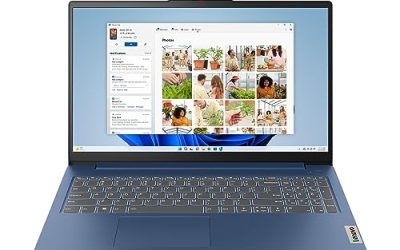
Lenovo IdeaPad Slim 3

The IdeaPad Slim 3 is the lightest-feeling machine in this group, with a slim 15.6-inch frame and a Full HD display that keeps text easy to read. The Ryzen 5 7520U processor handles documents, browsing, streaming, and video calls without fuss, and the 256GB solid-state drive starts the machine quickly. It suits students who carry their laptop to class every day and want a full-size screen without a heavy bag. Lenovo’s IdeaPad line has a long record as a sensible everyday choice.
Specs
- 15.6-inch FHD display
- AMD Ryzen 5 7520U processor
- 8GB memory
- 256GB storage
- Windows 11
Best for: Students who want a slim, light everyday laptop for classes.
Watch out for: The 256GB drive fills faster than a 512GB one, so keep large files in cloud storage.
Acer Aspire 5 A515-45-R74Z
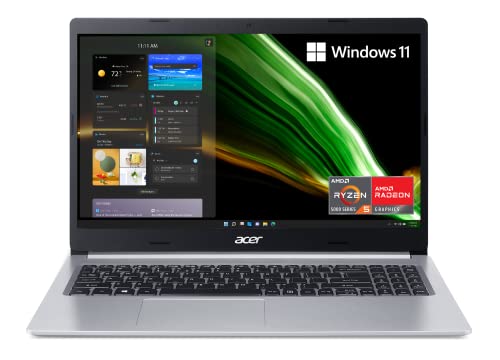
The Aspire 5 A515-45-R74Z brings a six-core Ryzen 5 5500U processor to this group, giving it the most cores for multitasking here. The 15.6-inch Full HD IPS display shows consistent color from different angles, and Wi-Fi 6 keeps video calls and streaming stable. With 8GB of memory and a 256GB NVMe drive, it covers study, work, and entertainment comfortably, and the backlit keyboard helps during evening sessions. It is the strongest all-round performer in this roundup for everyday use.
Specs
- 15.6-inch Full HD IPS display
- AMD Ryzen 5 5500U hexa-core processor
- 8GB DDR4 RAM
- 256GB NVMe SSD storage
- Wi-Fi 6, backlit keyboard
- Windows 11 Home
Best for: Buyers who want the most processing cores for everyday multitasking.
Watch out for: The 256GB drive is the limit here, so plan cloud storage for photos and videos.
ASUS VivoBook 15 F1504VA

The VivoBook 15 is the slim option, a 15.6-inch Full HD laptop with a 13th Gen Intel Core processor, 8GB of memory, and a 512GB solid-state drive. The larger drive is the standout feature, holding a photo library, school files, and apps without regular cleanup. ASUS designs the VivoBook line for light, portable daily use, and the clean look fits a classroom or an office. It suits buyers who carry their laptop daily and want a modern, slim machine.
Specs
- 15.6-inch Full HD display
- 13th Gen Intel Core processor
- 8GB RAM
- 512GB SSD storage
- Windows 11 Home
Best for: Commuters and students who want a slim laptop with a large drive.
Watch out for: The evidence for this configuration comes from a comparison source rather than a direct Amazon listing, so verify the exact processor on the listing.
Acer Aspire 5 A515-56-347N
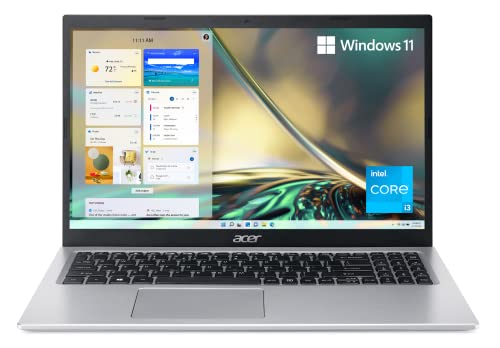
The Aspire 5 A515-56-347N is the dependable all-rounder, built around an 11th Gen Intel Core i3 with 8GB of memory and a 128GB solid-state drive behind a 15.6-inch Full HD IPS display. Wi-Fi 6 keeps video calls stable, the backlit keyboard suits evening work, and the Aspire line has a long record as a sensible everyday machine. The small drive is the trade-off, so this pick suits users whose files live in the cloud or on an external drive. It ships with Windows 11 Home in S mode, which runs Microsoft Store apps only until you switch out of S mode.
Specs
- 15.6-inch Full HD IPS display
- Intel Core i3-1115G4 processor
- 8GB RAM
- 128GB NVMe SSD storage
- Wi-Fi 6, backlit keyboard
- Windows 11 Home in S mode
Best for: Students and home users who want a proven, no-fuss everyday laptop.
Watch out for: The 128GB drive fills quickly with local files, so cloud storage is essential.
Dell Inspiron 15 3535

The Dell Inspiron 15 3535 rounds out the group with a newer Ryzen 5 7530U processor and a 15.6-inch Full HD touchscreen. The touch display makes scrolling through long documents and web pages easy, and the 512GB drive gives plenty of room for files. Dell’s Inspiron line has a long record as a dependable home laptop, and this configuration adds the sharper screen and faster chip that the budget tier sometimes skips. It is a strong choice for a family laptop that several people share.
Specs
- 15.6-inch Full HD touchscreen display
- AMD Ryzen 5 7530U processor
- 8GB DDR4 RAM
- 512GB SSD storage
- AMD Radeon Graphics
- Windows 11 Home
Best for: Home users who want a sharp touch display and a proven brand.
Watch out for: The listing evidence for this configuration comes from comparison sources, so verify the processor and touch panel on the exact listing.
Which One Fits Your Situation
You want the lightest bag for class
Choose the Lenovo IdeaPad Slim 3. Its slim frame and Full HD screen make it easy to carry, and the Ryzen 5 processor covers a full day of classes without slowing down. The large screen stays readable during long reading sessions, and the light body means the bag never feels heavy. It is the pick when the laptop travels as much as it sits on a desk.
You want the most cores for multitasking
Choose the Acer Aspire 5 A515-45-R74Z. The six-core Ryzen 5 5500U handles many apps at once better than its rivals here, and the IPS display keeps colors consistent from any angle. Wi-Fi 6 keeps video calls stable, and the backlit keyboard helps during evening work. It suits buyers who always have too many windows open at once.
You want the biggest drive in a slim machine
Choose the ASUS VivoBook 15. The 512GB drive holds files, photos, and apps without constant management, and the slim design travels well in any bag. The 13th Gen Intel processor covers everyday work easily, and the Full HD screen keeps text sharp. It is the pick when storage matters more than raw processing power.
You want a touch display for home use
Choose the Dell Inspiron 15 3535. The Full HD touchscreen makes everyday navigation easy, from scrolling through documents to tapping through web pages, and the newer Ryzen chip keeps everything responsive. The 512GB drive gives a family plenty of room. It works well as a shared family laptop that everyone can use.
Common Mistakes
- Buying a laptop with a spinning hard drive inside a fixed budget and losing all the speed the processor offers.
- Choosing 4GB of memory and watching the machine stutter with a browser and a video call open.
- Ignoring the display resolution and ending up with a dim panel for hours of daily reading.
- Ordering by model name alone without checking the processor generation and storage size on the listing.
- Filling a 128GB drive with local files instead of using cloud storage from the start.
Frequently Asked Questions
Is a laptop under 600 good enough for school and work?
Yes, a machine in this range with a modern processor, 8GB of memory, and a solid-state drive handles documents, browsing, streaming, and video calls comfortably. The key is choosing a recent processor generation and an SSD. Only heavy video editing, 3D work, and demanding games call for a stronger machine.
How much storage do I need in a budget laptop?
A 256GB drive is enough when documents and photos live in the cloud, while 512GB gives comfortable room for local files, apps, and media. A 128GB drive works only for light users who store almost everything online. Count your local files before choosing, because storage is harder to add later than memory.
Does the processor generation matter at this level?
Yes, the generation matters more than the brand name. A newer Ryzen 5 or a 13th Gen Intel Core runs cooler and faster than an older chip with the same label. Read the full model number in the listing title and prefer the newer generation when the rest of the specification is equal.
Is Windows 11 Home in S mode a problem?
S mode limits the laptop to apps from the Microsoft Store, which covers browsers, Office, and common school apps. Switching out of S mode is free and takes a few minutes in the settings, so it is a minor step rather than a real limitation. Check whether the listing mentions S mode before ordering.
Related guides
More from Amazon
Programs that pair well with the guide above. Offers and eligibility are set by Amazon and may change.
Free shipping on eligible items, Prime Video and more. Eligible new members can start with a free trial.
Start a Prime free trialAd-free music streaming. Eligible new subscribers can start with a free trial.
Try Music Unlimited freeA Prime membership for ages 18-24 with a trial period. Eligibility is set by Amazon.
See Prime for Young AdultsAudiobooks and podcasts to listen to on the go. Eligible new members can start with a free trial.
Try Audible freeAs an Amazon Associate we earn from qualifying purchases.




Write Your Review
No reviews yet. Be the first to share your experience!