
Key takeaways
- The best laptops for investment bankers combine enterprise security, a sharp display for models, and all-day battery for client meetings.
What's inside
As an Amazon Associate I earn from qualifying purchases. This post may contain affiliate links at no extra cost to you.
An investment banker’s laptop is a working tool that has to survive a 14-hour day without a hiccup: a hundred-tab spreadsheet open beside a pitch deck, a video call with a client, and a model that recalculates every time an assumption changes. The buying decision is not about gaming frame rates or creative software, but about a keyboard that stays comfortable, a screen that keeps numbers sharp, security that satisfies a compliance team, and a battery that lasts through back-to-back meetings.
This guide is for analysts building models late into the night, associates presenting to clients, and vice presidents who live on planes and in boardrooms. Every laptop below was picked from the processor, memory, display, security, and battery details listed on its Amazon product page, with a focus on the hardware that keeps financial work fast, private, and portable.
Quick Picks
As an Amazon Associate we earn from qualifying purchases
| Product | Best for | Key spec from title |
|---|---|---|
| Lenovo ThinkPad X1 Carbon Gen 12 | All-day deal work | Core Ultra 7 165U, 32GB memory, touchscreen |
| Apple MacBook Pro 14 M4 | Models and presentations | M4 chip, 24GB memory, Liquid Retina XDR |
| Dell XPS 14 | Sharp numbers on OLED | Core Ultra 7 255H, 32GB memory, 3.2K OLED |
| HP EliteBook 840 G11 | Enterprise security | Core Ultra 7 165U, 32GB memory, 512GB SSD |
| Microsoft Surface Laptop 7th Ed. | Client meetings on the go | Core Ultra 7 Series 2, 16GB memory, 512GB SSD |
How to Choose
The processor has to handle huge models
A financial model with thousands of formulas recalculates every time an input changes, and a slow processor turns each tweak into a wait. A current Core Ultra 7 or Apple M4 chip keeps large workbooks responsive, and enough cores help when Excel, a browser, a PDF reader, and a video call all run at once. Look for a recent processor with strong single-core speed, since spreadsheet calculations still lean heavily on one fast core. That single-core speed matters most in the middle of a live negotiation, when a model must update before the next question lands.
Memory keeps a hundred tabs alive
Bankers rarely close anything: a model, a data room, a research portal, email, and a chat app all stay open through the day. Sixteen gigabytes is the floor, but 32GB is the comfortable level for a machine that never gets rebooted between meetings. Memory that runs out forces the system to swap to the drive, which makes every window switch feel sluggish at exactly the wrong moment. Buying 32GB up front costs less than the hours lost to a machine that stutters through every meeting.
Security and manageability satisfy compliance
A laptop that handles client financial data needs hardware security a compliance team can approve: a fingerprint reader or infrared camera for Windows Hello, a TPM chip, and a platform the IT department can manage remotely. Business-class machines with vPro processors and enterprise support fit this requirement, while consumer laptops often lack the management features a bank expects. Check that the machine ships with Windows 11 Pro, since the Home edition misses several enterprise controls. Ask the IT team to confirm the exact model before ordering, since a small configuration change can remove a required feature.
Weight, battery, and the keyboard
A banker carries the laptop between the office, a client site, and a plane, so every pound matters by the end of the day. A machine under three pounds with a battery that lasts a full working day removes the hunt for an outlet between meetings. The keyboard deserves equal attention: long nights of model building punish a shallow or cramped layout, so a full-size keyboard with good travel and a precise trackpad is worth more than a slightly faster chip.
The 5 Best Options
Lenovo ThinkPad X1 Carbon Gen 12

The ThinkPad X1 Carbon Gen 12 is the classic banking laptop because it does everything a deal team needs in a body that weighs barely more than two pounds. Its Core Ultra 7 vPro processor and 32GB of memory keep enormous models responsive, while the 14-inch touchscreen with full sRGB coverage shows spreadsheets and pitch decks sharply. The 1TB solid-state drive holds years of deal files, and the infrared camera with Windows Hello keeps client data behind a face login that compliance teams accept.
Specs
- Intel Core Ultra 7 165U vPro processor
- 32GB RAM, 1TB Gen4 SSD storage
- 14-inch WUXGA touchscreen display, 100% sRGB
- FHD+ IR camera with Windows Hello
- Windows 11 Pro, backlit keyboard
Best for: Analysts and associates who need the lightest serious work machine for long deal days.
Watch out for: Integrated graphics limit heavy data visualization work, so pair it with a dock and monitors at the desk.
Apple MacBook Pro 14 M4

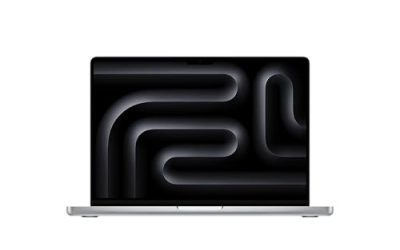
The MacBook Pro 14 with the M4 chip suits bankers who present as much as they model. Its Liquid Retina XDR display makes pitch decks and charts look exceptional in a client meeting, and 24GB of unified memory keeps a model, a browser, and a presentation open together without slowdowns. The 1TB solid-state drive loads large files instantly, and the battery lasts through a full day of meetings, flights, and late-night revisions without hunting for a charger.
Specs
- Apple M4 chip, 10-core CPU and 10-core GPU
- 24GB unified memory, 1TB SSD storage
- 14.2-inch Liquid Retina XDR display, 3024 x 1964 resolution
- Up to 1600 nits peak brightness
- macOS, all-day battery life
Best for: Bankers who present often and want the sharpest screen and longest battery in a portable body.
Watch out for: Some bank systems and Excel macros are built for Windows, so confirm the firm’s toolchain runs well on macOS before switching.
Dell XPS 14
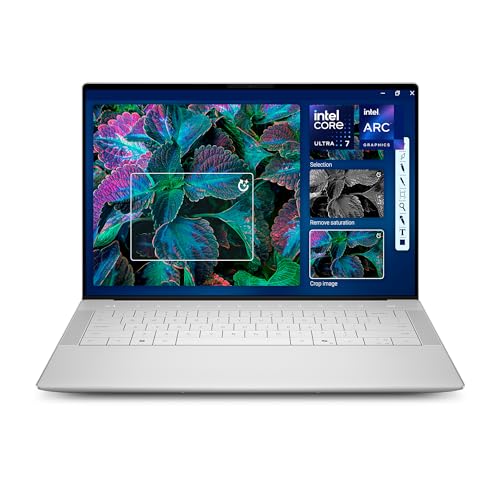
The Dell XPS 14 is the choice for bankers who stare at numbers all day and want a screen that never strains their eyes. Its 14.5-inch touch OLED display renders spreadsheets with deep contrast and sharp text, while the Core Ultra 7 processor and 32GB of memory keep large models and research portals responsive. The 1TB solid-state drive holds deal archives, and the fingerprint reader in the keyboard signs in quickly between meetings.
Specs
- Intel Core Ultra 7 255H processor
- Intel Arc Graphics
- 32GB memory, 1TB SSD storage
- 14.5-inch touch 3.2K OLED display, 48-120Hz refresh rate
- Backlit keyboard with fingerprint reader, Windows 11
Best for: Bankers who want the sharpest, highest-contrast screen for long hours of model work.
Watch out for: The OLED display draws more power at full brightness, so lower it during long unplugged days to protect battery life.
HP EliteBook 840 G11

The HP EliteBook 840 G11 is built for the enterprise side of banking, with the security and manageability an IT department expects. Its Core Ultra 7 processor and 32GB of memory handle large models and multitasking without strain, while the 512GB solid-state drive keeps the system fast. The 14-inch WUXGA display is bright and easy on the eyes, and HP’s enterprise security features, including a privacy camera and hardware-level protection, fit a compliance checklist.
Specs
- Intel Core Ultra 7 165U processor
- 32GB memory, 512GB SSD storage
- 14-inch WUXGA display, 1920 x 1200 resolution
- 5MP IR camera with privacy shutter
- Windows 11 Pro, enterprise security features
Best for: Bankers in firms with strict IT requirements who need a secure, manageable Windows machine.
Watch out for: The 512GB drive is small for a large deal archive, so plan on cloud storage or an external drive.
Microsoft Surface Laptop for Business 7th Edition

The Surface Laptop for Business, 7th Edition, is the meeting-room machine in this group, built around a bright 13.8-inch touchscreen and a clean, professional design. Its Core Ultra 7 Series 2 processor and 16GB of memory handle models, decks, and video calls together, while the 512GB solid-state drive keeps files close. Windows 11 Pro and Copilot+ features fit an enterprise environment, and the slim body slips into a bag beside a notebook for a day of client meetings.
Specs
- Intel Core Ultra 7 Series 2 processor
- 16GB memory, 512GB SSD storage
- 13.8-inch touchscreen display
- Windows 11 Pro, Copilot+ PC
- All-day battery life
Best for: Bankers who spend the day in client meetings and want a light, polished machine for presenting.
Watch out for: Sixteen gigabytes of memory is the floor for heavy multitasking, so close unused apps before opening a very large model.
Which One Fits Your Situation
You build models until late at night
Pick the Lenovo ThinkPad X1 Carbon Gen 12, because its light body, excellent keyboard, and 32GB of memory suit long nights of model building. The vPro platform and Windows 11 Pro also keep the IT department happy, which matters when the machine touches client data. That reliability matters most after midnight, when a crash or a slow recalculation costs more than any hardware saving.
You present to clients every week
Pick the Apple MacBook Pro 14 M4 or the Microsoft Surface Laptop for Business, because both look polished in a boardroom and show decks beautifully. The MacBook wins on screen quality and battery, while the Surface fits firms that standardize on Windows. Either way, a bright screen and a quiet fan keep the room focused on the deal instead of the machine.
You stare at spreadsheets all day
Pick the Dell XPS 14, because its OLED display renders numbers with the sharpest contrast in this group, and 32GB of memory keeps a dozen heavy workbooks open at once. Lower the brightness during long unplugged stretches to stretch the battery. Pair it with a large external monitor at the desk, and the OLED panel becomes the second screen for reference material and email.
Your firm has strict IT rules
Pick the HP EliteBook 840 G11, because its enterprise security features and Windows 11 Pro configuration are built for managed environments. It is the safest choice when compliance, not raw speed, decides the purchase. The machine passes the checks that matter, from encryption to remote management, without slowing the work it exists to support.
Common Mistakes
- Buying a consumer laptop and discovering the firm’s IT team cannot manage or secure it.
- Choosing 8GB of memory and watching a large model slow to a crawl by mid-afternoon.
- Picking a heavy machine and regretting it after the first week of carrying it between meetings.
- Ignoring the keyboard and suffering through long nights on a cramped layout.
- Skipping the privacy screen and working on client data in airports and cafes without protection.
Frequently Asked Questions
How much RAM does an investment banker need?
Sixteen gigabytes is the minimum for a typical day of models, email, and research, but 32GB is the comfortable level for analysts who keep many heavy workbooks and browser tabs open at once. Memory pressure shows up as slow window switching and long recalculation times, both of which cost time during a live deal.
Is a MacBook good for investment banking?
It can be, especially for presenting and general productivity, but bankers should confirm the firm’s tools first. Some Excel macros, data terminals, and internal systems are built for Windows, so a MacBook works best in firms that already support macOS or where the banker mainly presents and reviews rather than builds complex models.
Do bankers need a dedicated graphics card?
No, for most banking work, because spreadsheets, presentations, and video calls run well on integrated graphics. A dedicated card only matters for heavy data visualization or 3D work, which most deal teams do not need. The budget is better spent on memory, storage, and a better screen.
What security features should a banking laptop have?
A banking laptop should have a fingerprint reader or infrared camera for biometric login, a TPM chip for encryption, and Windows 11 Pro for enterprise management. A privacy screen and a camera shutter add protection in public places, and the machine should support the firm’s remote management and encryption policies.
Related guides
More from Amazon
Programs that pair well with the guide above. Offers and eligibility are set by Amazon and may change.
Free shipping on eligible items, Prime Video and more. Eligible new members can start with a free trial.
Start a Prime free trialAd-free music streaming. Eligible new subscribers can start with a free trial.
Try Music Unlimited freeA Prime membership for ages 18-24 with a trial period. Eligibility is set by Amazon.
See Prime for Young AdultsAudiobooks and podcasts to listen to on the go. Eligible new members can start with a free trial.
Try Audible freeAs an Amazon Associate we earn from qualifying purchases.




Write Your Review
No reviews yet. Be the first to share your experience!