
Key takeaways
- The 4 best thermal pastes for laptops in November 2026, picked from Amazon listings for conductivity, spread, longevity, durability and tube size.
What's inside
As an Amazon Associate I earn from qualifying purchases. This post may contain affiliate links at no extra cost to you.
Choosing thermal paste for a laptop is a decision about survival inside a cramped, hot chassis, not about chasing the biggest conductivity number on a box. A laptop processor sits bare under its heatsink, with no metal lid to forgive a sloppy layer, and it heats up and cools down dozens of times a day. The paste that wins is the one that stays put through those cycles, fills the microscopic gaps between the die and the cooler, and still transfers heat well two years later without drying into flakes.
This guide is for laptop owners who are opening their machine to replace dried-out paste, for gamers whose laptop throttles under sustained load, and for first-time repasters who want a forgiving product rather than a finicky one. Every pick below comes from its Amazon product listing, using the name, stated uses, and specifications shown there, so you can match the tube in the listing to the job in front of you.
Quick Picks
As an Amazon Associate we earn from qualifying purchases.
| Product | Best for | Key spec from title |
|---|---|---|
| ARCTIC MX-6 (4 g) | An everyday repaste on a laptop that runs hot | Carbon filler-based paste for laptops, very high thermal conductivity |
| Noctua NT-H2 (3.5 g) | A first repaste with easy cleanup | Includes 3 cleaning wipes, not electrically conductive |
| Thermal Grizzly Kryonaut (5.55 g) | A gaming laptop pushed hard for hours | Non-conductive compound for CPU, GPU and consoles |
| ARCTIC MX-4 (4 g) | A spare tube for occasional repastes | Premium paste for all processors, long durability |
How to Choose
Thermal conductivity, kept in perspective
Thermal conductivity measures how readily a paste moves heat from the chip to the cooler, and every tube in this guide is sold as a high-conductivity compound. In a laptop, though, the gap between two good pastes is usually smaller than the gap between a good application and a bad one, because the die is small and mounting pressure is fixed by the heatsink screws. Treat conductivity as a filter rather than a ranking: pick a paste from the top tier, then judge it on spread and longevity. Beware of comparing numbers across brands, since manufacturers do not all test the same way.
Viscosity and how it spreads on a bare die
Laptop processors usually have no integrated heat spreader, so the paste goes straight onto the silicon die, and its thickness decides whether it fills the gap or leaves air pockets behind. A paste that is too stiff is hard to spread thinly across a small die, while a very runny one can squeeze out or pump out under repeated heating and cooling. A syringe with a smooth plunger and, where included, a spatula gives you control over a thin, even layer. Noctua states NT-H2 needs no manual spreading before the heatsink goes on, which suits a first-timer, while a thicker paste rewards a careful hand and a spatula.
Longevity and resistance to drying out
A laptop repaste is a chore: screws, ribbon cables, and a heatsink that must come off cleanly. The last thing you want is a paste that dries out or bleeds oil within a year and forces you to open the machine again. Look for durability claims in the listing rather than assuming every paste ages the same way. ARCTIC describes both MX-6 and MX-4 as long-durability pastes, and Noctua states that NT-H2 can stay on a CPU for five years or more thanks to its curing and dry-out characteristics. Longevity matters more than a marginal performance edge when the cost of redoing the job is an afternoon with a screwdriver.
Tube size and what comes in the box
A laptop CPU and GPU together need only a small dab each, so a 3.5 g or 4 g tube covers several repastes, and a 5.55 g tube covers even more or serves several machines. Buying a bigger tube than you need is only useful if you actually repaste more than one device, since an opened tube still ages on the shelf. Check the extras too: cleaning wipes save a separate purchase of isopropyl alcohol and cloths, and a spatula helps when the paste is thick. Match the tube size to how many laptops you plan to service, not to the idea that more paste in the box means better cooling.
The 4 Best Options
ARCTIC MX-6 (4 g)

MX-6 is the straightforward pick for a laptop that runs hot every day, because its listing names laptops directly alongside CPUs, graphics cards, and consoles. It is a carbon filler-based paste that reaches its full performance without a burn-in period, so there is no waiting for temperatures to settle after the repaste, and ARCTIC describes it as non-conductive and non-capacitive, which lowers the stakes if a little paste strays past the die. The 4 g tube is enough for several laptop repastes, and the long-durability claim fits a machine you would rather not open twice a year.
Specs
- Capacity: 4 g
- Carbon filler-based thermal paste
- For CPU, consoles, graphics cards, and laptops
- Very high thermal conductivity, long durability
- Non-conductive, non-capacitive
- Reaches maximum performance without burn-in
- Available in package sizes from 2 to 8 grams
Best for: A daily-use laptop that needs a reliable repaste without a break-in wait.
Watch out for: The tube holds more paste than one laptop needs, so cap it tightly and store it upright between jobs.
Noctua NT-H2 (3.5 g)

NT-H2 is the friendliest tube in this guide for someone opening a laptop for the first time, because the box does much of the thinking for you. It is a hybrid compound built from metal oxide micro-particles, it is not electrically conductive and does not corrode, and the listing says it needs no manual spreading before the heatsink is fitted, which removes the most common beginner mistake. Three pre-moistened cleaning wipes come in the box, so the old paste comes off without a separate shopping trip, and Noctua states the compound can stay on a CPU for five years or more.
Specs
- Capacity: 3.5 g, volume 1.2 ml
- Includes 3 NA-CW1 cleaning wipes
- Not electrically conductive, non-corroding
- No manual spreading needed before installing the heatsink
- Usable on the CPU for 5 years or more
- Sufficient for around 3 to 20 applications depending on chip size
- Density: 2.81 g/cm³
Best for: A first-time repaste where easy application and cleanup matter most.
Watch out for: The 3.5 g tube is the smallest here, so plan on one or two laptops per tube rather than a whole fleet.
Thermal Grizzly Kryonaut (5.55 g)
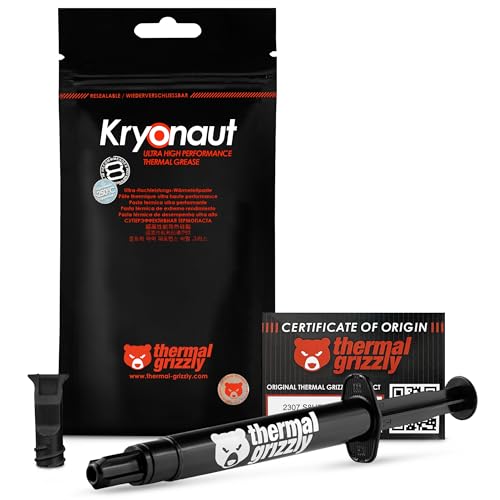
Kryonaut is the pick for a gaming laptop that spends hours under heavy load, where the paste has to keep transferring heat while the fans run flat out. Its listing describes it as an extremely high-performance paste for demanding applications and overclocking, aimed at CPUs, GPUs, and consoles, and it is a non-conductive compound, which is reassuring on a bare laptop die surrounded by tiny surface components. The 5.55 g syringe comes with a spatula for laying down a thin, even layer, and the larger tube suits someone who repastes more than one machine or revisits the same laptop over time.
Specs
- Capacity: 5.55 g (1.5 ml)
- Extremely high-performance thermal paste for demanding applications and overclocking
- For CPU, GPU, and consoles
- Non-conductive thermal compound with high thermal conductivity
- Includes spatula
- Syringe applicator
Best for: A gaming laptop under sustained load where application control matters.
Watch out for: This is a premium paste aimed at demanding use, so it is overkill for a light office laptop that rarely gets warm.
ARCTIC MX-4 (4 g)

MX-4 is the sensible spare tube: a long-running, widely used paste that the listing sells for all processors, covering CPU and GPU use in PCs as well as consoles. ARCTIC describes it as a premium-performance paste with very high thermal conductivity, long durability, and safe application, and it is non-conductive and non-capacitive. It has no cleaning wipes or spatula in this 4 g listing, so it suits someone who already has isopropyl alcohol and cloths on hand and simply wants a dependable tube to keep for the next repaste, whether that is next month or next year.
Specs
- Capacity: 4 g
- Premium performance thermal paste for all processors (CPU, GPU)
- Very high thermal conductivity, long durability, safe application
- Non-conductive, non-capacitive
- Item model number: ACTCP00002B
Best for: Keeping a dependable tube on hand for occasional repastes across machines.
Watch out for: This listing has no spatula or wipes included, so have your own cleaning supplies ready before you open the laptop.
Which One Fits Your Situation
Repasting a laptop for the first time
Choose the Noctua NT-H2. The included cleaning wipes handle the messy part, the paste needs no manual spreading, and the non-conductive formula forgives a small slip past the die. A first repaste has enough steps to learn without fighting a stiff paste or hunting for separate cleaning supplies.
A laptop that runs hot every single day
Choose the ARCTIC MX-6 for this daily job. Its listing names laptops directly, it needs no burn-in period before reaching full performance, and the long-durability claim fits a machine you use hard every day and would rather not reopen. The 4 g tube leaves enough paste for the next repaste too.
A gaming laptop pushed hard for hours
Choose the Thermal Grizzly Kryonaut. It is built for demanding applications and overclocking, the included spatula helps lay a thin, even layer on the bare die, and the 5.55 g tube covers a CPU and GPU repaste with plenty left over. It is the most deliberate choice here, so it suits a job you plan carefully.
A spare tube for the occasional job
Choose the ARCTIC MX-4. It covers CPU and GPU use, it is described as long-lasting, and the 4 g tube is enough for several repastes whenever a machine in the house starts running warm. Just remember to buy cleaning supplies separately, since this listing includes neither wipes nor a spatula.
Common Mistakes
- Using far too much paste: a small dot or thin line is enough, and excess squeezes out onto the board where it does no good.
- Skipping the cleaning step: old, dried paste left on the die or heatsink blocks contact and wastes the new paste entirely.
- Spreading paste with a finger or a rough tool: skin oils and uneven pressure create air pockets, so use the spatula or let the heatsink spread it.
- Lifting the heatsink to check the spread and then putting it back: once the layer is disturbed, the paste must be cleaned off and applied again.
- Ignoring the warranty: opening some laptops voids coverage, so check the warranty terms before removing the heatsink.
Frequently Asked Questions
How often should I repaste a laptop?
Most laptops go several years before a repaste is needed, and the sign is sustained high temperatures or fan noise under loads that used to run quietly. A long-durability paste such as the ones in this guide is meant to last years rather than months, and opening a laptop on a schedule instead of on symptoms risks more harm than good.
Can I use desktop CPU paste on a laptop?
Yes, the pastes in this guide are sold for CPUs and GPUs generally, and the same compound works on a laptop processor. The difference is the application: laptop dies are bare and smaller, so a thin, even layer matters more than it does on a desktop chip with a metal heat spreader.
How much paste does a laptop need?
Very little: a small pea-sized dot on the CPU die and another on the GPU die is the usual starting point, with the heatsink pressure spreading it into a thin layer. A 3.5 g or 4 g tube covers several repastes, so one tube serves more than one laptop if it is stored capped and upright.
Is thermal paste safe if it spills onto the board?
The pastes in this guide are non-conductive, so a small spill is far less risky than with an electrically conductive compound. That is not a licence to be careless: wipe away excess with a cleaning wipe, keep paste off connectors and fan headers, and never scrape a spill off the board with a metal tool.
Related guides
- Best Laptops to Play Roblox: From Budget Integrated Graphics to Dedicated GPUs
- Best Laptops for Zoom Teaching: Clear Video, Reliable Audio and All-Day Class Power
- Best Laptops for Video Editing and Music Production: Power, Screen and Storage
- Best Laptops for Network Engineers: Ethernet, RAM for Labs and Ports That Matter
More from Amazon
Programs that pair well with the guide above. Offers and eligibility are set by Amazon and may change.
Free shipping on eligible items, Prime Video and more. Eligible new members can start with a free trial.
Start a Prime free trialAd-free music streaming. Eligible new subscribers can start with a free trial.
Try Music Unlimited freeA Prime membership for ages 18-24 with a trial period. Eligibility is set by Amazon.
See Prime for Young AdultsAudiobooks and podcasts to listen to on the go. Eligible new members can start with a free trial.
Try Audible freeAs an Amazon Associate we earn from qualifying purchases.










Write Your Review
No reviews yet. Be the first to share your experience!