
Key takeaways
- Compare five electric L-shaped standing desks for creative studios, from triple-motor lifts to storage models, and pick the corner setup for your gear.
What's inside
As an Amazon Associate I earn from qualifying purchases. This post may contain affiliate links at no extra cost to you.
Choosing an electric L-shaped standing desk for a creative studio is a decision about how your corner works when the gear multiplies, not about how tall the desk can go. A photo editor, illustrator, or video editor needs one wing for monitors and a drawing tablet and the other wing for a printer, reference prints, or a second machine, with both wings moving together when the working position changes. The motor system decides whether that move feels smooth under a loaded desktop, while the footprint decides whether the desk leaves room to step back and look at a print.
This guide is for illustrators, photographers, video editors, and designers who run multi-monitor setups in a corner and want to alternate between sitting and standing. Each desk below was picked from its Amazon listing name and published specifications, and every model here is electric and L-shaped, with a real ASIN so the exact listing can be checked before ordering.
Quick Picks
As an Amazon Associate we earn from qualifying purchases.
| Product | Best for | Key spec from title |
|---|---|---|
| FEZIBO Triple Motor L Shaped Standing Desk | Heaviest multi-monitor and tablet setups | Triple motor, supports 330 lbs |
| VIVO 63 x 55 Corner Electric Standing Desk | A large corner workstation on a single motor | Single motor, holds 225 lbs |
| HUANUO 65 Inch L Shaped Standing Desk with 3 Drawers | Studio storage built into the corner | Dual motor, 3 drawers, power outlets |
| FLEXISPOT 63 Inch L Shaped Standing Desk with Monitor Shelf | A tidy desk with drawers and a raised shelf | Monitor shelf, 4 storage drawers |
| Claiks 63 x 55 L Shaped Standing Desk | A dual-motor corner desk with a simple layout | Dual motor, 63 x 55 inch top |
How to Choose
Motor count and lifting strength
A single motor can move a light two-monitor setup, yet a creative studio usually loads the desktop with more than screens: a tablet, speakers, a dock, and a printer add up fast. Dual-motor desks split the work between two legs, so the lift stays steadier when one wing carries more weight than the other, which is common when the monitor side is heavier than the return side. Triple-motor models add a third lifting column at the corner joint, the spot where an L-shaped desk flexes most. Match the stated load capacity to everything that will sit on the desk at once, including items that arrive later, and leave headroom rather than buying exactly at the limit.
Footprint, wing lengths, and the corner joint
Measure the corner before falling for a desktop size, because a 63 by 55 inch L-shape needs more than its own footprint: the chair pulls out, the desk rises, and cables hang below. Note which wing is longer, since the long wing usually holds the monitors while the short wing becomes the side station for paper, a tablet, or a printer. Some tops arrive as one piece, while others join two or three panels at the corner, and a splice board at the joint can catch a pen or a tablet edge. Check whether the layout reverses left to right, because a fixed orientation can put the return wing against the wrong wall.
Height range and memory presets
The low end of the range matters as much as the high end, especially in a studio where people of different heights share one desk or where a low task chair is used for detailed drawing work. A minimum near 27.5 inches suits seated work, while a maximum near 47 inches or higher covers tall users standing at a monitor. Memory presets save the sitting and standing heights so the desk returns to the same spot each time instead of being nudged by hand. Count the presets on the listing and decide whether two saved heights are enough or whether a third position for perching on a stool would get used.
Storage, power, and cable routing
Creative work generates clutter: chargers, hard drives, cables, swatch books, and print proofs. Drawers built into the desk keep those items within reach without adding a separate cabinet that eats floor space, although drawers under the desktop can reduce legroom on that wing. Built-in power outlets and USB ports on the desktop cut down on crawling under the desk to reach a wall socket, and a monitor shelf lifts screens to eye level while freeing surface below. A cable tray or grommets keep cords from snagging when the desk rises, so check the listing for those details before ordering.
The 5 Best Options
FEZIBO Triple Motor L Shaped Standing Desk

The FEZIBO triple-motor model is the strongest lifter in this group, and it suits a studio where the desktop carries two or three monitors, a drawing tablet, speakers, and a dock all at once. Three motors drive the frame, which helps the corner joint stay level when the load is uneven, and the built-in power outlet plus LED strip keeps charging and task lighting on the desk itself. The large monitor stand raises screens to a comfortable viewing height, leaving the desktop below free for a tablet or a keyboard tray.
Specs
- Triple-motor electric height adjustment
- Supports up to 330 lbs
- Height range from 27.5 to 47.2 inches
- Built-in LED strip
- Built-in power outlet
- Large monitor stand included
- Black walnut top with black frame
Best for: A heavy multi-monitor editing bay where the corner joint must stay level under an uneven load.
Watch out for: The triple-motor frame and monitor stand add assembly steps, so allow extra time and a second person for the build.
VIVO 63 x 55 Corner Electric Standing Desk
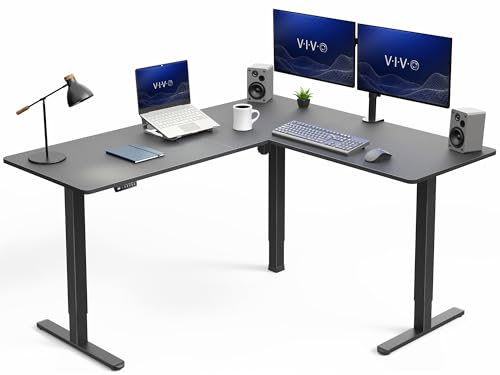
The VIVO DESK-E3CTB gives a studio a wide 63 by 55.2 inch corner surface on a single-motor frame, which keeps the layout simple and the mechanism easy to understand. Its all-steel frame with 2.4-inch wide legs supports up to 225 lbs, enough for a dual-monitor array, a laptop, and paper spread across the return wing. The three-part laminated particle board top forms a main desk and a return, so screens sit straight ahead while documents or a printer live on the shorter side.
Specs
- Single electric motor with telescopic legs
- Height range from 28.5 to 46.8 inches
- Supports up to 225 lbs
- Desktop measures 63 by 55.2 inches
- All-steel frame with 2.4-inch wide legs
- Three-part laminated particle board top, 0.8-inch thick
- Memory controller for saved heights
- Model DESK-E3CTB
Best for: A spacious corner workstation where one motor and a wide top are enough for a dual-monitor setup.
Watch out for: Sources differ on the preset count, with some listing three memory presets and others listing four, so confirm the controller on the exact listing before ordering.
HUANUO 65 Inch L Shaped Standing Desk with 3 Drawers

The HUANUO 65-inch model is the storage pick of this group, pairing a dual-motor lift with three drawers and a raised tier that holds monitors above the main surface. Its integrated power strip with USB ports and an LED-lit cubby keep chargers, drives, and small supplies inside the desk rather than scattered across the studio. The dual motors move the desktop smoothly, and the carbon steel frame supports up to 220 lbs, which covers a monitor pair plus the contents of the drawers.
Specs
- Dual-motor electric height adjustment
- Height range from 27.5 to 46.4 inches
- Supports up to 220 lbs
- Desktop measures 65 by 50 inches
- Three built-in drawers with 30 liters of storage
- Integrated power strip with USB ports
- Built-in LED light in the open cubby
- Carbon steel frame
- Model HNESD38B-US
Best for: A studio corner that needs drawers, charging, and a raised monitor tier in one unit.
Watch out for: The height range appears as 27.5 to 46.4 inches in some listing summaries and 28 to 46 inches in others, and the preset count is listed as three height positions on the Amazon listing while some summaries list four, so check both figures on the exact listing.
FLEXISPOT 63 Inch L Shaped Standing Desk with Monitor Shelf

The FLEXISPOT model brings order to a busy studio with a monitor shelf, four storage drawers, and a cable-friendly layout in a 63 by 55 inch corner footprint. Its electric lift moves from 28.7 to 48.0 inches, the widest top height in this group, which helps taller users stand comfortably at a monitor. A child lock, anti-collision sensing, and a sedentary reminder are built into the controller, so the desk is also a sensible choice for a studio that doubles as a family workspace.
Specs
- Electric height adjustment from 28.7 to 48.0 inches
- Supports up to 176 lbs
- Desktop measures 63 by 55 inches
- Monitor shelf included
- Four storage drawers
- Child lock on the controller
- Anti-collision sensing
- Sedentary reminder
- Tabletop thickness 0.6 inches
- Model with black top and black frame
Best for: A tidy studio corner where drawers, a raised monitor shelf, and a high standing range matter more than maximum load.
Watch out for: The 176 lb capacity is the lowest in this group, so add up monitors, a printer, and drawer contents before ordering.
Claiks 63 x 55 L Shaped Standing Desk

The Claiks model is the straightforward dual-motor pick: a 63 by 55 inch L-shaped top on an alloy steel frame, with a memory keypad and a splice board joining the two desktop sections. Dual motors lift from 28.5 to 47.2 inches, and the frame supports up to 220 lbs, which handles a dual-monitor setup plus a tablet and a small printer without strain. With no drawers or built-in lighting, the layout stays open underneath, leaving legroom and space for a separate storage unit or a pedal board.
Specs
- Dual-motor electric height adjustment
- Height range from 28.5 to 47.2 inches
- Supports up to 220 lbs
- Desktop measures 63 by 55 inches
- Alloy steel frame
- Engineered wood desktop with splice board
- Memory keypad
- Model P1.01.020
Best for: A clean, open corner desk for a studio that already has separate storage and wants a strong dual-motor lift.
Watch out for: The desktop joins at a splice board, so check the seam alignment during assembly and keep a tablet away from the joint if it catches.
Which One Fits Your Situation
A two-monitor editing bay with a tablet on the side
Pick the FEZIBO triple-motor desk. Its 330 lb capacity and third motor at the corner keep the desktop level when monitors sit on one wing and a tablet and speakers sit on the other, and the monitor stand lifts screens while the tablet stays flat below. The built-in power outlet also keeps chargers close, so the whole editing bay runs from one corner.
A small studio corner that also needs storage
Pick the HUANUO 65-inch model. Three drawers, a power strip, and an LED-lit cubby absorb chargers and supplies that would otherwise need a separate cabinet, and the raised tier keeps monitors at eye level without a separate stand. Dual motors lift the loaded desktop smoothly, so the storage does not slow the sit-stand switch.
A heavy rig with a printer and a second machine
Pick the FEZIBO triple-motor desk for the heaviest loads, or the VIVO 63 x 55 if the setup stays under 225 lbs. Both give a wide corner surface, while the FEZIBO handles the extra weight of a printer and a second machine on the return wing. The VIVO keeps things simpler with one motor, which suits a rig that rarely changes.
A shared studio where two people use the same desk
Pick the Claiks dual-motor desk or the FLEXISPOT model. Both offer memory presets that return the desk to each person’s saved sitting and standing heights, and the FLEXISPOT adds a child lock and anti-collision sensing for a shared family space. Either desk avoids the daily fiddling that comes with a single-height corner setup.
Common Mistakes
- Buying by desktop size alone and forgetting the chair pull-out space and the clearance the desk needs as it rises.
- Loading the desk to its stated capacity and then adding a printer or a second machine later.
- Choosing a fixed left-or-right layout without checking which wall the return wing will sit against.
- Ignoring the corner joint, where a splice board seam can catch a tablet, a pen, or a sheet of paper.
- Skipping the preset count and height range, then finding the lowest setting is too high for a low task chair.
Frequently Asked Questions
How much weight can an electric L-shaped standing desk hold?
It depends on the model and the motor count. The desks in this guide list capacities from 176 lbs to 330 lbs, with single-motor models at the lower end and triple-motor models at the top. Add up every item that will sit on the desk at once, including monitors, a printer, and drawer contents, and leave headroom rather than buying at the limit.
Do L-shaped standing desks fit in a small studio corner?
A 63 by 55 inch L-shape needs a corner with room for the chair to pull out and for the desk to rise without hitting shelves or wall art. Measure the floor area, the wall lengths on both sides, and the height of anything mounted above the desk before ordering, and confirm whether the layout reverses.
Are electric L-shaped desks hard to assemble?
Most arrive in two boxes with the frame, motors, and desktop panels packed separately, and the build takes longer than a straight desk because the corner joint and the extra leg must be aligned. A second person helps with lifting the top into place, and the wiring for the motors and the controller should be routed before the desktop is fully tightened.
What should I check on the listing before ordering?
Confirm that the listing states electric height adjustment and an L-shaped top, then check the height range, the load capacity, the number of memory presets, and the desktop dimensions. Also note whether drawers, a monitor shelf, or power outlets are included, since those features vary widely between models that look similar in photos.
Related guides
- Best Laptops to Play Roblox: From Budget Integrated Graphics to Dedicated GPUs
- Best Laptops for Zoom Teaching: Clear Video, Reliable Audio and All-Day Class Power
- Best Laptops for Video Editing and Music Production: Power, Screen and Storage
- Best Laptops for Network Engineers: Ethernet, RAM for Labs and Ports That Matter
More from Amazon
Programs that pair well with the guide above. Offers and eligibility are set by Amazon and may change.
Free shipping on eligible items, Prime Video and more. Eligible new members can start with a free trial.
Start a Prime free trialAd-free music streaming. Eligible new subscribers can start with a free trial.
Try Music Unlimited freeA Prime membership for ages 18-24 with a trial period. Eligibility is set by Amazon.
See Prime for Young AdultsAudiobooks and podcasts to listen to on the go. Eligible new members can start with a free trial.
Try Audible freeAs an Amazon Associate we earn from qualifying purchases.










Write Your Review
No reviews yet. Be the first to share your experience!