
Our Short List of 3

- Best for: Editors who want dedicated graphics and 16GB of memory in a slim, portable laptop.
- 15.6-inch Full HD IPS display
- Intel Core i7-1260P processor
- NVIDIA GeForce RTX 2050 dedicated graphics
- 16GB DDR4 memory

- Best for: Video editors working with effects, grading and longer timelines who want the strongest graphics in this group.
- 15.6-inch Full HD IPS display, 144Hz refresh rate
- AMD Ryzen 7 7445HS processor, up to 4.7GHz boost
- NVIDIA GeForce RTX 4050 dedicated graphics, 6GB GDDR6
- 16GB DDR5 memory

- Best for: Beginners and photo-first editors who need a capable, light laptop for stills and short clips.
- 15.6-inch Full HD IPS display
- 12th Gen Intel Core i5-1235U processor
- 8GB DDR4 memory
- 512GB NVMe SSD
All 3 Picks at a Glance
| Product | Specs | Action |
|---|---|---|
| Acer Aspire 5 A515-57G-735F Slim Laptop |
| Check price on Amazon |
| HP Victus 15.6″ FHD 144Hz Gaming Laptop |
| Check price on Amazon |
| Acer Aspire 5 A515-57-53T2 Slim Laptop |
| Check price on Amazon |
Key takeaways
- Three affordable laptops that can genuinely handle photo and video editing. Compare processors, memory, graphics and screens before you choose.
What's inside
As an Amazon Associate I earn from qualifying purchases. This post may contain affiliate links at no extra cost to you.
Choosing a laptop for editing on a tight budget is a decision about where the money goes, not about finding the fastest machine on the market. A photo editor and a video editor punish different weaknesses: stills work rewards a sharp, color-true screen and plenty of memory, while video timelines punish a weak processor, a slow drive and too little RAM. Spend on the wrong part and the laptop feels fine in a browser but stutters the moment a timeline fills with clips, layers and effects.
This guide is for hobbyist photographers, new YouTube creators, students cutting class projects and anyone editing as a side job without a workstation budget. Every laptop below was picked from the specifications stated in its Amazon listing, with an emphasis on dedicated graphics where the budget allows it, at least 16GB of memory for serious timelines, and an IPS screen. Check the exact configuration on the listing before you buy, since these models are sold in several similar-looking variants.
Quick Picks
As an Amazon Associate we earn from qualifying purchases.
| Product | Best for | Key spec from title |
|---|---|---|
| Acer Aspire 5 A515-57G-735F | Photo and video editing with dedicated graphics | Intel Core i7-1260P, RTX 2050, 16GB DDR4, 512GB SSD |
| HP Victus 15 | Demanding video timelines and effects work | AMD Ryzen 7 7445HS, RTX 4050, 16GB DDR5, 512GB SSD |
| Acer Aspire 5 A515-57-53T2 | Light photo editing and short clips on the smallest spend | Intel Core i5-1235U, 8GB DDR4, 512GB NVMe SSD |
How to Choose
Processor and graphics: the timeline test
The processor decides how fast previews render, how quickly exports finish and whether scrubbing a timeline feels smooth. Look for a recent multi-core chip, an Intel Core i5 or i7 or an AMD Ryzen 7, and treat anything with fewer cores as a machine for stills rather than video. A dedicated graphics card matters even more once effects, transitions and color grading enter the picture, because editing software hands that work to the GPU. Integrated graphics can cut short clips, but a dedicated card such as an RTX 2050 or RTX 4050 keeps playback smooth when the timeline gets busy. Check the listing for the exact chip and graphics card, since similar model names hide very different hardware.
Memory: 16GB is the real starting point
Memory is where tight-budget laptops most often disappoint, because editing software, a browser full of reference tabs and the operating system all compete for the same RAM. Sixteen gigabytes is the realistic starting point for photo editing in Lightroom or Photoshop and for video editing in 1080p, and it leaves headroom for background apps without constant swapping to the drive. Eight gigabytes can work for light photo work and short clips, but expect slowdowns once layers pile up or several apps run together. Before buying, check whether the memory is soldered or upgradeable, because a laptop with a spare slot can grow with your projects while a sealed one cannot.
Display color accuracy: trust the panel type, verify the rest
An editing screen has to show colors you can trust, and the panel type is the first clue. IPS panels keep colors and brightness steady when you lean in or shift position, which matters when you judge skin tones or match shots from different cameras. Budget laptops rarely publish wide color gamut coverage on the listing, so do not assume a bright screen is an accurate one. Read the listing for the panel type and resolution, and treat color-critical finishing as a job for a calibrated external monitor if the listing stays silent on gamut. A 15.6-inch or larger Full HD IPS screen is a sensible floor for editing, giving enough room for a timeline and preview side by side.
Storage: fast, roomy and expandable
Video files are large and they multiply quickly, so storage decides whether a laptop stays usable after a few projects. A 512GB NVMe SSD is the minimum worth considering, giving fast boot times, quick project loading and room for current work, while a smaller drive forces constant shuffling of footage to external disks. Check the drive type on the listing, because an NVMe SSD moves footage far faster than an older hard drive or a slow SATA unit. Also look for a second drive slot or a fast USB port for external storage, since an editing laptop with only one small drive becomes a bottleneck no matter how strong its processor is.
The 3 Best Options
Acer Aspire 5 A515-57G-735F Slim Laptop
- Best for: Editors who want dedicated graphics and 16GB of memory in a slim, portable laptop.
- 15.6-inch Full HD IPS display
- Intel Core i7-1260P processor
- NVIDIA GeForce RTX 2050 dedicated graphics
- 16GB DDR4 memory
Editors who want dedicated graphics and 16GB of memory in a slim, portable laptop.
The listing does not publish color gamut coverage, so check the panel specification or plan an external monitor for color-critical finishing.
This Aspire 5 is the balanced pick of the three, pairing a 12th-generation Intel Core i7-1260P with a dedicated NVIDIA GeForce RTX 2050, so photo edits stay responsive and video timelines with effects keep playing instead of stuttering. Sixteen gigabytes of DDR4 memory and a 512GB NVMe SSD give it room for real projects, while the 15.6-inch Full HD IPS display, Thunderbolt 4 port and fingerprint reader round out a machine that works as an everyday laptop too. It suits editors who want dedicated graphics without stepping up to a heavy gaming chassis.
Watch out for: The listing does not publish color gamut coverage, so check the panel specification or plan an external monitor for color-critical finishing.
HP Victus 15.6″ FHD 144Hz Gaming Laptop
- Best for: Video editors working with effects, grading and longer timelines who want the strongest graphics in this group.
- 15.6-inch Full HD IPS display, 144Hz refresh rate
- AMD Ryzen 7 7445HS processor, up to 4.7GHz boost
- NVIDIA GeForce RTX 4050 dedicated graphics, 6GB GDDR6
- 16GB DDR5 memory
Video editors working with effects, grading and longer timelines who want the strongest graphics in this group.
At 5.06 pounds it is the heaviest pick here, and the listing does not publish color gamut coverage, so verify the panel before color-critical work.
The Victus 15 is the strongest performer here, built around an AMD Ryzen 7 7445HS and an NVIDIA GeForce RTX 4050 with 6GB of video memory, a combination that handles effects-heavy timelines, 4K preview work and color grading with far more headroom than an integrated-graphics laptop. Sixteen gigabytes of DDR5 memory and a 512GB SSD keep large projects moving, and the 15.6-inch Full HD IPS display runs at 144Hz for smooth playback. It is heavier than the Aspire 5 models at 5.06 pounds, so it suits a desk-first editor who wants the most editing power the budget allows.
Watch out for: At 5.06 pounds it is the heaviest pick here, and the listing does not publish color gamut coverage, so verify the panel before color-critical work.
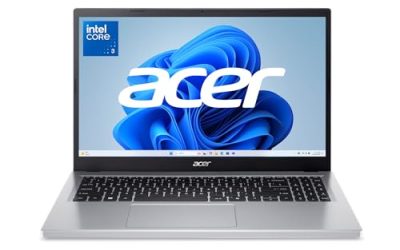
Acer Aspire 5 A515-57-53T2 Slim Laptop
- Best for: Beginners and photo-first editors who need a capable, light laptop for stills and short clips.
- 15.6-inch Full HD IPS display
- 12th Gen Intel Core i5-1235U processor
- 8GB DDR4 memory
- 512GB NVMe SSD
Beginners and photo-first editors who need a capable, light laptop for stills and short clips.
Only 8GB of memory and no dedicated graphics card is listed, so long timelines, heavy effects and 4K footage will feel slow.
This second Aspire 5 is the lightest spend of the three, built on a 12th-generation Intel Core i5-1235U with 8GB of DDR4 memory and a 512GB NVMe SSD. It handles photo editing, short clips and simple cuts without complaint, and its 15.6-inch Full HD IPS display, Thunderbolt 4 port and backlit keyboard make it a pleasant everyday machine. At 3.88 pounds it is also the easiest to carry. It is the right choice when the work is mostly stills, short social clips and learning the craft, rather than long multi-track video projects.
Watch out for: Only 8GB of memory and no dedicated graphics card is listed, so long timelines, heavy effects and 4K footage will feel slow.
Which One Fits Your Situation
You edit photos most days and video only occasionally
Choose the Acer Aspire 5 A515-57G-735F. Its Core i7 processor, RTX 2050 graphics and 16GB of memory handle Lightroom catalogs and Photoshop layers comfortably, and the dedicated graphics keep the occasional video project smooth. The slim chassis and fingerprint reader suit a laptop that travels between home, studio and client meetings.
You cut video every week and use effects and grading
Choose the HP Victus 15. Its RTX 4050 graphics and Ryzen 7 processor give the most headroom for effects, transitions and color work, and the 144Hz IPS display keeps playback smooth. Accept the extra weight in exchange for a machine that stays responsive as projects grow longer and more demanding.
You are learning to edit and want the smallest spend
Choose the Acer Aspire 5 A515-57-53T2. It covers photo editing and short clips well, weighs only 3.88 pounds and leaves room in the budget for an external drive or a monitor later. Treat it as a starter machine and plan to step up once your projects outgrow 8GB of memory.
You work from a desk and want one machine for everything
Choose the HP Victus 15. Its stronger graphics and 16GB of DDR5 memory cover editing, everyday work and heavier creative apps in one chassis for home and office use, and the numeric keypad helps with timelines and shortcuts. Pair it with an external monitor for color-critical finishing and external storage for finished projects.
Common Mistakes
- Buying the cheapest laptop with 8GB of memory and expecting it to cut long video projects smoothly.
- Ignoring the graphics card and judging a laptop only by its processor.
- Trusting a bright screen without checking whether it is an IPS panel or what color coverage the listing states.
- Choosing a 256GB drive for video work and then fighting for space after two projects.
- Assuming every model with the same name has the same hardware, instead of checking the exact processor, memory and storage on the listing.
Frequently Asked Questions
How much memory does an editing laptop need?
Sixteen gigabytes is the realistic starting point for photo editing and 1080p video work, because the editor, the operating system and background apps share the same memory. Eight gigabytes suits light photo work and short clips, but layers, effects and multitasking will slow it down. If the laptop has a spare memory slot, you can add more later, so check upgrade options on the listing before buying.
Does an editing laptop need a dedicated graphics card?
It depends on the work. Photo editing and simple cuts run acceptably on modern integrated graphics, but effects, transitions, color grading and 4K timelines lean heavily on the GPU. A dedicated card such as an RTX 2050 or RTX 4050 keeps playback smooth and exports faster when the timeline gets busy. For regular video work, dedicated graphics is the single most useful upgrade over a basic laptop.
Is a Full HD screen good enough for editing?
Yes for most hobbyist and student work, provided it is an IPS panel with stable colors at different viewing angles. Full HD gives enough room for a timeline and preview on a 15.6-inch display. What matters more than resolution is color accuracy, so check the panel type on the listing and use a calibrated external monitor when color-critical finishing is part of the job.
Can a budget laptop handle 4K video editing?
It can cut 4K footage with proxy files, smaller stand-in clips that make editing smooth, but native 4K timelines with effects demand far more processor and graphics power than a tight-budget laptop usually carries. The Victus 15 here has the strongest graphics for that work, while the 8GB Aspire 5 is better kept to 1080p projects. Plan your workflow around proxies if 4K is part of your footage.
Related guides
More from Amazon
Programs that pair well with the guide above. Offers and eligibility are set by Amazon and may change.
Free shipping on eligible items, Prime Video and more. Eligible new members can start with a free trial.
Start a Prime free trialAd-free music streaming. Eligible new subscribers can start with a free trial.
Try Music Unlimited freeA Prime membership for ages 18-24 with a trial period. Eligibility is set by Amazon.
See Prime for Young AdultsAudiobooks and podcasts to listen to on the go. Eligible new members can start with a free trial.
Try Audible freeAs an Amazon Associate we earn from qualifying purchases.


Write Your Review
No reviews yet. Be the first to share your experience!