
Key takeaways
- Discover the best laptops with high memory for heavy multitasking, large files and demanding apps — 32GB RAM and 1TB SSD picks compared for work and study.
What's inside
As an Amazon Associate I earn from qualifying purchases. This post may contain affiliate links at no extra cost to you.
Introduction
Finding the best laptops with high memory starts with a clear definition, because the phrase “high memory” can mean two different things. In this guide, high memory means generous RAM and generous storage together: at least 32GB of RAM and at least 1TB of solid-state storage in every laptop featured below. That combination matters for heavy multitasking, large files and demanding apps, from dozens of browser tabs and spreadsheets to photo libraries, video projects, virtual machines and large datasets.

RAM is the short-term workspace where your laptop holds the apps and files you are using right now. When RAM runs out, the system leans on storage instead, and everything slows down. Storage is the long-term home for your operating system, applications, documents, photos and videos. A large, fast SSD keeps boot times short, projects loading quickly and large files moving without long waits.
The quick answer is straightforward. If you want a laptop that stays responsive while you juggle demanding work, choose a model with 32GB of RAM and a 1TB SSD as a minimum, pair it with a modern multi-core processor, and make sure the screen, keyboard, ports and battery fit the way you actually work. The five laptops below all meet that memory baseline, yet they suit different people: business users, creators, students, professionals on the move and gamers who also need a capable everyday machine.
Every specification quoted comes from the product listing for that exact configuration, so check the configuration name on the product page before ordering, because many laptop families are also sold in lower-memory versions.
Quick Picks
Our Short List of 3
All 4 Picks at a Glance
| Product | Specs | Action |
|---|---|---|
| ASUS Vivobook S 14 (B0DV99XJD8) | Check price on Amazon | |
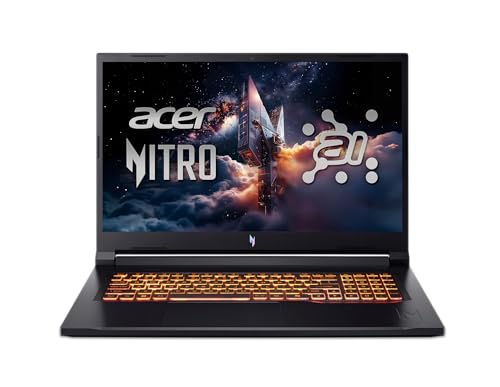
| Acer Nitro V 17 AI (B0FTC8Z91C) | Check price on Amazon | |
 HP ZBook Firefly G11 (B0FMKNSWVQ) | Check price on Amazon | |
 Dell 16 (B0HLL38ZXY) | Check price on Amazon |
How to Choose
How Much RAM Do You Really Need?
For light work such as email, documents and a handful of browser tabs, 16GB of RAM is often enough. The case for 32GB becomes strong once you keep many applications open at once, work with large spreadsheets or databases, edit photos or video, run virtual machines, or use memory-hungry development tools. With 32GB, switching between a browser full of tabs, a video call, a design application and a large document feels smoother, because less data has to be shuffled in and out of storage. If your work involves 64GB-scale datasets, complex simulations or several virtual machines at once, 32GB is a sensible starting point rather than a ceiling, and an upgradeable machine is worth seeking out.
RAM Type and Speed
Not all 32GB configurations behave identically. DDR5 and LPDDR5X memory are the current standards in the laptops below, and they support higher bandwidth than older DDR4 memory. That bandwidth helps when the processor and graphics hardware are moving large amounts of data, for example during video editing or when many applications are active at once. Soldered memory, which is fixed to the main board, cannot be upgraded later, so the amount you buy is the amount you keep. Socketed memory can sometimes be upgraded, which gives a laptop a longer useful life.
Storage Capacity and SSD Speed
A 1TB SSD gives room for Windows, a full set of applications, years of documents and a substantial media library without constant housekeeping. Creative work changes the calculation: raw photos, 4K video and large project files can fill storage quickly, so creators should think about whether they need a second drive bay, a larger SSD option or reliable external storage. Speed matters as well as capacity. A PCIe Gen 4 NVMe SSD loads applications and large files faster than an older SATA drive, which is noticeable when opening big projects or copying large folders.
Processor and Graphics
Memory alone does not make a laptop fast. The processor decides how quickly demanding tasks complete, while the graphics hardware decides how well visual work and games run. A modern multi-core processor from Intel Core Ultra or AMD Ryzen families pairs well with 32GB of RAM for office work, coding, data analysis and content creation. Integrated graphics are enough for office work, streaming and light photo editing. A dedicated graphics card, such as the NVIDIA GeForce RTX 5070 in the Acer Nitro V 17 AI below, is the better choice for gaming, 3D work, video rendering and other graphics-heavy tasks. Match the processor and graphics hardware to your heaviest regular task, not to the lightest one.
Display Size, Quality and Comfort
A high-memory laptop is often a working laptop, so the display deserves as much attention as the internals. A 14-inch display is easier to carry and suits frequent travel, while a 16-inch or 17-inch display gives more room for side-by-side windows, timelines and spreadsheets. Resolution, brightness and colour coverage affect how comfortable long sessions feel, and an OLED panel gives deep contrast that many people prefer for photos and video. Touchscreens can be useful for note-taking and presentations, but they add weight and cost.
Battery Life, Ports and Upgradability
Large amounts of memory and a powerful processor are most useful when the rest of the machine keeps up. Battery life varies widely between a slim ultraportable and a large gaming laptop, so check the battery capacity and the expected use case rather than assuming a big machine lasts all day. Ports matter for high-memory workflows too: USB-C, USB-A, HDMI and a card reader make it easier to connect external drives, monitors and cameras, which is how large files usually move in and out.
The Best Laptops With High Memory Reviewed
ASUS Vivobook S 14 (B0DV99XJD8)
The ASUS Vivobook S 14 is a compact Copilot+ PC built around an Intel Core Ultra 7 Series 2 258V processor, 32GB of LPDDR5X RAM on board and a 1TB PCIe Gen 4 SSD. Its 14-inch WUXGA OLED display is the standout feature for everyday use, with rich contrast and clear text that suit long reading and editing sessions. Windows 11 and Intel Evo branding point to a machine designed for responsive everyday productivity, video calls and portable work.
This laptop suits someone who wants high memory in a portable package without moving to a large 16-inch chassis. The 32GB of fast memory handles dozens of browser tabs, office applications and creative tools at once, while the 1TB SSD holds a full working library.
Who should skip it? Anyone who needs upgradeable RAM should look elsewhere, because the memory is on board and fixed at 32GB. Gamers and 3D artists who need a dedicated graphics card will also want a larger machine with discrete graphics. For everyone else who wants a vivid, portable, high-memory laptop, the Vivobook S 14 is an appealing balance of size, memory and display quality.
Lenovo ThinkBook 16 G7 (B0FD4XZ2C4)
The Lenovo ThinkBook 16 G7 pairs an AMD Ryzen 7 7735HS processor with 32GB of DDR5 RAM and a 1TB NVMe SSD, in a 16-inch business laptop with a full HD+ display, backlit keyboard, fingerprint reader and Windows 11 Pro. The larger screen gives room for two documents side by side, a spreadsheet beside a browser, or a video call beside notes, which is exactly the kind of multitasking that high memory is meant to support.
This laptop suits business users and students who want a large screen and generous memory for office work, research and presentations. The Ryzen 7 processor has eight cores and sixteen threads, so it handles demanding productivity software, data work and content creation without feeling strained.
Who should skip it? People who carry a laptop all day may prefer a lighter 14-inch model, and anyone who needs a high-resolution or OLED display for colour-critical photo work should compare display options carefully. It is also worth confirming the exact configuration, because the ThinkBook 16 G7 family includes several memory and storage combinations. For large-screen business multitasking with 32GB of RAM and 1TB of storage, this configuration is a practical and well-rounded choice.
Acer Nitro V 17 AI (B0FTC8Z91C)
The Acer Nitro V 17 AI is the gaming-focused pick in this roundup, with an AMD Ryzen 7 260 processor, an NVIDIA GeForce RTX 5070 laptop graphics card, 32GB of DDR5 memory and a 1TB PCIe Gen 4 SSD. Its 17.3-inch full HD IPS display runs at 144Hz, which suits fast-moving games and smooth scrolling through timelines and large documents alike. Two PCIe M.2 slots are listed, with one slot available, which gives useful room for a future storage upgrade.
This laptop suits gamers who also need a machine for demanding everyday work. The 32GB of RAM keeps games, streaming software, browsers and chat applications running together, while the 1TB SSD holds a useful game library and large project files. The dedicated RTX graphics card also helps with video editing, 3D rendering and other graphics-heavy tasks that integrated graphics handle slowly.
Who should skip it? Anyone who prioritises portability and battery life should choose a smaller, lighter laptop, because a 17.3-inch gaming machine is built for desk use and performance rather than all-day travel. People who only need office applications and web browsing will find the graphics hardware more than they need. For gaming plus heavy multitasking, the Nitro V 17 AI puts its high memory to clear use.
HP ZBook Firefly G11 (B0FMKNSWVQ)
The HP ZBook Firefly G11 is a mobile workstation built for professional work, with a 12-core Intel Core Ultra 7 165U processor, 32GB of DDR5 5600MHz memory and a 1TB PCIe Gen 4 SSD. Its 14-inch WUXGA display, fingerprint reader, infrared camera and Windows 11 Pro round out a machine aimed at business, creative and AI-assisted workloads. The ZBook name signals a workstation heritage, with an emphasis on reliability and professional software support.
This laptop suits professionals who run demanding business, creative or AI workloads in a portable 14-inch body. The 32GB of fast DDR5 memory and the Gen 4 SSD support large datasets, complex documents, design applications and virtual meetings at the same time. It is a good fit for consultants, engineers, analysts and creators who travel between offices and client sites and need a capable machine that does not weigh them down.
Who should skip it? Gamers should choose a laptop with a dedicated gaming graphics card, and anyone on a tight budget for basic office work may find a mainstream laptop with the same memory more suitable. As with other listings in this guide, confirm that the configuration you order is the 32GB RAM and 1TB SSD version, because workstation families are sold in many combinations. For professional high-memory work in a compact body, the ZBook Firefly G11 is a strong option.
Dell 16 (B0HLL38ZXY)
The Dell 16 is a touchscreen business laptop with an AMD Ryzen AI 7 350 processor, 32GB of DDR5 RAM and a 1TB SSD, running Windows 11 Pro. Its 16-inch FHD+ touch display, fingerprint reader and backlit keyboard suit office work, presentations and note-taking, while the AI-capable processor supports modern productivity features. The 50 TOPS neural processing unit is listed as part of the platform, which points to on-device AI features becoming part of everyday office software.
This laptop suits business users and students who want a large touchscreen, generous memory and a modern processor for office work, data analysis and multimedia projects. The 32GB of RAM keeps complex spreadsheets, virtual machines for software development and Adobe Creative Suite applications running smoothly side by side, while the 1TB SSD provides room for large files and project archives.
Who should skip it? People who do not want a touchscreen, or who prefer a smaller and lighter laptop for travel, should compare the 14-inch options in this guide. Gamers will also want a dedicated graphics card rather than relying on integrated graphics. For touchscreen productivity with high memory, the Dell 16 covers the essentials with room to spare.
What to Check Before You Buy
Before ordering any high-memory laptop, confirm the exact configuration on the product page. Many laptop families share a single listing across several memory and storage combinations, so the title, specification table and configuration selector should all agree on 32GB of RAM and 1TB of storage. If they disagree, choose a different listing or contact the seller for clarification.
Next, check the operating system, warranty and included accessories. Windows 11 Pro adds business features that Windows 11 Home does not include, which matters for some workplaces. A fingerprint reader, backlit keyboard and webcam quality are small details that affect daily use, so read the full specification table rather than the headline alone.
Finally, think about how you will back up a 1TB drive. A large SSD invites a large library of files, and that library deserves a backup plan, whether that is an external drive or a cloud service. Check that the laptop has the ports you need for an external drive and a monitor, and confirm the return policy so you can check the machine against your real workload in the first days of use.
FAQ
How much RAM is considered high memory in a laptop?
In current laptops, 16GB is a common mainstream amount, 32GB is a clear step into high-memory territory, and 64GB suits specialist workloads such as large virtual machines, complex simulations and heavy video production. For most demanding users, 32GB of RAM paired with a 1TB SSD is the practical definition of high memory.
Is 32GB of RAM enough for video editing and virtual machines?
For many video editing projects and one or two virtual machines, 32GB is enough and gives comfortable headroom over 16GB. Larger 4K projects, several virtual machines running at once, or very large datasets may benefit from 64GB, so match the memory to the largest project you run regularly rather than the smallest.
Does a 1TB SSD make a laptop faster than a 512GB SSD?
Capacity alone does not decide speed, but a 1TB PCIe NVMe SSD in a modern laptop is usually fast, and the extra room means the drive stays less full, which helps maintain performance. The interface matters most: a PCIe Gen 4 NVMe drive loads large files faster than an older SATA drive, regardless of capacity.
Can I upgrade the RAM or storage later?
It depends on the model. Some laptops have accessible RAM slots or a second SSD bay, while others use soldered memory that cannot be changed. Check the specification table and the manufacturer’s documentation before buying if future upgrades matter to you, and buy the memory you need up front if the laptop is sealed.
Should I choose DDR5 or LPDDR5X memory?
Both are current standards and both work well with 32GB configurations. DDR5 is common in upgradeable business and gaming laptops, while LPDDR5X is common in slim ultraportables where memory is soldered to the board. Choose based on the laptop as a whole, including upgradeability, battery life and portability, rather than on the memory type alone.
Bottom Line
The best laptops with high memory all share the same foundation: 32GB of RAM and a 1TB SSD, paired with a modern processor and a display that fits the work. The ASUS Vivobook S 14 is the portable pick with a vivid OLED display, the Lenovo ThinkBook 16 G7 is the large-screen business choice, the Acer Nitro V 17 AI is the gaming and graphics option, the HP ZBook Firefly G11 is the compact professional workstation, and the Dell 16 is the touchscreen productivity pick. Choose the one whose size, graphics hardware and features match your heaviest regular task, confirm the exact 32GB and 1TB configuration before ordering, and you will have a laptop with room to multitask, store large files and stay useful for years.
Disclosure: As an Amazon Associate, we may earn from qualifying purchases.
Related guides
More from Amazon
Programs that pair well with the guide above. Offers and eligibility are set by Amazon and may change.
Free shipping on eligible items, Prime Video and more. Eligible new members can start with a free trial.
Start a Prime free trialAd-free music streaming. Eligible new subscribers can start with a free trial.
Try Music Unlimited freeA Prime membership for ages 18-24 with a trial period. Eligibility is set by Amazon.
See Prime for Young AdultsAudiobooks and podcasts to listen to on the go. Eligible new members can start with a free trial.
Try Audible freeAs an Amazon Associate we earn from qualifying purchases.








Write Your Review
No reviews yet. Be the first to share your experience!