
Key takeaways
- The best laptops for data scientists compared on memory, CPU cores, storage and NVIDIA GPU options, from a 64GB HP ZBook Fury workstation to a portable ThinkPad P1 for notebooks and models.
What's inside
As an Amazon Associate I earn from qualifying purchases. This post may contain affiliate links at no extra cost to you.
As an Amazon Associate we earn from qualifying purchases.
Data science makes a different set of demands from almost every other laptop workload. A data scientist might spend the morning cleaning a dataset that barely fits in memory, the afternoon running cross-validation across many processor cores, and the evening training a model that either uses a compatible graphics processor or does not run locally at all. A laptop that is excellent for office work can fail at every one of those steps, usually by running out of memory first.
This guide is about laptops for data scientists specifically, and the picks were chosen on the specifications that decide real analytical work: how much memory the exact configuration carries, how many cores the processor offers for parallel tasks, how much fast storage is available for datasets and environments, and whether the machine includes an NVIDIA graphics processor for the libraries that can use one. Operating system matters here too, because local development, containers and remote workflows all shape which platform fits a given data scientist’s stack.
One discipline matters throughout this guide. Specifications below come from each product listing and describe the exact configuration linked. Model names cover many configurations, and the difference between a workable data science laptop and a frustrating one is often a single line in that configuration, such as memory size. Always confirm the processor, memory, storage and graphics on the listing page before ordering.
Disclosure: This article contains affiliate links. If you buy through a link on this page, we may earn a commission at no additional cost to you.
Quick Picks
- HP ZBook Fury 16 G11 — the memory and workstation pick, listed with an Intel Core i9-13950HX, 64GB of DDR5 memory, a 2TB SSD, an NVIDIA RTX 4000 Ada Generation graphics option described in the listing, and a 16-inch 3840 x 2400 display.
- MSI Vector 16 HX AI — the high core count and GPU pick, listed with an Intel Core Ultra 9 275HX, an NVIDIA GeForce RTX 5080 Laptop GPU, 64GB of DDR5 memory and a 2TB SSD for local model work and parallel processing.
- Lenovo ThinkPad P1 Gen 7 — the portable professional pick, listed with an Intel Core Ultra 7 155H, 32GB of memory, a 1TB SSD and a 16-inch WQUXGA touchscreen, suited to CPU-based analysis, notebooks and remote-first workflows.
1. HP ZBook Fury 16 G11
The ZBook Fury 16 G11 is a mobile workstation, and that category matters for data science. Workstations are built for sustained professional workloads, large memory configurations and long working days, rather than short bursts of consumer performance. This configuration is listed with an Intel Core i9-13950HX processor with vPro technology, 64GB of DDR5 memory, a 2TB SSD and a 16-inch display at 3840 x 2400 resolution running Windows 11 Pro. The listing’s graphics information describes an NVIDIA RTX 4000 Ada Generation option with 12GB of graphics memory alongside integrated Intel graphics, which is the configuration detail to confirm carefully on the listing page.
For a data scientist, 64GB of memory is the headline. Large pandas operations, in-memory joins, feature engineering on wide tables and running a notebook server alongside an IDE and a local database all consume memory in ways that quickly expose a smaller machine. Having 64GB locally means more exploratory work stays on the laptop instead of being pushed to a remote server for purely practical reasons. The Core i9-13950HX gives parallel jobs such as cross-validation, model ensembles and data preprocessing a high core count processor to spread across, and 2TB of fast storage holds datasets, multiple environments and model artifacts without constant cleanup.
Where an NVIDIA RTX Ada Generation workstation GPU is part of the confirmed configuration, it is relevant because many GPU-accelerated data science libraries are built around NVIDIA’s CUDA platform, and an NVIDIA RTX GPU is the hardware those libraries target on a laptop. That statement is about compatibility, not a promise about training speed on any particular model, which depends on the framework, the data and the model itself. If your work is CPU-only, treat the GPU as a bonus rather than the reason to buy, and value this machine for its memory, processor and workstation build instead.
The trade-offs are size, weight and focus. The listing gives a weight of 5.29 pounds, and a Fury is a machine you carry between desks rather than forget in a bag. It is also a professional tool with a professional specification, so data scientists whose work is light notebooks and remote clusters will not use what they are paying for in hardware capability.
Specifications from the listing
- Processor: Intel Core i9-13950HX, 13th generation, with vPro technology
- Memory: 64GB DDR5
- Storage: 2TB SSD
- Display: 16-inch, 3840 x 2400, WQUXGA
- Graphics described in listing: NVIDIA RTX 4000 Ada Generation, 12GB graphics memory, alongside Intel UHD Graphics — confirm the exact graphics configuration on the listing before ordering
- Operating system: Windows 11 Pro
Pros
- 64GB of memory for large in-memory datasets and heavy multitasking
- High core count Core i9 HX processor for parallel analytical work
- 2TB of storage for datasets, environments and model files
- Workstation design and Windows 11 Pro for professional environments
Cons
- Heavy at 5.29 pounds according to the listing, so it suits desk-based work best
- Graphics configuration needs careful confirmation on the listing page
- Specification exceeds what remote-first or light notebook workflows require
View the HP ZBook Fury 16 G11 on Amazon
2. MSI Vector 16 HX AI
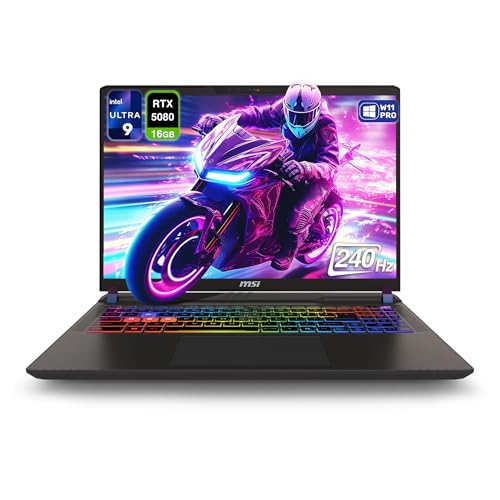
The Vector 16 HX AI is built around the two specifications data scientists ask about most after memory: processor cores and graphics power. This configuration is listed with an Intel Core Ultra 9 275HX processor, an NVIDIA GeForce RTX 5080 Laptop GPU, 64GB of DDR5 memory and a 2TB PCIe SSD, with a 16-inch WQXGA display at 2560 x 1600 and a 240Hz refresh rate, running Windows 11 Pro. The listing positions this model for STEM professionals and describes it for complex computations, software development and data analysis, which matches how it is recommended here.
In practical terms, this is the pick for a data scientist who wants serious local compute in one machine. The Core Ultra 9 275HX is a high core count processor for parallel preprocessing, traditional machine learning and simulation work. The 64GB of memory keeps large datasets and multiple processes resident at once. The NVIDIA GeForce RTX 5080 Laptop GPU is the component that matters for GPU-accelerated frameworks, because those libraries are built for NVIDIA GPUs and the CUDA platform, so a laptop with an NVIDIA GeForce RTX GPU is the correct starting point for local GPU work on Windows or Linux. As with any GPU recommendation, actual training behavior depends on your framework versions, drivers and model, so treat the GPU as compatibility and capability, not as a guaranteed result on a specific workload.
Storage and connectivity support that role. A 2TB PCIe SSD gives room for datasets and environments, and the listing describes Thunderbolt 5 connections among its ports, which helps with fast external storage and docking at a desk. The display’s high refresh rate is a gaming inheritance rather than a data science requirement, but the 2560 x 1600 resolution itself is genuinely useful, giving notebooks, code and data tables more vertical and horizontal room than a basic panel.
Expect a performance laptop’s compromises. A machine with this processor and GPU class will use its cooling system audibly during long training or heavy parallel runs, and it is a substantial laptop to carry daily. Battery life under compute load is not the point of this category. For a data scientist who runs real local workloads and wants one machine that does not immediately force work onto a server, those are the right compromises to accept.
Specifications from the listing
- Processor: Intel Core Ultra 9 275HX
- Graphics: NVIDIA GeForce RTX 5080 Laptop GPU
- Memory: 64GB DDR5
- Storage: 2TB PCIe SSD
- Display: 16-inch WQXGA, 2560 x 1600, 240Hz
- Operating system: Windows 11 Pro
Pros
- 64GB of memory paired with a high core count processor
- NVIDIA GeForce RTX 5080 Laptop GPU for GPU-accelerated libraries that target NVIDIA hardware
- 2TB of fast storage for datasets and multiple environments
- High-resolution 16-inch display gives notebooks and tables more room
Cons
- Cooling fans will be audible during long training or parallel runs
- Substantial performance-laptop design for daily carrying
- Far more local power than a purely remote workflow will use
View the MSI Vector 16 HX AI on Amazon
3. Lenovo ThinkPad P1 Gen 7
The ThinkPad P1 Gen 7 represents the other end of sensible data science buying: a professional, portable workstation for analysts and data scientists whose heavy compute often lives on a server, a cluster or a cloud instance, and whose laptop needs to be excellent at everything around that compute. This configuration, model 21KV0006US in the listing, is described with an Intel Core Ultra 7 155H processor on the Intel Evo platform, 32GB of memory, a 1TB SSD and a 16-inch WQUXGA touchscreen display, in the familiar black ThinkPad design with an English keyboard.
That specification suits a large amount of real data science work very well. Exploratory analysis, notebook development, SQL and dashboard work, data cleaning on moderate datasets, and traditional machine learning that runs on the CPU are all comfortable with 32GB of memory and a modern Core Ultra 7 processor. The 16-inch high-resolution display makes long sessions in notebooks and IDEs easier on the eyes and leaves room for code, output and documentation side by side. ThinkPad keyboards and build quality also matter more than spec sheets suggest when the laptop is your main working tool every day, and the P1 line exists specifically as a thinner mobile workstation rather than a consumer laptop.
Be clear about what this configuration is not. The listing title for this exact configuration centers on the processor, memory, storage and display, and does not present a discrete NVIDIA GPU as its headline feature, so do not buy this configuration expecting local GPU training. Data scientists who need CUDA-based library work locally should choose one of the NVIDIA-equipped picks above instead. Data scientists who develop locally and train remotely, or whose models are CPU-based, will find this the most livable machine in the guide to carry and use all day.
Specifications from the listing
- Processor: Intel Core Ultra 7 155H, Intel Evo platform
- Memory: 32GB
- Storage: 1TB SSD
- Display: 16-inch WQUXGA touchscreen
- Model number in listing: 21KV0006US
- Design: ThinkPad mobile workstation, black
Pros
- Portable workstation design for daily carrying and long working sessions
- 32GB of memory covers notebooks, analysis and CPU-based modeling well
- High-resolution 16-inch touchscreen display for code, notebooks and tables
- Sensible fit for remote-first workflows where training happens on a server
Cons
- This configuration is not presented as a discrete NVIDIA GPU machine, so it is not the pick for local GPU training
- 1TB of storage is the smallest figure in this guide
- 32GB of memory is a ceiling for very large in-memory datasets
View the Lenovo ThinkPad P1 Gen 7 on Amazon
How to Choose a Laptop for Data Science
Start with memory, because it is the limit data scientists hit first and the hardest to work around. If your datasets regularly approach the size of your current machine’s memory, prioritize 64GB, as two of the picks here offer. If your work is notebooks, moderate datasets and remote training, 32GB is a workable and more portable level. Buying too little memory cannot be fixed by a faster processor.
Next, count cores for the work you actually parallelize. Data preprocessing, cross-validation, hyperparameter searches, ensembles and simulations can all spread across cores, so a high core count HX or Ultra 9 class processor earns its place for local compute. Single-threaded notebook work benefits less, which is why a balanced machine like the ThinkPad P1 still serves many data scientists well.
Decide the GPU question honestly. If you use, or plan to use, GPU-accelerated libraries and frameworks built on NVIDIA’s CUDA platform, you need a laptop with an NVIDIA GPU, such as the GeForce RTX 5080 Laptop GPU in the MSI Vector or the RTX Ada Generation workstation graphics described for the ZBook Fury configuration. Confirm the exact GPU on the listing page, because the same model name can be sold with different graphics. If all your training happens on remote servers or cloud instances, a GPU in the laptop adds cost and weight without adding workflow value, and CPU, memory and display quality matter more.
Storage and operating system finish the decision. Datasets, environments, containers and model checkpoints consume fast storage quickly, so 2TB is a comfortable target for a local-compute machine and 1TB is a sensible minimum for a remote-first one. On operating system, Windows 11 Pro machines can run local Linux environments through standard Windows tooling, while many data scientists also dual-purpose their laptop as a remote terminal. Choose the platform your team, tools and infrastructure already assume, and then confirm every specification line on the listing before you buy.
FAQs
How much RAM does a data scientist need in a laptop?
For moderate datasets, notebooks and remote training, 32GB is workable. For large in-memory datasets, wide feature tables or running several heavy tools at once, 64GB is the safer choice, and it is the specification that most often decides whether work stays local or has to move to a server.
Does a data scientist need a GPU in the laptop?
Only if local work uses GPU-accelerated libraries. Those libraries are generally built for NVIDIA GPUs and the CUDA platform, so an NVIDIA-equipped laptop is required for that style of local work. If training happens on a cluster or in the cloud, a laptop GPU is optional and memory, processor and screen quality matter more.
Is a workstation better than a gaming laptop for data science?
Both can work, for different reasons. A workstation such as the ZBook Fury or ThinkPad P1 offers professional design, large memory configurations and business support expectations. A performance laptop such as the MSI Vector offers very strong processor and GPU specifications. Choose on memory, GPU, portability and your employer’s or team’s requirements rather than on the category label.
How much storage should a data science laptop have?
Plan for datasets, environments and checkpoints to grow. A 2TB drive is comfortable for a machine that holds local data and models, while 1TB works for a remote-first setup where large data lives elsewhere. Fast SSD storage matters in both cases because dataset loading is part of daily work.
Can these laptops run Linux-based data science tools?
Data scientists commonly work through Linux environments, containers and remote servers from Windows laptops, and the Windows 11 Pro configurations here suit that pattern. What matters most is that the hardware specifications — memory, cores, storage and, where needed, an NVIDIA GPU — match the way you actually run your stack.
Conclusion
For a data scientist who wants maximum local capability in a professional workstation, the HP ZBook Fury 16 G11 leads this guide on memory, processor class and storage, provided you confirm the exact graphics configuration on its listing. For local GPU work and high core count computing in one machine, the MSI Vector 16 HX AI pairs 64GB of memory with an NVIDIA GeForce RTX 5080 Laptop GPU and a Core Ultra 9 275HX. For the many data scientists whose training lives on a server and whose laptop is a daily working tool, the Lenovo ThinkPad P1 Gen 7 is the balanced, portable choice. Decide your memory requirement first, settle the GPU question honestly, and then pick the machine whose exact listed configuration matches the way you really work.
Related guides
More from Amazon
Programs that pair well with the guide above. Offers and eligibility are set by Amazon and may change.
Free shipping on eligible items, Prime Video and more. Eligible new members can start with a free trial.
Start a Prime free trialAd-free music streaming. Eligible new subscribers can start with a free trial.
Try Music Unlimited freeA Prime membership for ages 18-24 with a trial period. Eligibility is set by Amazon.
See Prime for Young AdultsAudiobooks and podcasts to listen to on the go. Eligible new members can start with a free trial.
Try Audible freeAs an Amazon Associate we earn from qualifying purchases.









Write Your Review
No reviews yet. Be the first to share your experience!