
Key takeaways
- Compare the best touchscreen laptops under 500: 2-in-1 convertibles and a detachable Chromebook picked by screen, RAM, storage and hinge from Amazon listings.
What's inside
As an Amazon Associate I earn from qualifying purchases. This post may contain affiliate links at no extra cost to you.
At this budget, the real decision is not whether you can get a touchscreen — it is what you give up to have one. The touch panel and the hinge that flips it around cost money that would otherwise buy a faster processor or more memory, so every model below makes a different trade: one keeps a strong chip and generous memory, one accepts less RAM for a sharper screen, one shrinks storage to almost nothing, and one leaves Windows behind entirely.

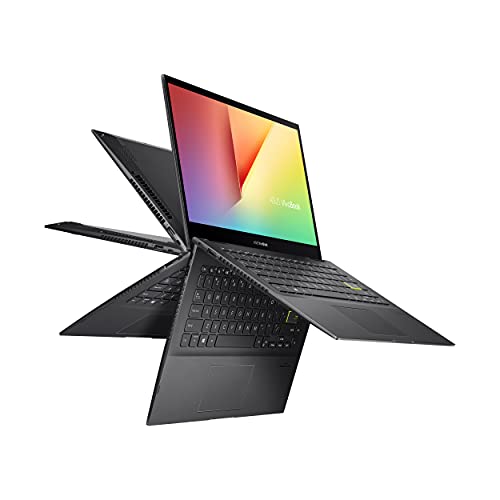
This guide is for students, casual home users, and anyone who wants one device for typing, browsing, and tapping through media on the couch. Every pick was chosen from the names and specifications printed on its Amazon product page, so the screen size, processor, memory, and storage quoted here are the ones the listing itself states.
Quick Picks
As an Amazon Associate we earn from qualifying purchases.
| Product | Best for | Key spec from title |
|---|---|---|
| Lenovo IdeaPad Flex 5 14 | Everyday Windows use with headroom | Ryzen 5 5500U with 16GB RAM |
| ASUS Vivobook S 14 Flip | A sharper screen and stronger chip | Ryzen 5 5600H, WUXGA touch display |
| Lenovo IdeaPad Duet 5 Chromebook | Tablet-first media and browsing | 13.3-inch OLED touchscreen |
| ASUS VivoBook Flip 14 | The lowest entry point to a 2-in-1 | Thunderbolt 4 on a Core i3 build |
How to Choose
Decide Between a 360-Degree Hinge and a Detachable Keyboard
Convertibles such as the Flex 5 and the two ASUS models fold their keyboard behind the screen, which keeps everything in one piece and works well on a desk or lap. A detachable design like the Duet 5 separates into a true tablet, which is lighter in the hand and better for reading or watching in bed, but the keyboard is a cover rather than a rigid base, so typing on your knees feels wobbly. Pick the hinge style around where you will actually type most of the time.
Set a Memory and Storage Floor Before You Look at Screens
Touch is the headline feature in this category, yet memory decides how the machine feels a year from now. Eight gigabytes of RAM is a sensible floor for Windows with a browser and office apps open together, and the Flex 5 doubles that figure. Storage matters just as much: a 512GB SSD holds a real photo library and offline files, while the 64GB in the Duet 5 only works because Chrome OS expects your files to live in the cloud.
Check the Panel, Not Just the Touch Layer
Nearly every screen here is Full HD or slightly taller, and that resolution is fine at 13 to 14 inches. What separates them is panel type and shape. The Duet 5 uses an OLED panel, which gives deeper contrast for video than the IPS panels elsewhere. The Vivobook S 14 Flip stretches to a 16:10 WUXGA resolution, adding vertical room for documents. A glossy finish is standard at this level, so expect reflections under bright lights whichever model you choose.
Confirm the Ports and the Operating System Match Your Apps
A touchscreen laptop is a poor bargain if it cannot run your software or plug into your desk. The VivoBook Flip 14 includes Thunderbolt 4, which is unusual at the entry end and opens up single-cable docking. The Duet 5 runs Chrome OS, so it handles web apps and Android apps but not installed Windows programs such as the full desktop Office suite. Read the listing’s operating system line carefully, because a Windows machine in S Mode also limits you to store apps until you switch it out.
The 4 Best Options
Lenovo IdeaPad Flex 5 14
The Flex 5 is the safest all-round answer in this group because it refuses to skimp on the two specs budget buyers usually regret: memory and storage. Its Ryzen 5 5500U and 16GB of RAM keep Windows feeling responsive with many tabs open, and the 512GB drive means you are not managing space from the first month. The 14-inch Full HD touch display folds fully back for tent and tablet use, and the Storm Grey shell keeps it looking like a work machine rather than a toy.
Specs
- 14.0-inch FHD touch display
- AMD Ryzen 5 5500U processor
- 16GB RAM
- 512GB storage
- AMD Radeon graphics
- Windows 11 Home
- Color: Storm Grey
Best for: Buyers who want one Windows convertible for school or home office work without upgrading anything later.
Watch out for: The listing centers on core hardware, so confirm pen support and port selection on the product page if a stylus or a specific connector matters to you.
ASIN: B09YWM1CM1
ASUS Vivobook S 14 Flip
The Vivobook S 14 Flip spends its budget on the screen and the processor instead of memory. The Ryzen 5 5600H is a higher-wattage chip than the U-series parts around it, so sustained tasks like exporting a presentation or light photo work feel less strained, and the 14-inch WUXGA touchscreen runs at a taller 16:10 shape with Corning Gorilla Glass NBT over the panel. The trade is visible in the spec sheet: 8GB of RAM is adequate rather than generous, and multitaskers will notice the ceiling sooner.
Specs
- 14-inch WUXGA (1920 x 1200) 16:10 NanoEdge touchscreen
- AMD Ryzen 5 5600H processor
- 8GB DDR4 RAM
- 512GB SSD
- NumberPad and fingerprint reader
- Windows 11 Home
- Color: Quiet Blue
- Model: TN3402QA-AS54T
Best for: Users who read and edit documents all day and want the sharpest, tallest screen in this group.
Watch out for: The 8GB of memory is the compromise that pays for the processor and display, so heavy tab hoarders should look at the Flex 5 first.
ASIN: B09T5QWMD8
Lenovo IdeaPad Duet 5 Chromebook
The Duet 5 answers a different question: what if the tablet is the point and the keyboard is the accessory? Its 13.3-inch OLED touchscreen is the best-looking panel here for streaming and reading, the Snapdragon processor sips power, and the listing quotes up to 15 hours of battery life. The keyboard detaches completely, so the device drops into a bag like a large tablet. The limits are just as clear — 4GB of RAM and 64GB of storage only make sense because Chrome OS is light and cloud-centered.
Specs
- 13.3-inch FHD OLED touch display
- Qualcomm Snapdragon SC7180 processor
- 4GB RAM
- 64GB storage
- Qualcomm Adreno graphics
- Chrome OS
- Detachable keyboard included
- Color: Abyss Blue
- Model: 82QS0000US
Best for: Media watchers, readers, and students whose work lives in a browser and Google apps.
Watch out for: Chrome OS cannot install Windows desktop programs, and the small local storage fills quickly if you download large files for offline use.
ASIN: B09LP61KDP
ASUS VivoBook Flip 14
The VivoBook Flip 14 is the entry ticket to a Windows 2-in-1, and its spec sheet shows exactly where the money was saved. The Core i3-1115G4 handles documents, browsing, and video calls without drama, while 4GB of RAM and a 128GB SSD set a hard ceiling on how much you can keep open or stored. In return you still get the full folding hinge, a fingerprint reader, and a Thunderbolt 4 port that many pricier machines omit. It suits a light, single-purpose workload far better than a growing one.
Specs
- 14-inch FHD touch display
- Intel Core i3-1115G4 processor
- 4GB RAM
- 128GB SSD
- Thunderbolt 4
- Fingerprint reader
- Windows 10 Home in S Mode
- Color: Indie Black
- Model: TP470EA-AS34T
Best for: A first touchscreen laptop for email, browsing, homework, and video calls on a tight budget.
Watch out for: Windows ships in S Mode, which restricts installs to the Microsoft Store until switched out, and the 4GB of RAM is not a comfortable long-term figure.
ASIN: B08XPBTWJS
Which One Fits Your Situation
You Type Essays and Reports Most Days
Choose the Lenovo IdeaPad Flex 5. Its rigid keyboard deck, 16GB of memory, and roomy SSD fit long writing sessions and large reference libraries, and the hinge still folds back when you want to mark up a PDF or present from the screen in tent mode.
You Mostly Watch, Read, and Browse
The Duet 5 was built for you. The OLED screen makes video look richer than any IPS panel in this guide, the detachable design keeps the couch experience tablet-simple, and the long battery life means the charger can stay in another room for most of the day.
Your Screen Time Is Documents, All Day
Pick the ASUS Vivobook S 14 Flip. The taller WUXGA display shows more of a page at once, the stronger processor keeps big spreadsheets and decks moving, and the fingerprint reader makes constant unlocking painless. Just keep your open apps reasonably tidy.
This Is a Second or Shared Family Machine
The ASUS VivoBook Flip 14 covers shared basics — homework, browsing, streaming, and calls — without asking you to fund performance nobody in the house will use. Set expectations around its small storage, keep personal files in cloud folders, and it does the job.
Common Mistakes
- Buying the touchscreen first and the specs second, then discovering 4GB of RAM struggles with everyday multitasking.
- Assuming every model supports a pressure-sensitive pen when the listing never says so.
- Forgetting that a Chromebook cannot run installed Windows software your school or office requires.
- Ignoring S Mode on entry Windows machines and being surprised when a program will not install.
- Comparing screen sizes while skipping resolution and panel type, which shape the experience more.
Frequently Asked Questions
Is a touchscreen worth it on a budget laptop?
It is worth it if you will actually use the modes it enables: tent mode for video, tablet mode for reading, and direct tapping for forms and maps. If your work is entirely keyboard-driven, the same money usually buys a faster non-touch machine, so be honest about your habits before paying for the hinge.
How much RAM do I need in this price range?
Eight gigabytes is the comfortable minimum for Windows with a browser and office apps running together, and 16GB gives the machine a longer useful life. Four gigabytes works for light, single-task use, as the VivoBook Flip 14 shows, but expect slowdowns when you stack up tabs and programs.
Can these laptops work with a stylus?
Support varies by model and is not guaranteed by the presence of a touchscreen. Some convertibles accept an active pen while others only register fingers and passive capacitive tips. Check the individual product page for pen support before buying, especially if note-taking or sketching is the reason you want touch.
Should I choose a Chromebook or a Windows convertible?
Choose the Chromebook if your work lives in the browser, Google services, and Android apps, and you value battery life and a tablet form. Choose a Windows convertible if you need installed desktop programs, local file storage, or compatibility with specific school and office software. The operating system matters more than the hinge.
Related guides
More from Amazon
Programs that pair well with the guide above. Offers and eligibility are set by Amazon and may change.
Free shipping on eligible items, Prime Video and more. Eligible new members can start with a free trial.
Start a Prime free trialAd-free music streaming. Eligible new subscribers can start with a free trial.
Try Music Unlimited freeA Prime membership for ages 18-24 with a trial period. Eligibility is set by Amazon.
See Prime for Young AdultsAudiobooks and podcasts to listen to on the go. Eligible new members can start with a free trial.
Try Audible freeAs an Amazon Associate we earn from qualifying purchases.










Write Your Review
No reviews yet. Be the first to share your experience!