
Our Short List of 3

- Best for: Solo bookkeepers and small firms handling large ledgers and several company files at once.
- Intel Core Ultra 5 225H processor, 14 cores, up to 4.9GHz
- 32GB DDR5 RAM, 1TB PCIe SSD
- 16-inch WUXGA display, 1920 x 1200, anti-glare, 300 nits
- Full-size backlit keyboard with numeric keypad

- Best for: Bookkeepers who want a touchscreen and Windows 11 Pro for client work.
- Intel Core i5-1334U processor, 10 cores, up to 4.4GHz
- 16GB DDR4 RAM, 512GB PCIe SSD
- 15.6-inch Full HD touchscreen, 1920 x 1080, IPS
- Full-size keyboard with numeric keypad

- Best for: New practices, starter setups, and second machines for occasional bookkeeping.
- Intel Core i5 processor, 10 cores, up to 4.6GHz
- 8GB DDR4 RAM, 256GB SSD
- 15.6-inch Full HD touchscreen, 1920 x 1080, IPS
- Full-size keyboard with numeric keypad
All 4 Picks at a Glance
| Product | Specs | Action |
|---|---|---|
| Lenovo ThinkPad E16 Gen 3 |
| Check price on Amazon |
| Dell Inspiron 15 (Core i5-1334U) |
| Check price on Amazon |
| Dell Inspiron 15 (8GB, 256GB) |
| Check price on Amazon |
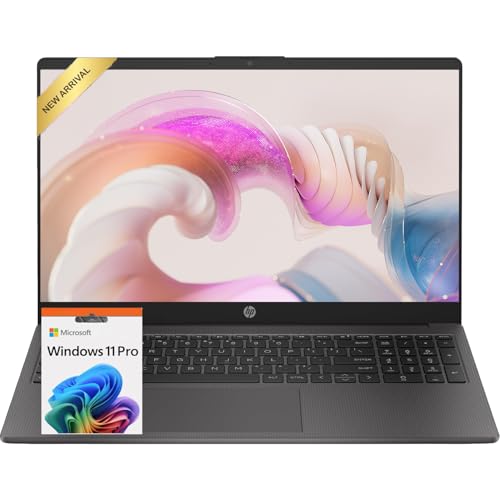 HP 255 G10 (Ryzen 5 7530U) |
| Check price on Amazon |
Key takeaways
- Find the best laptops for bookkeeping business work: number pads, strong multitasking and long battery life for QuickBooks, spreadsheets and client files.
What's inside
As an Amazon Associate I earn from qualifying purchases. This post may contain affiliate links at no extra cost to you.
A bookkeeping laptop earns its keep in the details. Every day brings long spreadsheets, invoices, bank statements, and accounting software open at the same time, so the machine has to keep up without lagging when a client calls with a question. The real decision is not about the fastest processor on the market. It is about a keyboard that lets you enter numbers quickly, enough memory to juggle several programs, and a screen that stays comfortable through a full workday.
This roundup is for solo bookkeepers, small accounting firms, and small-business owners who handle their own books. Freelancers who work from home, staff who travel between client offices, and anyone switching from paper ledgers to QuickBooks will find a fit here. Each laptop below was chosen from the names and specifications shown on its Amazon page, with a focus on a dedicated number pad, reliable keyboards, long battery life, and enough memory for spreadsheet multitasking.
Quick Picks
As an Amazon Associate we earn from qualifying purchases
| Product | Best for | Key spec from title |
|---|---|---|
| Lenovo ThinkPad E16 Gen 3 | Large ledgers and all-day multitasking | Intel Core Ultra 5, 32GB RAM |
| Dell Inspiron 15 (Core i5-1334U) | Touchscreen bookkeeping with Office work | Intel Core i5, 16GB RAM |
| Acer Aspire 5 (Core i5-13420H) | Storing years of client files | Intel Core i5-13420H, 1TB SSD |
| Dell Inspiron 15 (8GB, 256GB) | Starter setups and second machines | Intel Core i5, touchscreen display |
| HP 255 G10 (Ryzen 5 7530U) | Carrying between client offices | AMD Ryzen 5, Windows 11 Pro |
How to Choose
Put the Number Pad First
A dedicated numeric keypad is the single most useful feature for bookkeeping, because it turns hours of number entry into fast, accurate work. Look for a full-size keyboard where the number pad sits on the right with clear, well-spaced keys and a proper Enter key. Laptops with 15.6-inch or 16-inch screens almost always include one, while smaller machines usually leave it out. Key travel matters too: shallow keys tire your fingers during long data-entry sessions, while a backlit keyboard helps when you work late. Before ordering, confirm the layout in the listing, since some sellers show a keypad in photos but ship a different configuration.
Match Memory and Storage to Your Books
Bookkeeping software, spreadsheets, a browser full of bank tabs, and a PDF reader often run at the same time, so memory decides whether the day feels smooth or sluggish. Sixteen gigabytes of RAM is the sweet spot for most bookkeepers, letting QuickBooks, Excel, and a dozen browser tabs share the machine without constant swapping. Eight gigabytes works for one client file at a time, but it struggles once you add a second company file or a video call. For storage, a 512GB solid-state drive holds several years of client records, while a 1TB drive suits firms that archive scanned receipts and statements locally.
Battery Life and Screen Comfort
A bookkeeper’s laptop often runs from the first invoice of the morning to the last reconciliation at night, so battery life is a working tool, not a luxury. Look for a machine that lasts through a full workday on a single charge, and check whether fast charging is included so a short break restores hours of use. The screen matters just as much: a 15.6-inch or 16-inch Full HD display shows more columns of a spreadsheet at once, and an anti-glare coating keeps numbers readable near a window. Touchscreens are optional, but they help when you scroll long ledgers or sign documents on screen.
Security and Ports for Client Work
Client financial data deserves real protection, so treat security as a buying criterion rather than an afterthought. Windows 11 Pro adds BitLocker drive encryption and remote desktop access, both useful when a machine holds tax files and bank records. A fingerprint reader or an infrared camera makes secure sign-in quick, and a physical webcam shutter adds privacy during video calls. On ports, look for USB-C for a modern dock, HDMI for a second monitor, and enough USB-A ports for a printer, a scanner, and an external drive at the same time. A wired Ethernet port is a bonus for stable connections in a small office.
The 5 Best Options
Lenovo ThinkPad E16 Gen 3
- Best for: Solo bookkeepers and small firms handling large ledgers and several company files at once.
- Intel Core Ultra 5 225H processor, 14 cores, up to 4.9GHz
- 32GB DDR5 RAM, 1TB PCIe SSD
- 16-inch WUXGA display, 1920 x 1200, anti-glare, 300 nits
- Full-size backlit keyboard with numeric keypad
Solo bookkeepers and small firms handling large ledgers and several company files at once.
The cached Amazon page shows no buy box, so confirm the 32GB configuration when ordering, since the listing offers several memory options.
The ThinkPad E16 Gen 3 leads this roundup because it pairs serious multitasking power with the keyboard bookkeepers actually want. Its Intel Core Ultra 5 225H processor runs 14 cores, so QuickBooks, a large spreadsheet, email, and a browser full of bank tabs stay responsive together. Thirty-two gigabytes of DDR5 memory and a 1TB solid-state drive leave plenty of room for several company files and years of archived records. The 16-inch anti-glare display shows wide ledgers clearly, while the backlit full-size keyboard includes a numeric keypad. Fingerprint login, a privacy shutter, and MIL-STD testing round out a machine built for daily business use.
Watch out for: The cached Amazon page shows no buy box, so confirm the 32GB configuration when ordering, since the listing offers several memory options.
Dell Inspiron 15 (Core i5-1334U)
- Best for: Bookkeepers who want a touchscreen and Windows 11 Pro for client work.
- Intel Core i5-1334U processor, 10 cores, up to 4.4GHz
- 16GB DDR4 RAM, 512GB PCIe SSD
- 15.6-inch Full HD touchscreen, 1920 x 1080, IPS
- Full-size keyboard with numeric keypad
Bookkeepers who want a touchscreen and Windows 11 Pro for client work.
The listing advertises a lifetime Microsoft Office bundle from the seller, not a Dell factory inclusion, so confirm exactly what ships with the laptop.
The Dell Inspiron 15 suits bookkeepers who like a touchscreen for scrolling long ledgers and signing documents on screen. Its Intel Core i5-1334U processor has 10 cores, which keeps QuickBooks, spreadsheets, and video calls running smoothly side by side. Sixteen gigabytes of memory is the right amount for everyday bookkeeping, and the 512GB solid-state drive holds several years of client files. The full-size keyboard includes a numeric keypad, and the 15.6-inch Full HD touchscreen uses an IPS panel for clear viewing angles. At 3.5 pounds it is light enough to carry between a home office and a client site.
Watch out for: The listing advertises a lifetime Microsoft Office bundle from the seller, not a Dell factory inclusion, so confirm exactly what ships with the laptop.
Acer Aspire 5 (Core i5-13420H)
The Acer Aspire 5 is the storage champion of this roundup, with a 1TB solid-state drive that swallows years of scanned receipts, statements, and client archives. Its Intel Core i5-13420H processor runs 8 cores up to 4.6GHz, so heavy spreadsheets and accounting software open quickly and stay responsive. The 15.6-inch Full HD touchscreen uses an IPS panel, and the integrated keypad speeds up number entry without an external device. Wi-Fi 6E keeps cloud accounting snappy, while HDMI 2.1 connects a second monitor for side-by-side ledger work. Eight gigabytes of memory suits one client file at a time.
Specs
- Intel Core i5-13420H processor, 8 cores, up to 4.6GHz
- 8GB LPDDR5 RAM, 1TB PCIe SSD
- 15.6-inch Full HD touchscreen, 1920 x 1080, IPS
- Integrated keypad for number entry
- Wi-Fi 6E, Bluetooth 5.1, HDMI 2.1
- 3.92 lbs
- Windows 11 Home
Best for: Bookkeepers who archive large volumes of scanned documents and client records.
Watch out for: The listing disagrees with itself — the title says Windows 11 Pro and one bullet mentions 16GB of RAM, while the specs table says Windows 11 Home and 8GB; confirm the exact configuration before buying.
Dell Inspiron 15 (8GB, 256GB)
- Best for: New practices, starter setups, and second machines for occasional bookkeeping.
- Intel Core i5 processor, 10 cores, up to 4.6GHz
- 8GB DDR4 RAM, 256GB SSD
- 15.6-inch Full HD touchscreen, 1920 x 1080, IPS
- Full-size keyboard with numeric keypad
New practices, starter setups, and second machines for occasional bookkeeping.
Eight gigabytes of memory limits how many programs run smoothly at once, and at 4.6 pounds it is the heaviest laptop in this roundup.
This Dell Inspiron 15 is the sensible starting point for a new bookkeeping practice or a second machine at a satellite office. Its 10-core Intel Core i5 processor reaches 4.6GHz, which is plenty for invoicing, reconciliations, and everyday spreadsheet work. The 15.6-inch Full HD touchscreen uses an IPS panel, and the full-size keyboard includes a numeric keypad for fast data entry. Express Charge tops up the battery quickly between appointments, while USB-C, HDMI, and an SD card reader cover monitors, printers, and camera cards. Eight gigabytes of memory and a 256GB drive keep the setup simple and focused.
Watch out for: Eight gigabytes of memory limits how many programs run smoothly at once, and at 4.6 pounds it is the heaviest laptop in this roundup.
HP 255 G10 (Ryzen 5 7530U)
- Best for: Bookkeepers who travel between clients and want the lightest machine in this roundup.
- AMD Ryzen 5 7530U processor, 6 cores, up to 4.5GHz
- 8GB DDR4 RAM, 256GB PCIe SSD
- 15.6-inch Full HD display, 1920 x 1080, IPS, anti-glare, 250 nits
- Full-size keyboard
Bookkeepers who travel between clients and want the lightest machine in this roundup.
The Amazon page lists a full-size keyboard but does not spell out a numeric keypad, so confirm the layout before ordering; the listing also shows two different weights, 3.3 and 4.6 pounds.
The HP 255 G10 is the lightest laptop here, which matters when the workday moves between a home office, a client site, and a coffee shop. Its AMD Ryzen 5 7530U processor runs 6 cores up to 4.5GHz, enough for QuickBooks, spreadsheets, and browser-based banking tools running together. The 15.6-inch Full HD display uses an anti-glare IPS panel that stays readable near bright windows, and Windows 11 Pro adds BitLocker encryption for sensitive client files. Wi-Fi 6 and Bluetooth 5.3 keep connections steady, while USB-C and HDMI support a dock and a second monitor at a desk.
Watch out for: The Amazon page lists a full-size keyboard but does not spell out a numeric keypad, so confirm the layout before ordering; the listing also shows two different weights, 3.3 and 4.6 pounds.
Which One Fits Your Situation
Solo Bookkeepers Working From a Home Office
Pick the Lenovo ThinkPad E16 Gen 3. Its 32GB of memory and 1TB drive handle several company files at once, the 16-inch screen shows wide ledgers clearly, and the backlit keyboard with a number pad suits long evenings of data entry. The fingerprint reader and Windows 11 Pro keep client data protected at home.
Bookkeepers Who Travel Between Clients
Pick the HP 255 G10. At 3.3 pounds it is the lightest machine here, and Windows 11 Pro with BitLocker protects client files on the move. The anti-glare screen stays readable in bright client offices, while USB-C and HDMI connect quickly to a desk setup when you arrive.
Small Firms Running Big Spreadsheets All Day
Pick the Dell Inspiron 15 with the Core i5-1334U. Sixteen gigabytes of memory keeps QuickBooks, Excel, and a browser full of bank tabs responsive together, and the touchscreen helps when you scroll long ledgers or sign documents. The numeric keypad and Windows 11 Pro round out a solid desk machine for a busy office.
Tight Budgets and Starter Setups
Pick the Dell Inspiron 15 with 8GB of memory and a 256GB drive. It covers invoicing, reconciliations, and everyday spreadsheet work without paying for power a new practice does not need yet. Keep one client file open at a time, and add an external drive when the archive grows.
Common Mistakes
- Buying a 14-inch laptop without a numeric keypad, then adding a separate keypad that eats desk space and a USB port.
- Choosing 8GB of memory for a firm that runs QuickBooks, Excel, and a dozen browser tabs at once.
- Storing client tax files on a machine without BitLocker or another form of drive encryption.
- Trusting a seller-upgraded configuration without checking what the warranty actually covers.
- Skipping backups and keeping every client file on a single drive with no second copy.
Frequently Asked Questions
Do I need Windows 11 Pro for bookkeeping?
Not always, but it helps. Windows 11 Pro adds BitLocker drive encryption, which protects client tax files and bank records if the laptop is lost or stolen, plus remote desktop access for working from another machine. Solo bookkeepers with one client file can manage on Home, while firms handling sensitive data should choose Pro.
How much RAM do I need for QuickBooks and Excel?
Sixteen gigabytes is the right target for most bookkeeping work. It lets QuickBooks, Excel, a PDF reader, and a browser full of bank tabs run together without slowing down. Eight gigabytes works when you open one program at a time, but it struggles once you add a second company file or a video call to the mix.
Is a touchscreen useful for bookkeeping work?
It is a convenience, not a requirement. A touchscreen helps when you scroll through long ledgers, sign documents, or tap through invoices, but it does not speed up number entry. A dedicated numeric keypad matters far more for daily bookkeeping, so choose the keypad first and treat the touchscreen as a bonus.
Can these laptops run QuickBooks Desktop and QuickBooks Online?
Yes. Every laptop in this roundup runs both versions, since QuickBooks Online works in a browser and QuickBooks Desktop needs a standard Windows 11 machine. Check the system requirements for the desktop version before buying, and prefer 16GB of memory if you keep several company files open at once.
Related guides
More from Amazon
Programs that pair well with the guide above. Offers and eligibility are set by Amazon and may change.
Free shipping on eligible items, Prime Video and more. Eligible new members can start with a free trial.
Start a Prime free trialAd-free music streaming. Eligible new subscribers can start with a free trial.
Try Music Unlimited freeA Prime membership for ages 18-24 with a trial period. Eligibility is set by Amazon.
See Prime for Young AdultsAudiobooks and podcasts to listen to on the go. Eligible new members can start with a free trial.
Try Audible freeAs an Amazon Associate we earn from qualifying purchases.










Write Your Review
No reviews yet. Be the first to share your experience!