
Our Short List of 3

- Best for: Everyday work, study, and streaming on one balanced machine.
- 15.6-inch HD (1366 x 768) touch display, micro-edge, anti-glare, 250 nits
- AMD Ryzen 5 7520U, up to 4.3 GHz, 4 cores, 8 threads
- 8 GB LPDDR5-5500 memory, onboard
- 512 GB PCIe NVMe M.2 SSD

- Best for: Students and home workers who read and write on screen all day.
- 15.6-inch Full HD IPS touchscreen, 1920 x 1080
- AMD Ryzen 5 7520U, up to 4.3 GHz
- 8 GB DDR5 memory, 512 GB PCIe SSD
- AMD Radeon Vega 8 graphics
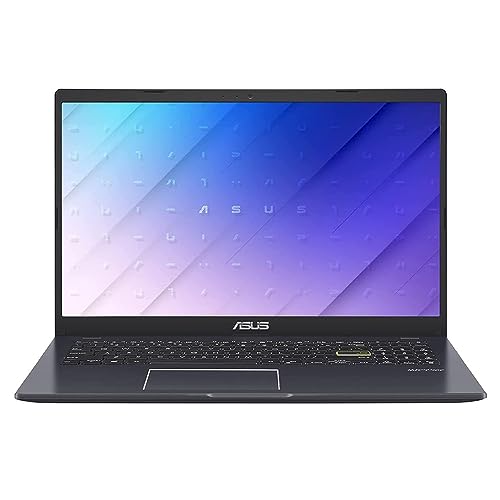
- Best for: Light writing, email, and streaming in a silent, thin body.
- 15.6-inch FHD display, 1920 x 1080
- Intel Celeron N4020, 2 cores, up to 2.8 GHz
- 4 GB DDR4 memory, 64 GB eMMC storage
- Intel UHD Graphics 600
All 4 Picks at a Glance
| Product | Specs | Action |
|---|---|---|
| HP 15-fc0499nr |
| Check price on Amazon |
| Acer Aspire 3 A315-24PT-R90Z |
| Check price on Amazon |
| ASUS Vivobook Go 15 L510 |
| Check price on Amazon |
 Lenovo IdeaPad 1 15IJL7 |
| Check price on Amazon |
Key takeaways
- Shop the 5 best 15 inch laptops under 500 dollars for November 2026: big screens, everyday speed, and long battery life without stretching your budget.
What's inside
As an Amazon Associate I earn from qualifying purchases. This post may contain affiliate links at no extra cost to you.
A 15-inch laptop gives you room to work: two documents side by side, a full-size keyboard with a number pad, and text that stays readable without squinting. The hard part in the under-500 class is knowing what to give up, because every machine in this band makes a trade somewhere — screen sharpness, memory, storage, or build. Pick the wrong trade and the laptop feels slow on day one; pick the right one and a modest machine handles classes, office work, browsing, and streaming without complaint.
This guide is for students, home workers, and families who want a large screen on a tight budget, plus anyone replacing an aging laptop without paying for power they will never use. The five laptops below were chosen from the names and specifications on their Amazon product pages, and every one of them has a 15.6-inch screen. They differ in processor, memory, storage, and screen quality, so the best pick depends on how you plan to use it.
Quick Picks
As an Amazon Associate we earn from qualifying purchases
| Product | Best for | Key spec from title |
|---|---|---|
| HP 15-fc0499nr | Everyday all-rounder with a touchscreen | 15.6-inch HD touchscreen |
| Acer Aspire 3 A315-24PT-R90Z | Student or home office work with a sharp screen | 15.6-inch Full HD IPS touchscreen |
| ASUS Vivobook Go 15 L510 | Lightest carry for basic browsing and writing | 15.6-inch Full HD display, fanless |
| Lenovo IdeaPad 1 15IJL7 | Dual-storage setup for school and light multitasking | 15.6-inch Full HD IPS-level display |
| Dell Inspiron 15 3520 | Smoother scrolling and room to upgrade later | 15.6-inch Full HD 120 Hz display |
How to Choose
Screen quality matters more than size
Every laptop here has a 15.6-inch screen, so the difference is sharpness and brightness, not size. A Full HD panel shows crisper text and more detail in photos than an HD panel, and it matters most if you read long documents or edit photos. Brightness matters too: a 250-nit screen works well indoors, but it can wash out near a sunny window. Touch is a bonus, not a must — it helps when you tap through slides or sign a form, yet it adds glare and fingerprints. Check the resolution and the brightness figure on the listing before anything else.
Match the processor and memory to your day
A Ryzen 5 or Core i5 chip handles a browser full of tabs, office documents, and video calls at the same time, while a Celeron chip is built for lighter days: email, writing, streaming, and one or two apps at once. Memory decides how many things stay open without stuttering. Eight gigabytes is the sensible floor for everyday multitasking, and it is what most of the laptops here carry. Four gigabytes works only if your routine is genuinely light. If you plan to keep the laptop for years, favor the stronger processor and the larger memory first, because both are hard or impossible to change later.
Storage: size, type, and room to grow
A solid-state drive is the single biggest speed win in this class: it boots fast, opens apps quickly, and has no moving parts. The question is how much room you get. A 512 GB drive holds a large photo library, years of documents, and a healthy app collection without constant cleanup. A 256 GB drive is workable if your files live in the cloud, but it fills up fast once you save videos or install large programs. A 64 GB drive is only for the lightest users. Look for a laptop that lets you add storage later, or plan on an external drive from the start.
Weight, battery, and the keyboard you will live with
A 15-inch laptop is not a featherweight, so the difference between 3.4 and 3.9 pounds shows up in a backpack by the end of the day. Battery life matters just as much: the laptops here are rated between eight and eleven hours, and the real figure depends on screen brightness and how many apps you run. A full-size keyboard with a number pad is one of the best reasons to buy this size, so check that the keys feel spaced and the trackpad is centered under the space bar. If you carry the machine daily, favor the lighter body and the longer battery over a slightly faster chip.
The 5 Best Options
HP 15-fc0499nr
- Best for: Everyday work, study, and streaming on one balanced machine.
- 15.6-inch HD (1366 x 768) touch display, micro-edge, anti-glare, 250 nits
- AMD Ryzen 5 7520U, up to 4.3 GHz, 4 cores, 8 threads
- 8 GB LPDDR5-5500 memory, onboard
- 512 GB PCIe NVMe M.2 SSD
Everyday work, study, and streaming on one balanced machine.
HD resolution is softer than Full HD, and the 8 GB of memory is soldered onboard and cannot be upgraded later.
The HP 15 is the most balanced machine in this group, pairing a Ryzen 5 processor with a touchscreen and a full-size keyboard. It handles a browser full of tabs, office documents, and video calls without the lag that cheaper chips show, and the touch display is handy for tapping through slides or scrolling long pages. Battery life is rated at just over ten hours, and the laptop weighs 3.52 pounds, so it travels well for its size. The one compromise is the screen itself: HD resolution is softer than Full HD, so fine text looks less crisp.
Acer Aspire 3 A315-24PT-R90Z
- Best for: Students and home workers who read and write on screen all day.
- 15.6-inch Full HD IPS touchscreen, 1920 x 1080
- AMD Ryzen 5 7520U, up to 4.3 GHz
- 8 GB DDR5 memory, 512 GB PCIe SSD
- AMD Radeon Vega 8 graphics
Students and home workers who read and write on screen all day.
At 3.9 pounds it is the heaviest laptop in this group, and the listing shows conflicting webcam fields, so confirm the bundle contents on the listing.
The Aspire 3 is the pick for anyone who wants a sharper screen on a tight budget, with a Full HD IPS touchscreen that shows crisper text and truer colors than the HD panels in this class. The Ryzen 5 processor and 8 GB of DDR5 memory keep everyday multitasking smooth, and the 512 GB drive leaves room for photos, documents, and apps without constant cleanup. Battery life is rated at eleven hours, the longest in this group. The bundle adds a 7-in-1 USB-C hub, a mouse pad, and a cleaning cloth, which saves a separate trip for accessories.
ASUS Vivobook Go 15 L510
- Best for: Light writing, email, and streaming in a silent, thin body.
- 15.6-inch FHD display, 1920 x 1080
- Intel Celeron N4020, 2 cores, up to 2.8 GHz
- 4 GB DDR4 memory, 64 GB eMMC storage
- Intel UHD Graphics 600
Light writing, email, and streaming in a silent, thin body.
4 GB of memory and 64 GB of storage are tight, S Mode limits apps until you switch out, and the listing gives conflicting Bluetooth details.
The Vivobook Go 15 is the lightest-duty machine here, and it knows it: a fanless Celeron design that stays silent, a thin 0.71-inch body, and a 180-degree hinge that lays flat for sharing the screen. It suits writing, email, browsing, and streaming, and the Full HD display is a pleasant surprise at this level. The trade-offs are real, though: 4 GB of memory and 64 GB of eMMC storage leave little headroom, and Windows 11 runs in S Mode, which limits apps to the Microsoft Store until you switch out. Buy it for light days, not heavy ones.
Lenovo IdeaPad 1 15IJL7
- Best for: School work and light multitasking with flexible storage.
- 15.6-inch FHD display, 1920 x 1080, 250 nits, IPS-level, anti-glare
- Intel Celeron N4500, 2 cores, up to 2.8 GHz
- 8 GB DDR4 memory, 3200 MHz
- 128 GB eMMC plus 128 GB PCIe NVMe SSD
School work and light multitasking with flexible storage.
The Celeron processor suits light work only, and one buyer note says the machine arrived in S Mode, so confirm the edition on arrival.
The IdeaPad 1 stands out for storage flexibility: it pairs a 128 GB solid-state drive with 128 GB of eMMC, so the system boots from fast storage while the extra space holds documents and media. The 15.6-inch Full HD screen is an IPS-level anti-glare panel rated at 250 nits, and Wi-Fi 6 keeps wireless connections current. At 3.42 pounds it is the lightest laptop in this group, and the webcam has a privacy shutter for video calls. The Celeron processor is the limit here: it is fine for writing and browsing, but it slows down once you stack heavy apps.
Dell Inspiron 15 3520
The Inspiron 15 is the upgrade-friendly pick, with a 120 Hz Full HD display that makes scrolling and window movement feel smoother than the 60 Hz panels around it. The Core i5 processor and 8 GB of memory handle office work, study, and streaming with room to spare, and the listing notes the memory can grow to 32 GB while storage can grow to 2 TB. The port set is generous for this class, with HDMI, two USB 3.2 ports, a USB 2.0 port, and an SD card reader. The base 256 GB drive is the weak spot, so plan for the upgrade path early.
Specs
- 15.6-inch FHD display, 1920 x 1080, 120 Hz, anti-glare, 250 nits
- Intel Core i5-1135G7, up to 4.2 GHz, 4 cores, 8 threads
- 8 GB DDR4 memory, upgradable to 32 GB
- 256 GB SSD, upgradable to 2 TB
- Intel UHD Graphics
- Wi-Fi 5 and Bluetooth
- HDMI, 2 USB 3.2 Type-A ports, USB 2.0, SD card reader
- 3.82 pounds, Windows 11 Home
Best for: Buyers who want to start basic and upgrade memory and storage later.
Watch out for: This is a seller-upgraded configuration with the seal opened for the upgrade, and the base 256 GB drive fills up fast.
ASIN: B0CGL5PWX3
Which One Fits Your Situation
You want one laptop for everything
Take the HP 15. Its Ryzen 5 processor, touchscreen, and long battery life cover work, study, and streaming without a weak link, and the full-size keyboard suits long typing sessions. The HD screen is the only real compromise, and it matters less if your days are mostly documents and video calls.
You study or work from home and read all day
Take the Acer Aspire 3. The Full HD IPS touchscreen shows crisper text for long reading sessions, and the Ryzen 5 chip plus 512 GB of storage handles research, writing, and a dozen open tabs. The included USB-C hub is a useful bonus for a desk setup.
You need the lightest possible spend and the lightest bag
Take the ASUS Vivobook Go 15 or the Lenovo IdeaPad 1. The ASUS is silent and thin with a lay-flat hinge, while the Lenovo is lighter still and adds Wi-Fi 6 plus a privacy shutter. Both suit writing, email, and streaming; pick the Lenovo if storage flexibility matters more, the ASUS if silence does.
You want a laptop that can grow with you
Take the Dell Inspiron 15. Its memory can grow to 32 GB and its storage to 2 TB, so you can start with the base configuration and upgrade when your files or your workload grows. The 120 Hz display is a bonus that makes everyday scrolling feel smoother from day one.
Common Mistakes
- Buying on screen size alone and ignoring resolution: a 15.6-inch HD panel shows noticeably softer text than a Full HD panel at the same size.
- Choosing 4 GB of memory for a multitasking routine: it works for one or two light apps, but it stutters once tabs and programs pile up.
- Treating 64 GB of storage as enough: the operating system and a few apps take a large share, so check the free space before you commit.
- Skipping the battery and weight figures: a laptop that stays plugged in all day is a desktop, and a heavy one stays home.
- Assuming every listing in this class is the same configuration: sellers offer the same model with different memory, storage, and screen options, so read the exact listing.
Frequently Asked Questions
Is a 15-inch laptop too big to carry every day?
It depends on your bag and your routine. The laptops here weigh between 3.42 and 3.9 pounds, which is fine in a backpack with a padded sleeve, but heavier than a 13-inch machine. If you walk or commute with it daily, favor the lighter models and check the thickness figure on the listing before you decide.
Is 8 GB of memory enough for everyday use?
Yes, for most everyday work: browsing with several tabs, office documents, email, and video calls all run well on 8 GB. It starts to feel tight if you edit large photos, run virtual machines, or keep dozens of tabs open. In that case, pick a model that lets you add memory later, or step up to a 16 GB configuration.
Should I pick a touchscreen in this budget class?
A touchscreen is a nice extra, not a necessity. It helps when you tap through presentations, sign documents, or scroll with a finger, and two of the laptops here include one. The trade-off is a glossier screen that shows fingerprints. If you mostly type and use a mouse, put the money toward memory or storage instead.
How long will a budget 15-inch laptop last?
With light to moderate use, expect several years of everyday service. The processor and memory matter most for longevity, since storage can often be added later. Keep the operating system updated, avoid filling the drive completely, and treat the battery gently by avoiding constant full charges when the laptop stays plugged in.
Related guides
More from Amazon
Programs that pair well with the guide above. Offers and eligibility are set by Amazon and may change.
Free shipping on eligible items, Prime Video and more. Eligible new members can start with a free trial.
Start a Prime free trialAd-free music streaming. Eligible new subscribers can start with a free trial.
Try Music Unlimited freeA Prime membership for ages 18-24 with a trial period. Eligibility is set by Amazon.
See Prime for Young AdultsAudiobooks and podcasts to listen to on the go. Eligible new members can start with a free trial.
Try Audible freeAs an Amazon Associate we earn from qualifying purchases.










Write Your Review
No reviews yet. Be the first to share your experience!